
Congratulations on arriving at the 【Ultimate Programming】 WeChat public account 【Knowledge Treasure House】, specially customized for everyone《Qt C++ Architect Series – Project Practice Episode 130: This episode will focus on a practical and challenging technical topic – 【Building an Industrial-Level Signal and Slot Application Architecture with Qt6 and C++17, Surpassing Traditional Communication Paradigms】.Whether you are a beginner who has just mastered the Qt cross-platform framework and Linux C/C++ backend server development, or a developer who wants to delve deeper into C/C++ system architecture research, this technology will open a door to deep learning for you.
【Development Environment】: Win10 x64, Qt version 6.8;
【Daily sharing of high-quality projects and cutting-edge technical programming content!】
【Follow the UP master and join the QQ group】: 【895876809 Download project source code (for research and study)】.
1: 【Project】📁 Source Code Structure
1: Project File Structure
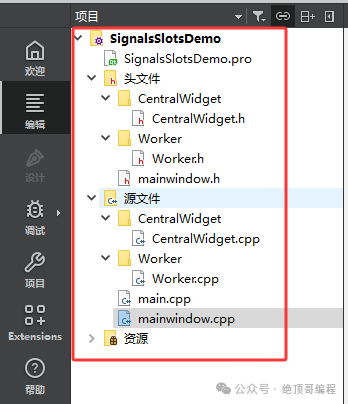
2: Directory Structure Comments
SignalsSlotsDemo/ CentralWidget/ CentralWidget.cpp # Implementation of central area widget (progress bar + status label) CentralWidget.h # Declaration of central area widget Worker/ Worker.cpp # Implementation of worker thread object (can pause/resume/cancel) Worker.h # Declaration of worker thread object images/ logo.ico logo2.ico images.qrc # Resource list (prefix=/new/prefix1) main.cpp # Program entry: set style/icon, log, display main window mainwindow.cpp # Main window implementation: menu/tool bar/thread connection/status management mainwindow.h # Main window declaration: signals and slots, status, QSettings SignalsSlotsDemo.pro # qmake project file2: 【Project】🚀 Running Results
1: Start Task
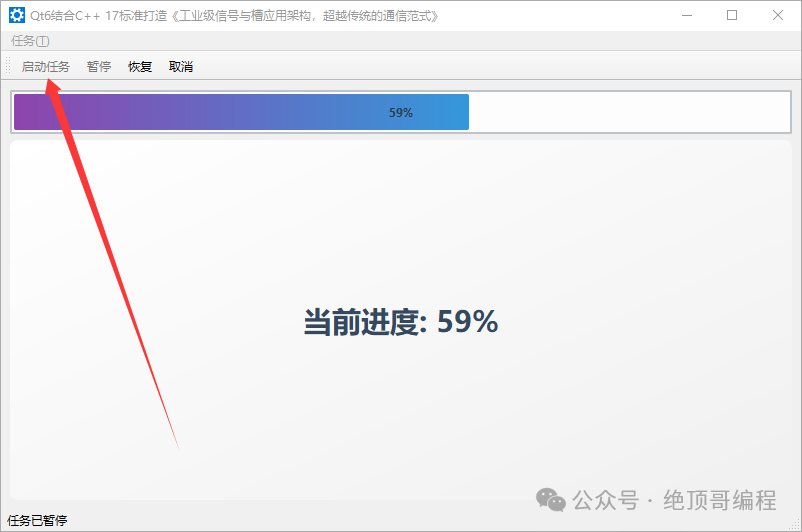
2: Pause Task
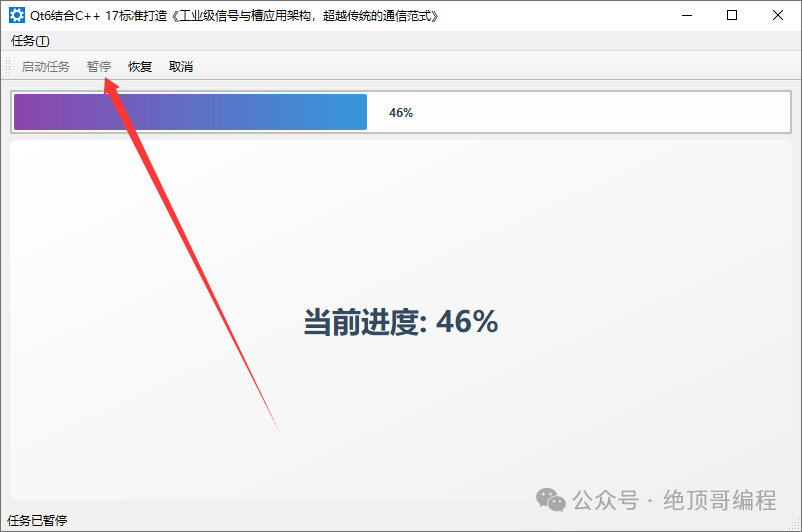
3: Resume Task
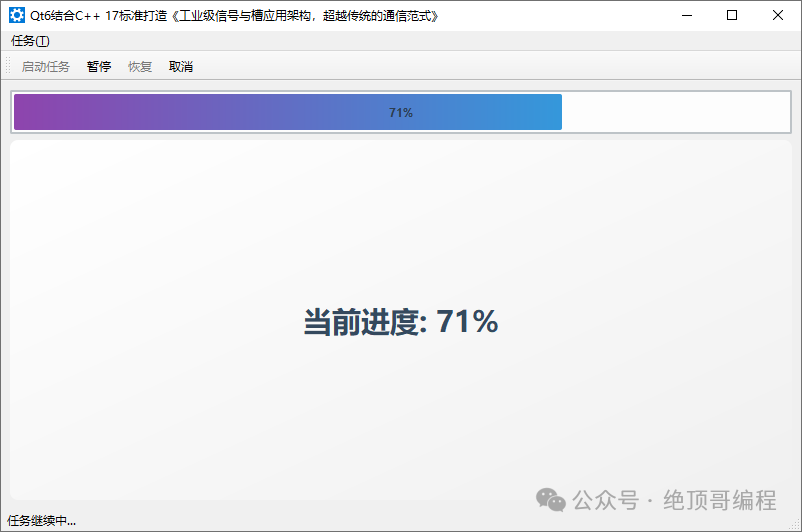
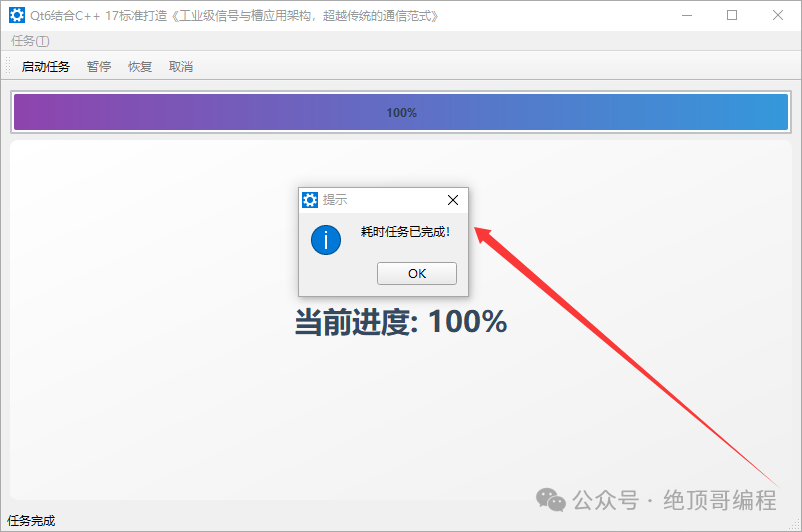
3: 【Project】🏗️ Project Overview and Features
1: Project Overview
A multithreaded example of signals and slots based on Qt Widgets and C++17, demonstrating how to use QThread + QObject combination to offload time-consuming tasks to a worker thread and decouple the UI through cross-thread signals and slots. The project includes a complete interactive process for starting, pausing, resuming, and canceling tasks, and uses QSettings to persist window and task parameters, managing icon resources with the Qt resource system.
2: Features
-
Multithreaded Tasks: Executes time-consuming loops in QThread through Worker, supporting cancellation and pause/resume.
-
Signal and Slot Interaction: MainWindow and Worker communicate using cross-thread Qt::QueuedConnection to ensure thread safety.
-
Status-Driven UI: Uses an enum TaskState to manage Idle/Running/Paused states, linking the availability of menu and toolbar buttons.
-
Parameter Persistence: Uses QSettings to remember window geometry, toolbar state, and task parameters (total steps, step time).
-
Resource Management: Packages icons into the executable via images.qrc, loading the application icon as :/new/prefix1/images/logo2.ico.
-
Basic Logging: Appends to app.log in the AppDataLocation directory, recording application startup time.
4: 【Project】📋 Source Code Analysis
1: main.cpp File
// main.cpp - Qt application entry file
// Include header file for main window class#include "mainwindow.h"
// Include Qt application core header#include <QApplication>#include <QDateTime>#include <QFile>#include <QTextStream>#include <QDir>#include <QStandardPaths>#include <QIcon>
// Main entry functionint main(int argc, char *argv[]){    // Create Qt application object, managing the entire application lifecycle    // argc and argv are command line parameters, Qt may use them to initialize some settings    QApplication a(argc, argv);
    // Set organization and application name (for QSettings use)    QCoreApplication::setOrganizationName("DemoOrg");    QCoreApplication::setApplicationName("SignalsSlotsDemo");    QCoreApplication::setApplicationVersion("1.0.0");
    // Set global application style to Fusion style (optional)    // Fusion is a modern cross-platform style provided by Qt, more uniform and beautiful than native styles    QApplication::setStyle("Fusion");
    // Simple logging: record to log file in user data directory    const QString logDir = QStandardPaths::writableLocation(QStandardPaths::AppDataLocation);    QDir().mkpath(logDir);    QFile logFile(logDir + "/app.log");    if (logFile.open(QIODevice::Append | QIODevice::Text)) {        QTextStream ts(&logFile);        ts << QDateTime::currentDateTime().toString("yyyy-MM-dd HH:mm:ss")           << " - Application started" << '\n';        logFile.close();    }
    // Create main window object    MainWindow w;
    // Set application window icon    // Note: Here the Qt resource system path syntax is used (starts with :/)    // Ensure that the project resource file has correctly added logo2.ico file    // Format: ":/[resource prefix]/[directory structure]/filename.extension"    w.setWindowIcon(QIcon(":/new/prefix1/images/logo2.ico"));
    // Show main window    w.show();
    // Enter Qt main event loop, waiting for user interaction    // exec() will block until the application exits (window closes)    return a.exec();}
2: CentralWidget.h File
// CentralWidget.h - Central widget container header file
// Prevent header file from being included multiple times#ifndef CENTRALWIDGET_H#define CENTRALWIDGET_H
// Include Qt basic components#include <QWidget>#include <QProgressBar>  // Progress bar widget#include <QLabel>        // Text label widget
/** * @brief CentralWidget class - Main window central area widget container * * Responsible for displaying core UI components: * - Progress bar: shows task progress * - Status label: displays current operation status * * Inherits from QWidget, as the central widget of the main window */class CentralWidget : public QWidget {    Q_OBJECT  // Enable Qt meta-object system (signals/slots, etc.)
public:    /**     * @brief Constructor     * @param parent Parent widget pointer (usually MainWindow)     *     * Use explicit keyword to avoid implicit type conversion     */    explicit CentralWidget(QWidget *parent = nullptr);
    /**     * @brief Update progress bar status     * @param value Progress value (0-100)     *     * This method will be called by the main thread to:     * 1. Update progress bar display     * 2. Update status label text     */    void updateProgress(int value);
private:    // Member variables    QProgressBar *progressBar;  // Progress bar widget pointer    QLabel *statusLabel;         // Status label widget pointer}; // End header file protection#endif // CENTRALWIDGET_H
3: CentralWidget.cpp File
// CentralWidget.cpp - Central widget container implementation file
#include "CentralWidget.h"#include <QVBoxLayout>  // Vertical layout manager#include <QFont>        // Font settings support
// Constructor: Initialize interface componentsCentralWidget::CentralWidget(QWidget *parent) : QWidget(parent) {    // Create vertical layout manager and set it to the current widget    QVBoxLayout *layout = new QVBoxLayout(this);
    // ================== Progress Bar Initialization ==================    progressBar = new QProgressBar();    progressBar->setRange(0, 100);  // Set progress range (0-100%)
    // Custom progress bar style (using Qt style sheet syntax)    progressBar->setStyleSheet(        "QProgressBar {"        "   height: 40px;"                   // Fixed height to ensure visual effect        "   border: 2px solid #BDC3C7;"      // Border color (light gray)        "   border-radius: 2px;"             // Corner radius (2 pixels)        "   background: rgba(255,255,255,0.9);" // Semi-transparent white background        "   text-align: center;"             // Center text display        "   color: #2C3E50;"                 // Text color (dark blue-gray)        "   font: bold 12px 'Segoe UI';"     // Font settings        "}"        "QProgressBar::chunk {"              // Progress bar fill part style        "   background: qlineargradient("    // Gradient background        "       x1:0, y1:0, x2:1, y2:0,"    // Horizontal gradient direction        "       stop:0 #8E44AD, stop:1 #3498DB" // From purple (#8E44AD) to blue (#3498DB)        "   );"        "   border-radius: 2px;"             // Consistent corner radius with outer part        "   margin: 2px;"                    // Margin to avoid overflow        "}"        );
    // Add progress bar to layout    layout->addWidget(progressBar);
    // ================== Status Label Initialization ==================    statusLabel = new QLabel("Waiting for task to start...");    statusLabel->setAlignment(Qt::AlignCenter);  // Center text (repeated settings need optimization)
    // Font configuration (suggest moving to style sheet for unified management)    QFont font("Microsoft YaHei", 22, QFont::Bold);  // Microsoft YaHei, 22-point bold    font.setStyleHint(QFont::SansSerif, QFont::PreferAntialias);  // Enable anti-aliasing    statusLabel->setFont(font);
    // Custom label style    statusLabel->setStyleSheet(        "background: qlineargradient(x1:0, y1:0, x2:1, y2:1, stop:0 #FFFFFF, stop:1 #F0F0F0);" // White to light gray gradient background        "color: #34495E;"        // Text color (dark blue-gray)        "padding: 15px;"         // Inner padding        "border-radius: 8px;"    // Rounded border        );
    // Add label to layout    layout->addWidget(statusLabel);}
// Update progress displayvoid CentralWidget::updateProgress(int value) {    // Set progress bar value (suggest adding range check)    progressBar->setValue(value);
    // Update status text (format: Current progress: XX%)    statusLabel->setText(QString("Current progress: %1%").arg(value));}
4: mainwindow.h File
#ifndef MAINWINDOW_H#define MAINWINDOW_H
// This file defines the main window class MainWindow, responsible for the application's top-level window, menu/tool bar, // creation and destruction of worker threads, and overall orchestration of signals and slots.//// Design points:// 1) Decoupling UI thread and worker thread: time-consuming logic placed in Worker (moved to QThread)// 2) Status-driven UI: controls button availability and status bar prompts through TaskState// 3) Parameter persistence: uses QSettings to remember window geometry and task parameters#include <QMainWindow>   // Provides main window base class#include <QAction>       // Menu/tool bar actions#include <QStatusBar>    // Status bar display#include <QThread>       // Thread support#include <QCloseEvent>   // Handle close events#include <QSettings>     // Application settings persistence#include <QString>       // String type#include "./CentralWidget/CentralWidget.h"  // Central area widget#include "./Worker/Worker.h"                // Background worker object
/** * @brief Main window class, as the application's appearance and control center * * Main responsibilities: * - Build menu and tool bar, bind operations to slot functions * - Manage Worker/QThread lifecycle * - Interact with Worker through signals and slots (start/pause/resume/cancel/progress/complete/error) * - Use QSettings to read/write user preferences (window geometry, task parameters) */class MainWindow : public QMainWindow {    Q_OBJECT
public:    /**     * @brief Constructor and Destructor     * @param parent Parent object     */    explicit MainWindow(QWidget *parent = nullptr);    ~MainWindow();
signals:  // Control signals for interacting with worker thread (cross-thread connection is queued connection)    void startTask();   // Start executing time-consuming task    void pauseTask();   // Pause task    void resumeTask();  // Resume task    void cancelTask();  // Cancel task
private slots:    // Menu/tool bar callbacks and handling of work results    void onStartTask();                 // User clicks "Start Task"    void onTaskProgress(int);           // Receive progress update from worker thread    void onTaskFinished();              // Task completed normally    void onPauseTask();                 // User clicks "Pause"    void onResumeTask();                // User clicks "Resume"    void onCancelTask();                // User clicks "Cancel"    void onTaskError(const QString &message); // Task error/cancel feedback
private:    // Assemble UI and runtime environment    void createMenu();         // Build menu bar and actions    void createToolBar();      // Build tool bar and mount actions    void initWorkerThread();   // Create thread and Worker, and connect signals and slots    void updateUiState();      // Switch control availability based on TaskState    void loadSettings();       // Read parameters/window state from QSettings    void saveSettings();       // Write to QSettings
protected:    // Intercept close event: prompt confirmation when task is running/paused, and save settings    void closeEvent(QCloseEvent *event) override; // Graceful exit
    // Member variables    // UI and thread object pointers    CentralWidget *centralWidget {nullptr};    QAction *startTaskAction {nullptr};    QAction *pauseTaskAction {nullptr};    QAction *resumeTaskAction {nullptr};    QAction *cancelTaskAction {nullptr};    QThread *workerThread {nullptr};    Worker *worker {nullptr};    // Settings and state    QSettings settings;   // Use application's organization/name configuration (specified in constructor Org/App)    enum class TaskState { Idle, Running, Paused }; // Task state enumeration    TaskState taskState = TaskState::Idle;          // Current task state    int totalSteps = 100;       // Total number of task steps (can be persisted)    int stepMilliseconds = 50;  // Time per step (ms, can be persisted)};#endif // MAINWINDOW_H
5: mainwindow.cpp File
// Main window implementation: responsible for UI construction, signal-slot connection, and task state management#include "mainwindow.h"#include <QMenuBar>      // Menu bar#include <QMenu>         // Menu#include <QToolBar>      // Tool bar#include <QMessageBox>   // Prompt dialog box#include <QApplication>  // Application-level interface (e.g., style, etc.)#include <QCloseEvent>   // Close event#include <QIcon>         // Icon support
// Constructor: set window, create UI, load settings, and initialize worker threadMainWindow::MainWindow(QWidget *parent) : QMainWindow(parent), settings("DemoOrg", "SignalsSlotsDemo") {    setWindowTitle("Building an Industrial-Level Signal and Slot Application Architecture with Qt6 and C++17, Surpassing Traditional Communication Paradigms");    resize(800, 500);
    // Create central widget (containing progress bar and status label)    centralWidget = new CentralWidget(this);    setCentralWidget(centralWidget);
    // Initialize menu and tool bar    createMenu();    createToolBar();    statusBar()->showMessage("Ready");
    // Load persistent settings (window geometry/task parameters)    loadSettings();
    // Initialize worker thread: create QThread and Worker, and connect cross-thread signals/slots    initWorkerThread();
    // Update UI availability based on current state    updateUiState();}
MainWindow::~MainWindow() {    // Gracefully stop thread on destruction: request exit and wait for completion    // Worker memory is released through thread finished signal's deleteLater    if (workerThread) {        workerThread->quit();        workerThread->wait();    }}
// Build menu bar and related actions, and connect to this class's slot functionsvoid MainWindow::createMenu() {    QMenuBar *menuBar = this->menuBar();    QMenu *taskMenu = menuBar->addMenu("Task(&T)");    startTaskAction = taskMenu->addAction("Start Task");    connect(startTaskAction, &QAction::triggered, this, &MainWindow::onStartTask);
    pauseTaskAction = taskMenu->addAction("Pause");    connect(pauseTaskAction, &QAction::triggered, this, &MainWindow::onPauseTask);
    resumeTaskAction = taskMenu->addAction("Resume");    connect(resumeTaskAction, &QAction::triggered, this, &MainWindow::onResumeTask);
    cancelTaskAction = taskMenu->addAction("Cancel");    connect(cancelTaskAction, &QAction::triggered, this, &MainWindow::onCancelTask);}
// Build tool bar, reusing the same actions in the tool barvoid MainWindow::createToolBar() {    QToolBar *toolBar = addToolBar("Operations");    toolBar->setObjectName("mainToolBar");    toolBar->addAction(startTaskAction);    toolBar->addAction(pauseTaskAction);    toolBar->addAction(resumeTaskAction);    toolBar->addAction(cancelTaskAction);}
// Create QThread and Worker, set object thread affinity and complete cross-thread connectionvoid MainWindow::initWorkerThread() {    workerThread = new QThread(this);    worker = new Worker();    worker->moveToThread(workerThread);
    // Connect signals and slots (cross-thread prefer using queued connection to ensure thread safety)    connect(this, &MainWindow::startTask, worker, &Worker::doWork, Qt::QueuedConnection);    connect(this, &MainWindow::pauseTask, worker, &Worker::pause, Qt::QueuedConnection);    connect(this, &MainWindow::resumeTask, worker, &Worker::resume, Qt::QueuedConnection);    connect(this, &MainWindow::cancelTask, worker, &Worker::cancel, Qt::QueuedConnection);    connect(worker, &Worker::progress, this, &MainWindow::onTaskProgress, Qt::QueuedConnection);    connect(worker, &Worker::finished, this, &MainWindow::onTaskFinished, Qt::QueuedConnection);    connect(worker, &Worker::error, this, &MainWindow::onTaskError, Qt::QueuedConnection);
    // Safely release Worker and thread objects when the thread ends    connect(workerThread, &QThread::finished, worker, &QObject::deleteLater);    connect(this, &QObject::destroyed, workerThread, &QThread::quit);    connect(workerThread, &QThread::finished, workerThread, &QObject::deleteLater);
    // Timer mode has been removed, no need for additional initialization    workerThread->start();}
// Handle user-triggered "Start Task": set parameters and emit start signalvoid MainWindow::onStartTask() {    worker->setTaskParams(totalSteps, stepMilliseconds); // Apply parameters to worker thread    taskState = TaskState::Running;    statusBar()->showMessage("Task running...");    updateUiState();    emit startTask();  // Trigger worker thread}
// Receive progress updates sent by worker thread and refresh central widgetvoid MainWindow::onTaskProgress(int value) {    // If already idle (e.g., just canceled), ignore lagging progress signals    if (taskState == TaskState::Idle) return;    centralWidget->updateProgress(value);}
// Task completed normally: reset state and promptvoid MainWindow::onTaskFinished() {    taskState = TaskState::Idle;    updateUiState();    statusBar()->showMessage("Task completed");    QMessageBox::information(this, "Notice", "Time-consuming task has been completed!");}
// Task error or canceled: reset state, zero progress, and give promptvoid MainWindow::onTaskError(const QString &message) {    taskState = TaskState::Idle;    updateUiState();    // Reset progress to 0 after cancel/error    centralWidget->updateProgress(0);    statusBar()->showMessage("Task error/canceled");    QMessageBox::warning(this, "Error", message);}
// Pause: directly call the thread-safe method of the worker object and update UIvoid MainWindow::onPauseTask() {    if (taskState == TaskState::Running) {        // Directly cross-thread call (method is internally locked, thread-safe)        worker->pause();        taskState = TaskState::Paused;        statusBar()->showMessage("Task paused");        updateUiState();    }}
// Resume: notify worker object to resume and update UIvoid MainWindow::onResumeTask() {    if (taskState == TaskState::Paused) {        worker->resume();        taskState = TaskState::Running;        statusBar()->showMessage("Task continuing...");        updateUiState();    }}
// Cancel: request cancellation in a thread-safe manner, immediately reset UI feedbackvoid MainWindow::onCancelTask() {    // Directly cross-thread call, ensuring no reliance on worker thread event loop    worker->cancel();    taskState = TaskState::Idle;    updateUiState();    statusBar()->showMessage("Task canceled");    // Immediately reset progress to 0 for improved interaction feedback    centralWidget->updateProgress(0);}
// Switch action availability based on task state to avoid invalid operationsvoid MainWindow::updateUiState() {    bool isIdle = (taskState == TaskState::Idle);    bool isRunning = (taskState == TaskState::Running);    bool isPaused = (taskState == TaskState::Paused);
    startTaskAction->setEnabled(isIdle);    pauseTaskAction->setEnabled(isRunning);    resumeTaskAction->setEnabled(isPaused);    cancelTaskAction->setEnabled(isRunning || isPaused);}
// Load window geometry and task parameters from persistent storage, and make safe corrections if necessaryvoid MainWindow::loadSettings() {    // Window geometry    restoreGeometry(settings.value("window/geometry").toByteArray());    restoreState(settings.value("window/state").toByteArray());    // Task parameters    totalSteps = settings.value("task/totalSteps", totalSteps).toInt();    stepMilliseconds = settings.value("task/stepMilliseconds", stepMilliseconds).toInt();    // Parameter correction: avoid too small values leading to undetectable pause/cancel    bool corrected = false;    if (totalSteps < 1) { totalSteps = 100; corrected = true; }    if (stepMilliseconds < 10) { stepMilliseconds = 50; corrected = true; }    if (corrected) {        settings.setValue("task/totalSteps", totalSteps);        settings.setValue("task/stepMilliseconds", stepMilliseconds);    }}
// Write window geometry and task parameters back to QSettingsvoid MainWindow::saveSettings() {    settings.setValue("window/geometry", saveGeometry());    settings.setValue("window/state", saveState());    settings.setValue("task/totalSteps", totalSteps);    settings.setValue("task/stepMilliseconds", stepMilliseconds);}
// Close event: if task is not finished, prompt user whether to cancel and exitvoid MainWindow::closeEvent(QCloseEvent *event) {    // If task is running or paused, prompt user    if (taskState == TaskState::Running || taskState == TaskState::Paused) {        auto ret = QMessageBox::question(this, "Exit Confirmation", "Task is still ongoing/paused, do you want to cancel and exit?");        if (ret == QMessageBox::Yes) {            worker->cancel();            workerThread->quit();            workerThread->wait(3000);        } else {            event->ignore();            return;        }    }
    saveSettings();    QMainWindow::closeEvent(event);}
Due to space limitations, follow the UP master and join the group to download the project source code for research and study.