Alternatives to Threads
Before starting to write multithreaded applications, let’s do a quick review: generally speaking, multithreading is a good thing. However, due to the limitations of Python’s GIL, multithreading is more suitable for I/O-bound applications (I/O releases the GIL, allowing for more concurrency) rather than CPU-bound applications. For the latter case, to achieve better parallelism, you need to use multiprocessing to allow other CPU cores to execute.
This will not be elaborated further (this topic has already been covered in the “Execution Environment” chapter of Core Python Programming or Core Python Language Fundamentals). The main alternatives to the threading module for multithreading or multiprocessing include the following.
subprocess Module
This is the primary alternative for spawning processes, which can simply execute tasks or communicate between processes through standard files (stdin, stdout, stderr). This module was introduced in Python 2.4.
multiprocessing Module
This module was introduced in Python 2.6 and allows for spawning processes for multi-core or multi-CPU systems, with an interface very similar to the threading module. This module also includes various ways to transfer data between processes sharing tasks.
concurrent.futures Module
This is a new high-level library that operates only at the “task” level, meaning you no longer need to overly focus on synchronization and thread/process management. You just need to specify a thread/process pool with a given number of “workers”, submit tasks, and then organize the results. This module was introduced in Python 3.2, but there is a backport available for Python 2.6+, which can be found at http://code.google.com/p/pythonfutures.
What would the rewritten bookrank3.py look like using this module? Assuming the rest of the code remains unchanged, the following code shows the import of the new module and the modification of the _main() function.
from concurrent.futures import ThreadPoolExecutor
. . .
    def _main():
        print('At', ctime(), 'on Amazon...')
        with ThreadPoolExecutor(3) as executor:
            for isbn in ISBNs:
                executor.submit(_showRanking, isbn)
        print('all DONE at:', ctime())
The parameter passed to concurrent.futures.ThreadPoolExecutor is the size of the thread pool, which in this application is the 3 books whose rankings are to be checked. Of course, this is an I/O-bound application, so multithreading is more useful. For CPU-bound applications, you can use concurrent.futures.ProcessPoolExecutor instead.
Once we have the executor (whether thread or process), it is responsible for scheduling tasks and organizing results, and we can call its submit() method to execute those operations that previously required spawning threads.
If we were to do a complete port to Python 3, we would replace the string formatting operator with the str.format() method, freely utilize the with statement, and use the executor’s map() method, allowing us to completely eliminate the _showRanking() function and integrate its functionality into the _main() function. Example 4-13 bookrank3CF.py is the final version of this script.Example 4-13 Advanced Task Management (bookrank3CF.py)
from concurrent.futures import ThreadPoolExecutor
from re import compile
from time import ctime
from urllib.request import urlopen as uopen
import urllib.error

# Fix regex & add exception handling
REGEX = compile(br'#([,]+)\s+in\s+Books')
AMZN = 'https://www.amazon.com/dp/'
ISBNs = {
    '0132269937': 'Core Python Programming',
    '0132356139': 'Python Web Development with Django',
    '0137143419': 'Python Fundamentals',
}

def getRanking(isbn):
    try:
        # Add URL path separator handling
        with uopen(f"{AMZN}{isbn}", timeout=10) as page:
            content = page.read()
            match = REGEX.findall(content)
            return match[0].decode('utf-8') if match else "Ranking N/A"
    except (urllib.error.URLError,  IndexError, ValueError) as e:
        return f"Error: {str(e)}"

def _main():
    print(f'At {ctime()} on Amazon...')
    with ThreadPoolExecutor(max_workers=3) as executor:
        # Fix thread pool call & result mapping
        results = executor.map(getRanking,  ISBNs)
        for isbn, ranking in zip(ISBNs, results):
            print(f'- {ISBNs[isbn]} ranked {ranking}')
    print(f'All DONE at: {ctime()}')

if __name__ == '__main__':
    _main()
Execution Results
At Fri Aug  1 13:26:34 2025 on Amazon...
- Core Python Programming ranked Error: HTTP Error 500: Internal Server Error
- Python Web Development with Django ranked Error: HTTP Error 500: Internal Server Error
- Python Fundamentals ranked Error: HTTP Error 500: Internal Server Error
All DONE at: Fri Aug  1 13:26:36 2025
Related Modules
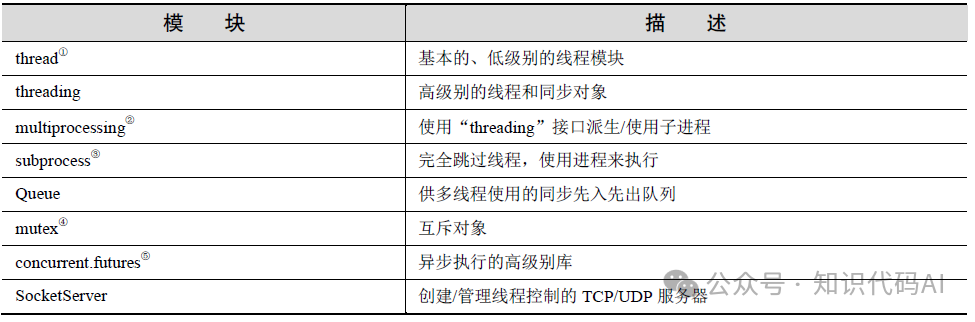
Table 4-6 lists some modules that may be used in multithreaded application programming.