
As a software developer, it is inevitable to read others’ code, which involves the programming standards of a language. Although standards are not strict requirements of the language itself, they have become conventions among users of each language.
Code written according to programming standards at least provides a pleasant reading experience, especially for those with obsessive-compulsive tendencies. On the other hand, a unified programming style can reduce errors and facilitate later maintenance.
Recently, I have started developing in pure C language, based on SDK, so every line of code added should be consistent with the original style; one bad apple should not spoil the whole bunch. A good programming standard can also reflect the attention to detail and code quality of the programmer.
The two companies I previously worked for each had their own summarized programming standards, but they were all consistent in applying to the software development of the company. Recently, I had the privilege of reviewing Huawei Technologies Co., Ltd.’s C language programming standards, which are comparatively more detailed.
At least I have encountered many aspects reflected in this programming standard, and I feel it is necessary to summarize them for future reference. First, learn the standards, then accumulate them, and finally write according to the standards.
1. Clarity First
Clarity is an essential characteristic of programs that are easy to maintain and refactor. Code is primarily for human reading; good code should be able to be recited like an article.
2. Simplicity is Beauty
Simplicity means being easy to understand and implement. The longer the code, the harder it is to read, and the more likely it is to introduce errors during modification. The more code written, the more places there are for errors, which means lower reliability of the code.
Therefore, we advocate writing concise and clear code to enhance code reliability. Obsolete code (unused functions and global variables) should be removed promptly, and duplicate code should be refined into functions whenever possible.
3. Choose the Right Style, Maintain Consistency with Existing Code Style
The benefits of sharing a common style among all product owners far outweigh the costs of unification. Under the guidance of the company’s existing coding standards, it is a very important skill to carefully arrange code to make it as clear as possible.
If refactoring/modifying code of a different style, a wise approach is to continue writing code according to the existing style of the current code or use formatting tools to convert it to the internal company style.
1. Header Files
Principle 1.1 Header files should contain interface declarations, not implementations.
Explanation: Header files are the external interfaces of a module or unit. They should contain declarations for external use, such as function declarations, macro definitions, type definitions, etc.
Principle 1.2 Header files should have a single responsibility.
Explanation: Complex header files with too many dependencies are a major cause of long compilation times. Many existing codes have overly large header files with too many responsibilities, and coupled with circular dependencies, it may lead to including dozens of header files just to use a single macro in a .c file.
Principle 1.3 Header files should include stable dependencies.
Explanation: The inclusion relationship of header files is a form of dependency. Generally, unstable modules should depend on stable modules, so that when unstable modules change, they do not affect (compile) stable modules.
Rule 1.1 Each .c file should have a corresponding .h file with the same name for declaring publicly accessible interfaces.
Explanation: If a .c file does not need to expose any interfaces, it should not exist, unless it is the entry point of the program, such as the file containing the main function.
Rule 1.2 Circular dependencies in header files are prohibited.
Explanation: Circular dependencies in header files refer to situations where a.h includes b.h, b.h includes c.h, and c.h includes a.h, causing any modification to one header file to require recompiling all code that includes a.h/b.h/c.h.
Rule 1.3 .c/.h files should not include unnecessary header files.
Explanation: In many systems, the inclusion relationships of header files are complex. Developers may not take the time to investigate each one and may include everything they think of, or some products may simply release a god.h that includes all header files for use by various project teams. This short-sighted approach leads to further deterioration of the system’s compilation time and creates significant maintenance challenges for future developers.
Rule 1.4 Header files should be self-contained.
Explanation: Simply put, self-contained means that any header file can be compiled independently. If a file includes a header file and needs to include another header file to work, it increases communication barriers and adds unnecessary burdens to users of that header file.
Rule 1.5 Always write internal #include guards (#define protection).
Explanation: Multiple inclusions of a header file can be avoided through careful design. If this cannot be achieved, a mechanism to prevent the header file’s content from being included more than once is required.
Note: Not adding an underscore at the beginning of the macro, using FILENAME_H instead of _FILENAME_H, is because identifiers starting with _ and __ are reserved for the system or standard library. In some static analysis tools, if globally visible identifiers start with _, warnings may be issued.
When defining include guards, the following rules should be followed:
1) Use unique names for guards;
2) Do not place code or comments before or after the protected section.
Rule 1.6 Defining variables in header files is prohibited.
Explanation: Defining variables in header files can lead to multiple definitions due to the header file being included by other .c files.
Rule 1.7 Interfaces provided by other .c files should only be used through header file inclusion; using extern to access external function interfaces or variables in .c is prohibited.
Explanation: If a.c uses the foo() function defined in b.c, it should declare extern int foo(int input); in b.h and include #include
Rule 1.8 Header files should not be included within extern “C”.
Explanation: Including header files within extern “C” can lead to nested extern “C”, and Visual Studio has limitations on the nesting level of extern “C”; too many nested levels will result in compilation errors.
Suggestion 1.1 A module usually contains multiple .c files, and it is recommended to place them in the same directory, with the directory name being the module name. To facilitate external users, it is recommended that each module provide a .h file named after the directory.
Suggestion 1.2 If a module contains multiple sub-modules, it is recommended that each sub-module provide an external .h file named after the sub-module.
Suggestion 1.3 Header files should not use non-standard extensions, such as .inc.
Suggestion 1.4 Maintain a unified order of header file inclusion for the same product.
2. Functions
Principle 2.1 A function should accomplish only one task.
Explanation: A function that implements multiple tasks creates significant difficulties for development, usage, and maintenance.
Principle 2.2 Duplicate code should be refined into functions whenever possible.
Explanation: Refining duplicate code into functions can reduce maintenance costs.
Rule 2.1 Avoid overly long functions; new functions should not exceed 50 lines (excluding empty lines and comments).
Explanation: This rule only applies to new functions; for existing functions, it is recommended not to increase the number of lines of code.
Rule 2.2 Avoid excessive nesting of code blocks in functions; new functions should not exceed 4 levels of nesting.
Explanation: This rule only applies to new functions; for existing code, it is recommended not to increase the nesting level.
Rule 2.3 Reentrant functions should avoid using shared variables; if necessary, they should be protected through mutual exclusion (disabling interrupts, semaphores).
Rule 2.4 The responsibility for checking the validity of parameters should be uniformly defined within the project team/module, whether it is the caller or the interface function. By default, it is the caller’s responsibility.
Rule 2.5 All error return codes from functions should be comprehensively handled.
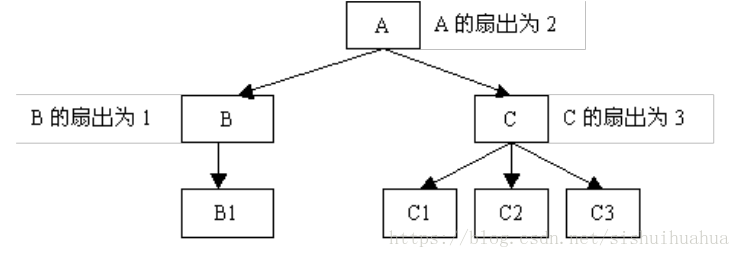
Rule 2.6 Design functions with high fan-in and reasonable fan-out (less than 7).
Explanation: Fan-out refers to the number of other functions directly called (controlled) by a function, while fan-in refers to how many higher-level functions call it. As shown in the figure:
Rule 2.7 Obsolete code (unused functions and variables) should be promptly removed.
Suggestion 2.1 Use const for parameters that do not change.
Explanation: Unchanging values are easier to understand, track, and analyze. Using const as the default option will be checked at compile time, making the code more robust and secure.
Suggestion 2.2 Functions should avoid using global variables, static local variables, and I/O operations; unavoidable cases should be centralized.
Suggestion 2.3 Check the validity of all non-parameter inputs to functions, such as data files, public variables, etc.
Explanation: Function inputs mainly consist of two types: parameter inputs and global variables/data file inputs, i.e., non-parameter inputs. Before using input parameters, functions should perform validity checks.
Suggestion 2.4 The number of parameters for functions should not exceed 5.
Suggestion 2.5 Avoid using variable-length parameter functions, except for printing functions.
Suggestion 2.6 All functions declared and defined within the source file should be marked with the static keyword unless they are externally visible.
3. Identifier Naming and Definition
The following naming styles are currently commonly used:
Unix-like style: words are in lowercase letters, separated by underscores, e.g., text_mutex, kernel_text_address.
Windows style: mixed case letters, words are concatenated, with the first letter of each word capitalized. However, Windows style can be awkward when encountering capitalized proper nouns, for example, naming a function that reads RFC text as ReadRFCText looks less clear than the Unix-like read_rfc_text.
Principle 3.1 Identifiers should be named clearly and meaningfully, using complete words or commonly understood abbreviations to avoid misunderstandings.
Principle 3.2 Avoid using abbreviations for words other than common general abbreviations, and do not use Pinyin.
Suggestion 3.1 Maintain a unified naming style within the product/project team.
Suggestion 3.2 Avoid using numerical identifiers in names unless logically necessary.
Suggestion 3.3 Do not prefix identifiers with module, project, product, or department names.
Suggestion 3.4 Maintain consistent naming styles for platform/driver adaptation code with the platform/driver.
Suggestion 3.5 When refactoring/modifying part of the code, maintain consistency with the original naming style.
Suggestion 3.6 File names should uniformly use lowercase characters.
Rule 3.2 Global variables should have a “g_” prefix.
Rule 3.3 Static variables should have an “s_” prefix.
Rule 3.4 Single-byte variable names are prohibited, but defining i, j, k as local loop variables is allowed.
Suggestion 3.7 Avoid using Hungarian notation.
Explanation: Variable naming should indicate the meaning of the variable, not its type. Adding type indications before variable names reduces readability; a more troublesome issue is that if the variable’s type definition changes, all places using that variable need to be modified.
Suggestion 3.8 Use a noun or adjective + noun format for naming variables.
Suggestion 3.9 Function names should be based on the action the function performs, generally using a verb or verb + noun structure.
Suggestion 3.10 Function pointers should be named according to the function naming rules, except for the prefix.
Rule 3.5 For defining constants such as numbers or strings, it is recommended to use all uppercase letters with underscores between words (the same applies to enumerations).
Rule 3.6 Except for special identifiers like header files or compilation switches, macro definitions should not start or end with underscores.
4. Variables
Principle 4.1 A variable should have only one function; it should not be used for multiple purposes.
Principle 4.2 Structures should have a single function; do not design overly comprehensive data structures.
Principle 4.3 Avoid or minimize the use of global variables.
Rule 4.1 Prevent local variables from having the same name as global variables.
Rule 4.2 When using structures for communication, pay attention to byte order.
Rule 4.3 It is strictly prohibited to use uninitialized variables as right values.
Suggestion 4.1 Construct only one module or function that can modify or create a global variable, while other related modules or functions only access it, preventing multiple different modules or functions from modifying or creating the same global variable.
Suggestion 4.2 Use interface-oriented programming ideas to access data through APIs: if the data of this module needs to be exposed to external modules, provide interface functions to set and get it, while ensuring mutual exclusion for accessing global data.
Suggestion 4.3 Initialize variables before their first use, with the initialization location as close to the usage location as possible.
Suggestion 4.4 Clearly define the initialization order of global variables to avoid cross-module initialization dependencies.
Explanation: During system startup, when using global variables, consider when the global variable is initialized and the timing relationship between using and initializing global variables; it is crucial to analyze who comes first. Otherwise, the consequences are often trivial yet disastrous.
Suggestion 4.5 Minimize unnecessary data type conversions and forced conversions.
Explanation: When performing forced conversions of data types, the meaning of the data and the values after conversion may change, and if these details are not carefully considered, it can lead to hidden dangers.
5. Macros and Constants
Rule 5.1 When using macro definitions for expressions, use complete parentheses.
Explanation: Macros are simply code replacements and do not evaluate parameters like functions before passing them.
Rule 5.2 Place multiple expressions defined by macros within curly braces.
Explanation: A better approach is to write multiple statements in the form of do while(0).
Rule 5.3 When using macros, parameters must not change.
Rule 5.4 Direct use of magic numbers is prohibited.
Explanation: The disadvantages of using magic numbers include: code is difficult to understand; if a meaningful number is used in multiple places, modifying that value can be costly. Using names that clearly indicate physical states or meanings increases information and provides a single maintenance point.
Suggestion 5.1 Unless necessary, prefer using functions over macros.
Explanation: Macros have some obvious disadvantages compared to functions: macros lack type checking and are not as strictly checked as function calls.
Suggestion 5.2 It is recommended to use const definitions instead of macros for constants.
Suggestion 5.3 Avoid using statements that change program flow, such as return, goto, continue, break, etc., in macro definitions.
6. Quality Assurance
Principle 6.1 Prioritize code quality assurance
(1) Correctness refers to the program achieving the functional requirements of the design.
(2) Simplicity refers to the program being easy to understand and implement.
(3) Maintainability refers to the ability of the program to be modified, including error correction, improvement, and adaptation to changes in new requirements or functional specifications.
(4) Reliability refers to the probability that the program will successfully run according to design requirements under given time intervals and environmental conditions.
(5) Testability refers to the ability of the software to discover, isolate, and locate faults, as well as the ability to design and execute tests within certain time and cost constraints.
(6) Code performance efficiency refers to occupying as few system resources as possible, including memory and execution time.
(7) Portability refers to the ability to modify the system to run outside the originally designed specific environment.
(8) Personal expression/personal convenience refers to individual programming habits.
Principle 6.2 Always be aware of confusing operators, such as certain symbol characteristics and calculation priorities.
Principle 6.3 Understand the memory allocation methods of the compilation system, especially the memory allocation rules for different types of variables, such as where local variables are allocated and where static variables are allocated.
Principle 6.4 Pay attention not only to interfaces but also to implementations.
Explanation: This principle may seem contrary to the