Data Indexing
Supplementing the content of Chapter 5:
In Python, indexing is applicable to various iterable and accessible data structures. Indexing is typically used to access elements by position (index) or key. The following are the main Python data structures suitable for indexing operations:
Data structures that support indexing:
-
Strings (str): Individual characters can be accessed by index.
s = "Hello"
print(s[0])  # 'H'
print(s[-1]) # 'o' (Negative indexing starts from the end)
Python Basics (Part 5) – Strings discusses string indexing, which you may find interesting.
-
Lists (list): Elements can be accessed by index.
my_list = [1, 2, 3, 4, 5]
print(my_list[0])  # 1
print(my_list[-1]) # 5-
Tuples (tuple): Elements can be accessed by index.
my_tuple = (1, 2, 3, 4, 5)
print(my_tuple[1])  # 2
print(my_tuple[-2]) # 4-
Dictionaries (dict): Values can be accessed by keys, although the “index” of a dictionary is not a numeric index, it is similar to indexing using square brackets and keys.
my_dict = {'a': 1, 'b': 2, 'c': 3}
print(my_dict['a'])  # 1 (Using key as "index")
Data structures that do not support indexing:
-
Sets (set): Do not support indexing because sets are unordered.
my_set = {1, 2, 3}# print(my_set[0]) # This will raise TypeError- Numeric types (int, float, complex)
num = 42# print(num[0]) # This will raise TypeError- Boolean values (bool)
flag = True# print(flag[0]) # This will raise TypeError- None type
n = None# print(n[0]) # This will raise TypeErrorThe indexing operator [ ] is used to access elements in sequence types. Indexing applies to various data structures, but not all data types support indexing operations.
Lists
Lists (List) are one of the most basic and commonly used data structures in Python. They are ordered, mutable collections that can store elements of any type, including numbers, strings, objects, and even other lists. Lists provide an efficient and portable way to store multiple data items, as opposed to a variable that can only store a single data item. They are frequently used in Python, similar to dictionaries, and are important to learn.Basic Concepts of Lists Lists are ordered collections of elements with the following characteristics:
- Ordered: Elements are stored in the order they are inserted
- Mutable: Elements can be added, removed, or modified
- Heterogeneous: Can contain elements of different types
- Nested: Lists can contain other lists
- Support indexing and slicing: Elements can be accessed by position
List Operations
Python lists provide many methods for conveniently manipulating lists. Data stored in lists is separated by commas, and the data can be of any data type.
Creating Lists
Syntax format:
# Create an empty list
list1 = []
list2 = list()
# Create a list with elements
numbers = [1, 2, 3, 4, 5]
fruits = ['apple', 'banana', 'cherry']
mixed = [1, 'hello', 3.14, True]
# Using the list() constructor
string = list("hello")  # Output: ['h', 'e', 'l', 'l', 'o']
# Nested lists (multi-dimensional lists)
matrix = [[1, 2, 3], [4, 5, 6], [7, 8, 9]]
Accessing Nested Lists Syntax format:
# Nested list (accessing values)
matrix= [[1,2,3], [4,5,6], [7,8,9]] # Access the list at index 1 and then access the value at index 1 in that list
print(matrix[1][2]) # Output: 6
print(matrix[0][0]) # Output: 1
# Accessing values in a multi-level nested list
matrix= [1,2,3, [4,5,6,[[8,9],[10,11,12],7]]]
print(matrix[3][3][1][1])  # Output: 11
If you find multi-level nesting confusing, don’t worry! I was confused too, but after breaking it down step by step, it becomes clearer!!!
matrix # print(matrix[3][3][1][1]) Breakdown target│├── 0: 1├── 1: 2├── 2: 3└── 3: [4, 5, 6, [[8, 9], [10, 11, 12], 7]] # This is the first index 3 position │ ├── 0: 4 ├── 1: 5 ├── 2: 6 └── 3: [[8, 9], [10, 11, 12], 7] # This is the second index 3 position │ ├── 0: [8, 9] ├── 1: [10, 11, 12] ← We are here # This is the third index 1 position │ │ │ ├── 0: 10 │ ├── 1: 11 ← Final target # This is the fourth index 1 data │ └── 2: 12 └── 2: 7# If print(matrix[3][3][1][1]) changes the first or second index to [2],# Python will throw an error: TypeError: 'int' object is not subscriptable# Indicating that the subsequent index position cannot be used Multi-level nesting may seem difficult, but once you understand the processing logic and break it down step by step, it becomes clear. (If you really can’t understand, listen to the song ‘Onion’ to peel back the layers of your heart.) It is said to be very commonly used. Remember this point.Tips for Handling Nested Lists
- Access from outside to inside: Always start from the outermost layer and gradually access inward
- Count indices: Remember that Python uses 0-based indexing (the index of the first element is 0)
- Visualize structure: For complex nested structures, you can break them down or draw them out to help understand
Slicing Operations
Syntax format: Similar to strings, slicing can be performed, but the difference is that the elements in string slicing are always characters (strings of length 1), while the elements in list slicing can be of any type.
fruits = ['apple', 'banana', 'cherry', 'date', 'elderberry']
# Accessing by index (starting from 0)
print(fruits[0])   # 'apple'
print(fruits[2])   # 'cherry'
# Negative indexing (starting from the end)
print(fruits[-1])  # 'elderberry'
print(fruits[-2])  # 'date'
# Slicing operation [start:stop:step]
print(fruits[1:4])    # ['banana', 'cherry', 'date']
print(fruits[:3])     # ['apple', 'banana', 'cherry']
print(fruits[2:])     # ['cherry', 'date', 'elderberry']
print(fruits[::2])    # ['apple', 'cherry', 'elderberry'] (every other element)
print(fruits[::-1])   # ['elderberry', 'date', 'cherry', 'banana', 'apple'] (reverse the list)
Adding Data
Syntax format:
list.append()  # Add data to the end of the list, modifying the original list directly
list.insert(index: position to insert, object: data to insert)  # Insert data at a specified position, also modifying the original list
S_list = ['HF', 30,'male']
S_list.append('Yunnan') # Add region to the end of the list
print(S_list) # Output: ['HF', 30, 'male', 'Yunnan']S_list = ['HF', 30,'male']
S_list.insert(2,'Xiao Bai learns Python') # Insert data at index 2, original data at index 2 'male' becomes index 3
print(S_list) # Output: ['HF', 30, 'Xiao Bai learns Python', 'male', 'Yunnan'] 
Removing Data
Syntax format:
list.remove() # remove method: Removes the first matching element from the list.
del list (index of the data to be deleted) # del statement: Deletes the element at the specified position in the list
Example:
# remove method:
list1 = [1,2,3,4,5,6,7]
list1.remove(2)     # Remove the first matching element 2
print(list1)        # Output: [1, 3, 4, 5, 6, 7]
list2 = [1,2,2,3,4,5,6,7]
list2.remove(2)     # Remove the first matching element 2
print(list2)        # Output: [1, 2, 3, 4, 5, 6, 7]
# Since only the first matching result can be removed, the second 2 will still be retained in the output
# del method:
list3 = [1,2,3,4,5,6,7]
del list3[2] # Delete the element at index (position) 2, not the value 2 itself
print(list3) # Output: [1, 2, 4, 5, 6, 7]Searching for Data
Syntax format:
list.index(data to query)  # index() method: Returns the index position of a certain element in the list
list.count(data to count)  # Count the occurrences of an element
Example:
# index() method
list4 = [1,2,3,4,5,6,7]
li = list4.index(4)     # Query the index of the data 4, starting from the left with index 0
print(li)               # Output: 3 at index 3
# count() method
list5 = [1,2,3,4,5,6,7,78,1,88,1,6,8,9,10,52,1,3,1]
li = list5.count(1) # Count how many times data 1 appears in the list
print(li) # Output: 5, appears five times in the list Lists do not have a find function like strings, using it will immediately raise an error.
Modifying Data
Syntax format:
list[index of the data to modify] = 'modified data'Example:
# Modify data at a specified position:
list6 = ['hello',2,'python','!']
list6[1] = 'Xiao Bai learns'    # Modify the data at index 1, which is 2 in the list
print(list6)  # Output: ['hello', 'Xiao Bai learns', 'python', '!']
Other Operation Methods (Self-Expanded Content)
Syntax format:
len(list) # Get the length of the list, similar to getting the length of a string
list.sort # Sort the list, default is ascending order
list.sort(reverse = True)  # Sort the list in descending order by adding reverse condition
Example:
# Get the length of the list
list7 = ['hello',2,'python','!']
li = len(list7)   # Create variable li to receive the length of the list recognized by len() function
print(li)         # Output: 4, indicating there are 4 data items in the list
print(len(list7))  # Shorter version, if you don't need to save the length data, you can use this method
# Output is also: 4
# Sorting the list (error example)
list8 = ['hello',2,'python','!']
list8.sort() # At this point, the code will not prompt an error
print(list8) # At this output step, the code will return an error
# TypeError: '<' not supported between instances of 'int' and 'str'
# Data type error, because the list contains the string 'hello' and the integer 2, which are of different data types and cannot be compared, raising TypeErrorBasic Sorting Functionality Numeric Type Sorting
# Integer sorting
umbers = [3, 1, 4, 1, 5, 9, 2, 6]
numbers.sort()
print(numbers)    # Output: [1, 1, 2, 3, 4, 5, 6, 9]
# Float sorting
floats = [3.14, 2.71, 1.41, 1.62]
floats.sort()
print(floats)    # Output: [1.41, 1.62, 2.71, 3.14]
# Mixed numeric types (integers and floats)
mixed_numbers = [3, 1.5, 4, 2.7, 1]
mixed_numbers.sort()
print(mixed_numbers)  # Output: [1, 1.5, 2.7, 3, 4]
Sorting Strings in the List
# String sorting (in alphabetical order)
fruits = ['banana', 'apple', 'cherry', 'date']
fruits.sort()
print(fruits)  # ['apple', 'banana', 'cherry', 'date']
# Chinese string sorting
chinese_words = ['苹果', '香蕉', '樱桃', '日期']
chinese_words.sort()
print(chinese_words)  # ['日期', '苹果', '樱桃', '香蕉'] (sorted by pinyin or Unicode order)
# Case-sensitive sorting
words = ['Apple', 'banana', 'Cherry', 'date']
words.sort()
print(words)  # ['Apple', 'Cherry', 'banana', 'date'] (uppercase letters come first)
Using the reverse parameter for descending order sorting
# Numeric descending order sorting
umbers = [3, 1, 4, 1, 5, 9, 2, 6]
numbers.sort(reverse=True)   # The first letter of True must be capitalized, otherwise it will raise an error
print(numbers)   # Output: [9, 6, 5, 4, 3, 2, 1, 1]
The sort() method is a list method that directly modifies the original list, while sorted() is a built-in function that returns a new sorted list: Syntax format:
variable = sorted(list) # sort() method modifies the original list
umbers = [3, 1, 4, 1, 5]
numbers.sort()
print(numbers) # [1, 1, 3, 4, 5]
# sorted() function returns a new list, does not modify the original list
numbers = [3, 1, 4, 1, 5]
sorted_numbers = sorted(numbers)
print(numbers) # [3, 1, 4, 1, 5] (original list unchanged)
print(sorted_numbers) # [1, 1, 3, 4, 5] (new sorted list)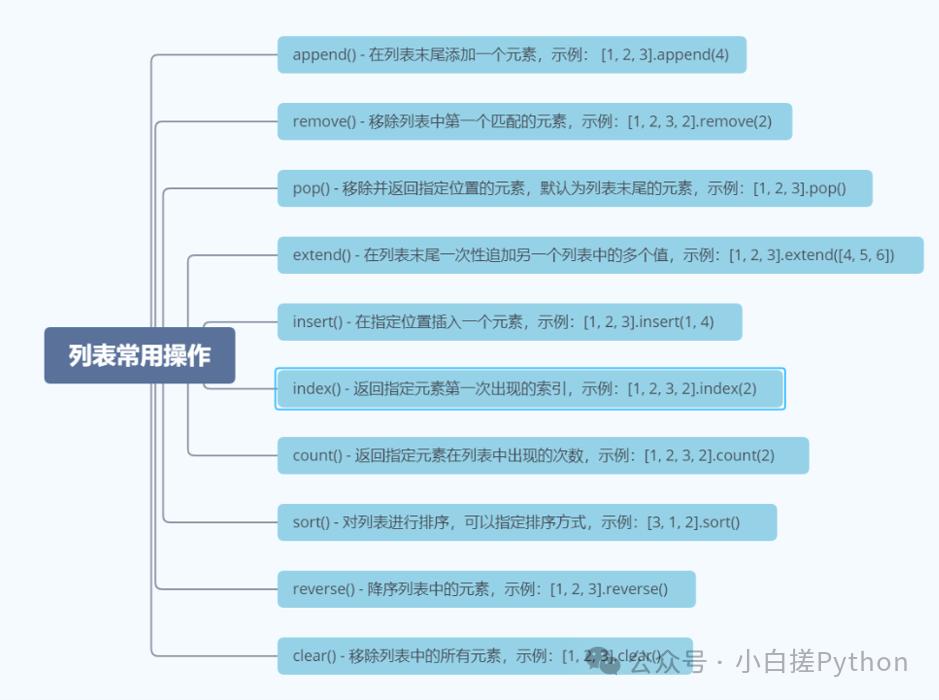 SummaryPython lists are an extremely flexible and powerful data structure with the following characteristics:
- Ordered and mutable: Elements are stored in order and can be modified
- Heterogeneous: Can contain elements of different types
Mastering the use of lists is fundamental to Python programming, and they have wide applications in data processing, algorithm implementation, web development, and more. By effectively using list comprehensions, slicing operations, and various list methods, concise and efficient Python code can be written. As a beginner, I have not encountered or learned many methods in Python, and I do not dare to speak recklessly about parts I have not studied. This public account is also a sharing of what I have learned, and if you find it appealing, you can follow it (though updates are irregular). Still, as I always say: Every line of code you write today is building confidence for the future “automation master” – take it slow.