In the previous article, we introduced the principles of LoRA fine-tuning. In this issue, we will get hands-on with supervised fine-tuning (SFT) of a basic pre-trained model, transforming it into an instruction model capable of interacting with users in a dialogue system.
LoRA Fine-Tuning Principles
JunJun AI, WeChat Official Account: JunJun AI. What exactly is the principle of Fine-Tuning with LoRA?
yahma/alpaca-cleaned dataset
First, let’s introduce the dataset for instruction fine-tuning – Alpaca. The Alpaca dataset is a dataset for instruction tuning of language models, developed by the Stanford research team. The original dataset, Alpaca-52k, was initially used to fine-tune the LLaMA model to generate the Alpaca-7B model, containing approximately 52K instruction data. The cleaned version, yahma/alpaca-cleaned, is an optimized version of the original Alpaca dataset, fixing flaws in the data (such as noise and formatting issues).The format of the alpaca-cleaned data is JSON, with three fields: instruction (
the user input instruction), input (the user input), and output (the response the model should generate). It looks like this:

Download link:https://modelscope.cn/datasets/AI-ModelScope/alpaca-cleaned/files
Base model download
For our practical implementation, we can choose a smaller model that requires fewer resources and allows us to see results quickly. We will take the Qwen3-4B model as an example and use modelscope to download the model.
#cache_dir is the model storage path
from modelscope import snapshot_download
snapshot_download('Qwen/Qwen3-4B', cache_dir="/root/autodl-tmp/models")
Training the Instruction Model
We will use the unsloth framework to assist us in training the model. We will load the base model using FastLanguageModel.from_pretrained() and then add the LoRA layer using FastLanguageModel.get_peft_model().
# Import necessary libraries
from unsloth import FastLanguageModel
import torch
# Set model parameters
max_seq_length = 2048  # Set maximum sequence length, supports RoPE scaling
dtype = None  # Data type, None means automatic detection. Tesla T4 uses Float16, Ampere+ uses Bfloat16
load_in_4bit = True  # Use 4bit quantization to reduce memory usage
# Load pre-trained model and tokenizer
model, tokenizer = FastLanguageModel.from_pretrained(
    #model_name = "unsloth/Qwen2.5-7B",  # Use Qwen2.5-7B model
    model_name = "/root/autodl-tmp/models/Qwen/Qwen3-4B",  # Use Qwen3-4B model
    max_seq_length = max_seq_length,
    dtype = dtype,
    load_in_4bit = load_in_4bit
)
# Add LoRA adapter, only need to update 1-10% of parameters
model = FastLanguageModel.get_peft_model(
model,
r = 16, # LoRA rank, recommended values are 8, 16, 32, 64, 128
target_modules = ["q_proj", "k_proj", "v_proj", "o_proj",
"gate_proj", "up_proj", "down_proj",], # Modules to apply LoRA
lora_alpha = 16, # LoRA scaling factor
lora_dropout = 0, # LoRA dropout rate, 0 for optimization
bias = "none", # Bias setting, none for optimization
use_gradient_checkpointing = "unsloth", # Use unsloth's gradient checkpointing to reduce memory usage by 30%
random_state = 3407, # Random seed
use_rslora = False, # Whether to use rank stabilized LoRA
loftq_config = None, # LoftQ configuration
)Next, we define the dataset template and format the dataset data into the template.
# Define Alpaca format prompt template
alpaca_prompt = """
以下是描述一项任务的指令,该指令配有一个提供更多上下文的输入。请编写一个响应,适当完成该请求。
### Instruction:{}
### Input:{}
### Response:{}
"""
# Get end token
EOS_TOKEN = tokenizer.eos_token
# Define data formatting function
def formatting_prompts_func(examples):
    instructions = examples["instruction"]
    inputs       = examples["input"]
    outputs      = examples["output"]
    texts = []
    for instruction, input, output in zip(instructions, inputs, outputs):
        # Must add EOS_TOKEN, otherwise generation will continue indefinitely
        text = alpaca_prompt.format(instruction, input, output) + EOS_TOKEN
        texts.append(text)
    return { "text" : texts, }
# Load Alpaca dataset
from datasets import load_dataset
dataset = load_dataset("/root/autodl-tmp/lora/alpaca-cleaned", split = "train")
dataset = dataset.map(formatting_prompts_func, batched = True,)
Next, we define training parameters and create the SFTTrainer.
SFTTrainer (Supervised Fine-tuning Trainer) is a tool designed by Hugging Face to simplify the supervised fine-tuning process of Transformer models. The training environment is RTX4090*1 + 24GB memory + cuda12.4.
# Set training parameters and trainer
from trl import SFTTrainer
from transformers import TrainingArguments
from unsloth import is_bfloat16_supported
# Define training parameters
training_args = TrainingArguments(
        per_device_train_batch_size = 4,  # Batch size per device, larger means faster training, but may not fit in memory
        gradient_accumulation_steps = 4,  # Gradient accumulation steps
        warmup_steps = 5,  # Warmup steps
        max_steps = 60,  # Maximum training steps
        learning_rate = 2e-4,  # Learning rate
        fp16 = not is_bfloat16_supported(),  # Whether to use FP16
        bf16 = is_bfloat16_supported(),  # Whether to use BF16
        logging_steps = 1,  # Logging steps
        optim = "adamw_8bit",  # Optimizer
        weight_decay = 0.01,  # Weight decay
        lr_scheduler_type = "linear",  # Learning rate scheduler type
        seed = 3407,  # Random seed
        output_dir = "outputs",  # Output directory
        report_to = "none",  # Reporting method
)
# Create SFTTrainer instance
trainer = SFTTrainer(
    model = model,
    tokenizer = tokenizer,
    train_dataset = dataset,
    dataset_text_field = "text",
    max_seq_length = max_seq_length,
    dataset_num_proc = 2,
    packing = False,  # For short sequences, can be set to True for 5x speedup
    args = training_args,
)
# Start training
trainer_stats = trainer.train()Model Inference
After training is complete, we can load the model for inference, using the tokenizer to convert the prompt into tokens as input to the model, and then converting the model’s output tokens back into text. The input instruction and input allow the model to automatically provide the output, indicating that the model has the capability for instruction output.
# Model inference part
FastLanguageModel.for_inference(model)  # Enable native 2x speed inference
inputs = tokenizer([
    alpaca_prompt.format(
        "Continue the following sequence.",  # Instruction
        "1, 1, 2, 3, 5, 8",  # Input
        "",  # Output left empty for generation
    )], return_tensors = "pt").to("cuda")
# Generate output
outputs = model.generate(**inputs, max_new_tokens = 64, use_cache = True)
print(tokenizer.batch_decode(outputs))
Model Saving
Saving the model can be used for final model usage and production deployment.
# Save model
model.save_pretrained("lora_model")  # Save locally
tokenizer.save_pretrained("lora_model")
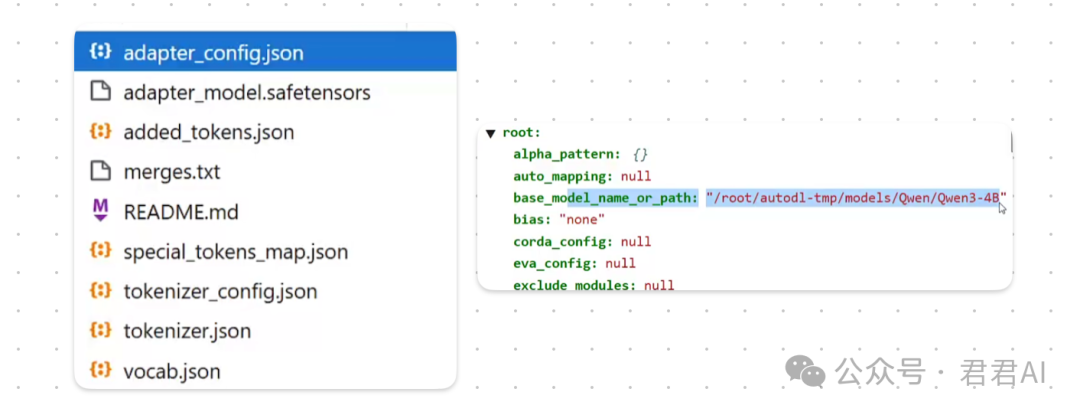
The saved folder contains model files and multiple configuration files. It is worth noting that the adapter_config file contains the path to the base model, which should be modified during deployment.
Code to load the saved model for inference is similar to loading the model before training:
from unsloth import FastLanguageModel
model, tokenizer = FastLanguageModel.from_pretrained(
        model_name = "lora_model",
        max_seq_length = max_seq_length,
        dtype = dtype,
        load_in_4bit = load_in_4bit,
)
Final model deployment can use vllm; for reference, see this article:
Deploying Large Models with vllm
JunJun AI, WeChat Official Account: JunJun AI. Deploying local large pre-trained models in 5 minutes.
That’s all for this issue on LoRA fine-tuning of large models. If you have any questions, feel free to discuss in the comments section. Follow us for more updates!
#LoRA #Model Fine-Tuning #SFT #Fine-Tuning #vllm #alpaca