Introduction
When optimizing the performance of C++ projects, we often enable -O2 or -O3 to enhance the compilation optimization level. However, many developers are unaware that GCC’s Link Time Optimization (LTO) is a powerful technique that breaks the boundaries of object files, enabling cross-file function inlining and the removal of unused code, further improving program efficiency and reducing binary size. This article will provide practical guidance on how to correctly enable LTO using CMake + GCC toolchain, resolve common build errors, and ultimately achieve a comprehensive performance upgrade for C++ projects.
✨ What is LTO (Link Time Optimization)?
LTO is a cross-compilation unit optimization method that aggregates the intermediate representations (such as LLVM IR or GCC GIMPLE) of various object files during the linking phase, allowing for unified inlining, deletion, reordering, and other optimizations. Compared to a standard -O3 compilation, LTO can achieve:
- Cross-source file function inlining
- Elimination of unused static functions/variables
- More aggressive constant folding and call path optimization
In simple terms: multiple .cpp files compiled into .o files are no longer “black boxes” but can be globally optimized!
✅ How to Enable LTO: CMake + GCC Practical Configuration
1. Set Compilation Options
In the CMake configuration file CMakeLists.txt, there are two ways to set it up:
- Explicitly specify flto compilation options and link options (recommended) target_compile_options(main PRIVATE -O2 -g -flto) target_link_options(main PRIVATE -flto -fuse-linker-plugin)
- Set the CMAKE option INTERPROCEDURAL_OPTIMIZATION.
# Add the following option in CMakeLists.txt
set(CMAKE_INTERPROCEDURAL_OPTIMIZATION TRUE)
2. Set ar and runlib
# Add the following options in CMakeLists.txt
set(CMAKE_AR "/usr/bin/gcc-ar")
set(CMAKE_RANLIB "/usr/bin/gcc-ranlib")
🧪 Practical Demo: Two Static Libraries + Main Program
We will build a simple example: two static libraries A/B providing functions add() and square(), with the main program calling these two functions. If LTO is effective, they will be automatically inlined, improving performance and reducing symbol overhead.
📁 Project Structure:
lto-demo/├── CMakeLists.txt├── A/│ ├── CMakeLists.txt│ └── a.cpp│ └── a.h├── B/│ ├── CMakeLists.txt│ └── b.cpp│ └── b.h└── main.cpp
Library A
// a.h
#pragma once
int add(int a, int b);
// a.cpp
#include "a.h"
int add(int a, int b) { return a + b; }# CMakeLists.txt
add_library(A STATIC a.cpp)
target_compile_options(A PRIVATE -O2 -g -flto)
target_link_options(A PRIVATE -flto -fuse-linker-plugin)Library B
// b.h
#pragma once
int square(int x);
// b.cpp
#include "b.h"
int square(int x) { return x * x; }# CMakeLists.txt
add_library(B STATIC b.cpp)
target_compile_options(B PRIVATE -O2 -g -flto)
target_link_options(B PRIVATE -flto -fuse-linker-plugin)Main Program
// main.cpp
#include <iostream>
#include "A/a.h"
#include "B/b.h"
int main(int argc, char** argv) {
    if (argc != 3) {
        std::cerr << "Usage: ./main data1 data2" << std::endl;
        return 0;
    }
    auto data1 = std::atoi(argv[1]);
    auto data2 = std::atoi(argv[2]);
    int sum = add(data1, data2);
    int result = square(sum);
    std::cout << "square(add(" << data1 << ", " << data2 << ")) = " << result << std::endl;
    return 0;
}
# CMakeLists.txt
cmake_minimum_required(VERSION 3.13)
project(LTODemo)
# Use C++11
set(CMAKE_CXX_STANDARD 11)
set(CMAKE_CXX_STANDARD_REQUIRED ON)
# ✅ Set the correct toolchain to avoid LTO build failures (GCC specific)
set(CMAKE_AR "/usr/bin/gcc-ar")
set(CMAKE_RANLIB "/usr/bin/gcc-ranlib")
# Add subdirectories (two static libraries)
add_subdirectory(A)
add_subdirectory(B)
# Main program
add_executable(main main.cpp)
# Link static libraries
target_link_libraries(main PRIVATE A B)
# ✅ Enable Link Time Optimization (LTO)
target_compile_options(main PRIVATE -O2 -g -flto)
target_link_options(main PRIVATE -flto -fuse-linker-plugin)🧱 Build and Validate
cd lto-demo
mkdir build && cd build
cmake ..
make VERBOSE=1
./main 3 4
You should see the output:
square(add(3,4)) = 49
✅ Verify if LTO is Effective
1. Check if symbols have been optimized away:
[root@instance-bguv65e0 build]# nm main | grep -E 'add|square'
[root@instance-bguv65e0 build]#
No symbol names appear, indicating that LTO inlining was successful and functions have been optimized away. If the compilation level of the executable is adjusted to -O0, the following output can be seen:
[root@instance-bguv65e0 build]# nm main | grep -E 'add|square'
0000000000401240 t _Z3addii
0000000000401250 t _Z6squarei
2. Run readelf on the object files to check LTO sections
[root@instance-bguv65e0 build]# readelf -S A/CMakeFiles/A.dir/a.cpp.o | grep lto
[ 4] .gnu.lto_.pr[...] PROGBITS         0000000000000000  00000040
[ 5] .gnu.lto_.ic[...] PROGBITS         0000000000000000  0000004f
[ 6] .gnu.lto_.ip[...] PROGBITS         0000000000000000  00000069
[ 7] .gnu.lto_.in[...] PROGBITS         0000000000000000  00000082
[ 8] .gnu.lto_.jm[...] PROGBITS         0000000000000000  000000c7
[ 9] .gnu.lto_.pu[...] PROGBITS         0000000000000000  000000e5
[10] .gnu.lto_.ip[...] PROGBITS         0000000000000000  000000f6
[11] .gnu.lto_.lt[...] PROGBITS         0000000000000000  00000107
[12] .gnu.lto__Z3[...] PROGBITS         0000000000000000  0000010f
[13] .gnu.lto_.sy[...] PROGBITS         0000000000000000  00000207
[14] .gnu.lto_.re[...] PROGBITS         0000000000000000  0000022e
[15] .gnu.lto_.de[...] PROGBITS         0000000000000000  0000023c
[16] .gnu.lto_.sy[...] PROGBITS         0000000000000000  00000473
[17] .gnu.lto_.ex[...] PROGBITS         0000000000000000  0000048b
[18] .gnu.lto_.opts    PROGBITS         0000000000000000  0000048e
[root@instance-bguv65e0 build]# readelf -S B/CMakeFiles/B.dir/b.cpp.o | grep lto
[ 4] .gnu.lto_.pr[...] PROGBITS         0000000000000000  00000040
[ 5] .gnu.lto_.ic[...] PROGBITS         0000000000000000  0000004f
[ 6] .gnu.lto_.ip[...] PROGBITS         0000000000000000  00000069
[ 7] .gnu.lto_.in[...] PROGBITS         0000000000000000  00000083
[ 8] .gnu.lto_.jm[...] PROGBITS         0000000000000000  000000c5
[ 9] .gnu.lto_.pu[...] PROGBITS         0000000000000000  000000df
[10] .gnu.lto_.ip[...] PROGBITS         0000000000000000  000000f0
[11] .gnu.lto_.lt[...] PROGBITS         0000000000000000  00000101
[12] .gnu.lto__Z6[...] PROGBITS         0000000000000000  00000109
[13] .gnu.lto_.sy[...] PROGBITS         0000000000000000  000001f5
[14] .gnu.lto_.re[...] PROGBITS         0000000000000000  0000021c
[15] .gnu.lto_.de[...] PROGBITS         0000000000000000  0000022a
[16] .gnu.lto_.sy[...] PROGBITS         0000000000000000  00000458
[17] .gnu.lto_.ex[...] PROGBITS         0000000000000000  00000472
[18] .gnu.lto_.opts    PROGBITS         0000000000000000  00000475
[root@instance-bguv65e0 build]# readelf -S CMakeFiles/main.dir/main.cpp.o | grep lto
[ 4] .gnu.lto_.od[...] PROGBITS         0000000000000000  00000040
[ 5] .gnu.lto_.pr[...] PROGBITS         0000000000000000  0000033e
[ 6] .gnu.lto_.ic[...] PROGBITS         0000000000000000  0000034f
[ 7] .gnu.lto_.ip[...] PROGBITS         0000000000000000  000003c7
[ 8] .gnu.lto_.jm[...] PROGBITS         0000000000000000  000005fc
[ 9] .gnu.lto_.pu[...] PROGBITS         0000000000000000  00000753
[10] .gnu.lto_.ip[...] PROGBITS         0000000000000000  0000077f
[11] .gnu.lto_.lt[...] PROGBITS         0000000000000000  0000083e
[12] .gnu.lto__ZN[...] PROGBITS         0000000000000000  00000846
[13] .gnu.lto__ZN[...] PROGBITS         0000000000000000  00000a16
[14] .gnu.lto_mai[...] PROGBITS         0000000000000000  00000b0c
[15] .gnu.lto__ZS...] PROGBITS         0000000000000000  00000cb2
[16] .gnu.lto__ZS...] PROGBITS         0000000000000000  00000e75
[17] .gnu.lto__ZN...] PROGBITS         0000000000000000  00001003
[18] .gnu.lto__Z4...] PROGBITS         0000000000000000  000011ae
[19] .gnu.lto__GL...] PROGBITS         0000000000000000  0000138c
[20] .gnu.lto__ZS...] PROGBITS         0000000000000000  0000144e
[21] .gnu.lto__ZN...] PROGBITS         0000000000000000  000016e6
[22] .gnu.lto_.sy...] PROGBITS         0000000000000000  000018b5
[23] .gnu.lto_.re...] PROGBITS         0000000000000000  00001a6c
[24] .gnu.lto_.de...] PROGBITS         0000000000000000  00001a92
[25] .gnu.lto_.sy...] PROGBITS         0000000000000000  0000392d
[26] .gnu.lto_.ex...] PROGBITS         0000000000000000  00003cb2
[27] .gnu.lto_.opts    PROGBITS         0000000000000000  00003cdb
It can be seen that sections like .gnu.lto_.opts exist, indicating that the object files indeed contain GCC LTO’s IR information (GIMPLE).
3. Analyze the assembly file to check inlining effects
First, compile main into an executable without the flto option, using the command “objdump -d main” to view the assembly code of the main function, where the calls to add and square functions are not inlined.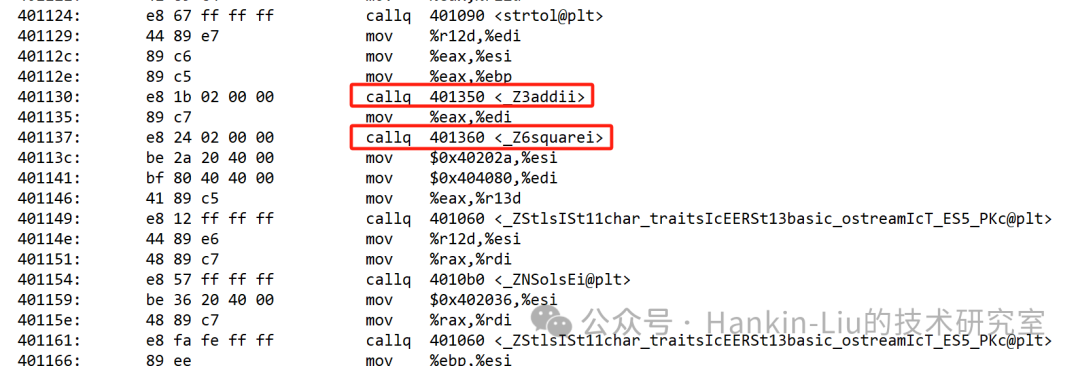
Next, compile main into an executable with the flto option, and you will see that these two functions have been inlined.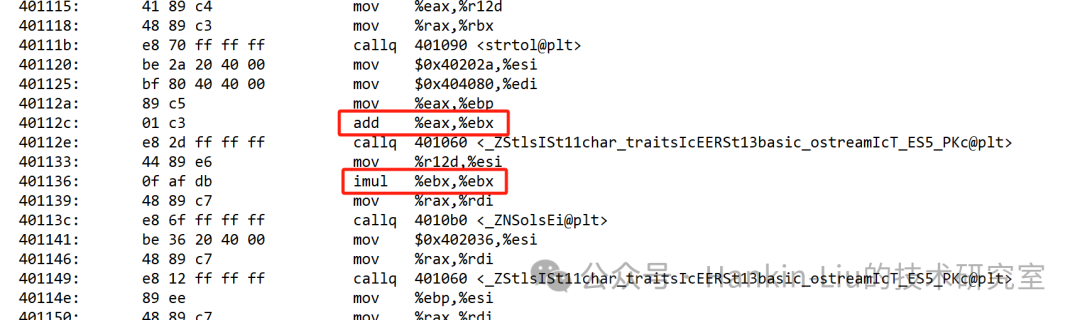
🚀 What is the Difference Between INTERPROCEDURAL_OPTIMIZATION and Manual -flto?
| Feature | <span>-flto</span> Manual Setting |
<span>INTERPROCEDURAL_OPTIMIZATION</span> |
|---|---|---|
| Maintainability | Poor | Good |
| Portability | Low (needs to match compiler) | High (CMake cross-platform support) |
| Compilation Behavior | Easy to miss toolchain settings | Automatically adapts (needs AR/RANLIB set) |
| Control Granularity | Coarse | Can act at the target level |
Recommendation: Unless there is a strong need for control over the build system, using CMake’s LTO interface is more modern and safer, but be sure to check and confirm whether the link-time optimization of the compiled products is effective, as described in the previous methods.
🚧 Why Does Enabling LTO Often Fail? — In-depth Analysis of GCC Compatibility Pitfalls
Although LTO (Link Time Optimization) is a powerful optimization feature provided by GCC, many developers encounter issues such as “compilation fails”, “linking fails”, or “compilation succeeds but no optimization effect” when enabling it for the first time in real projects. Behind this are pitfalls buried in the evolution of GCC versions and toolchain differences. Let’s break it down from several dimensions:
✅ 1. Key Differences in LTO Intermediate Representation (IR) Handling Between Old and New GCC Versions
The core of LTO is to retain the **intermediate representation (IR, GIMPLE)** of functions and data structures in the object files, waiting for global optimization during the linking phase.
🔹 GCC ≤ 10 Defaults to Slim LTO (Pure Bitcode)
- .o files contain no machine code, only GIMPLE intermediate representation.
- This format is called slim LTO.
- The compiled .o files are not recognizable or parsable by ordinary tools (like ar).
💥 Problem: If you are using the default /usr/bin/ar and /usr/bin/ranlib, the static library .a will discard or corrupt this IR information during packaging, causing subsequent linkers to be unable to perform LTO.
🔹 GCC ≥ 11 Defaults to Fat LTO (IR + Machine Code)
- .o files contain both normal machine code and GIMPLE IR.
- Can be correctly packaged by ordinary ar and ranlib.
- If -flto is enabled during the linking phase, IR will be used; otherwise, it will fall back to using normal machine code, which is much more compatible.
🎉 Advantage: Even if you do not set CMAKE_AR / CMAKE_RANLIB, you can complete the build, and LTO has a higher “success rate”.
✅ 2. Why Low Version GCC (≤10) Requires Explicit Specification of gcc-ar / gcc-ranlib
To ensure that slim LTO’s .o files can be correctly packaged into .a static libraries, GCC provides accompanying tools gcc-ar and gcc-ranlib. These two tools will recognize and retain the LTO IR in the .o files, rather than simply processing them as the system default ar does.
✅ Correct Approach (Low Version GCC):
# Add the following options in CMakeLists.txt:
set(CMAKE_AR "/usr/bin/gcc-ar")
set(CMAKE_RANLIB "/usr/bin/gcc-ranlib")
Otherwise, you may encounter the following issues:
- ar: file format not recognized
- Linker error: lto-wrapper failed or undefined reference
- Compilation can pass but LTO has no effect, resulting in no optimization.
How to Completely Avoid Build Failures?
- Do not use CMAKE_INTERPROCEDURAL_OPTIMIZATION, as this option will add -flto=auto to the compilation options, which may not actually use -flto during the compilation process. Explicitly enable
<span>-flto</span>(rather than<span>-flto=auto</span>); - During compilation, use
<span>make VERBOSE=1</span>to confirm the actual parameters passed, ensuring that -flto is indeed included; - Set
<span>gcc-ar</span>and<span>gcc-ranlib</span>to retain LTO intermediate representation and avoid linking failures in low version compiler environments.
✅ Summary
LTO is a powerful optimization tool provided by GCC, and when used correctly, it can bring:
- 🚀 Smaller final binaries (removing unused code)
- ⚡ Higher runtime performance (cross-file inlining, unified optimization)
- ✅ Stronger consistency and maintainability during the build process
However, to truly make -flto effective, it is not just about adding a compilation parameter; you also need to:
- Correctly set CMake’s LTO options
- Use gcc-ar and gcc-ranlib in conjunction
- Avoid conflicts in enabling LTO across different targets
If you are optimizing large-scale C++ projects, speeding up builds, or fine-tuning inlining, LTO is a core skill you must learn. Try enabling it in your own projects and see the results!
Feel free to follow the WeChat public account “Hankin-Liu’s Technical Research Room”, where I will continue to share valuable technical content related to software performance testing, optimization, programming techniques, and debugging skills.