Overview and Core Concepts of Linux Workqueue
Part 1: Overview and Core Concepts of Workqueue
1.1 What is Workqueue?
Imagine you are a busy restaurant manager. When customers place their orders, some tasks need to be completed immediately (like pouring water for the guests), similar to the interrupt handling in the Linux kernel, which requires a quick response. However, some tasks are more time-consuming, like cooking a complex dish. You wouldn’t make the waiter wait for the dish to be ready; instead, you would write the “cooking steak” task on an order and hang it on the kitchen task board. The chefs in the kitchen (who are specifically responsible for cooking) will take orders from the task board in sequence and execute them.
The Linux kernel’s workqueue is this **”kitchen task board system”**.
- • Work: This is the “order” that represents a specific task (a function) that needs to be executed later.
- • Workqueue: This is the “task board”, a queue used to store and manage “work”.
- • Worker Thread: This is the “chef”, who is specifically responsible for taking “orders” from the “task board” and executing them as kernel threads.
Official Definition: Workqueue is a low-level mechanism provided by the Linux kernel for delayed task execution. It encapsulates tasks that need to be delayed (i.e., “work”), queues them, and then executes them asynchronously in process context by a set of dedicated kernel threads (i.e., “worker threads”) in sequence.
1.2 Why Do We Need Workqueue?
Before delving into the principles, we must understand its significance. The table below compares several common bottom half mechanisms in the kernel:
| Feature | Softirq | Tasklet | Workqueue |
|---|---|---|---|
| Execution Context | Interrupt Context | Interrupt Context | Process Context |
| Can Sleep | No | No | Yes |
| Can Be Scheduled | No | No | Yes (participates in system scheduling) |
| Concurrency/Reentrancy | Reentrant (requires locks) | Serial on the same CPU | Default thread pool shared, can create dedicated threads |
| Execution Latency | Very low | Low | Relatively high (affected by the scheduler) |
| Applicable Scenarios | High frequency, high performance, high atomicity requirements | Medium to low frequency, serialization requirements | Scenarios requiring sleep, large workloads, complex logic |
Core Advantage: The biggest feature of Workqueue is that it executes in process context. This means:
- 1. Can Sleep: In the work handling function, you can call
<span>kmalloc(GFP_KERNEL)</span>,<span>mutex_lock</span>,<span>msleep</span>, and other functions that may cause blocking or sleeping. This is absolutely prohibited in softirq and tasklet. - 2. Can Participate in Scheduling: It is managed by the CPU scheduler like a normal user process and does not monopolize the CPU like in interrupt context.
Life Analogy: Softirq and tasklet are like “firefighters” who must respond immediately and cannot rest (sleep) during the process. Workqueue is like “construction workers” who, upon receiving a task, will execute it according to plan, and if they need to wait for materials (sleep wait), they can go do something else and continue when the materials arrive.
Part 2: Core Data Structures and Code Framework of Workqueue
To understand how workqueue operates, we must delve into its core data structures. Their logical relationships can be summarized in the diagram below:
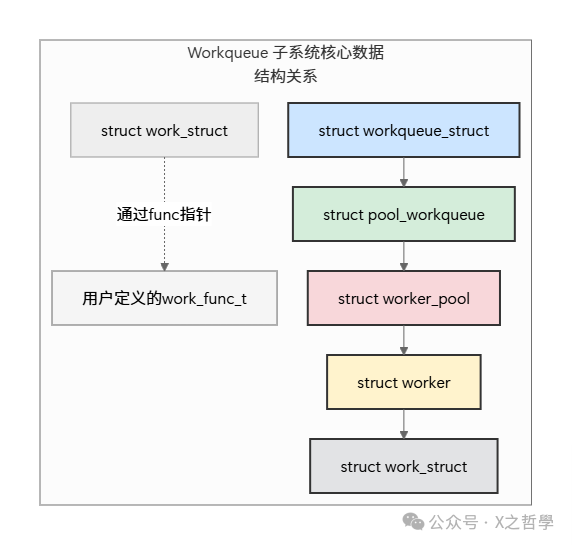
Next, we will break down these structures one by one.
2.1 <span>struct work_struct</span>: Task Order
This is the most basic structure, representing a task that needs to be executed later, i.e., the “order” itself.
// Located in include/linux/workqueue.h

struct work_struct {
    atomic_long_t data; // Stores status flags and a pointer to pool_workqueue (encoded)
    struct list_head entry; // Node used to link work to a list in the linked list
    work_func_t func; // **Core**: Pointer to the actual task function to be executed
};- •
<span>data</span>: A “multi-functional” field. Through atomic operations, it simultaneously stores the state of the work (e.g., whether it is being executed, whether it is queued, etc.) and a pointer to<span>pool_workqueue</span><span>. This is a clever encoding technique to save memory.</span> - •
<span>entry</span>: The standard doubly linked list structure of the Linux kernel. It is used to mount this work onto a certain queue (pending list) waiting to be processed. - •
<span>func</span>: This is the soul of the task. It is a function pointer, defined as<span>typedef void (*work_func_t)(struct work_struct *work);</span>. Your handling function is pointed to by it.
Life Analogy: <span>func</span> is the specific operation instruction written on the order, such as “cook steak, medium rare”. <span>entry</span> is the hook on the order that allows you to hang the order on the task board. <span>data</span> records the current status of the order (e.g., “order received”, “in production”) and which kitchen area this order belongs to.
2.2 <span>struct workqueue_struct</span>: Task Board
This represents a work queue, i.e., the “task board”. In earlier kernels, this structure was very complex, but now it is more of an abstract and configuration carrier.
// Simplified version, located in kernel/workqueue.c

struct workqueue_struct {
    struct list_head pwqs; /* All associated pool_workqueue */
    struct list_head list; /* Links to the global work queue list */
    char name[WQ_NAME_LEN]; /* Name of the work queue, e.g., "events", "my_wq" */
    /* ... Other fields for controlling concurrency, resource management, NUMA affinity ... */
};- •
<span>pwqs</span>: This is crucial! A work queue (<span>workqueue_struct</span><span>) can be associated with multiple </span><code><span>pool_workqueue</span><span> (the connection point between the kitchen and the task board). This is very important for multi-CPU (especially NUMA architecture) systems.</span> - •
<span>name</span>: The name of the work queue, which can be seen in the<span>proc</span><span> file system.</span>
2.3 <span>struct worker_pool</span>: Chef Resource Pool
This is a hidden but crucial core. It is not directly exposed to users but is used by the kernel to manage and schedule worker thread resources. You can think of it as the “chef resource pool” or “the kitchen itself”.
// Simplified version, located in kernel/workqueue_internal.h and kernel/workqueue.c

struct worker_pool {
    spinlock_t lock; /* Lock to protect the pool */
    int cpu; /* The CPU number this pool is bound to, -1 means unbound */
    int node; /* The NUMA node this pool belongs to */
    int id; /* ID of the pool */
    unsigned int flags; /* Flags */

    struct list_head worklist; /* ** Head of the pending work list ** */
    int nr_workers; /* Total number of workers in the pool */

    struct list_head idle_list; /* List of idle workers */
    int nr_idle; /* Number of idle workers */

    /* ... Fields for managing worker creation and destruction ... */
};- •
<span>worklist</span>: This is the real “task board”! All<span>work_struct</span><span> submitted to this worker_pool are linked to this list through their </span><code><span>entry</span><span> member.</span> - •
<span>idle_list</span>: Manages the currently idle “chefs” (workers). - •
<span>nr_workers</span>/<span>nr_idle</span>: Monitors resource usage.
Key Point: The kernel creates two types of worker_pool by default:
- 1. Bound: Creates two (one normal priority, one high priority) for each CPU core
<span>worker_pool</span><span>. Work submitted to these pools is executed only on specific CPUs, which is beneficial for CPU cache locality.</span> - 2. Unbound: Not bound to a specific CPU, work can be executed on any CPU, suitable for tasks that are not sensitive to execution location.
2.4 <span>struct pool_workqueue (pwq)</span>: Connector
This is the <span>workqueue_struct</span><span> and </span><code><span>worker_pool</span><span> bridge. A </span><code><span>workqueue_struct</span><span> connects to different CPUs' </span><code><span>worker_pool</span><span> through multiple </span><code><span>pwq</span><span>.</span>
// Simplified version, located in kernel/workqueue.c

struct pool_workqueue {
    struct worker_pool *pool; /* Pointer to the associated worker_pool */
    struct workqueue_struct *wq; /* Pointer to the belonging workqueue_struct */
    int work_color; /* Synchronization for Flush operations */
    int flush_color; /* Synchronization for Flush operations */
    /* ... Other statistics and flow control fields ... */
};
Life Analogy: A large restaurant brand (<span>workqueue_struct</span><span>) has branches (</span><code><span>pool_workqueue</span><span>) in every district (CPU) of the city. Each branch's kitchen (</span><code><span>worker_pool</span><span>) is independent. The headquarters' orders (</span><code><span>work</span><span>) are distributed to the kitchens of different branches according to strategy. </span><code><span>pwq</span><span> is the manager connecting the headquarters and the kitchens of each branch.</span>
2.5 <span>struct worker</span>: The Chef Himself
This is the real “chef” who does the work, corresponding to a kernel thread.
// Located in kernel/workqueue_internal.h

struct worker {
    union {
        struct list_head entry; /* Used to link to the idle list */
        struct hlist_node hentry; /* Used to link to the busy hash table */
    };
    struct work_struct *current_work; /* The work currently being processed */
    work_func_t current_func; /* The function currently being executed */
    struct pool_workqueue *current_pwq; /* The pwq to which the current work belongs */
    struct task_struct *task; /* **Pointer to the kernel thread** */
    struct worker_pool *pool; /* The belonging worker_pool */
    /* ... */
};- •
<span>task</span>: Pointer to the<span>task_struct</span><span>, which is the "thread" managed by the Linux scheduler.</span> - •
<span>current_work</span>/<span>current_func</span>: Which work and function this worker is currently executing. - •
<span>entry</span>/<span>hentry</span>: Linked to different lists of<span>worker_pool</span><span> based on the worker's state (idle or busy).</span>
Part 3: Complete Workflow Analysis of Workqueue
Now, let’s connect these data structures and see the complete lifecycle of a work from submission to execution. The core process is illustrated in the diagram below:
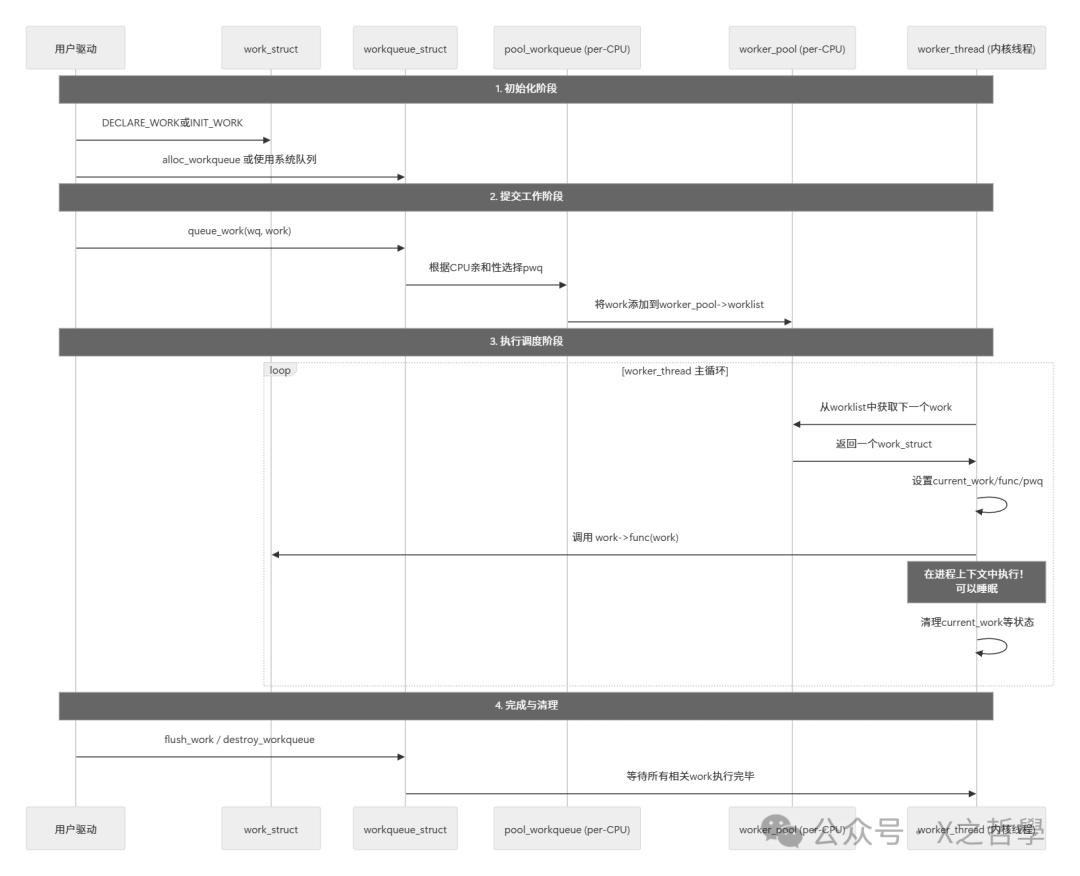
Step-by-Step Explanation:
- 1. Initialization:
- • The user creates a work queue using
<span>alloc_workqueue</span><span> (or uses the kernel's default </span><code><span>system_wq</span><span>, etc.).</span> - • Initializes a
<span>work_struct</span><span> using </span><code><span>DECLARE_WORK</span><span> (static) or </span><code><span>INIT_WORK</span><span> (dynamic), and points its </span><code><span>func</span><span> pointer to your handling function.</span>
- • The driver calls
<span>queue_work(my_wq, my_work)</span> - • This function determines the current CPU and finds the corresponding
<span>pwq</span> - • Then it adds
<span>my_work</span><span> to the end of the </span><code><span>pwq->pool->worklist</span><span> (pending list) through its </span><code><span>entry</span><span> member.</span> - • If the
<span>worker_pool</span><span> has idle </span><code><span>worker</span><span> (in the </span><code><span>idle_list</span><span>), it wakes it up.</span>
- • The
<span>worker</span>kernel thread (in the<span>worker_thread()</span><span> function) runs in an infinite loop.</span> - • It checks the
<span>worklist</span><span> of its belonging </span><code><span>worker_pool</span><span>.</span> - • If the linked list is not empty, it takes the first
<span>work_struct</span><span>.</span> - • Sets its
<span>current_work</span>,<span>current_func</span><span>, and other states.</span> - • Then, it directly calls
<span>current_func(current_work)</span> - • Your handling function is executed in process context! It can do anything, including sleeping.
- • After execution, the worker cleans up the state and marks the
<span>work</span><span> as completed. It then continues to take the next work from the </span><code><span>worklist</span><span>. If empty, it puts itself in the </span><code><span>idle_list</span><span> and goes to sleep.</span>
- •
<span>flush_work()</span><span> is used to wait for a specific work to complete execution.</span> - •
<span>destroy_workqueue()</span><span> ensures that all queued work is completed before destroying related data structures.</span>
Part 4: Classification and Usage Patterns of Workqueue
4.1 System Shared Work Queue (Shared Queue)
The kernel has predefined several global work queues (such as <span>system_wq</span><span>, </span><code><span>system_highpri_wq</span><span>). You do not need to create them yourself; just use them directly.</span>
Advantages: Simple, resource-saving.Disadvantages: Shared by everyone; if your work takes too long or sleeps too long, it may block other works using the same system queue.Usage:
// Schedule work
schedule_work(&my_work); // Equivalent to queue_work(system_wq, &my_work)
schedule_delayed_work(&my_delayed_work, HZ); // Execute after 1 second

// Wait for work to complete
flush_scheduled_work();
4.2 Dedicated Work Queue (Dedicated Queue)
This is a work queue you create yourself.
Advantages: Isolation. Your work will not affect others, and others’ work will not affect you. You can customize attributes (such as concurrency level, CPU affinity, priority, etc.).Disadvantages: Consumes more system resources (each queue has its own worker thread).Usage:
// Create queue
struct workqueue_struct *my_wq = alloc_workqueue("my_queue", WQ_MEM_RECLAIM | WQ_UNBOUND, 1);

// Schedule work
queue_work(my_wq, &my_work);

// Cleanup
destroy_workqueue(my_wq);
<span>alloc_workqueue</span> Flag Examples:
- •
<span>WQ_MEM_RECLAIM</span>: Ensures that at least one worker thread is available to execute memory reclamation-related work when memory is tight. - •
<span>WQ_UNBOUND</span>: Creates an unbound work queue; work is not bound to a specific CPU. - •
<span>WQ_HIGHPRI</span>: High-priority work queue; its workers will run at high priority. - •
<span>WQ_CPU_INTENSIVE</span>: CPU-intensive work queue; the execution time of this type of work is not counted in the worker pool’s load statistics, avoiding affecting concurrency decisions.
4.3 Delayed Work
This is used to specify work that will be executed after a certain period.
struct delayed_work {
    struct work_struct work;
    struct timer_list timer; // Kernel timer
};

// Initialization
INIT_DELAYED_WORK(&my_delayed_work, my_func);

// Schedule
queue_delayed_work(my_wq, &my_delayed_work, HZ * 5); // Execute after 5 seconds
Part 5: Practical Example – Creating a Simple Kernel Module
Below is a complete kernel module example that demonstrates how to create a dedicated work queue, submit immediate work, and delayed work.
#include <linux/module.h>
#include <linux/kernel.h>
#include <linux/workqueue.h>
#include <linux/slab.h>

/* Custom data structure containing work_struct */
struct my_data {
    struct work_struct my_work;
    struct delayed_work my_delayed_work;
    int value;
};

static struct workqueue_struct *my_wq;

/* Immediate work handler function */
static void my_work_handler(struct work_struct *work) {
    struct my_data *data = container_of(work, struct my_data, my_work);
    printk(KERN_INFO "My work: value = %d, CPU: %d\n", data->value, smp_processor_id());
    kfree(data); // Free memory after execution
}

/* Delayed work handler function */
static void my_delayed_work_handler(struct work_struct *work) {
    struct delayed_work *dwork = to_delayed_work(work);
    struct my_data *data = container_of(dwork, struct my_data, my_delayed_work);
    printk(KERN_INFO "My delayed work: value = %d, CPU: %d\n", data->value, smp_processor_id());
    kfree(data);
}

static int __init my_module_init(void) {
    struct my_data *data1, *data2;

    printk(KERN_INFO "Workqueue module init\n");

    /* 1. Create dedicated work queue */
    my_wq = alloc_workqueue("my_private_wq", WQ_MEM_RECLAIM, 1);
    if (!my_wq) {
        printk(KERN_ERR "Failed to create workqueue\n");
        return -ENOMEM;
    }

    /* 2. Prepare and submit immediate work */
    data1 = kmalloc(sizeof(*data1), GFP_KERNEL);
    if (data1) {
        INIT_WORK(&data1->my_work, my_work_handler);
        data1->value = 42;
        queue_work(my_wq, &data1->my_work);
    }

    /* 3. Prepare and submit delayed work (executed after 2 seconds) */
    data2 = kmalloc(sizeof(*data2), GFP_KERNEL);
    if (data2) {
        INIT_DELAYED_WORK(&data2->my_delayed_work, my_delayed_work_handler);
        data2->value = 100;
        queue_delayed_work(my_wq, &data2->my_delayed_work, HZ * 2); // HZ is the number of jiffies in 1 second
    }

    return 0;
}

static void __exit my_module_exit(void) {
    printk(KERN_INFO "Workqueue module exit\n");

    /* Flush and destroy work queue
     * This will wait for all queued work (including delayed work) to complete execution
     */
    flush_workqueue(my_wq);
    destroy_workqueue(my_wq);
}

module_init(my_module_init);
module_exit(my_module_exit);
MODULE_LICENSE("GPL");
MODULE_AUTHOR("Kernel Hacker");
Code Analysis:
- 1.
<span>container_of</span>Macro: This is a classic technique in the Linux kernel. It allows you to retrieve the pointer to the outer structure from the pointer to a member of the structure. This allows you to embed more custom data in<span>work_struct</span><span>.</span> - 2. Memory Management:
<span>data</span>is dynamically allocated during module initialization and released after the work is executed. This is a common pattern. - 3.
<span>flush_workqueue</span>: It is crucial to call this during module exit to ensure that all queued work is completed before destroying the work queue, avoiding use-after-free errors.
Part 6: Debugging and Monitoring Tools
6.1 <span>/sys/kernel/debug/workqueues</span> (DebugFS)
This is the most powerful workqueue debugging tool. You need to mount debugfs first:
mount -t debugfs none /sys/kernel/debug/Then view:
cat /sys/kernel/debug/workqueuesExample output:
PWQ            CPU-intensive  UNBOUND  WQ_MEM_RECLAIM
pool ID        active  total  max  in-flight
events         0       0      4    0
events_highpri 0       0      2    0
my_private_wq 0 1 1 0- •
<span>active</span>: The number of workers currently executing. - •
<span>total</span>: The total number of workers in this worker_pool. - •
<span>max</span>: The maximum number of workers allowed to be created in this worker_pool. - •
<span>in-flight</span>: The number of works submitted but not yet completed.
6.2 <span>ps</span> Command
You can see the worker kernel threads:
ps aux | grep "[kworker"Output like:
root        50  0.0  0.0      0     0 ?        I<   00:00:00 [kworker/0:0H]
root        51  0.0  0.0      0     0 ?        I    00:00:00 [kworker/0:1]
root        ... ... ... ... ... ... ... ... ... [kworker/u8:1-my_private_wq]
The thread naming convention is <span>kworker/[cpu]:[flags][/name]</span><span>. </span><code><span>H</span> indicates high priority, <span>u</span> indicates unbound, and the following number is the ID, sometimes showing the name of the work queue it belongs to.
6.3 <span>ftrace</span>
For performance analysis or deep debugging, <span>ftrace</span> can trace workqueue-related events.
echo 1 > /sys/kernel/debug/tracing/events/workqueue/enable
cat /sys/kernel/debug/tracing/trace_pipe
This will print events such as queuing, execution start, and execution end of work in real-time.
Part 7: Summary and Core Concepts Review
After the detailed analysis above, we have a comprehensive and in-depth understanding of Linux workqueue. Let’s conclude with a final summary and comparison table.
7.1 Core Concepts Reemphasized
- 1. Asynchronous and Delayed: The essence of Workqueue is “register now, execute later”, separating non-urgent tasks from critical paths (like interrupt handling).
- 2. Process Context: This is the fundamental difference from softirq/tasklet, granting it the right to sleep, allowing it to handle more complex kernel tasks that may require waiting for resources.
- 3. Producer-Consumer Model: Drivers, etc., are producers, producing
<span>work</span>; worker threads are consumers, consuming and executing<span>work</span>. The queue in between is the key to decoupling. - 4. Resource Pool Management: Dynamically manages worker threads (chefs) through
<span>worker_pool</span><span>, creating on demand, destroying when idle, and efficiently utilizing system resources.</span>
7.2 Overview Table of Key Data Structure Relationships
| Data Structure | Life Analogy | Core Responsibilities | Key Members |
|---|---|---|---|
<span>work_struct</span> |
Order | Encapsulates a delayed task | <span>func</span> (task function), <span>entry</span> (list node) |
<span>workqueue_struct</span> |
Restaurant Brand/Headquarters | User-visible queue abstraction, configuration attributes | <span>name</span>, <span>pwqs</span> (connection list) |
<span>worker_pool</span> |
Kitchen/Chef Resource Pool | The real core execution engine, managing threads and pending execution queues | <span>worklist</span> (to-do task linked list), <span>idle_list</span> (idle chef list) |
<span>pool_workqueue(pwq)</span> |
Branch Manager | Bridge connecting <span>workqueue_struct</span><span> and </span><code><span>worker_pool</span>. |
<span>pool</span>, <span>wq</span> |
<span>worker</span> |
Chef | Entity executing tasks kernel thread. | <span>task</span> (thread pointer), <span>current_work</span> (current order being worked on) |
7.3 Usage Recommendations Comparison Table
| Scenario | Recommended Use | Reason |
|---|---|---|
| Simple, quick, non-sleeping tasks | Tasklet | Low overhead, executes in interrupt context, low latency |
| Tasks requiring sleep, long execution | Workqueue | Process context, can sleep |
| High frequency, extremely performance-sensitive network processing | Softirq | Reentrant, parallel processing, highest performance |
| Single, independent tasks that do not interfere with others | Dedicated Work Queue | Good isolation, customizable parameters |
| Scattered, infrequent, simple tasks | System Shared Work Queue | Simple to use, resource-saving |
Final Conclusion: Linux workqueue is a well-designed, powerful asynchronous task processing framework. It provides a clear hierarchy and abstraction (work, wq, pwq, pool, worker) while ensuring strong functionality (such as sleeping, concurrency control, NUMA affinity) and offering users a simple API. Understanding its internal mechanisms not only helps you use it correctly but also allows you to appreciate the elegance and wisdom of Linux kernel design.