Click the blue text to follow us


The NCCL (NVIDIA Collective Communication Library, pronounced “Nickel”) library is primarily used for communication in GPU clusters. This article provides some basic C++ API library calls for learning reference. The NCCL documentation has a rich API introduction, but the explanations are interspersed with various operational details, which can be a bit convoluted for beginners. For example, when introducing the communicator, it also discusses the split operation of comm.
The official examples (Examples – NCCL 2.22.3 documentation) may seem somewhat incomplete from a beginner’s perspective. Another library (GitHub – NVIDIA/nccl-tests: NCCL Tests) is not simple enough and requires reading the entire text. To help provide a preliminary understanding of the NCCL API, this article first introduces the basic steps for using the API, then explains several common scenario examples, and provides compilation and execution methods.
Necessary terminology explanations:
-
Node: A server device/machine;
-
Rank: A label for GPU devices/threads used for device management during communication.
-
Comm: An identifier for NCCL communication, considered a handle.
1. Basic Steps
Part.1
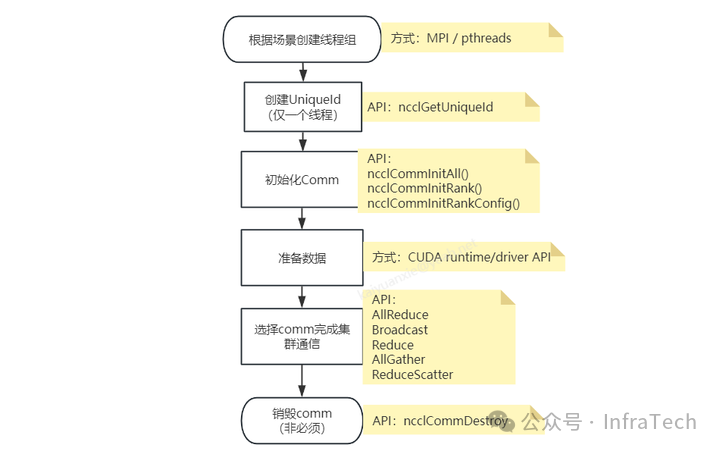
The process of using the NCCL API is illustrated in the following diagram, primarily initializing the communicator based on the scenario, then using it for cluster communication, and finally destroying and releasing it.
Step 1:
Create a thread group based on the scenario. Since GPUs are independent devices, CPU threads are needed to issue CUDA commands to control their operation. Specifically, different GPUs can be controlled by the same or different CPU threads. Before computation begins, a CPU thread group must be constructed, and the control relationship between threads and GPUs must be established. Thread creation/management can be done using openMPI or others (like pthread).
Step 2:
Create a unique ID. This unique ID is created by a single CPU thread and needs to be passed to other threads. It serves as an identifier for initializing the communication group.
Step 3:
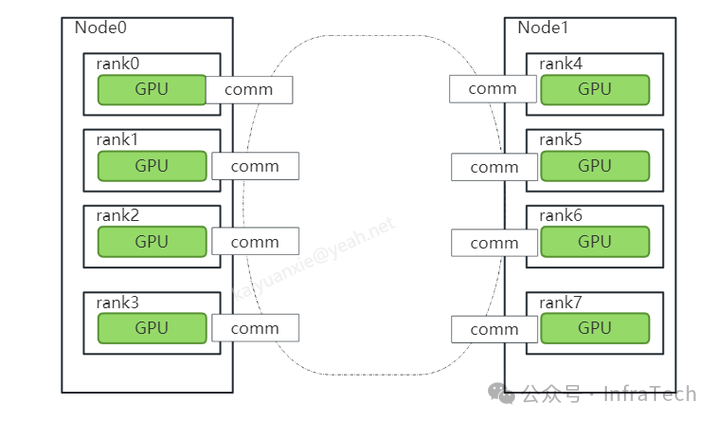
Initialize the communicator (abbreviated as comm). This primarily establishes a communication group, which can include all or part of the participating GPUs. Each participating GPU in the communication has a unique rank number, and each rank has its own comm instance. The following diagram illustrates the establishment of a communication group with a rank count of 8. Multiple communication groups can exist, so a GPU device can be controlled by different comms.
Step 4:
Prepare communication data. Here, the CUDA API is called to prepare the data.
Step 5:
Use the created comm for cluster communication.
Step 6:
Destroy the comm. Since the comm occupies a certain amount of resources, it can be destroyed.
2. Use Case Scenarios
Part.2
The official documentation examples (docs/examples.html) provide several basic examples, which may not be understood at first glance. Here, we explain a few with text and diagrams. A common scenario is Example 2.
Example 1
Single (main) thread managing all devices (Single Process, Single Thread, Multiple Devices)
After the main process starts, it manages all devices, meaning the main program does not create child processes and manages all GPU communications itself. As shown in the figure, there are 4 GPUs, and the main process creates a comms array, assigning a comm for communication to each GPU.
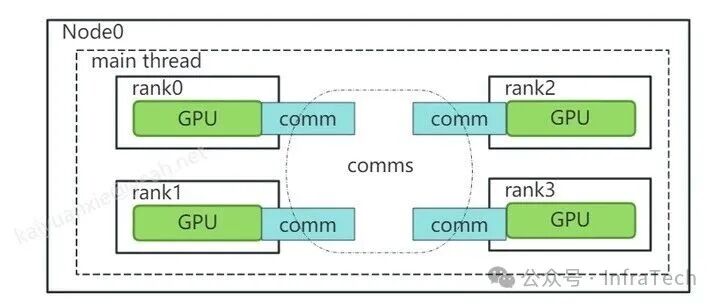
Code implementation reference (nccl/multi_devices_per_thread.cu), where it is important to note that the initialization function uses ncclCommInitAll, and the group function is called.
//initializing NCCL 用了一个comm组 NCCLCHECK(ncclCommInitAll(comms, nDev, devs)); //calling NCCL communication API. Group API is required when using //multiple devices per thread NCCLCHECK(ncclGroupStart()); // Group 是保证ncclAllReduce指令在CPU端非阻塞运行。 for (int i = 0; i < nDev; ++i) NCCLCHECK(ncclAllReduce((const void*)sendbuff[i], (void*)recvbuff[i], size, ncclFloat, ncclSum, comms[i], s[i])); NCCLCHECK(ncclGroupEnd()); // 此处是要让集合通信完成执行等待。示例二Example 2
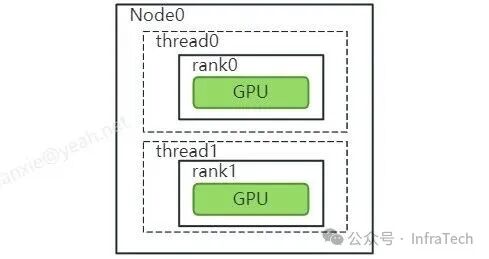
Single thread managing a single device (One Device per Process or Thread)
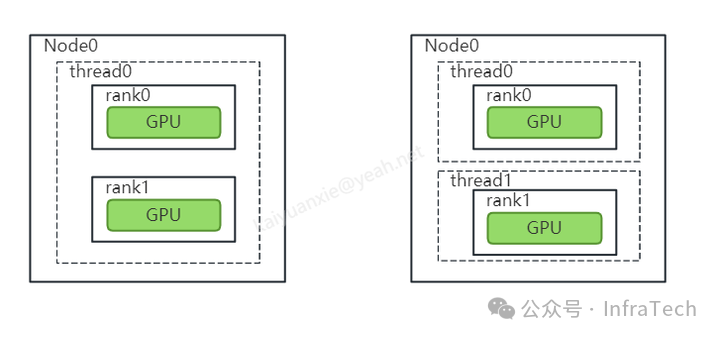
Managing a single device with a single thread is easier to understand and is the most commonly used scenario. This means creating multiple threads, with each thread managing one GPU device. As shown in the figure, two devices are managed by two different threads.
Example 3
Single thread managing multiple devices (Multiple Devices per Thread)
Managing multiple devices with a single thread differs from Example 1, where the main process/thread manages. Here, multiple threads are created to combine multiple devices. It is important to distinguish between NCCL rank and MPI rank. The MPI rank refers to the number of threads, while the NCCL rank refers to the identifier of the GPU in the comm. In some applications (like PyTorch), global rank and local rank are also used to identify the number of threads within and between machines. An example can be found at: https://zhuanlan.zhihu.com/p/358974461
As shown below, this is a dual-thread example, with each thread managing two GPUs:
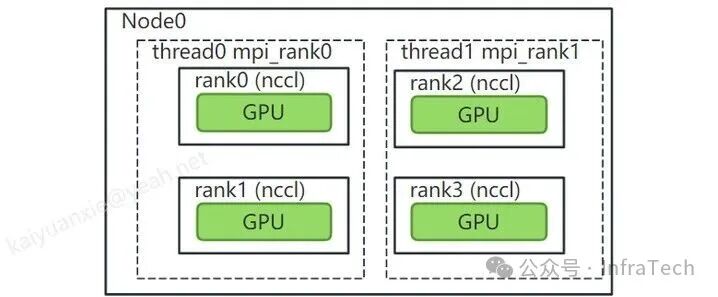
The main function of the example code is shown below. Note that in this example, each thread occupies two GPUs, so when starting with mpirun, the relationshipn=GPU count/2 must be ensured. In the code, localRank refers to the MPI thread label on the local node, and nRanks refers to the total number of MPI global threads.
Assuming there are 8 GPUs, an example of the startup method is: mpirun -n 4 –allow-run-as-root ./nccl_demo
// Main function: int main(int argc, char* argv[]){ int size = 32*1024*1024; int myRank, nRanks, localRank = 0; //initializing MPI MPICHECK(MPI_Init(&argc, &argv)); MPICHECK(MPI_Comm_rank(MPI_COMM_WORLD, &myRank)); MPICHECK(MPI_Comm_size(MPI_COMM_WORLD, &nRanks)); //calculating localRank which is used in selecting a GPU uint64_t hostHashs[nRanks]; char hostname[1024]; getHostName(hostname, 1024); hostHashs[myRank] = getHostHash(hostname); MPICHECK(MPI_Allgather(MPI_IN_PLACE, 0, MPI_DATATYPE_NULL, hostHashs, sizeof(uint64_t), MPI_BYTE, MPI_COMM_WORLD)); for (int p=0; p<nRanks; p++) { if (p == myRank) break; if (hostHashs[p] == hostHashs[myRank]) localRank++; } //each process is using two GPUs int nDev = 2; float** sendbuff = (float**)malloc(nDev * sizeof(float*)); float** recvbuff = (float**)malloc(nDev * sizeof(float*)); cudaStream_t* s = (cudaStream_t*)malloc(sizeof(cudaStream_t)*nDev); //picking GPUs based on localRank for (int i = 0; i < nDev; ++i) { CUDACHECK(cudaSetDevice(localRank*nDev + i)); CUDACHECK(cudaMalloc(sendbuff + i, size * sizeof(float))); CUDACHECK(cudaMalloc(recvbuff + i, size * sizeof(float))); CUDACHECK(cudaMemset(sendbuff[i], 1, size * sizeof(float))); CUDACHECK(cudaMemset(recvbuff[i], 0, size * sizeof(float))); CUDACHECK(cudaStreamCreate(s+i)); } ncclUniqueId id; ncclComm_t comms[nDev]; //generating NCCL unique ID at one process and broadcasting it to all if (myRank == 0) ncclGetUniqueId(&id); MPICHECK(MPI_Bcast((void *)&id, sizeof(id), MPI_BYTE, 0, MPI_COMM_WORLD)); //initializing NCCL, group API is required around ncclCommInitRank as it is //called across multiple GPUs in each thread/process NCCLCHECK(ncclGroupStart()); for (int i=0; i<nDev; i++) { CUDACHECK(cudaSetDevice(localRank*nDev + i)); NCCLCHECK(ncclCommInitRank(comms+i, nRanks*nDev, id, myRank*nDev + i)); // world size = nRanks*nDev } NCCLCHECK(ncclGroupEnd()); //calling NCCL communication API. Group API is required when using //multiple devices per thread/process NCCLCHECK(ncclGroupStart()); for (int i=0; i<nDev; i++) NCCLCHECK(ncclAllReduce((const void*)sendbuff[i], (void*)recvbuff[i], size, ncclFloat, ncclSum, comms[i], s[i])); NCCLCHECK(ncclGroupEnd()); //synchronizing on CUDA stream to complete NCCL communication for (int i=0; i<nDev; i++) CUDACHECK(cudaStreamSynchronize(s[i])); //freeing device memory for (int i=0; i<nDev; i++) { CUDACHECK(cudaFree(sendbuff[i])); CUDACHECK(cudaFree(recvbuff[i])); } //finalizing NCCL for (int i=0; i<nDev; i++) { ncclCommDestroy(comms[i]); } //finalizing MPI MPICHECK(MPI_Finalize()); printf("[MPI Rank %d] Success \n", myRank); return 0;}Example 4
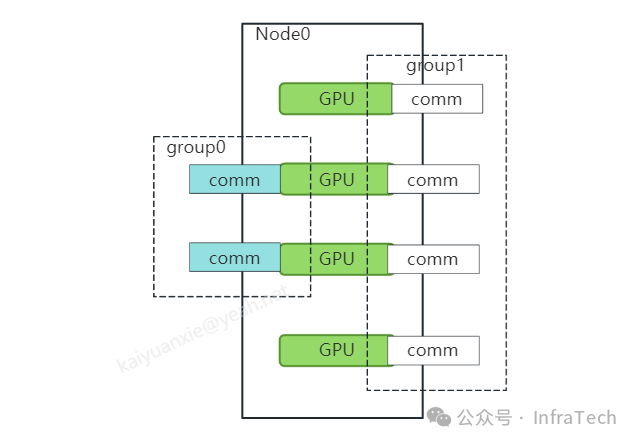
Devices participating in different communication groups (Multiple communicators per device)
This example describes how a device is called by different communication groups. In some scenarios, it is necessary for some/all GPU devices within a communication group to participate in cluster communication. As shown below, this is a node machine with 4 cards, creating two communication groups. Communication group 0 contains two devices, while communication group 1 contains four devices. Of course, the rank index is re-labeled within each communication group. Communication group 0 (rank0, rank1), communication group 1 (rank0, rank1, rank2, rank3).
3. Compilation and Execution
Part.3
Example 1: Single thread operating multiple devices, code:nccl/multi_devices_per_thread.cu
Example 2: Single thread managing a single device, code: nccl/one_device_per_thread.cu
Example 3: Using MPI to create threads managing devices, code:nccl/nccl_with_mpi.cu
The official examples do not provide compilation examples; compilation requires installing some dependencies:
CUDA NVIDIA NCCL (optimized for NVLink) Open-MPI (optional)Here, I used NVIDIA’s PyTorch image (PyTorch is not mandatory)ngc-pytorch. It contains the required dependencies; pull the image:
docker pull nvcr.io/nvidia/pytorch:24.07-py3Run the container:
sudo docker run  --net=host --gpus=all -it -e UID=root --ipc host --shm-size="32g"
-v /home/xky/:/home/xky
-u 0
--name=nccl2 nvcr.io/nvidia/pytorch:24.07-py3 bash
Example compilation command:
nvcc -lnccl -ccbin g++ -std=c++11 -O3 -g multi_devices_per_thread.cu -o multi_devices_per_threadUsing a makefile can compile multiple files simultaneously, with different GPU architecture flags. Here is an example:nccl/Makefile
You can complete the compilation with the following command:
make # To support MPI, use the mpi parameter for separate compilation. make mpiExecution:
./multi_devices_per_thread ./one_devices_per_threadIf using MPI execution command:
mpirun -n 6 --allow-run-as-root ./nccl_with_mpiReferences:
This article’s code:
https://github.com/CalvinXKY/BasicCUDA/tree/master/nccl
NCCL examples: https://docs.nvidia.com/deeplearning/nccl/user-guide/docs/examples.html
NCCL test: https://github.com/NVIDIA/nccl-tests
Scan the code to follow us and learn more about CPU fundamentals