Note: Swipe left on the report content to view the event timeline, historical background, technical details, and quick Q&A information.
Debian Releases Version 13.2 ‘Trixie’, Fixing 123 Bugs
Debian has released the 13.2 point update of the stable “Trixie” series as a maintenance update for Debian 13, providing 123 bug fixes and 55 security updates.
This update is available in the form of updated packages for existing installations and refreshed installation images for new installations. The project states that this release focuses on stability and security improvements for the current stable version.
Users running Debian 13 are advised to apply updates to benefit from the fixes and security patches included in this point release.
Historical Background
Debian releases point updates for stable series to bundle bug fixes, security patches, and refreshed installation media; according to reports on this release, 13.2 is the second maintenance update for the ‘Trixie’ (Debian 13) series.
Did you know?
The release codename for Debian comes from characters in “Toy Story”; ‘Trixie’ is the codename for Debian 13.
Technical Details
Point Release:Planned updates for stable releases that integrate bug fixes and security updates into refreshed packages and installation images, making it easier for systems to upgrade or perform fresh installations.
Security Updates:Package changes that patch vulnerabilities; Debian 13.2 includes 55 such updates aimed at addressing known security vulnerabilities in the stable release series.
Quick Q&A
What specific packages were changed in the 13.2 security updates?The overview article does not list detailed information for each package; the Debian 13.2 changelog and Debian security tracker provide a complete and detailed list of affected packages and CVE information.
KDE Plasma 6.6 Adds OCR Functionality and UI Improvements to Spectacle
KDE announced that Plasma 6.6 will add optical character recognition (OCR) support directly in the desktop screenshot tool Spectacle, along with visual and interactive improvements to permission dialogs and system widgets.
These changes were highlighted in the weekly KDE blog summary “This Week in Plasma” and have been shared on community websites and forums.
Developers view these updates as part of the ongoing Plasma 6.x development aimed at streamlining users’ daily workflows and enhancing the desktop experience.
Historical Background
Spectacle has become the primary screenshot tool for multiple versions of KDE, commonly used for quick captures and documentation tasks. KDE’s “This Week in Plasma” blog series is a regular channel for developers to showcase incremental changes to the desktop and applications; this week’s entry focuses on the Spectacle OCR and UI enhancement projects.
Did you know?
Spectacle is the default screenshot tool bundled with KDE Plasma, widely used for capturing desktop images and annotated screenshots.
Technical Details
Optical Character Recognition (OCR):OCR converts image pixels into selectable text; integrating it into Spectacle allows users to run the image→OCR pipeline directly after capture without exporting to a separate application or service.
Permission Dialog Updates:Permission dialogs control access to hardware and data; visual and interactive improvements aim to reduce confusion and speed up common approval processes in Plasma components.
Quick Q&A
Which OCR engine will Spectacle use for text recognition?The article reporting this feature notes that OCR will be added to Spectacle but does not specify which OCR backend or engine will be used.
Will Spectacle’s OCR support multiple languages out of the box?The report highlights the OCR feature but does not specify whether multilingual recognition is included or which languages will be supported at launch.
Canonical Extends Ubuntu LTS Support to 15 Years
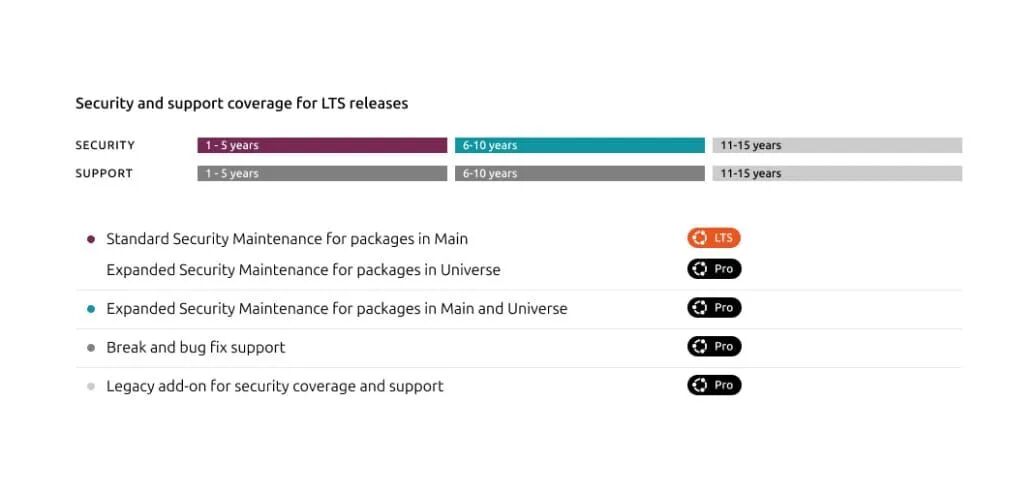
Canonical has announced an extension of the Ubuntu Long Term Support (LTS) lifecycle to 15 years by expanding the Legacy add-on components of Ubuntu Pro to cover five years of standard support, five years of Extended Security Maintenance (ESM), and five years of Legacy support.
This change is retroactive (starting from Ubuntu 14.04 LTS) and will maintain 14.04 until April 2029, while the Legacy add-on components are offered as a paid extension of Ubuntu Pro, costing 50% more than the standard subscription.
Canonical states that this move is aimed at enterprises that require more time to manage upgrades and security maintenance for long-term systems.
Historical Background
Ubuntu provides five years of standard LTS support; Canonical launched Ubuntu Pro in 2022, extending it by five years through Extended Security Maintenance (ESM), creating a 10-year option for customers. In 2024, Canonical introduced Legacy add-on components as an additional paid extension (initially for two years) to support older deployments; the 2025 extension increases the Legacy period to five years, resulting in a total lifecycle of 15 years when combined with standard support and ESM.
Did you know?
Ubuntu 14.04 LTS was first released in April 2014, and with this change, it will now be maintained by Canonical until April 2029.
Technical Details
Ubuntu Pro:A Canonical subscription service that extends the five-year standard LTS window through security maintenance services, launched in 2022, aimed at serving enterprise workloads.
Extended Security Maintenance (ESM):A paid security patch program that provides an additional five years of fixes after the standard LTS period, effectively creating a 10-year support lifecycle when combined with standard support.
Legacy Add-on Components:A paid extension that activates after an LTS version completes its initial 10-year coverage; Canonical has extended it to add five years of maintenance, resulting in a total lifecycle of 15 years.
Quick Q&A
Which Ubuntu LTS versions, besides 14.04, qualify for Legacy coverage?Canonical states that past and future LTS versions—including 16.04, 18.04, 20.04, and later—will be eligible for Legacy phase coverage once they reach the later ESM stage.
When does the Legacy add-on component take effect for LTS versions?The Legacy add-on component is available after an LTS version completes its initial 10 years of coverage (five years of standard support plus five years of ESM).
KDE Community Releases Frameworks 6.20, Optimizing User Interface
KDE Frameworks 6.20 has been released as the November update for the project, adding new push/pop animations to system settings and a series of internal improvements to support KDE Plasma 6.5.2 desktop and KDE Gear 25.08.3 applications.
This version bundles work from numerous libraries and modules, including Baloo, KIO, Kirigami, KArchive, and Breeze Icons, aimed at improving the performance, ergonomics for developers, and visual effects of KDE applications.
This update continues KDE’s regular Frameworks release cadence, allowing application authors and distributions to receive incremental bug fixes and small user experience enhancements without waiting for larger desktop versions.
Historical Background
KDE Frameworks is a set of modular libraries used by KDE applications; they receive updates regularly (usually monthly) so that desktop components and applications can adopt fixes independently of major Plasma versions. The release of Frameworks updates is intended to keep application developers and distributions aligned with the development cycles of Plasma and KDE Gear.
Did you know?
The release of KDE Frameworks versions is intended to allow individual libraries to be updated independently of the full desktop, providing faster fixes for applications and distributions.
Technical Details
Baloo (File Indexer):Baloo handles desktop file indexing and searching; in 6.20, it receives efficiency and stability adjustments aimed at reducing runtime overhead during indexing tasks.
KIO (Network File Access):KIO provides network-transparent file access for KDE applications; Frameworks 6.20 includes fixes and improvements to enhance file I/O reliability across protocols.
Kirigami (User Interface Toolkit):Kirigami is KDE’s adaptive user interface framework for converging applications; this version adds developer-facing fixes that simplify building responsive, cross-device interfaces.
System Settings Animation:The system settings page adds new push/pop animations to create smoother visual transitions as users navigate the settings screens.
Quick Q&A
Where can I read the full changelog for KDE Frameworks 6.20?Links to the release report and detailed changelog are provided in the KDE community article and Frameworks release notes; starting from the announcement on linuxiac.com and following its links to upstream notes.
Do I need to update Plasma or KDE Gear to use Frameworks 6.20?Frameworks updates can be adopted independently, but distributions typically coordinate package updates so that users of Plasma 6.5.2 and KDE Gear 25.08.3 receive compatible library versions; please refer to the packaging notes in the announcement report.
Valve Releases Proton 10, Supporting “Distant Horizon” and “Rift Breaker”
Valve has released Proton 10, the latest stable version of its open-source Steam Play compatibility tool, built on Wine and other components for running Windows games on Linux.
This version adds official support for games like “Distant Horizon” and “Rift Breaker,” along with extensive compatibility fixes and new playable titles aimed at improving playability on desktop Linux and Steam Deck.
Shortly after the major release, a micro-update—Proton 10.0-3—was released to address regressions and crashes specifically affecting the Steam Deck experience.
Historical Background
Proton is Valve’s open-source compatibility layer that integrates Wine and other components to translate Windows API calls for use on Linux, allowing many Windows-exclusive games to run under Steam Play. In recent years, Valve has actively maintained Proton, frequently updating it to expand the playable library and support handheld hardware like the Steam Deck.
Did you know?
Proton releases can include major compatibility updates and quick micro-releases (like 10.0-3), which focus solely on fixing regressions rather than adding new features.
Technical Details
Wine Base:Proton is built on Wine and bundles additional compatibility components to translate Windows API calls so that Windows games can run on Linux systems.
Micro-release Maintenance:Valve uses incremental point releases (like Proton 10.0-3) to quickly release regression fixes and address platform-specific crashes, especially on Steam Deck hardware.
Quick Q&A
How do I switch Proton versions for individual games in Steam?Open the game properties in the Steam client, enable “Force the use of a specific Steam Play compatibility tool,” and select the Proton version from the dropdown menu; then restart the game (the general Steam program).
Does Proton 10 improve performance or primarily enhance compatibility?This version emphasizes compatibility and fixes to expand the playable catalog and address crash issues, although some compatibility patches may bring performance improvements depending on the game and driver stack.
Wine Project Releases Version 10.19, Supporting Reparse Points
The Wine project released development version 10.19 on November 15, 2025, which, in addition to other developer-focused changes and bug fixes, adds support for reparse points; this version is part of the ongoing development work for Wine 11.
This update also introduces JScript typed arrays and updates WinRT exception handling, improving the scripting and runtime compatibility of certain Windows applications on Unix-like systems.
Media reports emphasize the importance of this version for Proton (Valve’s compatibility layer) and Linux gaming, noting that these incremental improvements help narrow the compatibility gap for Windows games on Linux.
Community discussions appeared on Reddit announcing this version and sharing impressions.
Historical Background
Wine (Wine Is Not an Emulator) has long enabled Windows applications to run on Unix-like systems by re-implementing the Windows API; recently, Valve’s Proton, based on Wine technology, has sparked additional interest and testing in the gaming community, influencing the incremental development of Wine 11.
Did you know?
Wine stands for “Wine Is Not an Emulator,” reflecting its method of running Windows applications by re-implementing the Windows API rather than emulating the entire Windows kernel.
Technical Details
Reparse Points:Reparse points are filesystem markers (used for junction points on NTFS and certain symbolic link behaviors); Wine 10.19 adds support for these, making the behavior of applications that query or rely on these markers more similar to that on Windows, thus reducing related errors.
JScript Typed Arrays:Typed arrays provide a binary array view for the JavaScript engine; adding JScript typed arrays helps scripts and installers expecting these semantics to run correctly under Wine’s script implementation.
WinRT Exception Handling:Wine updated WinRT exception behavior to better match Windows Runtime, preventing mismatched exception flows and reducing crashes in WinRT-based applications.
Quick Q&A
When is Wine 11 expected to be released?Sources indicate that development is progressing towards Wine 11, but no release date or timeline has been provided.
What types of Windows applications will benefit most from reparse point support?Applications and installers that rely on NTFS junction points, symbolic links, or reparse behavior are the primary beneficiaries, as reparse points affect how the filesystem reports linked paths and metadata.
How can community testers report regressions introduced by 10.19?Testers should follow the standard error reporting process mentioned in the release notes and discuss findings in community forums and in Reddit posts linked from the announcement article.
Valve Launches Steam Machines, Steam Frame, SteamOS Extensions
Valve announced in November the launch of three new gaming products—Steam Machines, a redesigned Steam controller, and the Steam Frame virtual reality headset—all centered around its Linux-based SteamOS.
This announcement positions hardware promotion as a strategic move towards console-like devices.
Reports and commentary suggest that this move aims to expand SteamOS hardware support and challenge the dominant platforms of PC and console gaming, with some media describing the launch of Steam Machines as a direct competitive push against Microsoft and the Xbox ecosystem.
Community discussions emphasize that successful hardware is expected to encourage developers and publishers to pay more attention to Linux-compatible versions, and that SteamOS hardware can serve as general-purpose Linux PCs.
Event Timeline
❶ November 12, 2025 Valve released the product announcement for Steam Machines and Steam Frame VR
❷ November 14, 2025 Commentary views the launch of Steam Machines as a competitive challenge to Microsoft and the Xbox ecosystem
Historical Background
Valve previously released the Steam Deck handheld and has already launched Linux-based gaming hardware, with community members viewing this as the foundation for broader SteamOS device work.
Technical Details
SteamOS Base:SteamOS used on the new hardware is based on Arch Linux, forming the operating system layer for the announced devices.
Installation Flexibility:Valve and the community report that the devices come pre-installed with SteamOS, but users “are free to install any operating system,” which may facilitate the installation of mainstream Linux distributions or other systems.
ARM Support and Compatibility Pipeline:Community posts describe work on an ARM variant of SteamOS and a workflow for chaining Windows to ARM compatibility via tools like Wine, potentially enabling Android and some Windows games to run on ARM Steam devices.
Quick Q&A
When will Valve’s new Steam hardware ship, and what are the prices?The provided article announced the products but did not give shipping dates or pricing details.
Can users replace SteamOS with other Linux distributions on Steam Machines?Yes—reports indicate that the devices come pre-installed with SteamOS, but users “are free to install any operating system,” suggesting that other Linux distributions can be installed.
Mozilla Thunderbird 145 Adds DoH and Exchange Support
Mozilla released Thunderbird 145 on November 13, 2025, updating the open-source email client with support for DNS over HTTPS (DoH) and native Microsoft Exchange Web Services (EWS), while discontinuing the distribution of 32-bit Linux x86 binaries.
This version was released simultaneously with Firefox 145 and includes various bug fixes and stability improvements for email, calendar, chat, and account management.
The new DoH option provides Thunderbird with a method for encrypted DNS queries, while native EWS support offers a built-in path to connect to Exchange servers without relying on separate connectors.
Historical Background
Thunderbird has long been offered as an independent open-source client related to the Mozilla Firefox series, providing email, news, chat, and calendar functionality; versions sometimes align with Firefox version control and shared platform libraries.
Did you know?
DoH (DNS over HTTPS) has gained widespread discussion since browsers began offering it as a privacy option, encrypting DNS queries that were traditionally sent in plain text.
Technical Details
DNS over HTTPS (DoH):DoH sends DNS queries within HTTPS requests, so the DNS queries between the client and DoH resolver are encrypted, improving privacy compared to traditional UDP/TCP DNS.
Exchange Web Services (EWS):EWS is the server protocol used by Microsoft for email, calendar, and contacts; native EWS support allows Thunderbird to connect directly to Exchange servers using this protocol without relying on third-party plugins.
32-bit vs. 64-bit Binaries:Discontinuing 32-bit Linux x86 binaries means that upstream will only release 64-bit builds for that architecture; users on 32-bit systems will rely on distribution maintainers or custom builds to continue running Thunderbird.
Quick Q&A
Does Thunderbird’s EWS support apply to Microsoft 365 (Exchange Online)?The article notes that Thunderbird 145 adds native Exchange Web Services support but does not specify which Exchange deployments are supported; administrators should refer to Mozilla’s release notes or test connections with their Exchange Online or on-premises servers.
Is DoH enabled by default for all users in Thunderbird 145?The report states that Thunderbird 145 adds DoH support but does not specify whether DoH is enabled by default; users should check Thunderbird’s network or privacy settings to enable or configure DoH.
Mesa 25.2.7 Released; RadeonSI Completes Mesh Shader
The Mesa open-source graphics stack has released the bug-fix point version Mesa 25.2.7, while development work on the AMD RadeonSI Gallium3D driver has completed, adding OpenGL mesh shader support for the upcoming Mesa 26.0 cycle.
Mesa 25.2.7 is now available as a stability update for Linux graphics users and distributions.
The mesh shader implementation in RadeonSI follows earlier work on the GL_EXT_mesh_shader extension and will appear with Mesa 26.0 in the next quarter, expanding OpenGL feature support for AMD Linux drivers.
Historical Background
Mesh shaders were initially part of the GL_EXT_mesh_shader extension and have since been integrated into driver and API support; Mesa and vendor drivers have been gradually integrating this work. Mesa is the community-maintained open-source implementation of graphics APIs on Linux, with stable point releases (like 25.2.7) providing bug fixes, while feature development is implemented in upcoming series releases.
Did you know?
Mesa follows a numbered release strategy, where point releases (like 25.2.7) focus on fixes, while new features are typically implemented in the next series (e.g., mesh shaders appear in 26.0).
Technical Details
OpenGL Mesh Shaders:A modern geometry stage feature that replaces traditional vertex/geometry shader stages with task and mesh shaders, enabling more flexible geometry batching and culling; RadeonSI’s support will expose this API to OpenGL applications once in Mesa 26.0.
GlGetString(GL_VERSION):Applications query GL capabilities through glGetString or glGetIntegerv, but the reported string/integer may vary by driver, even if Mesa implements a given OpenGL API level, which can affect runtime feature detection.
RadeonSI (Gallium3D):RadeonSI is the AMD Gallium3D open-source driver for Radeon GPUs on Linux; it resides within Mesa and implements vendor-specific support, such as the recently completed mesh shader integration described for Mesa 26.0.
Quick Q&A
Which specific AMD GPUs will benefit first from mesh shaders in RadeonSI?Sources confirm that RadeonSI (AMD Gallium3D driver) supports mesh shaders in Mesa 26.0, but specific GPU models are not listed; the exact hardware coverage will depend on the RadeonSI driver stack and vendor testing.
Will applications automatically use mesh shaders after installing Mesa 26.0?Applications can only use mesh shaders if they are coded to request that API feature and the driver reports support; since reported GL versions and feature availability may vary by driver, developers and users should verify support at runtime using GL queries like glGetString or glGetIntegerv.
Miracle-WM 0.8 Based on Mir Adds Accessibility and Animation
Miracle-WM 0.8 is a tiling Wayland window manager built on Canonical’s Mir, releasing new accessibility options, touchpad configurations, and smoother workspace animations to enhance usability and user control.
This update continues the active development led by Canonical engineer Matthew Kosarek, as the project moves towards the v1.0 milestone, marking ongoing maintenance and feature investment.
For users of the Mir-based desktop stack, this release provides immediate configuration options aimed at accessibility and input ergonomics while optimizing animation behavior for a more refined experience.
Historical Background
Miracle-WM is built on Canonical’s Mir display stack, which is an alternative display server developed by Canonical that supports the Wayland protocol; this lineage explains the Mir-specific integration and compatibility choices of Miracle-WM.
Did you know?
Tiling window managers arrange windows in a non-overlapping manner, which can enhance keyboard-centric multitasking efficiency.
Technical Details
Mir (Display Stack):Mir is Canonical’s display stack that serves as the foundation for Miracle-WM; Miracle-WM runs on Mir while presenting Wayland compositor surfaces to clients, affecting compatibility and integration.
Tiling Window Manager:A tiling window manager arranges application windows in a non-overlapping tiled manner, prioritizing keyboard-driven workflows and efficient use of screen space, defining the user interaction model of Miracle-WM.
Animation Configuration:Configurable animation options allow users to control workspace transition behaviors and smoothness, enhancing responsiveness and accessibility for motion-sensitive users.
Quick Q&A
Can Miracle-WM 0.8 run on non-Mir Wayland stacks?No—Miracle-WM is built on Canonical’s Mir stack and is targeted for Mir-based Wayland sessions, so it is not suitable for running on arbitrary non-Mir Wayland compositors.
Where can users report bugs or request features for Miracle-WM?Users should refer to the project’s release announcements and the linked issue tracker or repository mentioned in the announcements to submit bugs or feature requests; these links appear in the reporting for version 0.8.
OpenSUSE Tumbleweed Sets GRUB2-BLS as Default Bootloader for UEFI Installations
The openSUSE project announced that Tumbleweed now defaults to using GRUB2-BLS as the bootloader for new UEFI installations performed via the YaST installer, a change announced on November 13, 2025.
The project states that this move follows a broader trend of bootloaders compatible with Boot Loader Specification (BLS) in SUSE products; MicroOS earlier adopted a BLS-compatible solution (systemd-boot).
This setting applies to new installations performed in UEFI mode via YaST and does not describe automatic conversion for existing systems.
For users, unless the installer chooses to change this behavior, new installations of Tumbleweed on UEFI hardware will receive GRUB2-BLS by default.
Historical Background
SUSE has recently shifted towards bootloaders compatible with Boot Loader Specification (BLS); MicroOS earlier adopted systemd-boot as a BLS-compatible option, and openSUSE is extending BLS compatibility to Tumbleweed through GRUB2-BLS.
Technical Details
Boot Loader Specification (BLS):A standard that describes boot entries so that different bootloaders and tools can consistently read kernel/initramfs entries; openSUSE cites BLS compatibility as the rationale for this change.
GRUB2-BLS:A GRUB2 configuration that recognizes BLS format entries, allowing GRUB to act as a BLS-aware bootloader for systems installed in UEFI mode.
UEFI Installations:This default setting specifically applies to installations using UEFI firmware via the YaST installer and does not apply to traditional BIOS installations.
Quick Q&A
Will existing Tumbleweed installations automatically convert to GRUB2-BLS?The announcement clearly states that this default setting applies to new UEFI installations performed via YaST and does not describe automatic conversion for existing systems, so current installations remain unchanged unless manually altered by the user or administrator.
Which SUSE variant first adopted a BLS-compatible bootloader?SUSE’s MicroOS series earlier adopted a BLS-compatible bootloader using systemd-boot, and the openSUSE announcement references this as part of a broader trend towards BLS compatibility.