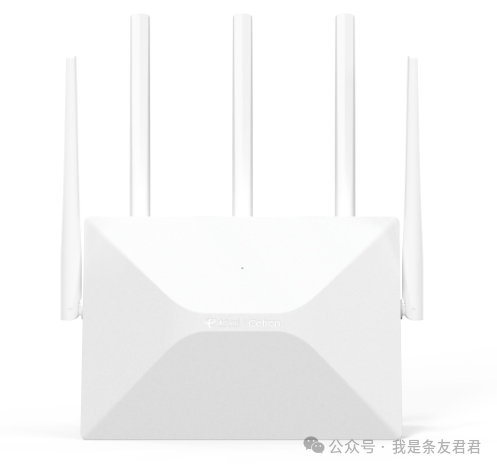
Product Overview:
The Sichuang CT3003 router has a design and appearance highly similar to the 360T7 router, with the packaging indicating a wireless standard of AX3000.
The processor is a dual-core 1.3GHz MT7981B, manufactured by Wuhan Sichuang Yikong, which previously focused on AP products, making this router their first attempt.
Unboxing and Appearance:
The package includes a manual, a 12V/1A power adapter, and a Cat 5e Ethernet cable.
The router features a raised design on the front, with heat dissipation holes on the back, equipped with 1 WAN port, 3 LAN ports, a RESET button, a power socket, and a Mesh networking button.
Compared to the 360T7, the CT3003 has a raised design on the front and a straighter back, while the 360T7 is more rounded; in terms of weight, the CT3003 is 15 grams lighter than the 360T7.
Disassembly and Hardware:
The disassembly method is the same as the 360T7, requiring the removal of two screws on the bottom and prying open the clips on all four sides.
The mainboard uses the MT7981B + MT7976CN reference design, with 256MB of RAM and 128MB of flash memory.
It is basically consistent with the 360T7 mainboard, but the power supply design is different, and the CT3003 lacks a wave-absorbing sticker.
System and Features:
The tested version is V1.0.1, hardware version V2.0, and the system interface is similar to a modified AP system, with complete basic functions.
It supports QoS functionality, with precise speed limiting.
Different versions of the system interface may lead to different flashing methods.
WiFi Performance Testing:
Testing environment: 80 square meters indoors, with the router placed in the corner of the balcony (Point A), 56 cm off the ground, simulating a TV cabinet placement.
Testing setup: WiFi set to channel 44, wall penetration mode, with no adjacent channel interference.
The factory system shows low upload speeds at Point A, with no improvement after multiple tests; the third-party system’s overall upload speed is still lower than that of the 360T7.
Download speeds at certain points (like Point E) are slightly better than the 360T7, but overall upload speeds are weak.
Flashing Tutorial:
The flashing process consists of three steps: uploading the configuration file, flashing uboot, and flashing the system.
Prerequisites: The router must be connected to the internet and set to dynamically obtain an IP address (secondary router mode).
Specific Steps:
In the system tools – configuration management, upload the “enable SSH” configuration file, and after rebooting, the WiFi password changes to 12345678, and the backend password is password.
Use MobaXterm to connect via SSH (IP: 192.168.2.1, username: root, password: password), drag the uboot file into the TMP folder and verify the MD5 value.
Flash uboot, and after verifying the partition is successful, power off.
Set the network card to a fixed IP (192.168.1.2), hold the RESET button for 8 seconds while powering on, enter the uboot backend (192.168.1.1) to flash the firmware.
After flashing the firmware, change the network card back to automatically obtain an IP, and enter the new system backend.
The flashing process is simple, but it is essential to follow the tutorial strictly to avoid bricking the device.
Summary and Evaluation:
The Sichuang CT3003 meets the AX3000 wireless standard, uses a MediaTek solution, and is priced around 100 yuan, offering high cost performance.
The flashing operation is convenient, and the third-party system is mature.
The WiFi signal strength is average, and the upload speed is slightly weaker than that of the 360T7.