Official Documentation:https://netboot.xyz/docs
Highlights
- One-click installation of Linux, supporting 19 common distributions
- One-click installation of Windows, using official ISO installations instead of custom images; the script automatically retrieves ISO links and installs common drivers like Virtio
- Supports reinstallation in any direction, i.e.,
<span><span>Linux to Linux</span></span>,<span><span>Linux to Windows</span></span>,<span><span>Windows to Windows</span></span>,<span><span>Windows to Linux</span></span> - No need to fill in IP parameters; automatically recognizes dynamic/static IPs, supporting
<span><span>/32</span></span>,<span><span>/128</span></span>,<span><span>gateway not in subnet range</span></span>,<span><span>pure IPv6</span></span>,<span><span>dual NICs</span></span> - Specifically adapted for low-spec servers, requiring less memory than the official netboot
- Identifies hard drives using partition table IDs throughout the process, ensuring the correct hard drive is not overwritten
- Supports BIOS and EFI booting, and ARM servers
- Does not include custom packages; all resources are obtained in real-time from mirror sources
System Requirements
The original system can be any system listed in the table
The configuration requirements for the target system are as follows:
|
System |
Version |
Memory |
Disk |
|
Alpine |
3.19, 3.20, 3.21, 3.22 |
256 MB |
1 GB |
|
Debian |
9, 10, 11, 12, 13 |
256 MB |
1 ~ 1.5 GB ^ |
|
Kali |
Rolling |
256 MB |
1 ~ 1.5 GB ^ |
|
|
16.04 LTS – 24.04 LTS, 25.04 |
512 MB * |
2 GB |
|
|
7, 8, 23 |
512 MB * |
5 GB |
|
RHEL AlmaLinux |
8, 9, 10 (if available) |
512 MB * |
5 GB |
|
|
8, 9, Stream 23 |
512 MB * |
5 GB |
|
|
9, 10 |
512 MB * |
5 GB |
|
Fedora |
41, 42 |
512 MB * |
5 GB |
|
openEuler |
20.03 LTS – 24.03 LTS, 25.03 |
512 MB * |
5 GB |
|
openSUSE |
Leap 15.6, Tumbleweed (Rolling) |
512 MB * |
5 GB |
|
|
25.05 |
512 MB |
5 GB |
|
|
Rolling |
512 MB |
5 GB |
|
|
Rolling |
512 MB |
5 GB |
|
安同 OS |
Rolling |
512 MB |
5 GB |
|
飞牛 fnOS |
Public Beta |
512 MB |
8 GB |
|
|
Any |
512 MB |
Depends on the image |
|
|
Vista, 7, 8.x (Server 2008 – 2012 R2) |
512 MB |
25 GB |
|
|
10, 11 (Server 2016 – 2025) |
1 GB |
25 GB |










* Indicates installation using cloud images, not traditional network installation
^ Indicates need for 256 MB memory + 1.5 GB disk, or 512 MB memory + 1 GB disk
Warning
❌ This script does not support OpenVZ or LXC virtual machines
Please usehttps://github.com/LloydAsp/OsMutation
1. Core Positioning and Needs Addressed by the Project
Core Positioning: A clean, efficient, and highly customizable server operating system network installation (Net-Reinstall) script.
What pain points does it address?
- Service provider’s pre-installed system is not clean: Many VPS providers offer template systems that may have pre-installed monitoring agents, promotional software, or other modifications. This script allows for a complete reinstallation to a pristine original system.
- Service provider does not support desired systems: Some providers may not offer specific Linux distributions (like Alpine, certain versions of Ubuntu) or specific versions of Windows. This script can overcome that limitation.
- Batch rapid deployment: For scenarios requiring the installation of the same configured system on many servers, an automated script is exponentially more efficient than manual clicks.
- Rescue and reinstallation: When a server system crashes and cannot boot, you can enter rescue mode via VNC/IPMI and use this script to reinstall the system.
2. Main Features and Characteristics
- Wide system support
- Linux: Almost all mainstream distributions are supported, such as Debian, Ubuntu, CentOS, AlmaLinux, Rocky Linux, Fedora, Oracle Linux, Kali Linux, Arch Linux, etc.
- Windows: Supports Windows 7, 8, 10, 11, and Windows Server series. This is a rare and powerful feature that usually requires you to provide image links yourself.
- Others: Even supports some lightweight or niche systems, such as Alpine Linux, OpenWrt, Tiny Core Linux, etc.
- Highly customizable installation
- Clean official sources: By default, it uses the official mirror sources of each Linux distribution to ensure system cleanliness.
- Custom password: You can preset the root user password or a regular user password.
- Custom port: You can preset the SSH port number to enhance security or meet specific needs.
- Custom partitioning: Supports using a custom partition scheme during installation (e.g.,
<strong><span><span>-p</span></span></strong>parameter). - Static IP configuration: For internal network environments or environments without DHCP, you can pre-configure static IP addresses, gateways, and DNS.
- Easy to use, one-click execution
- Usually requires just one command, specifying the version number with
<strong><span><span>-v</span></span></strong>and setting parameters like password with<strong><span><span>-p</span></span></strong>to start the fully automated installation. - Example:
<strong><span><span>bash <(wget --no-check-certificate -qO- 'https://raw.githubusercontent.com/bin456789/reinstall/main/reinstall.sh') -p 123456 -v 11</span></span></strong>(Install Debian 11, root password is 123456)
- Rich technical support
- Supports disk drivers for various virtualization technologies (VirtIO, SCSI, NVMe), with good compatibility.
- Supports running on various architectures (e.g., x86_64, ARM64).
- Provides detailed installation logs for troubleshooting.
3. Brief Introduction to the Working Principle
The working principle of this script is based onLinux network installation (Netboot) andQEMU/KVM technologies, with the general process as follows:
- Boot a small rescue system: The script first downloads and boots a minimal Linux system (like Alpine Linux) to run in memory. This system is independent of your original hard drive.
- Prepare the installation environment: In the rescue system running in memory, the script downloads the necessary tools and the installation image of the target system.
- Configure installation parameters: Based on the command parameters you provide (password, port, IP, etc.), the script generates an automatic response file (like preseed.cfg for Debian/Ubuntu, kickstart.cfg for Red Hat systems) to achieve an unattended installation process.
- Execute installation: Using
<strong><span><span>qemu-system-x86_64</span></span></strong>and other tools, it simulates a virtual machine environment to install the target system onto the real physical hard drive. This process will format the original hard drive. - Reboot into the new system: After installation is complete, the script automatically reboots the server and boots the new system from the hard drive.
4. Usage Method (Brief)
Extreme Warning: This script will completely erase your server’s hard drive data! Please ensure that all data is backed up! Test in a non-production environment before use!
- Connect to your server (VPS) via SSH.
- Obtain root privileges:
<strong><span><span>sudo -i</span></span></strong>or log in directly as the root user.
Download and execute the script (taking Debian 12 as an example):
3.
# Basic usage, install the latest Debian, password is 123456
bash <(wget --no-check-certificate -qO- 'https://raw.githubusercontent.com/bin456789/reinstall/main/reinstall.sh') -d 12 -p 123456

# More custom examples: install Ubuntu 22.04, password 123456, port 2222
bash <(wget --no-check-certificate -qO- 'https://raw.githubusercontent.com/bin456789/reinstall/main/reinstall.sh') -u 22.04 -p 123456 -port 2222
- Wait for the script to run automatically, during which the server will reboot. The installation time depends on the system size and network speed.
- Reconnect to the server using the new password and port via SSH.
Common parameters:
<strong><span><span>-d</span></span></strong>: Install Debian<strong><span><span>-u</span></span></strong>: Install Ubuntu<strong><span><span>-c</span></span></strong>: Install CentOS<strong><span><span>-v</span></span></strong>: Specify version number (e.g.,<strong><span><span>11</span></span></strong>,<strong><span><span>22.04</span></span></strong>)<strong><span><span>-p</span></span></strong>: Set root password<strong><span><span>-port</span></span></strong>: Set SSH port<strong><span><span>-a</span></span></strong>: Automatic mode (uses all default settings)<strong><span><span>-mirror</span></span></strong>: Custom mirror source
Using<strong><span><span>-h</span></span></strong> parameter can view complete help information.
5. Applicable Scenarios and Users
- VPS players and individual users: Quickly change systems and try different Linux distributions.
- Operations engineers: Batch deploy test machines or production servers with the same environment.
- Network security personnel: Quickly set up and restore test environments (like Kali Linux).
- Users pursuing a clean system: Get rid of the service provider’s customized system.
6. Risks and Precautions
- Risk of data loss: The script will format all hard drives! You must confirm that all important data is backed up before execution.
- Service provider policies: Some VPS providers may not allow or may restrict frequent system reinstalls; please comply with the provider’s terms.
- Compatibility issues: Although compatibility is generally good, there is still a very small chance of failure on certain special hardware or virtualization platforms.
- Network dependency: The entire installation process requires downloading the image from the network; if the server’s network is unstable or the mirror source is slow, it may lead to installation failures or take a long time.
In summary,bin456789/reinstall is a remarkably powerful “Swiss Army knife” that greatly simplifies the process of installing server systems, giving users maximum flexibility and control. But like all powerful tools, caution must be exercised when using it, and a full understanding of the risks involved is essential.
Download (Current system is Linux)
Foreign servers:
curl -O https://raw.githubusercontent.com/bin456789/reinstall/main/reinstall.sh || wget -O reinstall.sh $_Domestic servers:
curl -O https://cnb.cool/bin456789/reinstall/-/git/raw/main/reinstall.sh || wget -O reinstall.sh $_Download (Current system is Windows)
Important
Please first disable<span><span>Windows Defender</span></span>‘s<span><span>real-time protection</span></span> feature. This feature will prevent<span><span>certutil</span></span> from downloading any files.
Resolve the issue of not being able to download the script under Windows 7
Foreign servers:
certutil -urlcache -f -split https://raw.githubusercontent.com/bin456789/reinstall/main/reinstall.batDomestic servers:
certutil -urlcache -f -split https://cnb.cool/bin456789/reinstall/-/git/raw/main/reinstall.batUsage
All functions can run under Linux / Windows
- Run under Linux
<span><span>bash reinstall.sh ...</span></span> - Run under Windows first with
<span><span>cmd</span></span>, then run<span><span>reinstall.bat ...</span></span>
- If the link in the parameters contains special characters, wrap the link with
<span><span>""</span></span>, and do not use<span><span>''</span></span>
Function 1: Installation Linux
Linux
- Username
<span><span>root</span></span>Default password<span><span>123@@@</span></span> - Installing the latest version does not require entering the version number
- Maximize disk space usage: no boot partition (except for Fedora), no swap partition
- Automatically selects different optimized kernels based on machine type, such as
<span><span>Cloud</span></span>,<span><span>HWE</span></span>kernels - When installing Red Hat, you need to fill in thehttps://access.redhat.com/downloads/content/rhel to obtain the
<span><span>qcow2</span></span>image link; you can also install other RHEL-like systems, such as<span><span>Alibaba Cloud Linux</span></span><span><span> and</span></span><code><span><span>TencentOS Server</span></span> - After reinstallation, if you need to change the SSH port or switch to key login, remember to also modify the
<span><span>/etc/ssh/sshd_config.d/</span></span>files inside
Optional Parameters
<span><span>--password PASSWORD</span></span>Set password<span><span>--ssh-key KEY</span></span>Set SSH login public key, supporting the following formats. When using a public key, the password is empty
<span><span>--ssh-key "ssh-rsa ..."</span></span><span><span>--ssh-key "ssh-ed25519 ..."</span></span><span><span>--ssh-key "ecdsa-sha2-nistp256/384/521 ..."</span></span><span><span>--ssh-key http://path/to/public_key</span></span><span><span>--ssh-key github:your_username</span></span><span><span>--ssh-key gitlab:your_username</span></span><span><span>--ssh-key /path/to/public_key</span></span><span><span>--ssh-key C:\path\to\public_key</span></span>
<span><span>--ssh-port PORT</span></span>Modify SSH port (for observing logs during installation, also applies to the new system)<span><span>--web-port PORT</span></span>Modify web port (for observing logs during installation)<span><span>--frpc-toml /path/to/frpc.toml</span></span>Add frpc internal penetration<span><span>--hold 2</span></span>Do not reboot after installation; at this time, you can SSH in to modify system content, the system is mounted at<span><span>/os</span></span>(this feature is not supported on Debian/Kali)
Tip
When installing Debian/Kali, x86 can view the installation progress through the vendor’s backend VNC, and ARM can view the installation progress through the serial console.
When installing other systems, you can view the installation progress through various methods (SSH, HTTP port 80, vendor backend VNC, serial console). Even if the installation process encounters an error, you can run<span><span>/trans.sh alpine</span></span> to install to Alpine.
Experimental Features
Notes on Installing Windows on ARM
Most ARM machines support installing the latest Windows 11
The installation process may show a black screen, and the serial console may display<span><span>ConvertPages: failed to find range</span></span>, which does not affect normal installation
|
Compatibility |
Cloud Service Providers |
Instance Types |
Issues |
|
✔️ |
Azure |
B2pts_v2 |
|
|
✔️ |
Alibaba Cloud |
g6r, c6r |
|
|
✔️ |
Alibaba Cloud |
g8y, c8y, r8y |
May hang on the boot logo during reboot; forced reboot may be required |
|
✔️ |
AWS |
T4g |
|
|
✔️ |
Scaleway |
COPARM1 |
|
|
✔️ |
Gcore |
||
|
❔ |
Oracle Cloud |
A1.Flex |
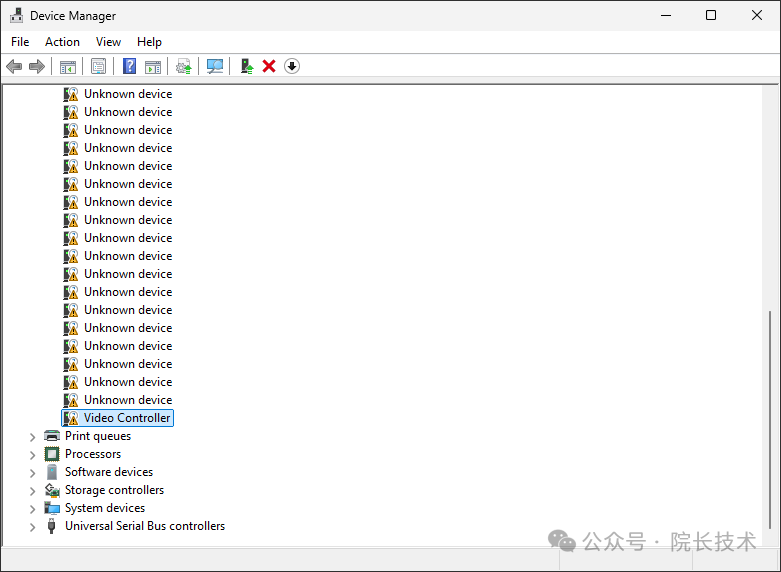
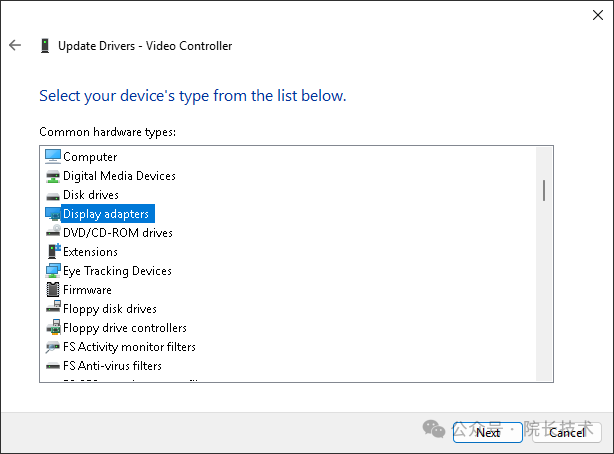
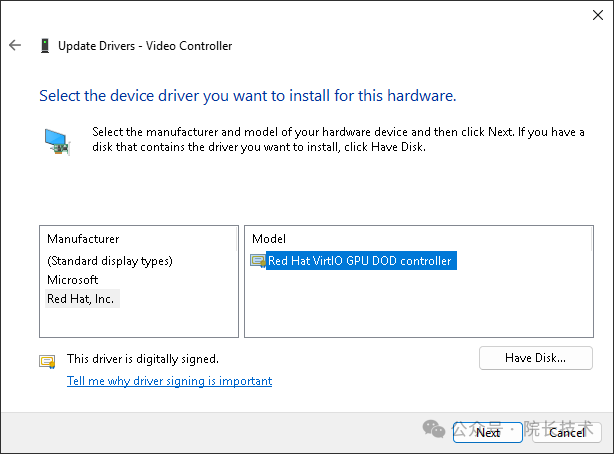
May not install successfully; newer instances are more likely to succeed After installation, you still need to manually load the graphics driver |
|
❌ |
Google Cloud |
t2a |
Missing network card driver |
Loading graphics driver on Oracle Cloud
How to Modify the Script for Personal Use
- Fork this repository
- Modify
<span><span>reinstall.sh</span></span>and<span><span>reinstall.bat</span></span>at the beginning of<span><span>confhome</span></span>and<span><span>confhome_cn</span></span> - Modify other code