Modbus TCP to HART – ADFWEB Gateway Converter– Guangzhou Xinyu IoT
Author:www.adfweb.com.cn Zou Wuyi Mobile185-020-77899 Email: [email protected]
1、Features:
HD67909-A1 is a Modbus TCP slave /HART master converter. It has the following features:
Triple isolation between Ethernet and power, Ethernet and HART, and HART and power;
Bidirectional information transmission between the Ethernet bus and HART bus;
Can be mounted on a 35mm DIN rail;
Wide power input range: 8…24V AC or 12…35V DC;
Wide temperature range: -40°C / +85°C [-40°F / +185°F].
Configuration:
You need to install the Compositor SW67909 software on your PC to perform the following actions:
Define parameters for the Modbus TCP line;
Define parameters for the HART line;
Define HART variables in read/write;
Define HART rules for gateway functionality;
Scan and configure HART devices through the integrated Web server;
Update devices.

2、New Configuration/ Open Configuration:
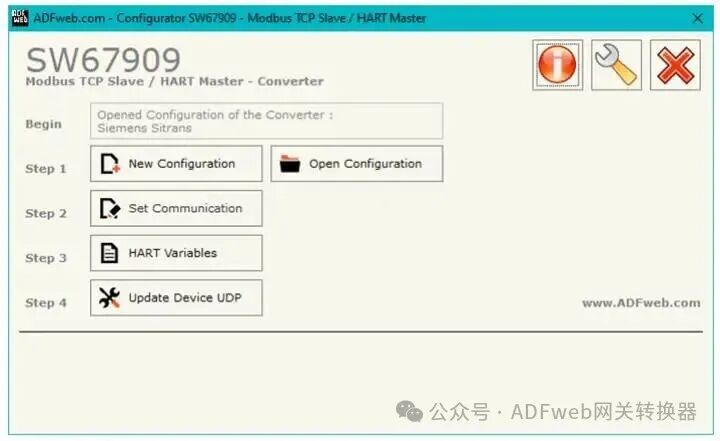
The “New Configuration” button creates a folder containing the entire device configuration.
The device configuration can also be imported or exported:
To configure another device in the same way, the folder and all its contents must be retained;
To obtain different versions of the project, simply copy the project folder and rename it, then use the “Open Configuration” button to open the new folder.
3、Setting Communication:
This section defines the basic communication parameters for the HART and Modbus TCP buses.
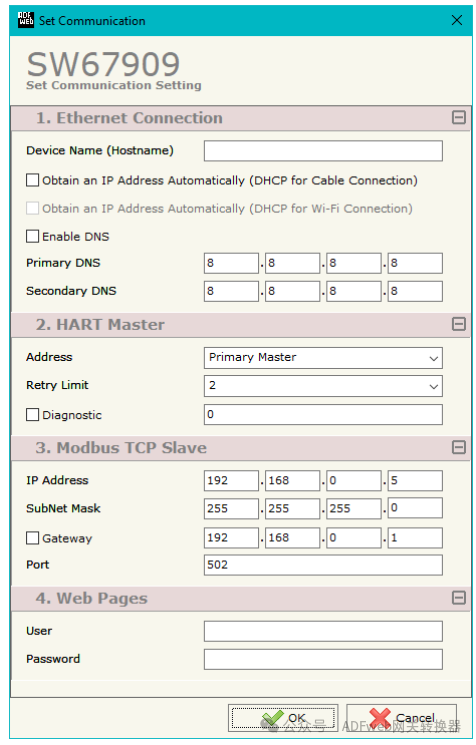
By pressing the “Set Communication” button in the main window (Figure 2), the “Set Communication” window (Figure 3) will appear.
The meaning of the “Ethernet Connection” field is:
Define the hostname to be assigned to the converter in the “Device Name (Hostname)” field;
If the “Automatically Obtain IP Address (DHCP for Cable Connection)” field is checked, it enables DHCP for the LAN connection;
If the “Enable DNS” field is checked, it enables the DNS protocol;
The “Primary DNS” field defines the IP address of the primary DNS server;
The “Secondary DNS” field defines the IP address of the secondary DNS server.
The meaning of the fields in the “HART Master” section is:
Define the type of master in the “Address” field;
Define the maximum number of retries in the “Retry Limit” field in case the HART device does not respond;
If the “Diagnostics” field is checked, a diagnostic idle position can be set where the status of the HART variables can be viewed. If it shows 0, it indicates that HART communication is active; if it shows 1, it indicates that the converter has not received any HART frames.
The meaning of the fields in the “Modbus TCP” slave section is:
Define the converter’s IP address in the “IP Address” field;
Define the converter’s subnet mask in the “Subnet Mask” field;
Define the default gateway of the network in the “Gateway” field. This function can be enabled or disabled by pressing the checkbox field. This function is used to leave the network;
4、HART Variables:
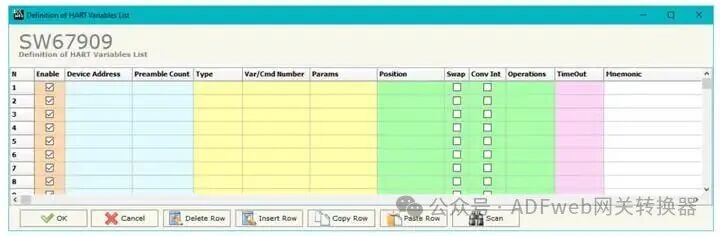
By pressing the “HART Variables” button in the main window (Figure 2), the “HART Variable List Definition” window (Figure 4) will appear.
This section is used to define the HART variables to be read and written with the Modbus master. The meanings of the fields are as follows:
If the “Enable” field is checked, the HART variable is enabled;
Define the HART device address in the “Device Address” field;
Define the number of synchronized bytes in the “Leading Byte Count” field;
If the “Type” field is checked, the type of HART parameter is defined;
Define the variable/command number to be read and written in the “Variable/Command Number” field. According to the HART standard, the most commonly used numbers are:
o 246: Primary Variable;
o 247: Secondary Variable;
o 248: Tertiary Variable;
o 249: Quaternary Variable.
5、