Regular expressions include basic and extended regular expressions.
★
Basic Regular Expressions (BRE)
Executed using the grep command
grep/sed/awk support basic regular expressions
01- ^ indicates lines starting with…
## cat -A can display spaces and other placeholders$ cat -A oldboy2.txtI am oldboy teacher!$I teach linux.$$I like badminton ball ,billiard ball and chinese chess!$my blog is http://oldboy.blog.51cto.com $our size is http://blog.oldboyedu.com $my qq is 49000448$$not 4900000448$my god ,i am not oldboy,but OLDBOY!$ $
$ grep "^my" oldboy2.txtmy blog is http://oldboy.blog.51cto.commy qq is 49000448my god ,i am not oldboy,but OLDBOY!
02- $ indicates lines ending with…
$ grep "448$" oldboy2.txtmy qq is 49000448not 4900000448$ grep "m $" oldboy2.txtmy blog is http://oldboy.blog.51cto.comour size is http://blog.oldboyedu.com03- ^$ indicates empty lines, meaning lines with no content; spaces are also characters.
##grep -n shows line numbers$ grep -n "^$" oldboy2.txt3:8:Usage: Exclude empty lines from the file
## -v indicates negation, i.e., show lines that are not selected$ grep -nv '^$' oldboy2.txt1:I am oldboy teacher!2:I teach linux.4:I like badminton ball ,billiard ball and chinese chess!5:my blog is http://oldboy.blog.51cto.com6:our size is http://blog.oldboyedu.com7:my qq is 490004489:not 490000044810:my god ,i am not oldboy,but OLDBOY!11:04- . indicates any single character; note that “.” does not match empty lines
$ grep '.' oldboy2.txtI am oldboy teacher!I teach linux.I like badminton ball ,billiard ball and chinese chess!my blog is http://oldboy.blog.51cto.comour size is http://blog.oldboyedu.commy qq is 49000448not 4900000448my god ,i am not oldboy,but OLDBOY!05- \ escape character, removes specific meanings to express literal meanings
Match lines ending with “.”
Escape character sequences:
\n indicates a newline
\t indicates a tab key
$ grep "\.$" oldboy2.txtI teach linux.06- * indicates the previous character appears 0 or more times; “*” is rarely used alone
Consecutive appearances: 0 (0 appears once), 000 (0 appears three times), oldboy (the letter appears six times)
$ grep "0*" oldboy2.txtI am oldboy teacher!I teach linux.
I like badminton ball ,billiard ball and chinese chess!my blog is http://oldboy.blog.51cto.comour size is http://blog.oldboy.edu.commy qq is 49000448
not 4900000448my god ,i am not oldboy,but OLDBOY!
07- .* indicates all content, any content
$ grep '.*' oldboy2.txtI am oldboy teacher!I teach linux.
I like badminton ball ,billiard ball and chinese chess!my blog is http://oldboy.blog.51cto.comour size is http://blog.oldboy.edu.commy qq is 49000448
not 4900000448my god ,i am not oldboy,but OLDBOY!
Match lines containing patterns like ‘……t’
$ grep "^.*t" oldboy2.txtI am oldboy teacher!I teach linux.I like badminton ball ,billiard ball and chinese chess!my blog is http://oldboy.blog.51cto.comour size is http://blog.oldboy.edu.comnot 4900000448my god ,i am not oldboy,but OLDBOY!$ grep "^.*t" oldboy2.txtI am oldboy teacher!I teach linux.I like badminton ball ,billiard ball and chinese chess!my blog is http://oldboy.blog.51cto.comour size is http://blog.oldboy.edu.comnot 4900000448my god ,i am not oldboy,but OLDBOY!Match lines containing patterns like ‘……o’
$ grep '^.*o' oldboy2.txtI am oldboy teacher!I like badminton ball ,billiard ball and chinese chess!my blog is http://oldboy.blog.51cto.comour size is http://blog.oldboy.edu.comnot 4900000448my god ,i am not oldboy,but OLDBOY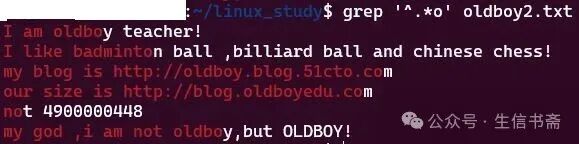
The greediness of regular expressions: .* indicates all or * indicates consecutive appearances, showing as much greediness as possible.
08- [] matches one character; [abc] indicates matching any one of a, b, or c
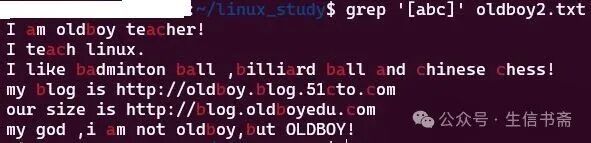
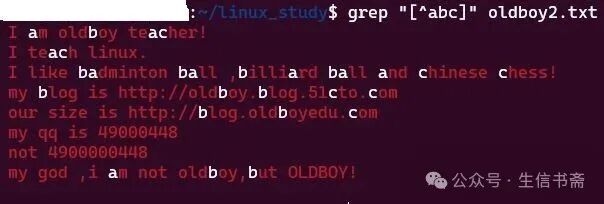
[^abc] indicates negation
[a-z] 26 lowercase letters
[A-Z] 26 uppercase letters
[0-9] all digits from 0-9
Usage: Match lowercase letters and all digits at once
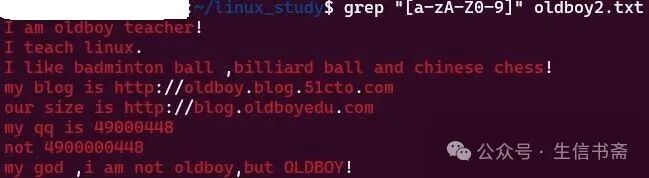
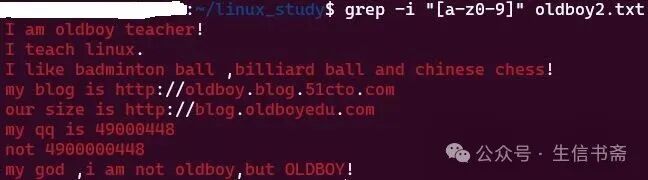
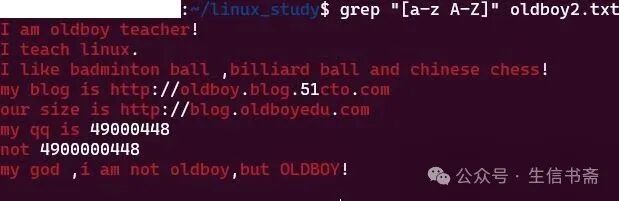
Note: [a-z A-Z] indicates matching lowercase, space, and uppercase
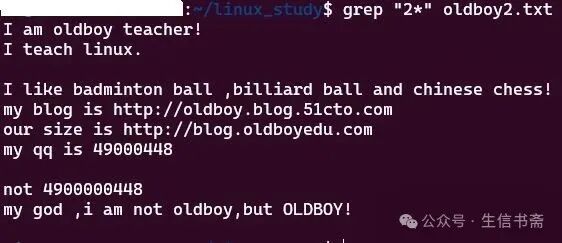
09- The mysterious 2* 0* why does it match multiple contents?
Because “2*” indicates that 2 appears 0 or more times; 0 times means empty, which means it matches all lines.

★
Extended Regular Expressions (ERE)
Use egrep or grep -E command.
egrep, sed -r, awk support extended regular expressions.
01- + indicates the previous character appears 1 or more times

Usage 1: Match all numbers in the file
egrep -o can only display matched content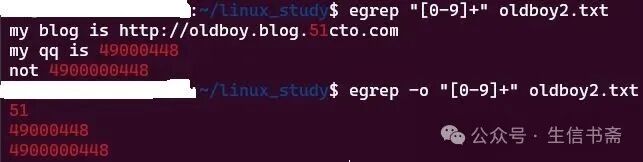
Usage 2: Match all words in the file
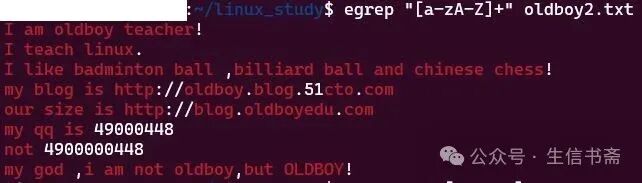
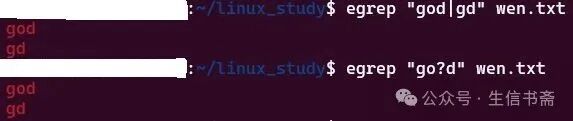
02- | indicates OR
Note: [] and | both indicate OR; the difference is: [] matchessingle character at a time, e.g., a/b/c; while | can matchone or more characters, e.g., a/asd/oldboy, generally used to match words.

03- () indicates that the content in parentheses is a whole (character), or a backreference (sed)

04- {} indicates consecutive appearances
o{n,m} indicates that the letter o appears at least n times and at most m times.
o{n} indicates that the letter o appears consecutively n times.
o{n,} indicates that the letter o appears at least n times.
o{,m} indicates that the letter o appears at most m times.


05- ? indicates that the previous character appears 0 or 1 time, i.e., it may or may not exist.
$ cat wen.txtgooodgoodgodgd