1. Introduction
Process state is an integer within <span>task_struct</span>; Running: the process is in the scheduling queue, and its state is <span>running</span>; Blocked: waiting for a device or resource to be ready. A process is a queue, and a device is also a queue. When we read from the disk or network card, if the corresponding device is not ready, the process must block and wait. One manifestation of process state changes is the flow between different queues, which is essentially about adding, deleting, querying, and modifying data structures!
Understanding Kernel Linked Lists
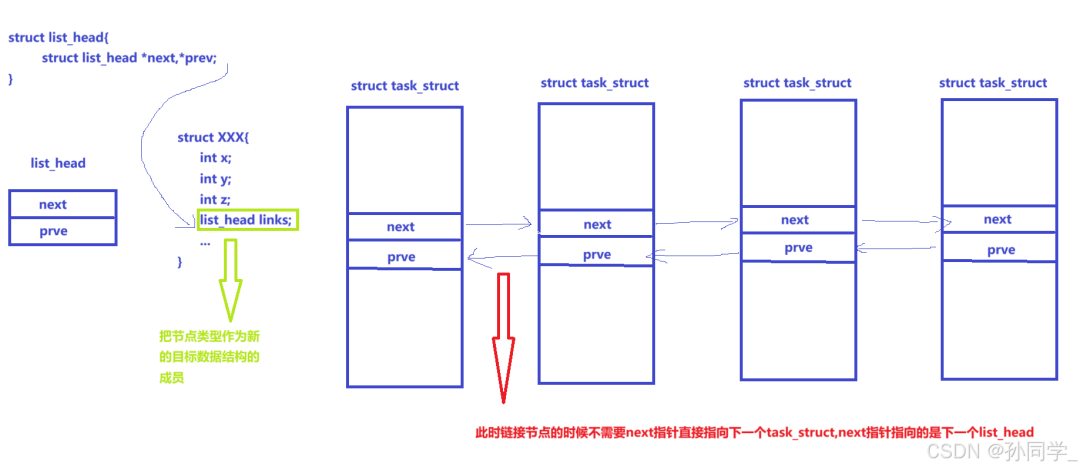
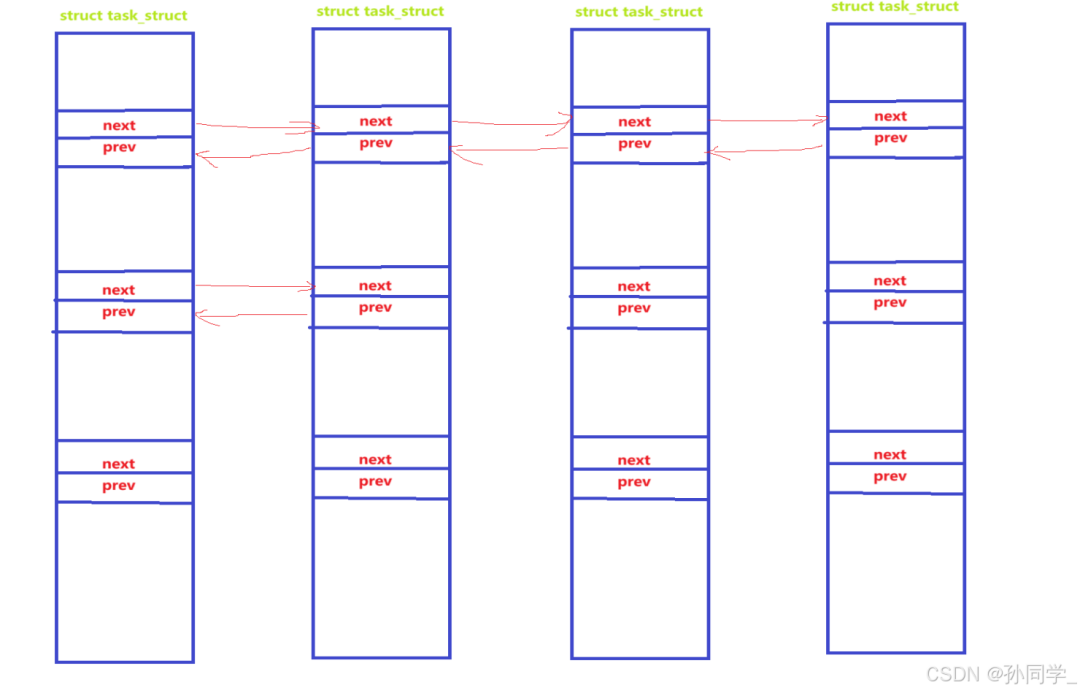
If a class has multiple <span>next</span> and <span>prev</span>, then any <span>task_struct</span> can belong to both the run queue and the global linked list, and can also be placed in a binary tree, etc.
2. Process States
A process can have several states (in the Linux kernel, a process is sometimes also called a task).
- The following states are defined in the kernel source code:
/*
*The task state array is a strange "bitmap" of
*reasons to sleep. Thus "running" is zero, and
*you can test for combinations of others with
*simple bit tests.
*/
static const char *const task_state_array[] = {
    "R (running)", /*0 */
    "S (sleeping)", /*1 */
    "D (disk sleep)", /*2 */
    "T (stopped)", /*4 */
    "t (tracing stop)", /*8 */
    "X (dead)", /*16 */
    "Z (zombie)", /*32 */
};
R Running or Runnable
State Description: The process is executing on the CPU or waiting in the run queue for scheduling.
Trigger Scenario: The process is active, executing or ready to execute.
S Interruptible Sleep
State Description: The process is waiting for an event to complete (such as
<span>I/O</span>operations, signals), and can be interrupted by signals.Trigger Scenario: For example, when calling
<span>sleep()</span>,<span>read()</span>, and other blocking operations.
D Uninterruptible Sleep
State Description: The process is waiting for an uninterruptible operation (such as hardware
<span>I/O</span>), and does not respond to signals.Trigger Scenario: Commonly occurs during disk
<span>I/O</span>or certain kernel operations that require waiting for completion.
T Stopped
State Description: The process is paused by a signal (such as
<span>SIGSTOP</span>,<span>SIGTSTP</span>) and needs<span>SIGCONT</span>to resume.Trigger Scenario: Manually pausing the process (such as pressing
<span>Ctrl+Z</span>) or during debugging.
Z Zombie
State Description: The process has terminated, but the parent process has not called
<span>wait()</span><span> to reclaim resources.</span>Trigger Scenario: The parent process fails to properly handle the exit of the child process, resulting in a lingering process descriptor.
t Tracing Stop
State Description: The process is paused while being traced by a debugger (such as
<span>gdb</span>), which is a type of stopped state.Trigger Scenario: When the debugger sets breakpoints or steps through the code.
X Dead
- State Description: After the child process ends, before the parent process retrieves the child process information.
- Trigger Scenario: The parent process has reclaimed the child process state, briefly existing before disappearing.
2.1 Viewing Process States
Command:<span>ps aux / ps axj</span>
a: Used to display processes for all users, including those of other users (requires appropriate permissions). By default, ps only shows processes for the current user. For example:
<span>ps a</span>
x: Used to display processes without a controlling terminal. These processes are usually background daemon processes. For example:
<span>ps x</span>Typically, the<span>ax</span>options are used together to display all processes for all users, regardless of whether they have a controlling terminal. For example:<span>ps ax</span>
j: Used to display information related to job control, including process group
<span>ID (PGID)</span>, session<span>ID (SID)</span>, parent process<span>ID (PPID)</span>, and job number (if any). For example:<span>ps j</span>This is helpful for understanding how processes are grouped and job control.
u : Used to display process information in a user-centric format. It provides detailed information for each process, such as user, CPU usage, memory usage, virtual memory size, resident memory size, controlling terminal, process state, start time, CPU time, and command line. For example:
<span>ps u</span>Typically, the u option is used with aux to display detailed process information for all users. For example:<span>ps aux</span>
2.2 Zombie Processes

- A zombie state
<span>(Zombies)</span>is a special state. When a process exits and the parent process (using the wait() system call) has not read the exit code of the child process, a zombie process is created. - A zombie process remains in the process table in a terminated state and will continue to wait for the parent process to read the exit status code.
- As long as the child process exits, the parent process is still running, but if the parent process does not read the child process status, the child process enters the Z state.
2.3 Dangers of Zombie Processes
- The exit status of a process must be maintained because it needs to inform the concerned process (the parent process) how well the task you assigned to me has been completed. If the parent process does not read it, the child process will remain in the
<span>Z</span>state? Yes! - Maintaining the exit status itself requires data maintenance, which is also part of the basic information of the process, so it is stored in
<span>task_struct(PCB)</span><span>. In other words, the </span><code><span>Z</span>state will not exit, and the<span>PCB</span>must always be maintained? Yes! - If a parent process creates many child processes and does not reclaim them, will it lead to a waste of memory resources? Yes! Because the data structure object itself occupies memory, defining a structure variable (object) in C requires allocating space in memory, which can lead to memory leaks? Yes! How to avoid this? We will discuss later.
2.4 Orphan Processes
- Let’s first create a piece of code
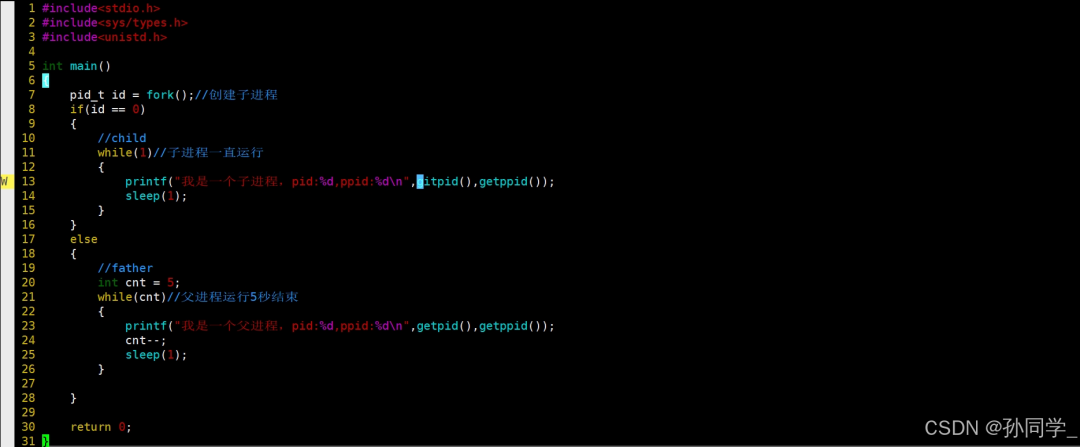
Insert image description here - After the code runs, the child process continues to run, while the parent process exits after
<span>5</span>seconds

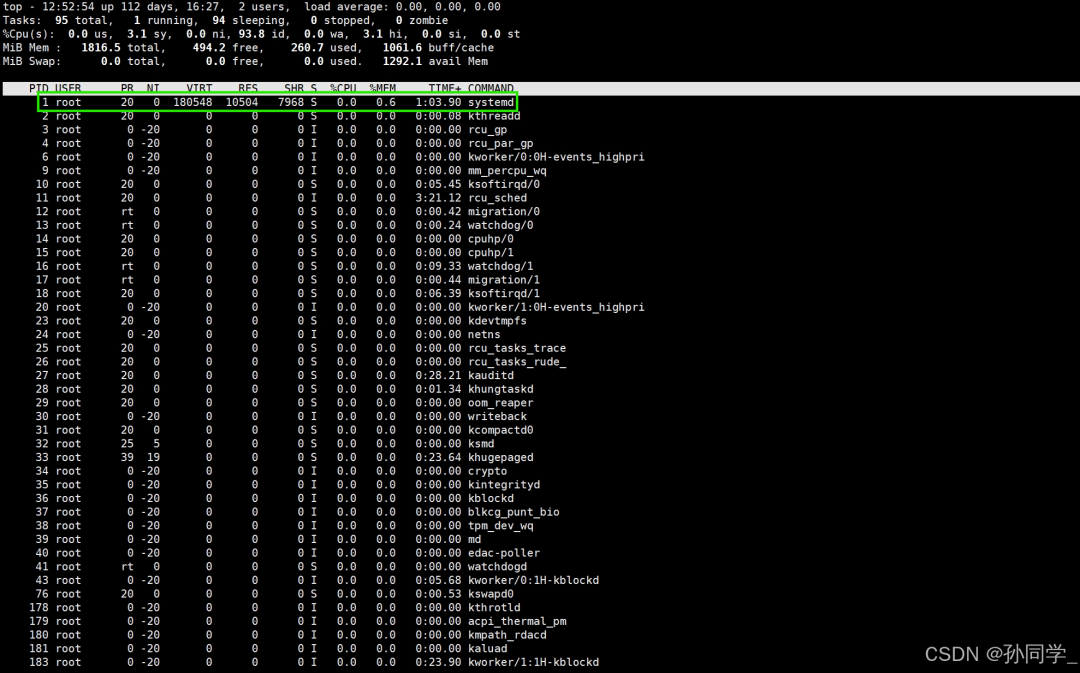
Insert image description here - Who is this
<span>1</span>process? Let’s check with<span>top</span>, and we can see it is<span>systemd</span>
Insert image description here - Let’s continue to check this
<span>systemd</span>

Insert image description here - Why does the child process get adopted by the
<span>1 (systemd)</span>process? What happens if it is not adopted? The answer is that if it is not adopted, then this child process will become a zombie process, which may cause memory leaks. - Why does the parent process not become an orphan or zombie process? The answer is that the parent process also has its own parent process, and the parent process’s parent process is
<span>bash</span>. - Once a process becomes an orphan, it will be adopted by the
<span>1</span>process, becoming a background process. At this point,<span>Ctrl+c</span>will not kill it; we can only use<span>kill</span>to terminate it.
3. Process Priority
3.1 Concept
-
<span>CPU</span>resource allocation order refers to the process priority. -
Target resource scarcity leads to the need to confirm who comes first based on priority.
-
Processes with higher priority have the right to execute first. Configuring process priority is very useful in a multitasking environment like
<span>Linux</span><span>, as it can improve system performance.</span> -
It is also possible to run processes on specific
<span>CPU</span>s, thus assigning less important processes to a certain<span>CPU</span>can greatly improve overall system performance. -
Priority vs Permission: Priority is about resource allocation order, while permission is about whether resources can be accessed.
✏️ Priority is actually a number, which is an attribute in <span>task_struct</span><span>. The lower the numerical value, the higher the priority. In a time-slice based time-sharing operating system, the priority may change in the future, but the change cannot be too large.</span>
3.2 Viewing System Processes
- Command
<span>ps -al</span>, where<span>a</span>indicates all, and<span>l</span>indicates detailed information. - In the previous code, if the parent process does not exit, and both parent and child processes continue to run, run the code again.

Insert image description here In the
<span>Linux</span><span> system, each user has a </span><code><span>UID</span><span>, and in </span><code><span>Linux</span><span>, users are identified by their </span><code><span>UID</span><span>.</span>
<span>UID</span>: Represents the identity of the executor<span>PID</span>: Represents the code of this process<span>PPID</span>: Represents which process this process is derived from, i.e., the code of the parent process<span>PRI</span>: Represents the executable priority of this process, with smaller values being executed earlier. The default process priority is:<span>80</span><span>NI</span>: Represents the adjustment data for this process’s priority,<span>nice</span>value✏️ The real priority of the process = PRI (default) + NI✏️ PRI(new) = PRI(old) + nice- Therefore, adjusting the process priority in
<span>Linux</span><span> means adjusting the process's </span><code><span>nice</span>value. <span>nice</span>can take values from<span>-20</span>to<span>19</span>, a total of<span>40</span>levels. The range of process priorities in<span>Linux</span>is<span>[60,99]</span>
- Check
<span>UID</span>, command<span>ls -ln</span>
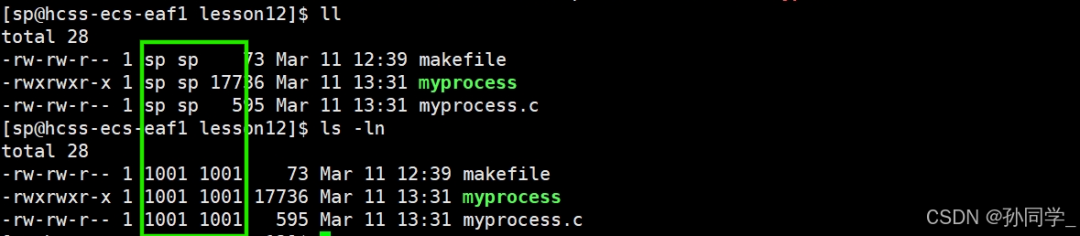
Insert image description here <span>sp</span>The corresponding<span>UID</span>for the user is<span>1001</span>, and when a file is created, this<span>UID</span>is saved to indicate who created the file. When a process is created, this<span>UID</span>is also saved to indicate who created the process.📌 So when we access a file, how does the system recognize us as the owner, the group, or<span>other</span>? When we access a file, it is essentially the process accessing the file. How does the process know who we are? The answer is that it knows the<span>UID</span>of the person who started this process, and the<span>UID</span>of the file that was created, so a process will compare its<span>UID</span>with the file’s<span>UID</span>. If they are equal, it is the owner; if not, it checks the next one. If both are not equal, it is<span>other</span>.✏️<span>In the </span><code><span>Linux</span><span> system, accessing any resource is done by processes, and processes represent users.</span>
3.3 Commands to View Process Priority
Use the <span>top</span> command to change the <span>nice</span> value of an existing process:
-
<span>top</span> -
After entering
<span>top</span>, press<span>"r"</span>→ enter the process<span>PID</span>→ enter the<span>nice</span>value -
Other commands to adjust priority:
<span>nice</span>,<span>renice</span> -
<span>Linux</span>system calls for adjusting priority
3.4 Supplementary Concepts – Competition, Independence, Parallelism, Concurrency
- Competition: There are many system processes, but only a small amount of CPU resources, even just one, so processes have competitive attributes. To efficiently complete tasks and compete for related resources more reasonably, priorities are established.
- Independence: Multiple processes need to run independently, requiring exclusive access to various resources, and do not interfere with each other during execution.
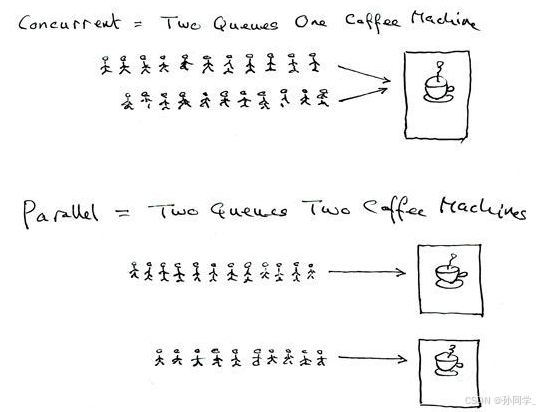
- Parallelism: Multiple processes run simultaneously on multiple CPUs, which is called parallelism.
- Concurrency: Multiple processes use process switching on a single CPU to advance multiple processes within a certain time frame, which is called concurrency.
Insert image description here
4. Process Switching
First, let’s discuss two issues:
- How does a process in an infinite loop run? Normally, when we write a
<span>while(1)</span>infinite loop in<span>vs</span>, once it runs, we will find that the system becomes sluggish but does not freeze.a. Once a process occupies the CPU, will it run its code to completion? No! (Unless the code is very short) Each process is allocated a time slice by the system. Therefore, each process’s access to CPU resources is not permanent but temporary.b. An infinite loop process will not kill the process because it does not continuously occupy the CPU! - CPU, registers
<span> When the CPU executes a process, it is not closely related to the PCB. The CPU focuses on accessing the process's code and data, so the CPU will access the current process's code and data. To handle each line of code and data, the CPU contains many registers, each of which has the task of temporarily storing data. Therefore, when the process runs, the registers will be filled with temporary values, such as calculation results, and whether there are errors in floating-point calculations.</span><strong><span>Conclusion:</span></strong><span> a. Registers are temporary spaces within the CPU. b. </span><strong><span>Registers != Data in registers</span></strong>
How does process switching occur? <span>CPU</span> context switching: its actual meaning is task switching, or <span>CPU</span> register switching. When a multitasking kernel decides to run another task, it saves the current state of the running task, which is the entire content of the <span>CPU</span> registers. This content is saved in the task’s own stack, and after the stack operation is completed, the current state of the next task to be run is reloaded from that task’s stack into the <span>CPU</span> registers and starts running the next task. This process is called <span>context switch</span>.
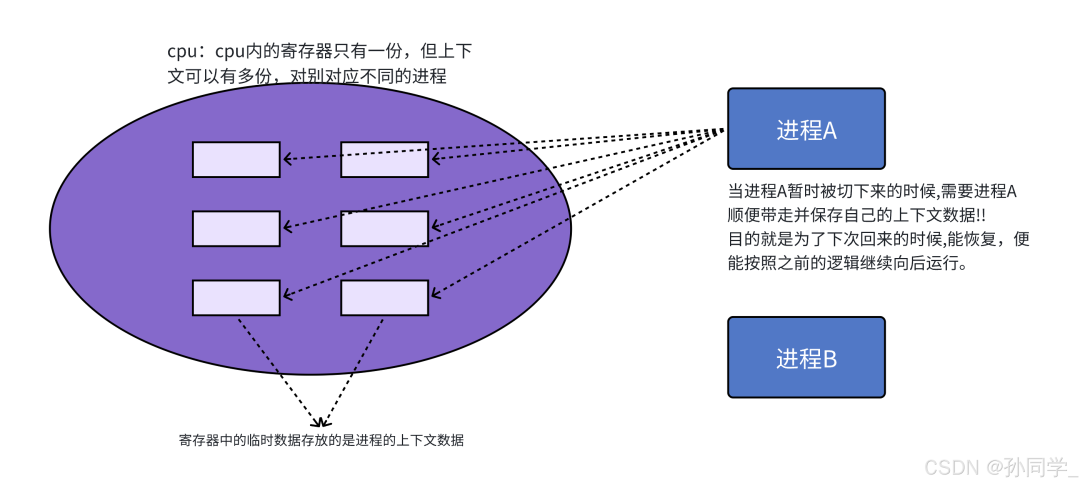
The core of process switching is to save and restore the current process’s hardware context data, namely the contents of the <span>CPU</span> registers.
- Where is it saved? Saved in the process’s
<span>task_struct</span>. - How to distinguish new processes from already scheduled processes? By adding a flag in the
<span>task_struct</span>.
5. Linux 2.6 Kernel O(1) Scheduling Queue
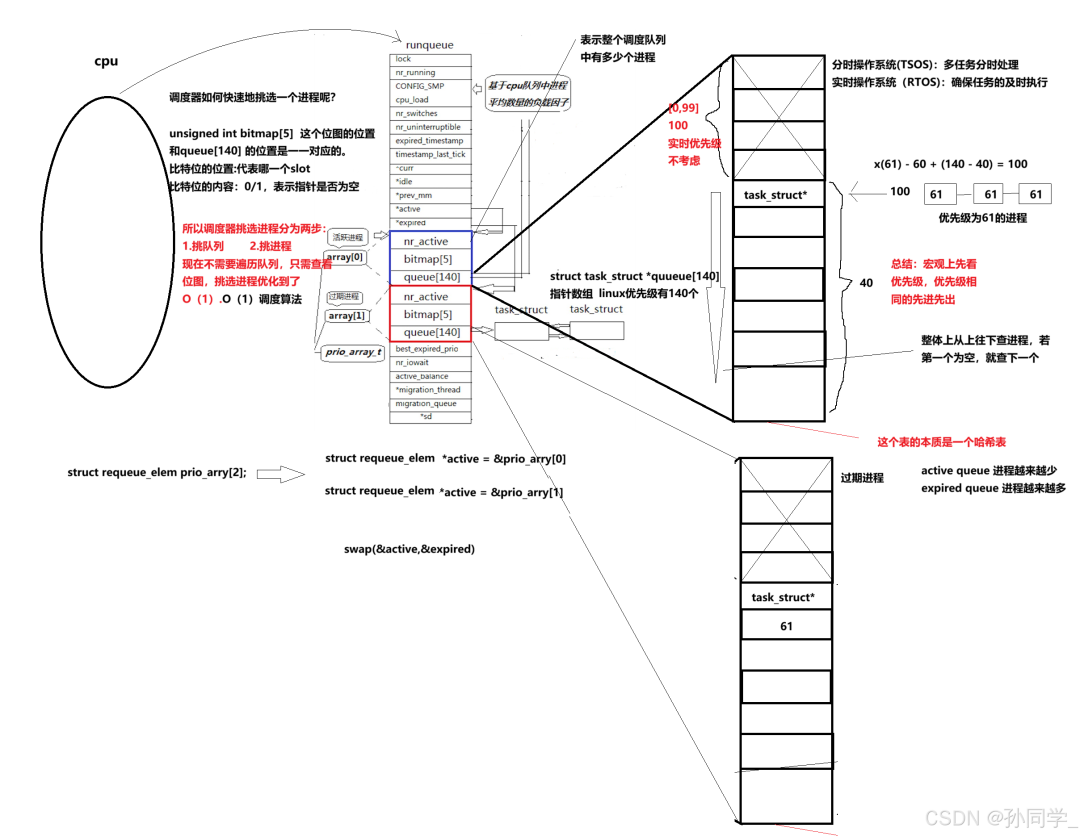
- Each CPU has a
<span>runqueue</span>
- If there are multiple CPUs, the load balancing issue of the number of processes must be considered.
- Priority
- Normal priority: 100-139 (we are all of normal priority, think about the range of nice values, which can correspond to this!)
- Real-time priority: 0-99 (not concerned)
- Active Queue
- All processes whose time slices have not yet expired are placed in this queue according to priority.
<span>nr_active</span>: Total number of processes in the running state<span>queue[140]</span>: Each element is a process queue, and processes of the same priority are scheduled according to the<span>FIFO</span>rule, so the array index corresponds to the priority!- From this structure, how is the most suitable process selected? a. Start traversing from index
<span>0</span>in<span>queue[140]</span>. b. Find the first non-empty queue, which must be the highest priority queue. c. Take the first process from the selected queue and start running; scheduling is complete! d. Traversing<span>queue[140]</span><span> has a time complexity of constant! But it is still too inefficient!</span> <span>bitmap[5]</span>: There are a total of 140 priorities and 140 process queues. To improve the efficiency of finding non-empty queues, we can use<span>5*32</span>bits to indicate whether the queue is empty, which greatly improves search efficiency.
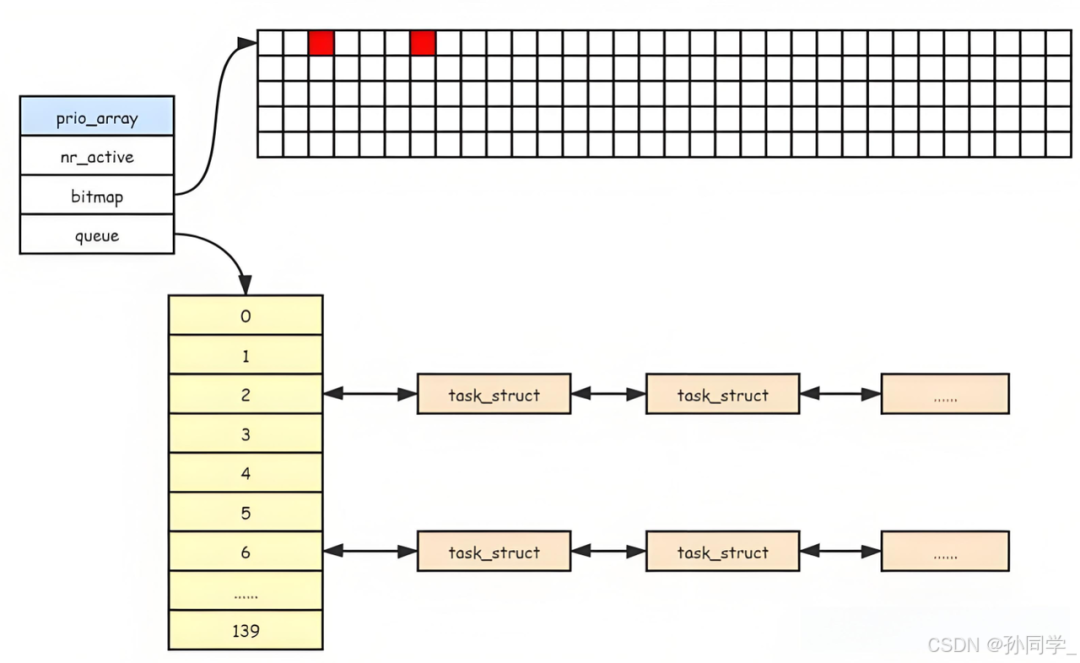
Insert image description here
- Expired Queue
- The expired queue has the same structure as the active queue.
- Processes placed in the expired queue are those whose time slices have expired.
- After all processes in the active queue have been processed, the processes in the expired queue will have their time slices recalculated.
- Active Pointer and Expired Pointer
<span>active</span>pointer always points to the active queue.<span>expired</span>pointer always points to the expired queue.- Processes in the active queue will decrease, while processes in the expired queue will increase, as processes’ time slices expire.
- At the right time, as long as we can swap the contents of the
<span>active</span>pointer and the<span>expired</span>pointer, it is equivalent to having a new batch of active processes!
<span>Linux</span> truly implements algorithm scheduling: O(1) scheduling algorithm. Re-understanding the <span>nice</span> value: The nice value is to ensure that the priority of old processes is not forcibly changed. The original priority of the process does not change, and when a nice value is added, when this scheduling is completed and reinserted into the expired queue, the priority is updated and linked to the specified position.
Link: https://blog.csdn.net/2301_81290732/article/details/146156088?spm=1001.2100.3001.7377&utm_medium=distribute.pc_feed_blog_category.none-task-blog-classify_tag-8-146156088-null-null.nonecase&depth_1-utm_source=distribute.pc_feed_blog_category.none-task-blog-classify_tag-8-146156088-null-null.nonecase
(Copyright belongs to the original author, please delete if infringed)
WeChat Group
WeChat group

To facilitate better communication on operation and maintenance and related technical issues, a WeChat group has been created. Friends who need to join the group can scan the QR code below to add me as a friend (note: join group).

Blog
Blog

CSDN Blog: https://blog.csdn.net/qq_25599925

Juejin Blog: https://juejin.cn/user/4262187909781751

Knowledge Planet: https://wx.zsxq.com/group/15555885545422

Long press to recognize the QR code to visit the blog website and see more high-quality original content.