1. Introduction: Firmware Security, the “Foundation Engineering” of System Protection
In the previous article, we fortified the “first gate” of system boot—the bootloader area, akin to equipping a house with a high-security door. However, if the foundation of the house is quietly compromised (corresponding to firmware tampering), even the strongest door cannot prevent the entire structure from collapsing. The firmware of a Linux system acts as the “core translator” between hardware devices and the operating system, responsible for initializing core hardware such as the CPU, memory, and disk, and transmitting interaction commands between hardware and the system, with a priority level even higher than that of the operating system kernel.
In everyday life, if the firmware of a smart lock is tampered with, even if the password is not leaked, an attacker can bypass the unlocking verification through malicious commands; if a router’s firmware is implanted with a backdoor, it can lead to the theft of data flowing through the entire home network. Similarly, if the firmware of a Linux server is tampered with, an attacker can implant malicious code before the system boots, bypassing all system-level protections (such as virus scanning and firewalls), and gain long-term control over hardware devices and system data. Firmware security is the underlying protection from “hardware to software”; only by solidifying this layer of defense can subsequent system security protections have a solid foundation.
This article will connect with the security system of the bootloader area, focusing on the core value of firmware security, detailing practical methods for firmware version verification, integrity checking, and malicious code scanning, helping operations personnel master the core techniques of firmware security checks and safeguard the “foundation” of system protection.
2. Tool Matrix: The “Firmware Security Equipment” from Verification to Protection
Firmware security checks must consider “version compliance,” “integrity verification,” and “malicious code detection”—system native tools can directly read firmware information, while open-source tools provide firmware read/write, structural analysis, and vulnerability scanning capabilities. All tools are well-known and continuously updated solutions in the open-source field, and the commands can be executed directly based on practical tests.
1. Core Tool Details (including precise installation and configuration)
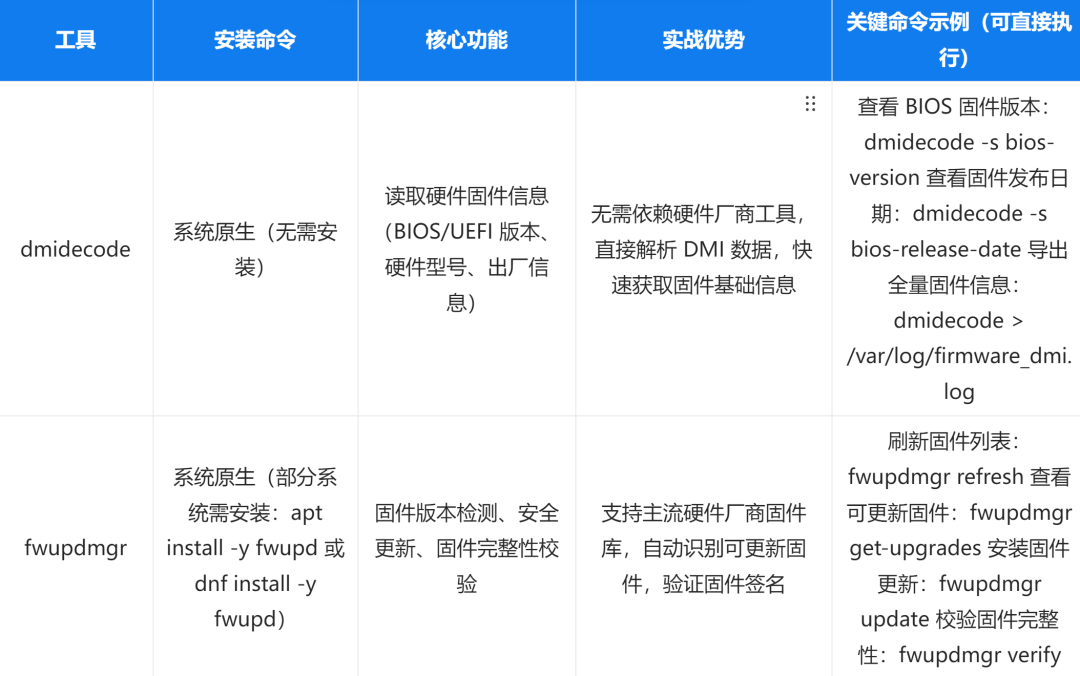
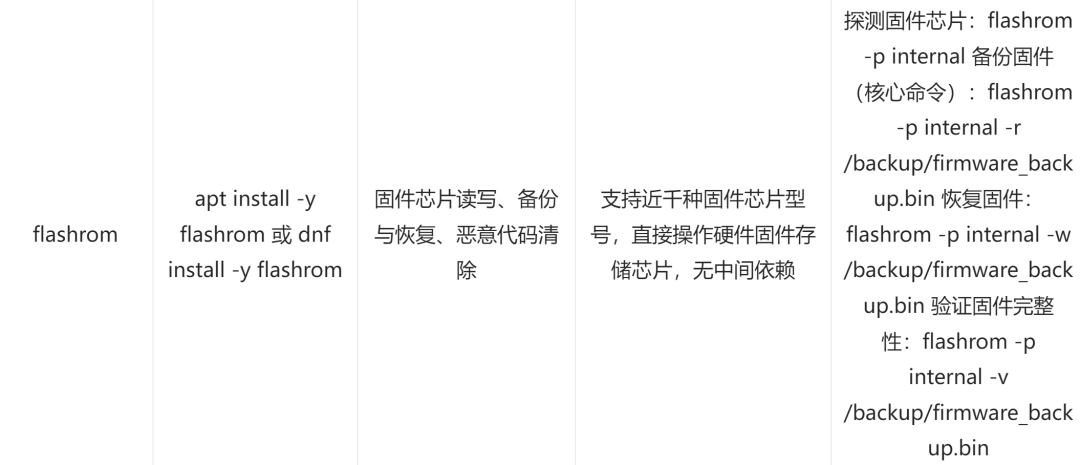
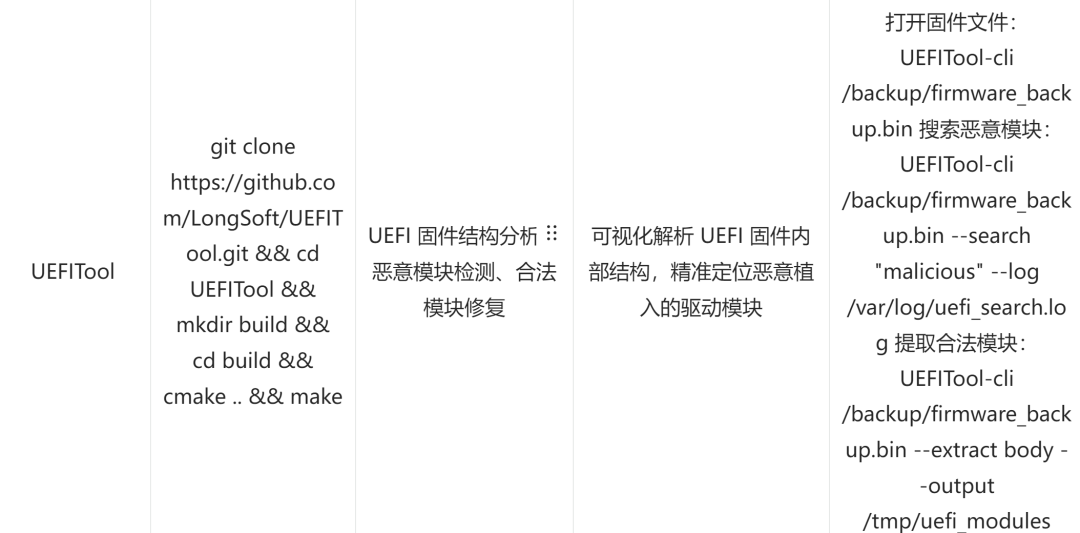
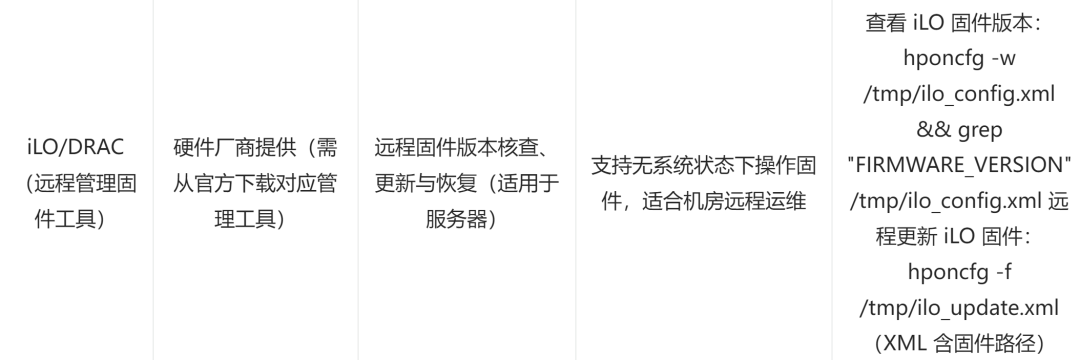
Tool Coordination Example (Firmware Security Emergency Inspection):
Use dmidecode to obtain basic firmware information: dmidecode -s bios-version, discovering that the firmware version is an outdated version released in 2018, with known vulnerabilities such as CVE-2023-XXXX;
Use fwupdmgr to check for upgradable versions: fwupdmgr get-upgrades, showing that a security update version from 2024 exists (fixing the aforementioned vulnerabilities);
Use flashrom to back up the current firmware: flashrom -p internal -r /backup/firmware_old.bin (backed up for offline storage to prevent update failures);
Use fwupdmgr to install updates: fwupdmgr update, and after rebooting the system as prompted, verify the version: dmidecode -s bios-version;
Use UEFITool to verify the firmware structure: UEFITool-cli /backup/firmware_new.bin –verify, confirming no abnormal modules or tampering traces.
2. Tool Selection Logic
Routine Inspection: Prioritize dmidecode + fwupdmgr, quickly check if the firmware version has known vulnerabilities, confirming whether a security update is needed, with lightweight and low-risk operations;
Integrity Checking: Use flashrom, regularly back up firmware and verify integrity, directly operating on hardware chips to avoid misjudgment caused by reliance on system-level interfaces;
In-depth Inspection: Combine UEFITool + flashrom, where UEFITool analyzes the internal module structure of the firmware to locate malicious code, and flashrom executes firmware recovery, suitable for suspected tampering scenarios;
Remote Operations: In server scenarios, use vendor tools like iLO / DRAC, supporting firmware management without system status, suitable for batch operations in data centers.
3. Scenario-Based Practice: Three Core Scenarios to Safeguard Firmware Security
The risks of firmware security concentrate on “outdated versions (with vulnerabilities), integrity being compromised (tampered), and implanted malicious modules.” The following three scenarios cover the entire process of protection, each scenario combines life logic with actionable command steps, with key operations accompanied by risk alerts.
1. Scenario One: Firmware Version Verification and Security Update—Patching the “Underlying System”
Firmware is like the “operating system” of hardware devices; outdated versions often have unpatched security vulnerabilities that attackers can exploit to implant malicious code. Timely firmware updates are akin to installing security patches on smart devices, blocking known vulnerability attack paths.
(1) Core Operation Steps
Obtain Basic Firmware Information:
First, clarify the current firmware version, release date, and hardware model to determine the necessity of updates:
# View BIOS/UEFI version and release date (core information)dmidecode -s bios-versiondmidecode -s bios-release-date# View hardware manufacturer and model (confirm the compatible firmware update package)dmidecode -s system-manufacturerdmidecode -s system-product-name# Use fwupdmgr to obtain detailed firmware information (including associated hardware device list)fwupdmgr get-devicesCheck for Upgradable Security Firmware:
Connect to the official firmware repository and filter for “Security” type updates (prioritize fixing vulnerabilities):
# Force refresh firmware repository cache (get the latest update list)fwupdmgr refresh --force# View all upgradable firmware, focusing on security updatesfwupdmgr get-upgrades | grep -E "Device|Version|Security"# View update details for a specified device (0 is the device index, obtained from get-upgrades output)fwupdmgr get-upgrade 0Securely Install Firmware Updates:
First, back up the current firmware to avoid hardware unavailability due to update failures (core risk control step):
# Use flashrom to back up the current firmware (key step, backup file must be stored offline)flashrom -p internal -r /backup/firmware_pre_update.bin# Execute firmware update (some updates require a reboot, ensure low-peak business operations)fwupdmgr update# Reboot the system to make the update effective (do not skip, otherwise the update will be incomplete)reboot# Verify the update result (double confirmation: version + integrity)dmidecode -s bios-version # Confirm the version has been updated to the target versionfwupdmgr verify # Verify the integrity of the firmware after the updateAnalogy:
This is like updating the system of a smart TV— the firmware of a smart TV is its “underlying operating system,” and the security updates released by the manufacturer will fix specific vulnerabilities (such as “implanting malicious programs through the screen mirroring function”). Timely updates can block such risks. The logic of firmware updates is entirely consistent, as it involves patching underlying vulnerabilities to prevent attackers from exploiting known flaws to invade the system.
2. Scenario Two: Firmware Integrity Checking—Verifying that the “Underlying Program” Has Not Been Tampered With
Firmware integrity is core to security; if the firmware is tampered with, attackers can implant malicious code during the hardware initialization phase, which cannot be detected by system-level tools. Regularly checking firmware integrity is like checking whether the “underlying program” of household appliances has been modified, ensuring that devices operate according to preset logic.
(1) Core Operation Steps
Establish Firmware Backup Baseline:
After the first deployment or firmware update, immediately back up the original firmware as a baseline for subsequent verification (the baseline must be stored offline):
# Detect firmware chip (confirm chip model and operable state to avoid misoperation)flashrom -p internal# Back up firmware to a secure storage medium (recommended to write to a USB drive or offline server)flashrom -p internal -r /backup/firmware_baseline.bin# Generate firmware hash value (for quick verification, avoiding full file comparison)sha256sum /backup/firmware_baseline.bin > /backup/firmware_baseline.sha256# Add read-only attribute to the backup file (to prevent tampering, ensuring baseline validity)chattr +i /backup/firmware_baseline*Regularly Check Firmware Integrity:
Compare the current firmware with the baseline backup hash value to quickly identify tampering traces:
# Read current firmware and generate hash value (temporary file, can be deleted after verification)flashrom -p internal -r /tmp/firmware_current.binsha256sum /tmp/firmware_current.bin > /tmp/firmware_current.sha256# Compare baseline hash value (no output indicates integrity is normal, output indicates tampering)diff /tmp/firmware_current.sha256 /backup/firmware_baseline.sha256# Use flashrom for direct verification (more accurate, avoiding errors during file read/write)flashrom -p internal -v /backup/firmware_baseline.binDetect Firmware Structural Anomalies:
If the hash values do not match, use UEFITool to analyze the internal structure of the firmware and locate newly added malicious modules:
# Analyze firmware structure, export module list (for comparative analysis)UEFITool-cli /tmp/firmware_current.bin --list > /tmp/firmware_modules.txt# Compare the module list of the baseline firmware (identify newly added, deleted, or modified modules)UEFITool-cli /backup/firmware_baseline.bin --list > /tmp/firmware_baseline_modules.txtdiff /tmp/firmware_modules.txt /tmp/firmware_baseline_modules.txt# Search for malicious module characteristics (common keywords: backdoor, miner, trojan, etc.)UEFITool-cli /tmp/firmware_current.bin --search "backdoor" --log /var/log/firmware_malicious.logAnalogy:
This is like checking the “core program” of a smart lock— if someone tampers with the underlying firmware of the lock, even if the appearance and mechanical structure are normal, it may execute hidden commands during unlocking (such as recording passwords or opening doors remotely). By comparing the “signature” (hash value) of the original firmware, such tampering can be quickly detected, preventing the lock from becoming a “backdoor.”
3. Scenario Three: Firmware Malicious Code Scanning and Repair—Removing “Underlying Intruders”
If tampering or implanted malicious modules are detected in the firmware, it is necessary to immediately remove the malicious code and restore the original firmware to prevent attackers from maintaining long-term control over the system through the firmware. The core of firmware repair is “overwriting malicious firmware + verifying integrity,” ensuring that hardware is restored to a secure state.
(1) Core Operation Steps
Emergency Backup of Abnormal Firmware:
First, back up the current abnormal firmware (for subsequent attack tracing), then perform repair operations:
# Backup abnormal firmware (name includes date for tracing tampering time)flashrom -p internal -r /backup/firmware_malicious_$(date +%Y%m%d).bin# Record firmware chip information (including model, manufacturer, for analyzing tampering methods)flashrom -p internal > /backup/firmware_chip_info_$(date +%Y%m%d).logRemove Malicious Code and Restore Firmware:
Prioritize restoring from the baseline backup (safest); if no backup exists, use the vendor’s official firmware:
# Method 1: Restore from baseline backup (recommended, highest compatibility and security)flashrom -p internal -w /backup/firmware_baseline.bin# Method 2: Use vendor's original firmware for recovery (when no backup exists, must be downloaded from the official website)# 1. Download the corresponding model's original firmware from the hardware vendor (e.g., firmware_original.bin)# 2. Verify the integrity of the firmware file (compare with the hash value provided by the official website)# 3. Execute the recovery commandflashrom -p internal -w /tmp/firmware_original.bin# Method 3: Precise deletion of malicious modules from UEFI firmware (advanced operation, requires professional knowledge)# Note: This operation requires familiarity with UEFI firmware structure; beginners are advised to prioritize Method 1# 1. Extract legitimate modules from the baseline firmwareUEFITool-cli /backup/firmware_baseline.bin --extract body --output /tmp/legit_modules# 2. Replace malicious modules in the abnormal firmwareUEFITool-cli /tmp/firmware_current.bin --replace /tmp/legit_modules --output /tmp/firmware_fixed.bin# 3. Write the repaired firmwareflashrom -p internal -w /tmp/firmware_fixed.binVerify Repair Effect:
From “integrity + functionality + structure” triple verification, ensure the firmware is restored to normal:
# Verify firmware integrity (consistent with baseline, no tampering)flashrom -p internal -v /backup/firmware_baseline.bin# Analyze firmware structure, confirm no abnormal modulesUEFITool-cli /tmp/firmware_current.bin --verify > /var/log/firmware_verify.log# Check hardware functionality (confirm that hardware is correctly recognized and operates normally after firmware repair)dmidecode -s system-status # Output "OK" for normallshw | grep -E "CPU|Memory|Disk" # Confirm core hardware is recognized normallyFirmware Security Hardening (to Prevent Further Tampering):
After repair, enable multi-layer protection to block subsequent tampering attempts:
# 1. Enable BIOS/UEFI write protection (hardware-level restriction on firmware modification, requires entering the BIOS interface) # Path reference: BIOS -> Security -> Firmware Write Protect -> Enable# 2. Configure regular automatic backups (add a scheduled task to execute every Sunday at 2 AM)echo "0 2 * * 0 flashrom -p internal -r /backup/firmware_backup_$(date +%Y%m%d).bin && sha256sum /backup/firmware_backup_$(date +%Y%m%d).bin >> /backup/firmware_backup_history.sha256" >> /etc/crontab# 3. Monitor firmware version changes (record version logs, alert for anomalies)echo "0 3 * * 0 dmidecode -s bios-version >> /var/log/firmware_version_monitor.log" >> /etc/crontabAnalogy:
This is like repairing the firmware of a tampered smart camera— if the camera firmware is implanted with malicious code, it may secretly record and upload footage. During repair, the original firmware must first be obtained from the vendor (to overwrite the malicious code), and then firmware write protection must be enabled (to prevent further tampering), ultimately ensuring that the camera operates only according to its preset function of “monitoring and recording,” without executing any hidden commands.
Conclusion: Firmware Security is the “Ultimate Defense Line” of the System’s Underlying Layer, Connecting Vulnerability Detection Tools
As the “bridge” between hardware and systems, the security of firmware directly determines the foundation of the entire protection system. Through version verification and updates, known vulnerability attacks can be blocked; with integrity checks, firmware tampering traces can be detected in a timely manner; using backup and repair tools, malicious code can be removed and a secure state restored. This set of “version verification – integrity checking – malicious repair – security hardening” protection logic safeguards the interaction security between hardware and systems from the ground up.
Firmware security focuses on “hardware-level protection,” while various software components (such as kernels and applications) may still have undiscovered vulnerabilities during system operation, which become important paths for attackers to breach the system. The next article, “Linux System Vulnerability Detection Tools and Methods,” will focus on the precise detection of system-level vulnerabilities, detailing the practical application of open-source vulnerability scanning tools, vulnerability risk grading assessment, and security patch deployment strategies, forming a comprehensive security loop of “firmware-level protection – system vulnerability protection – application security protection,” providing complete protection for Linux systems from hardware to software.