▎Introduction
In the digital age, our computers accumulate a large number of files, ranging from documents, images, to videos and audio in various formats. Manually organizing these files is not only time-consuming but also prone to errors. This article will introduce how to use Python to build an intelligent folder monitoring and automatic classification system, helping you automate the file organization process and improve work efficiency.
This article is suitable for developers with a certain foundation in Python, especially those interested in file processing and automation script development. By learning this article, you will master how to use the Watchdog library to monitor file system changes, implement automatic classification of files based on their extensions, and build an automation tool that can run continuously in the background.
▎Applicable Scenarios
In daily work and life, we often encounter the following file management challenges:
- Files in the download folder are disorganized, making it difficult to quickly find the required files.
- Need to manually classify different formats of files into different folders.
- Hope to monitor a specific folder in real-time and classify newly added files immediately.
The traditional manual organization method is inefficient, especially when the number of files is large or when new files need to be processed frequently. The solution provided in this article can automatically monitor a specified folder and classify new files into corresponding subfolders based on preset rules.
▎Solution
This article will use Python’s Watchdog library to build a folder monitoring and automatic classification system. The core idea of this solution is:
- Monitor file creation events in the specified folder.
- Identify file types based on file extensions.
- Move files to corresponding classified folders according to preset rules.
The main tools and technologies used:
- Python 3.x
- Watchdog library (for file system monitoring)
- Standard library modules: pathlib, shutil, sys
▎Code Implementation Logic
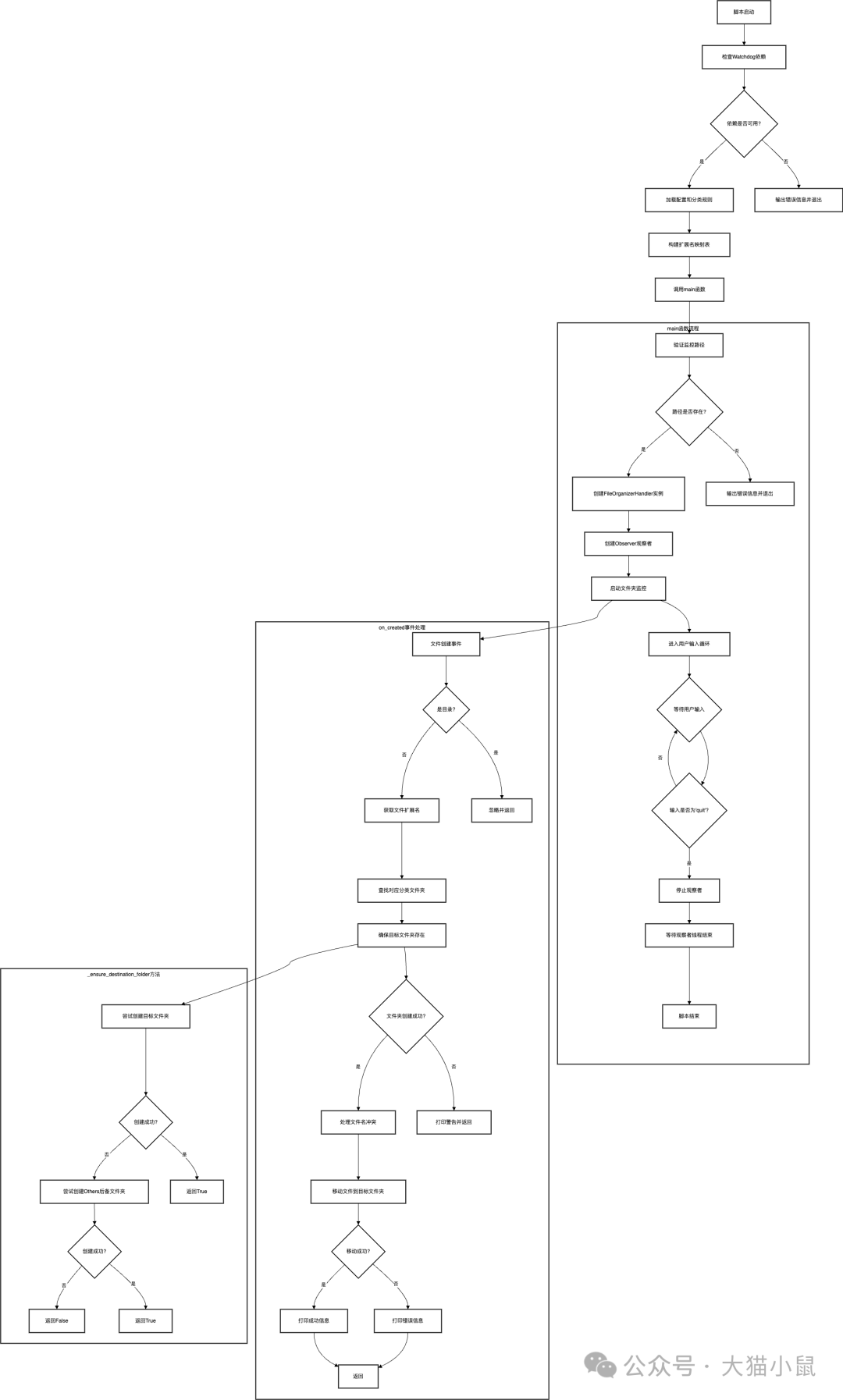
▎Implementation Steps
1. Environment Preparation
First, you need to install the necessary dependency libraries. Watchdog is the core dependency that provides cross-platform file system monitoring capabilities.
Installation command:
pip install watchdog
Verify installation:
import watchdog
print(watchdog.__version__)
2. Basic Construction
Create a script file (e.g., <span>file_organizer.py</span>) and import the required modules:
import sys
import shutil
from pathlib import Path
from watchdog.observers import Observer
from watchdog.events import FileSystemEventHandler
Next, configure the monitoring path and classification rules. This is the core configuration part of the script, and users can customize it as needed:
# Path of the folder to be monitored (please modify to your actual path)
WATCHED_FOLDER_PATH = r"/path/to/your/folder"

# File classification rules definition
_CATEGORIES = {
    "Documents": ['.txt', '.pdf', '.doc', '.docx', '.xls', '.xlsx'],
    "Images": ['.jpg', '.jpeg', '.png', '.gif', '.bmp'],
    "Videos": ['.mp4', '.avi', '.mov', '.wmv'],
    # More categories can be added as needed
}
3. Core Function Implementation
Create an event handler class that inherits from <span>FileSystemEventHandler</span> and override the <span>on_created</span> method:
class FileOrganizerHandler(FileSystemEventHandler):
    def __init__(self, watch_path):
        super().__init__()
        self.watch_path = Path(watch_path).resolve()

    def on_created(self, event):
        # Ignore folder creation events
        if event.is_directory:
            return

        src_path = Path(event.src_path)
        file_ext = src_path.suffix.lower()

        # Get the target folder based on the extension
        dest_folder_name = EXTENSION_FOLDERS.get(file_ext, 'Others')
        dest_folder_path = self.watch_path / dest_folder_name

        # Ensure the target folder exists
        dest_folder_path.mkdir(exist_ok=True)

        # Handle file name conflicts
        dest_file_path = dest_folder_path / src_path.name
        counter = 1
        while dest_file_path.exists():
            dest_file_path = dest_folder_path / f"{src_path.stem}_{counter}{src_path.suffix}"
            counter += 1

        # Move file
        shutil.move(str(src_path), str(dest_file_path))
        print(f"File moved: {src_path.name} -> {dest_file_path}")
Implement the main function to start monitoring and user interaction:
def main():
    # Create observer and handler
    event_handler = FileOrganizerHandler(WATCHED_FOLDER_PATH)
    observer = Observer()
    observer.schedule(event_handler, path=WATCHED_FOLDER_PATH, recursive=False)

    # Start monitoring
    observer.start()
    print("Monitoring started, type 'quit' to stop...")

    # Wait for user input to stop command
    try:
        while True:
            cmd = input().strip().lower()
            if cmd == 'quit':
                observer.stop()
                break
    except KeyboardInterrupt:
        observer.stop()

    observer.join()
▎Precautions
- Path Configuration: Ensure that the monitoring path is valid and has read and write permissions, especially on Windows systems where path format needs attention (use raw strings or double backslashes).
- File Conflicts: The script already includes logic to handle files with the same name, but a large number of file operations may still require performance optimization.
- System Resources: Long-term monitoring will consume a small amount of system resources, which should be noted on low-performance devices.
- File Locking: If other programs are using the monitored files, the move operation may fail.
- Permission Issues: Ensure that the Python process has sufficient permissions to create subfolders and move files in the target folder.
▎Conclusion
Through the study of this article, you have mastered how to use Python and the Watchdog library to build an automated file classification system. This tool can help you automatically organize your download folder, document directory, or other collections of files that need classification.
To further expand this tool, you might consider:
- Adding more file type classification rules.
- Implementing intelligent classification based on file content (e.g., using machine learning to recognize image content).
- Adding a graphical user interface (GUI) to make configuration more convenient.
- Increasing logging functionality to track file operation history.
If you encounter problems or have suggestions for improvement during use, feel free to share your thoughts and experiences in the comments section.
▎Complete Code Overview
#!/usr/bin/env python3

import sys
import shutil
from pathlib import Path

try:
    from watchdog.observers import Observer
    from watchdog.events import FileSystemEventHandler
except ImportError:
    print("Error: Watchdog library not found.", file=sys.stderr)
    print("Please install it using the command 'pip install watchdog'.", file=sys.stderr)
    sys.exit(1)

WATCHED_FOLDER_PATH = r"/path/to/your/folder"

_CATEGORIES = {
    "Documents": ['.txt', '.pdf', '.doc', '.docx', '.xls', '.xlsx', '.ppt', '.pptx', '.md', '.rtf'],
    "Images": ['.jpg', '.jpeg', '.png', '.gif', '.bmp', '.svg', '.webp'],
    "Videos": ['.mp4', '.avi', '.mov', '.wmv', '.flv', '.mkv'],
    "Audio": ['.mp3', '.wav', '.flac', '.aac', '.ogg'],
    "Archives": ['.zip', '.rar', 'z', '.tar', '.gz'],
    "Executables": ['.exe', '.msi', '.bat', '.sh', '.app'],
}

def build_extension_map(categories_dict):
    extension_map = {}
    for folder_name, extensions in categories_dict.items():
        for ext in extensions:
            clean_ext = ext.strip().lower()
            if not clean_ext.startswith('.'):
                clean_ext = '.' + clean_ext
            extension_map[clean_ext] = folder_name
    return extension_map

EXTENSION_FOLDERS = build_extension_map(_CATEGORIES)

class FileOrganizerHandler(FileSystemEventHandler):

    def __init__(self, watch_path):
        super().__init__()
        self.watch_path = Path(watch_path).resolve()
        if not self.watch_path.exists() or not self.watch_path.is_dir():
            print(f"Error: Monitoring path '{self.watch_path}' does not exist or is not a folder.", file=sys.stderr)
            sys.exit(1)

    def on_created(self, event):
        if event.is_directory:
            return

        src_path = Path(event.src_path)
        print(f"Detected new file: {src_path.name}")

        file_ext = src_path.suffix.lower()
        dest_folder_name = EXTENSION_FOLDERS.get(file_ext, 'Others')
        dest_folder_path = self.watch_path / dest_folder_name

        dest_folder_path.mkdir(exist_ok=True)

        dest_file_path = dest_folder_path / src_path.name
        counter = 1
        while dest_file_path.exists():
            dest_file_path = dest_folder_path / f"{src_path.stem}_{counter}{src_path.suffix}"
            counter += 1

        try:
            shutil.move(str(src_path), str(dest_file_path))
            print(f"File moved to: {dest_file_path.relative_to(self.watch_path)}")
        except Exception as e:
            print(f"Failed to move file: {e}")


def main():
    print("Starting folder monitoring and classification script...")

    watch_directory = Path(WATCHED_FOLDER_PATH)
    if not watch_directory.exists() or not watch_directory.is_dir():
        print(f"Error: Monitoring path '{watch_directory}' does not exist or is not a folder.", file=sys.stderr)
        sys.exit(1)

    event_handler = FileOrganizerHandler(str(watch_directory))
    observer = Observer()
    observer.schedule(event_handler, path=str(watch_directory), recursive=False)

    observer.start()
    print(f"Started monitoring folder: {watch_directory}")
    print("Type 'quit' to stop monitoring...")

    try:
        while True:
            cmd = input().strip().lower()
            if cmd == 'quit':
                print("Stopping monitoring...")
                observer.stop()
                break
    except (KeyboardInterrupt, EOFError):
        print("\nStopping monitoring...")
        observer.stop()

    observer.join()
    print("Monitoring stopped.")

if __name__ == "__main__":
    main()