NLTK (Natural Language Toolkit) is an open-source Python library used for natural language processing. NLTK is a powerful toolkit for natural language processing, and below are some common uses of NLTK in this field:
Part-of-Speech Tagging: Tags words with their parts of speech in a sentence, such as nouns, verbs, etc.
Tokenization: Splits text into words.
Sentence Splitting: Splits text into sentences.
Stop Word Filtering: Filters out common words in the text, such as “is”, “the”, etc.
Sentiment Analysis: Analyzes the sentiment in the text, such as positive, negative, etc.
Keyword Extraction: Extracts keywords from the text.
Syntactic Parsing: Analyzes the grammatical structure of the text.
Text Summarization: Generates a summary of the text.
Using the NLTK Library
(1) Basic Usage
1. Install the NLTK library and use nltk.download() to download the necessary corpora.
Command line:
pip install nltk
In Python interpreters or interactive development environments like Jupyter Notebook:
import nltk
nltk.download()
2. Learn basic text processing operations, such as reading files, tokenization, stop word filtering, stemming, and part-of-speech tagging.
Methods and code examples for learning basic text processing operations:
(1) Reading Files
Use Python’s built-in open() function to read the text content from a file, as shown in the code below:
| with open(‘filename.txt’, ‘r’) as f: text = f.read() |
Here, filename.txt is the name of the file to be read, and ‘r’ indicates that the file is opened in read-only mode. The with statement automatically closes the file handle to avoid resource leaks.
(2) Tokenization
The NLTK library provides several tokenizers, with the most commonly used being the word_tokenize() function. The specific code is as follows:
| import nltk from nltk.tokenize import word_tokenize text = ‘This is a sample text for tokenization.’ tokens = word_tokenize(text) print(tokens) |
The output will be:
| [‘This’, ‘is’, ‘a’, ‘sample’, ‘text’, ‘for’, ‘tokenization’, ‘.’] |
(3) Stop Word Filtering
Stop words are commonly ignored words in text processing, such as “the”, “a”, “an”, etc. The NLTK library provides various stop word lists that can be used to filter out stop words from the text. The specific code is as follows:
| from nltk.corpus import stopwords stop_words = set(stopwords.words(‘english’)) filtered_tokens = [token for token in tokens if token.lower() not in stop_words] print(filtered_tokens) |
The output will be:
| [‘sample’, ‘text’, ‘tokenization’, ‘.’] |
(4) Stemming
Stemming is the process of converting words to their root or base form. The NLTK library provides several stemmers, with the most commonly used being the PorterStemmer class. The specific code is as follows:
| from nltk.stem import PorterStemmer stemmer = PorterStemmer() stemmed_tokens = [stemmer.stem(token) for token in filtered_tokens] print(stemmed_tokens) |
The output will be:
| [‘sampl’, ‘text’, ‘token’, ‘.’] |
Note that stemmers may not always convert words to their correct base forms, and some errors may occur. Therefore, in certain scenarios, it is advisable to use more accurate lemmatization techniques.
3. Learn to use the NLTK library for text classification, such as sentiment analysis, spam filtering, and topic classification.
In NLTK, various techniques can be used for text classification, such as Naive Bayes, Maximum Entropy, and Support Vector Machines. Below is an example sentiment analysis program:
| import nltk nltk.download(‘punkt’) nltk.download(‘wordnet’) nltk.download(‘averaged_perceptron_tagger’) nltk.download(‘vader_lexicon’) from nltk.sentiment import SentimentIntensityAnalyzer sia = SentimentIntensityAnalyzer() text = “I love this movie, it’s so great!” sentiment = sia.polarity_scores(text) if sentiment[‘compound’] > 0: print(“Positive sentiment detected.”) elif sentiment[‘compound’] == 0: print(“Neutral sentiment detected.”) else: print(“Negative sentiment detected.”) |
This program uses NLTK’s SentimentIntensityAnalyzer to perform sentiment analysis on the text and outputs the result. In the example above, we classify the text “I love this movie, it’s so great!” as positive sentiment.
For other types of text classification, different algorithms and techniques can be used. For example, a Naive Bayes classifier can be used to filter spam, and Support Vector Machines can be used for topic classification, etc. Regardless of the method used, NLTK is a powerful tool that helps you easily perform various text classification tasks in Python.
What to do if you encounter problems?
1. When downloading English tokenization, if the following error occurs:
import nltk
nltk.download() # run this one time
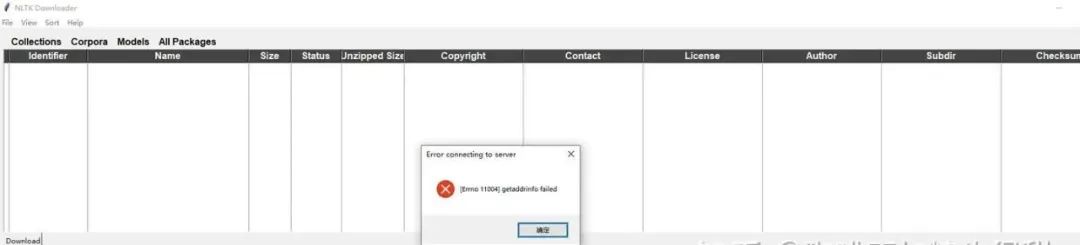
Solution:
Manually download from the official website and place it in the designated path to run normally. The steps are as follows:
(1) Go to the official website http://www.nltk.org/nltk_data/, find the download link for the Stopwords Corpus, and click to download;
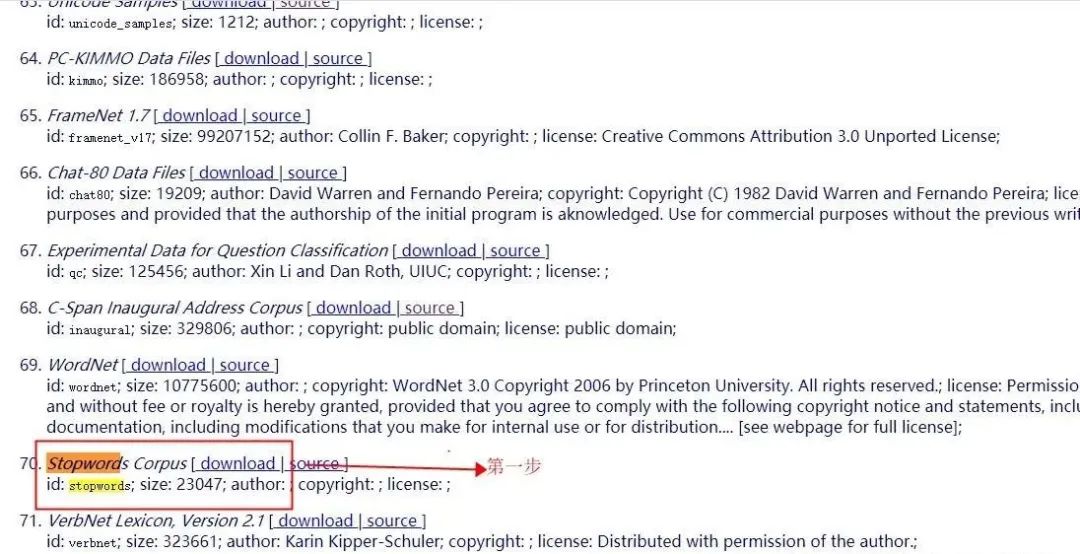
(2) Check the path of nltk:
from nltk import data
print(data.path)
(3) Unzip the downloaded file to the following directory, creating a new folder if there isn’t one:
- Find one of the folders, for example, I am in D:\anaconda\anaconda3 folder
- Create a new nltk_data folder in that directory;
- Then create a corpora folder in nltk_data and place the extracted stopword there.

(4) Re-execute, successfully import stopword.
from nltk.corpus import stopwords
stop_words = stopwords.words('english')
print(stop_words)
Mastering NLTK
What does it mean to master? Mastery means expressing your ideas fluently.
What does it mean to master a tool? It means being able to accomplish what you want smoothly with that tool. Do everything you want with NLTK.
As for how to master it, it is recommended to read more English materials and practice hands-on. The official NLTK documentation, various university research institutions participating in NLTK, and papers published by international language research institutions like ACL, Peking University, and Tsinghua University are all good resources.
Assuming you have truly mastered various uses of NLTK, your hallmark of mastery is to modify NLTK to make it more powerful, efficient, and convenient.
For example:
1) Integrate Jieba tokenizer into NLTK’s tokenizer.
2) Set up several places in China to host the NLTK data package for easier downloading.
3) Provide corpora for NLTK.
And so on, the rest is up to you to add.