🚀 Preview
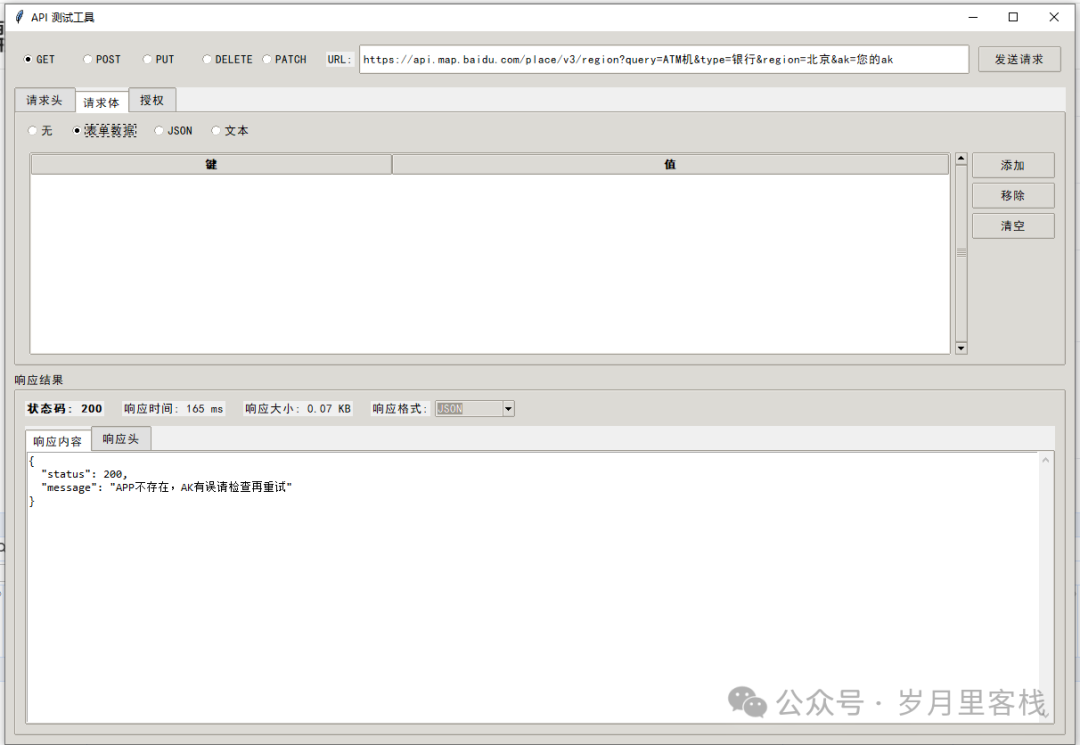
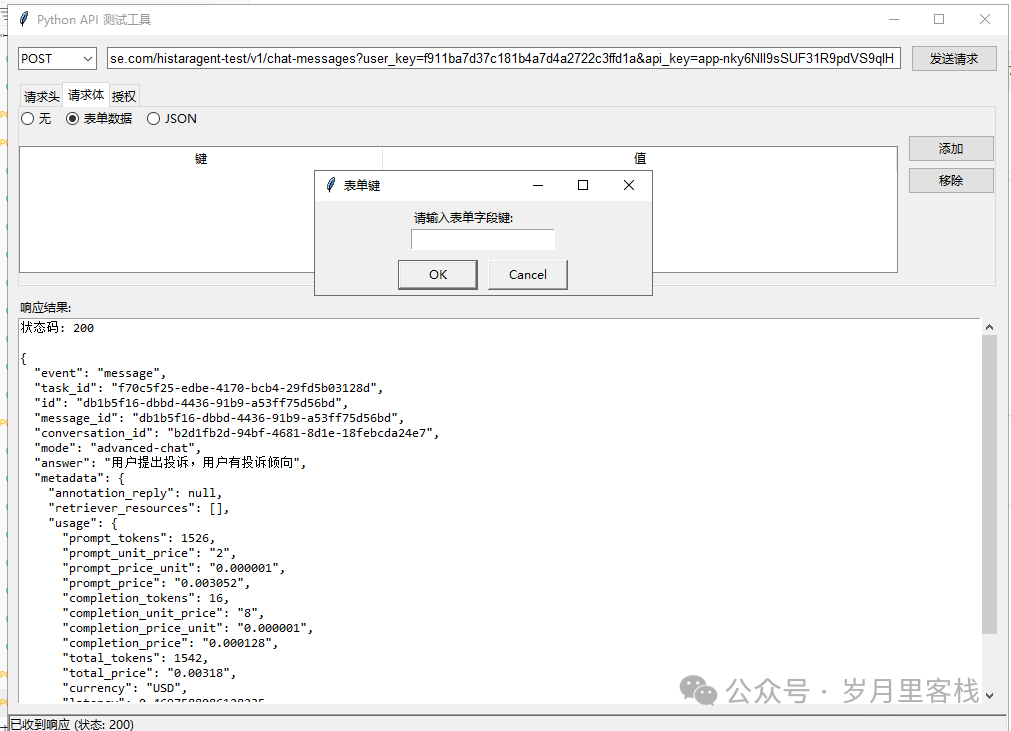
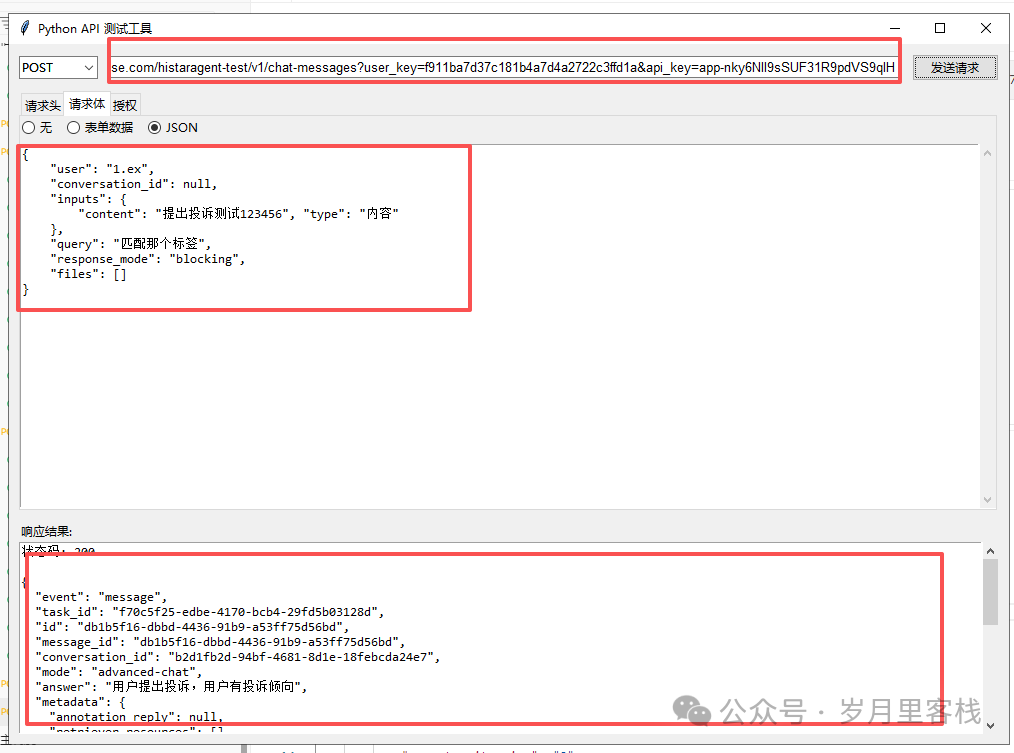
Super API Tester: The Journey from “Manual Curl” to “One-Click Launch”
“Hey! Are you still typing
<span>curl -X POST ...</span>in the terminal until your fingers cramp? Are you still doubting life because you can’t understand the massive JSON returned by the server? Today, we will use less than 400 lines of Python to pack the core functionalities of Postman into a desktop application – it can not only GET, POST, PUT, DELETE, but also automatically format, highlight, and even be cute! Get ready to hold the keyboard steady, let’s get started!”
📂 Table of Contents
- Project Overview: Small Size, Big Dreams
- Technology Selection: The Golden Pair of Tkinter + Requests
- Interface Architecture: Hierarchical Breakdown from Root Window to Tabs
- Request Configuration Area: Method, URL, Headers, Body, Authorization in Five Steps
- Response Display Area: Status, Time, Size, Formatting All-in-One
- Core Process: How send_request Completes the Request Lifecycle in One Go
- Knowledge Recap: GUI, Networking, Exceptions, Formatting
- Goals and Outlook: From “Running” to “Flying”
1️⃣ Project Overview: Small Size, Big Dreams
| Dimension | Description |
|---|---|
| Language | Python3 |
| GUI | Tkinter (built-in, zero dependencies) |
| Networking | Requests (human-friendly) |
| Functionality | Supports GET/POST/PUT/DELETE/PATCH, visual editing of Headers/Body/Auth, automatic response formatting, real-time feedback in the status bar |
| Size | Single file runnable, about 380 lines |
2️⃣ Technology Selection: The Golden Pair of Tkinter + Requests
- Tkinter: Built-in GUI for Python, cross-platform (Win/Mac/Linux), no additional installation required.
- ttk: The “beautified version” of Tkinter, providing advanced controls like Combobox, Notebook, Treeview, etc.
- Requests: Wraps 100 lines of urllib into 1 line, automatically handles redirection, encoding, SSL.
- json/xml.re: Formatting, highlighting, and indentation rely on them.
3️⃣ Interface Architecture: Hierarchical Breakdown from Root Window to Tabs
root (Tk)
└── EnhancedPostman
    ├── main_frame (ttk.Frame)
    │   ├── top_control_area (method + url + send)
    │   ├── notebook (request-related tabs)
    │   │   ├── headers_frame
    │   │   ├── body_frame
    │   │   └── auth_frame
    │   └── response_area (LabelFrame)
    │       ├── response_notebook
    │       │   ├── response_content_frame
    │       │   └── response_headers_frame
    └── status_bar
Code Snippet 1: Root Window and Main Frame
root = tk.Tk()
root.title("API Testing Tool")
root.geometry("1200x800")
root.minsize(1000, 700)
main_frame = ttk.Frame(root, padding="10")
main_frame.pack(fill=tk.BOTH, expand=True)
<span>geometry</span>sets width and height at once;<span>minsize</span>prevents user from dragging too small, causing control misalignment.<span>padding</span>gives the main frame a 10px breathing space.
4️⃣ Request Configuration Area: Method, URL, Headers, Body, Authorization in Five Steps
4.1 Method & URL
Code Snippet 2: Top Control Area
top_frame = ttk.Frame(self.main_frame, padding=5)
top_frame.pack(fill=tk.X)

self.method_var = tk.StringVar(value="GET")
for m in ["GET", "POST", "PUT", "DELETE", "PATCH"]:
    ttk.Radiobutton(top_frame, text=m, variable=self.method_var, value=m, width=6)\
        .pack(side=tk.LEFT, padx=2)

self.url_var = tk.StringVar(value="https://")
ttk.Entry(top_frame, textvariable=self.url_var).pack(side=tk.LEFT, fill=tk.X, expand=True, ipady=5)
<span>Radiobutton</span>ensures only one method can be selected at a time.<span>ipady=5</span>increases the height of the input box for easier clicking.
4.2 Request Headers Treeview
Code Snippet 3: headers_frame
self.headers_tree = ttk.Treeview(headers_frame, columns=("Key", "Value"), show="headings", height=6)
self.headers_tree.heading("Key", text="Key")
self.headers_tree.heading("Value", text="Value")
self.headers_tree.column("Key", width=180, anchor=tk.W)
self.headers_tree.pack(side=tk.LEFT, fill=tk.X, expand=True, padx=(10, 5), pady=10)
<span>show="headings"</span>hides the default first column, making it look cleaner.- Add and delete buttons interact through
<span>simpledialog.askstring</span>, zero learning cost.
4.3 Request Body: Dynamic Panel
Code Snippet 4: body_frame Switching Mechanism
self.body_type_var = tk.StringVar(value="none")
self.body_type_var.trace_add("write", self.update_body_frame)

def update_body_frame(self, *args):
    body_type = self.body_type_var.get()
    self.form_frame.pack_forget()
    self.json_frame.pack_forget()
    self.text_frame.pack_forget()
    if body_type == "form":
        self.form_frame.pack(fill=tk.BOTH, expand=True)
    elif body_type == "json":
        self.json_frame.pack(fill=tk.BOTH, expand=True)
    ...
<span>trace_add("write", callback)</span>: When the variable changes, the interface is immediately rearranged, responsive and smooth.
4.4 Authorization: Basic & Bearer
Code Snippet 5: auth_frame
self.auth_type_var = tk.StringVar(value="none")
self.auth_type_var.trace_add("write", self.update_auth_frame)

# Basic
basic_auth = ttk.LabelFrame(self.auth_frame, text="Basic Authentication Info")
ttk.Label(basic_auth, text="Username:").grid(row=0, column=0, sticky=tk.W)
ttk.Entry(basic_auth, textvariable=self.username_var).grid(row=0, column=1, sticky=tk.EW)
- Using
<span>LabelFrame</span>provides a group title, increasing space utilization by +1.
5️⃣ Response Display Area: Status, Time, Size, Formatting All-in-One
5.1 Information Bar Trio
Code Snippet 6: Response Information Bar
self.status_code_var = tk.StringVar(value="Status Code: --")
ttk.Label(response_info_frame, textvariable=self.status_code_var, font=('SimHei', 10, 'bold'))\
    .pack(side=tk.LEFT, padx=(0, 20))
- Three
<span>StringVar</span>refresh in real-time, UI thread is non-blocking.
5.2 Response Content Formatting
Code Snippet 7: format_response
def format_response(self, event=None):
    if not self.response_data:
        return
    fmt = self.response_format_var.get()
    if fmt == "JSON":
        data = json.loads(self.response_data)
        formatted = json.dumps(data, indent=2, ensure_ascii=False)
    elif fmt == "XML":
        dom = xml.dom.minidom.parseString(self.response_data)
        formatted = dom.toprettyxml(indent="  ")
    ...
    self.response_text.delete("1.0", tk.END)
    self.response_text.insert(tk.END, formatted)
<span>ensure_ascii=False</span>allows Chinese characters to display in their original form.- Exception handling
<span>try/except</span>: Even if the user pastes invalid JSON, it can degrade gracefully.
6️⃣ Core Process: send_request Completes the Lifecycle in One Go
Code Snippet 8: send_request (trimmed but still over 5 lines)
def send_request(self):
    url = self.url_var.get()
    if not url.startswith(('http://', 'https://')):
        messagebox.showwarning("Warning", "URL must start with http:// or https://")
        return
    method = self.method_var.get().lower()
    headers = self.get_headers()
    body = self.get_body()
    auth = self.get_auth()
    ...
    try:
        start = time.time()
        if method == "get":
            resp = requests.get(url, headers=headers, auth=auth, params=body, timeout=10)
        elif method == "post":
            resp = requests.post(url, headers=headers,
                                 json=body if self.body_type_var.get() == "json" else None,
                                 data=body if self.body_type_var.get() != "json" else None,
                                 auth=auth, timeout=10)
        ...
        self.response_time = round((time.time() - start) * 1000)
        self.response_size = round(len(resp.content) / 1024, 2)
        self.status_code_var.set(f"Status Code: {resp.status_code}")
        ...
    except Exception as e:
        self.response_text.delete("1.0", tk.END)
        self.response_text.insert(tk.END, f"Request Error: {str(e)}")
    finally:
        self.send_button.config(state=tk.NORMAL)
- Unified exception handling: network timeouts, SSL errors, DNS resolution failures can all be captured.
<span>finally</span>ensures the button state can be restored, preventing the interface from freezing.
7️⃣ Knowledge Recap: GUI, Networking, Exceptions, Formatting
| Module | Key Classes/Functions | Learned Points |
|---|---|---|
| GUI | <span>ttk.Notebook</span> |
Multi-tab |
| GUI | <span>Treeview</span> |
Table + Add/Delete Rows |
| GUI | <span>ScrolledText</span> |
Multi-line text with scrollbar |
| Networking | <span>requests.get/post/...</span> |
Timeout, auth parameters |
| Exceptions | <span>try/except Exception</span> |
Universal catch-all to prevent crashes |
| Formatting | <span>json.dumps(..., indent=2)</span> |
Human-readable |
| Formatting | <span>minidom.parseString(...).toprettyxml()</span> |
XML beautification |
| Authorization | <span>HTTPBasicAuth</span> |
Basic Auth in one line |
| Authorization | <span>Bearer token</span> |
Manually inject Header |
8️⃣ Goals and Outlook: From “Running” to “Flying”
✅ Achieved
- Full coverage of common HTTP methods
- Visualized request headers/body/authorization
- Response formatting & highlighting
- Real-time feedback in the status bar
🚧 Expandable
- Environment Variables: Supports
<span>{{base_url}}</span>placeholders, one-click switch between dev/test/prod. - History: Automatically saves the last 50 requests, double-click to replay.
- Assertion Testing: Write Python assertions in the “Tests” tab for automated regression.
- Export Curl: One-click converts current configuration to curl command, easy to share with backend colleagues.
- Dark Theme: ttk supports style mapping, no glare when writing interfaces at night.
🏁 Conclusion
“Don’t underestimate it just because it’s small; though small, it has everything: from inputting the URL to obtaining formatted JSON, all can be done with just a few clicks. Next time a backend colleague throws the blame saying ‘your parameters are incorrect’, just slap this ‘Super API Tester’ on their desk – ‘Bro, let me show you!’ I guarantee they will shut up on the spot, exclaiming how great it is!”
Python’s 20-Day Learning Plan
Python’s 7-Day Learning Plan
Top 10 Basic Libraries in Python
Developing a Ping Pong Game with Pygame Module
Python Tic-Tac-Toe Game
Python Implementation of Opening Local Files Like a Browser
Python Implementation of ID Photo Transformation into “Sakura”
Python Implementation of Image Color Extractor
Python Implementation of Text-to-Speech Assistant
Python Implementation of Multi-functional 2D Generator
Python Implementation of Foolproof GIF Meme Generator
Python Implementation of Local Camera Viewer
Simple Implementation of DeepSeek’s Q&A Chat with Python
Python Implementation of Video Player
Python Implementation of Simple Notepad
Python Implementation of Multi-functional Application
Python Implementation of Idiom Matching Game
Python Implementation of Process Killing System
Python Implementation of Multi-functional Desktop Application
Python Implementation of Volcano API Call to Automatically Generate Text Content
Python Implementation of Doubao AI to Generate Text Stories
Python Implementation of Simple Notepad
Python Implementation of Drawing Browser Tool Code
Python Implementation of Simple Drawing Tool Code
Python Implementation of To-Do Reminder Tool
Python Implementation of Local Camera Viewer
Python Implementation of Markdown to HTML Tool Code
Python Implementation of 163 Email Push
【Follow to Stay Updated】
Python: A Very Interesting Game – Source Code for 2048
Python: A Very Interesting Mini Game – Snake
Python: A Very Practical Tool – Word Frequency Statistics Tool
Python: A Practical Tool – Simple Crawler Weather Tool
Python: A Very Practical Tool – Timed Task Reminder Tool
Python “Guess the Number Game Code Analysis”
Python “Password Generator Code Analysis”
Python “Batch Rename Tool Code Analysis”
Python “Student Grade Management System Code Analysis”
Python “Stock Data Analysis Tool Code Analysis”
Python + AI Implementation of Intelligent Voice Assistant
Python “Simple Calculator Code Analysis”
Python + AI Implementation of Online Document Generation Assistant
Python Practical Tool – Simple Crawler Weather Tool
Python Implementation of Process Killing System
Python Implementation of Link Game Code
Python Implementation of AI Sentiment Analysis Tool
Python Implementation of Local Camera Viewer
Python Implementation of a Simple Real-World Scenario (like a simple intelligent Q&A system, text summary generation, etc.)
Click the following public account + 【Follow】 to receive the latest AI practical tutorials.
Daily Question: What is K8s?
Daily Question: What is the difference between K8s and Docker?
Daily Question: What is the relationship between containers, nodes, and pods in K8s?
Daily Question: What are the main features of K8s?
Daily Question: What are the advantages of K8s?
Daily Question: What is the difference between ReplicaSet and Deployment in Kubernetes?
Daily Question: How to determine a reasonable resource allocation strategy in a Kubernetes cluster?
Daily Question: How to adjust resource allocation strategies in Kubernetes?
Daily Question: What is blockchain technology?
Daily Question: What are the characteristics of blockchain technology?
Daily Question: What are the development trends of blockchain technology?
Daily Question: What is the difference between blockchain and traditional databases?
Daily Question: What are the evaluation methods for system architecture?
Daily Question: What tools or technologies can assist in architecture evaluation?
Daily Question: What is the architecture evaluation method SAAM?
Daily Question: What is the architecture evaluation method ATAM?
Daily Question: What are the advantages and characteristics of ATAM?
Daily Question: What are the advantages and characteristics of SAAM?
Daily Question: What are the 10 methods for system migration?
Daily Question: What are the security protection levels for information systems?
Daily Question: What is SQL injection? What are the injection methods and prevention methods?
Daily Question: What are the common solutions for distributed locks?
Daily Question: How to improve the hit rate of caching?
Daily Question: What are the solutions for distributed transactions?
Daily Question: What are the methods or solutions for distributed sessions?
Daily Question: What are the methods for generating distributed IDs?
Daily Question: What are the embedded software design models?
Daily Question: What are the main characteristics of real-time embedded systems?
Daily Question: How to improve the reliability of real-time embedded systems?
Daily Question: What is the development process of real-time embedded systems?
Daily Question: Supplementing real-time embedded operating systems.
Daily Question: Today let’s talk about what the snowflake algorithm is?
Daily Question: What is cloud-native?
Daily Question: How to solve the idempotency problem of interfaces?
Daily Question: 10 scenarios where @Transactional fails.
Daily Question: 12 scenarios where Java transactions fail.
Daily Question: What are the common load balancing strategies and implementations in Nginx?
Daily Question: What are the common interview questions for RabbitMQ?
Daily Question: What are the common algorithms for generating distributed IDs?
Daily Question: Today let’s talk about what the snowflake algorithm is?
Daily Question: How to achieve hardware load balancing for high availability frameworks?
Daily Question: How to achieve high-performance redundancy design?
Daily Question: What is a high-availability framework?
Daily Question: What are the common development design patterns?
Daily Question: Briefly introduce what pipeline execution time, throughput, and acceleration rate are?
Daily Question: What is DevOps?
Daily Question: What is a transaction in Java?
Daily Question: What are the common middleware?
Daily Question: How to hide the real backend service address in Nginx?
Daily Question: How to prevent hotlinking in Nginx?
Daily Question: What does static and dynamic separation mean in Nginx, and how to achieve it?
Daily Question: How to configure SSL certificates in Nginx to achieve HTTPS?
Daily Question: How to implement reverse proxy in Nginx?
Daily Question: What is Nginx and its main uses?
Daily Question: What are the common load balancing strategies and implementations in Nginx?
Daily Question: How to handle large transactions in Java?
Daily Question: How does WebSocket achieve front-end and back-end interaction?
Daily Question: What are the common methods for handling high concurrency in Java?
Daily Question: What are the common methods for creating asynchronous tasks in Java?
Daily Question: What are the seven parameters of thread pools?
Daily Question: What are the rejection strategies for thread pools?
Daily Question: What are the ways to create thread pools?
Daily Question: What is the meaning, function, parameters, etc. of thread pools?
Daily Question: In a scenario where a single order is clicked to take effect, and during the process, it is clicked again, causing a lock wait in the database, how to optimize?
Daily Question: What is the usage of composite indexes?
Daily Question: How to prevent duplicate form submissions? Frontend + Backend
Daily Question: How to solve the idempotency problem of interfaces?
Daily Question: What are the main data deletion strategies in Redis?
Daily Question: What are the common interview questions for Redis?
Daily Question: How to solve Redis cache penetration?
Daily Question: What are the common Redis cache problems and their solutions?
Daily Question: What are the common memory eviction strategies in Redis, and how to implement them?
Using simple JS to create an H5 version of the “Subway Fast Run” game
Using JS and H5 to implement Plants vs. Zombies Javascript version
Using simple JS to create an H5 version of “Angry Birds” game
Using simple JS to create an H5 ID copy online maker
Using simple JS to create an H5 Chinese Chess game
Using JS and H5 to implement a free text-to-speech player
Using JS and H5 to implement music for the college entrance examination
Using JS and H5 to create a story slideshow of Little Red Riding Hood and the Big Bad Wolf
Button Space + AI to assist efficient exam preparation: A new assistant for learning geography knowledge
Using JS and H5 to implement the “Superhero Adventure” game
Using JS and H5 to create a simple “Smart Puzzle Paradise”
Using JS and H5 to create a simple “Gossip Clock”
Using JS and H5 to implement a free text-to-speech player
Using JS and H5 to implement music for the college entrance examination
Using simple JS to create an H5 version of the “Landlord” game
Using simple JS to create an H5 version of the “Match 3” game
Using simple JS to create an H5 version of the “Fruit Ninja” game
Using simple JS to create an H5 Chinese Chess game
Using simple JS to create an H5 version of the “Subway Fast Run” game
Using JS and H5 to implement an online video player
Using simple JS to create an H5 version of the online test system
Using JS and H5 to implement the maze developed in “Maze Escape”
Using JS and H5 to implement the shooting game developed in “Space Warrior”
Using JS and H5 to create an interactive learning game developed in “Smart Spelling”
Using JS and H5 to implement an online video player
Button Space + AI to assist efficient exam preparation: A new assistant for learning geography knowledge
Using JS to create an H5 version of the “Animal Match” game
Using JS and H5 to implement the classic old TV from the 70s and 80s
Using JS and H5 to summarize beautiful sorting algorithms
Using JS and H5 to create an AI interactive learning platform for elementary school students’ four arithmetic operations
Using JS and H5 to implement the online video player of the old TV
Using JS and H5 to implement the explanation application of “Yueyang Tower”
Using JS and H5 to implement a web-based piano application
Using JS and H5 for a 3D Earth display project application
Using JS and H5 to implement a high-speed transportation big data analysis platform
Using JS and H5 to implement a rich text editor tutorial
Using JS and H5 to implement automatic translation
Using JS and H5 to create a podcast of insights from “Nezha: The Devil’s Child”
Using JS and H5 to create and download free seals
Using JS and H5 to implement the Javascript version of Plants vs. Zombies
Using JS and H5 to create a manual firework effect
Using JS and H5 to create and download free seals
AI Prompt: White Tiger Battle威
AI Prompt: National Style Beauty
AI Prompt: Enchanting Phoenix Eyes
AI Prompt: Stunning Beauty
AI Prompt: 3D Modeling Real Girl
AI Prompt: Bronze Scaled Long-Legged Beauty
AI Prompt: League of Legends Jinx
AI Prompt: Liquid Metal Armor
AI Prompt: High Definition Real Person
It’s the weekend again
AI Prompt: Ancient Clan Xun’er
AI Prompt: Future Spirit Warrior
AI Prompt: Stunning Beauty
AI Prompt: Mechanized Playing Cards
AI Prompt: Gothic Mask
AI Prompt: Stunning Woman
AI Prompt: Peking Opera Woman
AI Prompt: Stunning Beauty
AI Prompt: Beautiful Girl Warrior
AI Prompt: Divine and Demonic Universe
AI Prompt: Stunning Beauty
AI Prompt: Fashionable Beautiful Girl
AI Prompt: Beautiful Girl Warrior
AI Prompt: Divine and Demonic Mechanization
AI Prompt: Beautiful Girl Warrior
AI Prompt: Six-Winged Angel Gundam
AI Prompt: Old Hen
AI Prompt: Beauty
AI Prompt: Real Person Cosplay
AI Prompt: Barbarian Female Warrior
AI Prompt: Divine and Demonic Mechanization
AI Prompt: Divine Dragon Master
AI Prompt: Mechanized Playing Cards
AI Prompt: Three-Dimensional Miniature Landscape
AI Prompt: Gundam
AI Prompt: Future Mecha
AI Prompt: Female Underworld Fighter
AI Prompt: Sun Wukong 3D
AI Prompt: Dragon Beast General
AI Prompt: Cool and Handsome Female Avatar
AI Prompt: 9-Grid Emoji Pack
AI Prompt: Re-fight
AI Prompt: Ink Style Pig
AI Prompt: Goddess Nüwa
AI Prompt: Hulk Guan Yu
AI Prompt: Cool and Handsome Female Avatar
AI Prompt: Shanhaijing People
AI Prompt: Metal Avatar
AI Prompt: Classical Beauty
AI Prompt: Cartoon Zhang Fei
AI Prompt: Beauty Edition
AI Prompt: Masked Beauty