
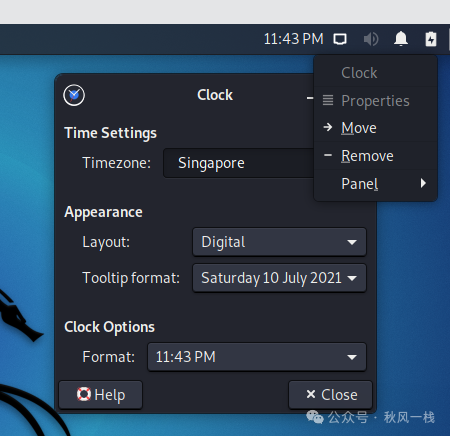
1. Set Time Zone
Right-click on the time -> Properties -> Select a city in the East Eight Time Zone (Singapore)
2. Modify Username or Hostname Display
// Modify ~/.zshrc file
vim ~/.zshrc
// Change emoji to @
3. Set Up SSH Passwordless Login
// Generate key pair
// Public key (id_rsa.pub) and private key (id_rsa) generated in /home/kali/.ssh/
ssh-keygen -t rsa
// Download the private key locally, change the public key to authorized_keys and save it
cp id_rsa.pub authorized_keys
// User permissions
chmod 700 /home/kali/.ssh
// Folder permissions
chmod 700 /home/kali/.ssh/
// authorized_keys file permissions
chmod 600 /home/kali/.ssh/authorized_keys
// Modify SSH configuration file
sudo vim /etc/ssh/sshd_config
    // Disable password authentication
    PasswordAuthentication no
    // Enable key authentication
    PubkeyAuthentication yes
    // Specify public key database file
    AuthorizedKeysFile  .ssh/authorized_keys
    // Add support for ssh-rsa keys (kali2022)
    PubkeyAcceptedKeyTypes=+ssh-rsa
// Start SSH service
sudo service ssh start
// Set SSH to start on boot
sudo systemctl enable ssh
4. Install pip
// Install pip3 (kali2022 is already installed)
wget https://bootstrap.pypa.io/pip/get-pip.py
python3 get-pip.py
// Install pip2
wget https://bootstrap.pypa.io/pip/2.7/get-pip.py
python2 get-pip.py
5. Display Chinese (excluding directories)
sudo dpkg-reconfigure locales
// Select zh-CN.UTF-8.UTF-8 with space
// After reboot, log in, and the pop-up will select the directory without changing the Chinese display
6. Install Microsoft Edge Browser
wget https://packages.microsoft.com/repos/edge/pool/main/m/microsoft-edge-stable/microsoft-edge-stable_110.0.1587.50-1_amd64.deb
sudo dpkg -i microsoft-edge-*.deb
# libu2f-udev affects icon display, fix with the following command
sudo apt-get -f install
************************************************************
Microsoft Edge has four channel versions: Stable, Beta, Dev, and Canary. Each version corresponds to different development stages and focuses on different features.
The Stable version is the official version of Microsoft Edge, also known as the stable version, widely used in the market; the Beta version is a testing version developed for user testing and validation, a candidate version before the official release; the Dev version is the development branch of Microsoft Edge, allowing early access to the latest features, but also enduring various issues, usually more stable than the Canary version, not recommended for ordinary users; the Canary version incorporates many of the latest features, including cutting-edge and risky content, so it is generally updated frequently and is unstable, not recommended for ordinary users.
************************************************************
7. Install Kali Anti-Virus Tool Shellter
apt-get update       // Update
apt-get install shellter    // Directly install via apt online
dpkg --add-architecture i386 && apt-get update && apt-get install wine32
### Kali Linux Wine32 English font display issue
wget http://winetricks.org/winetricks
sudo cp winetricks /usr/bin
sudo chmod +x /usr/bin/winetricks
# Uninstall wine64
sudo apt --purge remove wine64
# Then install all fonts needed for Wine32
sudo winetricks allfonts
sudo apt-get install cabextract # Install as prompted