Linux Shell Scripting from 0 to 1: Write Production Code in One Article
127 commands, 15 scenario templates, and 8 debugging tips, all provided at once! A must-save long article, recommended to share before reading 🚀
📑 Table of Contents
- Get Started: 30-Second Script “Hello World”
- Mind Map: A Diagram to Remember All Syntax
- Syntax Quick Reference
- 15 Production-Level Scenario Scripts
- Debugging & Troubleshooting 8 Hits
- Practical Exercise: 30-Line Script Daemon
- One-Click Access to All Scripts
- Copyright Notice
01 Get Started: 30-Second Script “Hello World”
Paste the following 4 lines into the terminal to immediately experience the charm of scripting:
#!/bin/bash
# hello.sh
echo "Today is $(date +%F)"

# Grant script permissions
chmod +x hello.sh && ./hello.sh
Running this will help you grasp the three key components:<span>Shebang</span> → <span>Variables</span> → <span>Execution Permissions</span>.
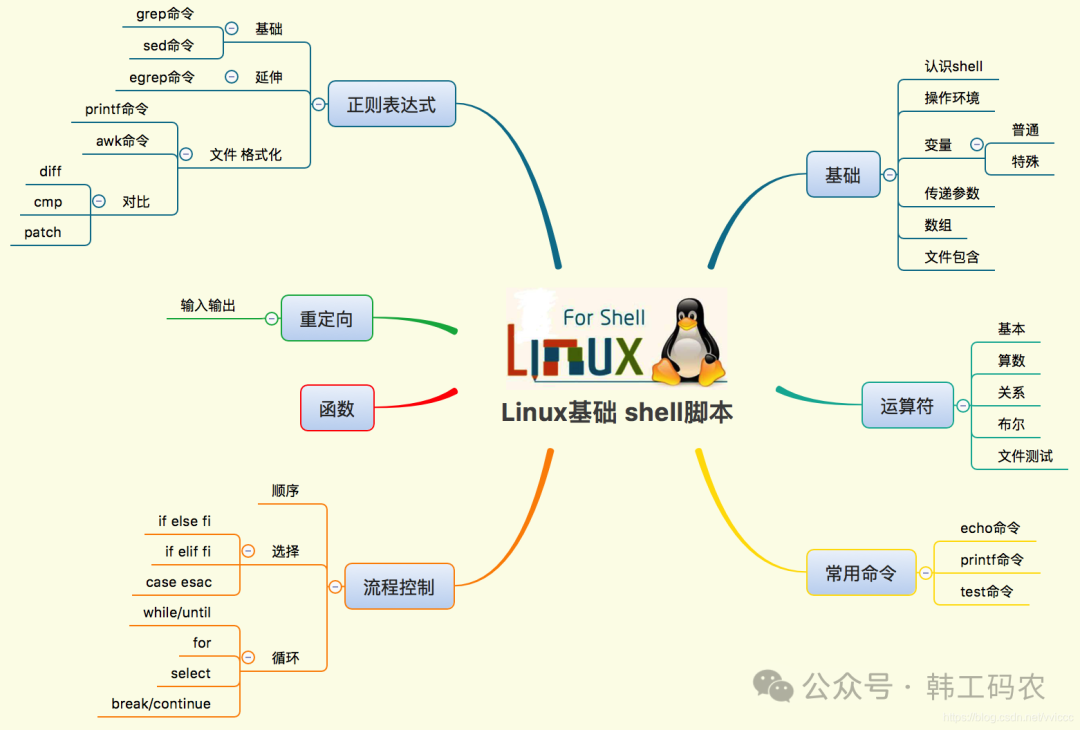
02 Mind Map: A Diagram to Remember All Syntax
03 Syntax Quick Reference (Copy and Use)
| Function | Template | Notes |
|---|---|---|
| Variables | <span>name="tom"</span> / <span>echo $name</span> |
No spaces around the equals sign |
| Arrays | <span>arr=(a b c)</span> / <span>echo ${arr[0]}</span> |
<span>@</span> for iteration |
| Strings | <span>${#str}</span> length / <span>${str:0:3}</span> substring |
|
| if | <span>if [ "$a" -gt 10 ]; then … fi</span> |
Spaces before and after brackets |
| for | <span>for f in *.log; do echo $f; done</span> |
|
| while | <span>while read line; do … done < file</span> |
|
| Functions | <span>deploy(){ git pull && npm run build; }</span> |
<span>deploy</span> for direct invocation |
| Test Files | <span>[ -f /etc/passwd ]</span> / <span>-d</span> for directory / <span>-x</span> for executable |
04 15 Production-Level Scenario Scripts
Each script can be directly implemented, saved as
<span>xxx.sh</span>, and run with<span>chmod +x</span>.
1️⃣ Incremental Backup of Directory
#!/bin/bash
# backup.sh
SRC=/data
DST=/backup/$(date +%F).tar.gz
tar -czf "$DST" "$SRC" --exclude='*.tmp'
echo "✅ Backup completed: $DST"
2️⃣ Log Rotation + Automatic Cleanup
#!/bin/bash
# log_cleanup.sh
LOGDIR=/var/log/app
find "$LOGDIR" -name "*.log" -mtime +7 -exec gzip {} \;
find "$LOGDIR" -name "*.gz"  -mtime +30 -delete
3️⃣ CPU / Memory Alerts (WeChat/DingTalk)
#!/bin/bash
# alert.sh
CPU=$(top -bn1 | awk '/Cpu/ {printf "%.0f", 100-$8}')
MEM=$(free | awk '/Mem/ {printf "%.0f", $3/$2*100}')

# Alert thresholds
CPU_THRESHOLD=80
MEM_THRESHOLD=85

WEBHOOK="https://qyapi.weixin.qq.com/cgi-bin/webhook/send?key=YOUR_KEY"

msg="CPU ${CPU}% MEM ${MEM}%"
if (( CPU > CPU_THRESHOLD )) || (( MEM > MEM_THRESHOLD )); then
    curl -sS -X POST "$WEBHOOK" \
         -H 'Content-Type: application/json' \
         -d '{"msgtype":"text","text":{"content":"⚠️ Resource Alert: $msg"}}'
fi