In server operations and maintenance, we often use Linux servers, and it is essential to understand the server’s information status through the command line. Below, I will summarize the commonly used commands for viewing Linux system information, including: kernel version, system version, CPU, memory, hard disk, etc.
1. Command to check the Linux kernel version (two methods):
1. cat /proc/version

2. uname -a

2. Command to check the Linux system version (three methods):
1. lsb_release -a, which lists all version information:
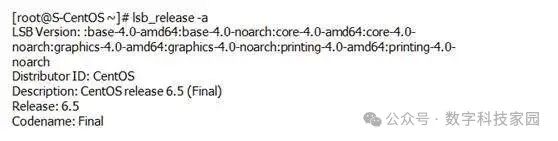
This command is applicable to all Linux distributions, including RedHat, SUSE, Debian, etc.
2. cat /etc/redhat-release, this method is only suitable for Redhat-based Linux:
[root@S-CentOS home]# cat /etc/redhat-release
CentOS release 6.5 (Final)
3. cat /etc/issue, this command is also applicable to all Linux distributions.

3. Check CPU information
To view CPU-related information in Linux, including model, frequency, and core information, use cat /etc/cpuinfo
4. Check remaining memory
free -m
5. Check hard disk information
df -h
6. Check network connectivity
ping www.baidu.com
You can use ping to check if the network is accessible.
These are some commonly used commands during my use of Linux servers to check system information. I hope they can be helpful and inspiring to you.