1. Motivation
Recently, while teaching an Android development course to third-year students at a vocational college, I noticed that the students primarily focused on embedded development and may not be very familiar with software development. As they are about to start their graduation projects, this series of articles aims to guide them in building a project from scratch that involves a mobile app controlling RGB lights. I hope this series can provide some ideas and inspiration for the students.
This series will consist of three articles, covering the theoretical knowledge, implementation on embedded microcontrollers, and implementation of the Android app, detailing how to construct a complete project from the ground up.
2. Project Demonstration
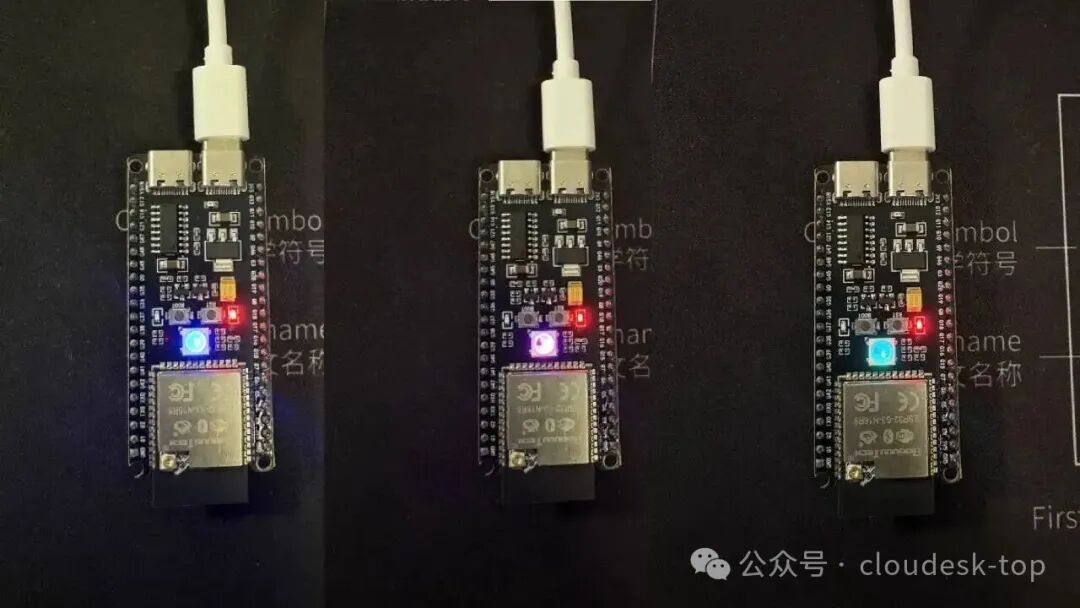
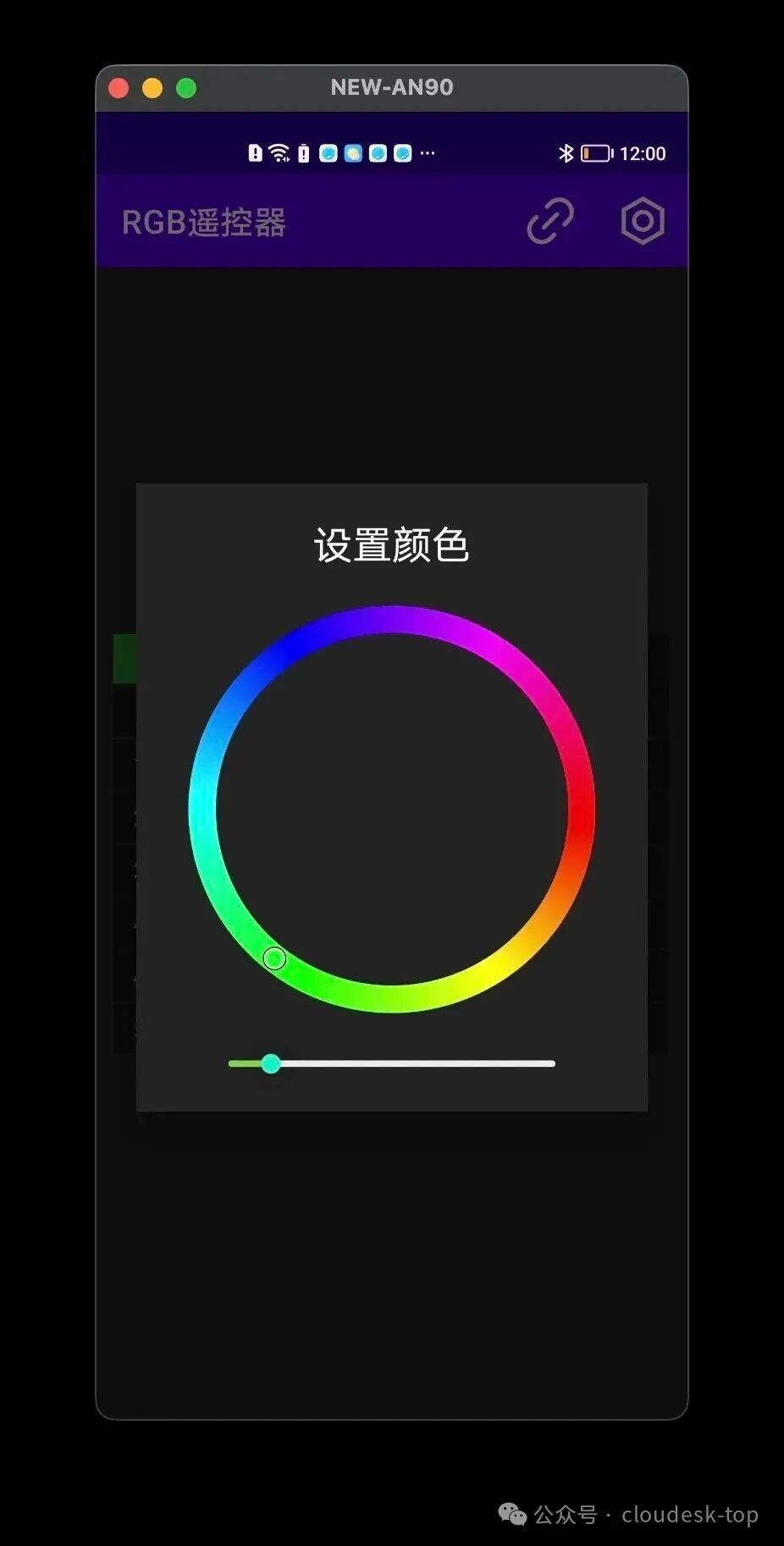
3. Target Audience
This article is suitable for undergraduate or vocational college students who wish to learn about IoT-related knowledge, as well as electronic/software development enthusiasts. This article is relatively basic, so those with relevant experience can skip the related sections.
4. Introductory Knowledge
4.1 Introduction to MQTT Protocol
To achieve remote control, this tutorial utilizes the widely popular MQTT communication protocol in the IoT field, implementing a device control system based on message subscription.
MQTT is a lightweight, TCP-based communication protocol based on a publish/subscribe model. Due to its lightweight nature, MQTT is widely used for data transmission in IoT devices.
4.1.1 Publish/Subscribe Model
The core of MQTT is the publishing and subscribing of messages. So, what is the publish/subscribe model? We can briefly describe it using the common example of subscribing to newspapers in daily life.
For instance, some readers like to stay updated on current events, while others prefer geographical magazines about mountains and rivers. If these readers subscribe to their preferred magazines through the post office.
Since there are hundreds of magazines, and readers may only want to subscribe to a few, the post office needs to register which magazines reader A subscribes to and which magazines reader B subscribes to. With this mapping, when new magazines are published, the post office can deliver them to the corresponding readers based on their subscriptions.
This involves several roles:
- • Magazines, which print and carry different content, including geographical magazines and current affairs magazines. (Topics)
- • Publishers, responsible for writing and printing different types of magazines. (Publishers)
- • The post office, responsible for receiving the latest magazines published by the publishers and delivering them to the relevant readers. (Message Center Broker)
- • Readers, the subscribers of the magazines, who can subscribe to different magazines based on their preferences. (Subscribers)
Reader C/Subscriber Reader B/Subscriber Reader A/Subscriber Post Office/Broker Publisher Reader C/Subscriber Reader B/Subscriber Reader A/Subscriber Post Office/Broker Publisher Subscription Phase Publishing Phase Distribution Phase Subscribe to "Sports News" Subscribe to "Finance News" Subscribe to "Sports News" Publish new "Sports News" Publish new "Finance News" Deliver "Sports News" Deliver "Finance News" Deliver "Sports News"4.1.2 Core Concepts of MQTT
In the IoT context, the MQTT protocol functions similarly to the magazine subscription example, where messages are generated by devices, and our app acts like the readers. There are thousands of devices, but a user’s app may only care about a few specific devices, so readers can subscribe to messages from specific device topics through the Broker.
Basic Model of MQTT
- • Publish/Subscribe Model: Decouples message senders (publishers) and receivers (subscribers)
- • Topic: A classification channel for messages, such as sensor/temperature
- • Broker: A message broker server responsible for routing messages
Three Roles
- • Publisher – The device that sends messages
- • Broker – The message relay server
- • Subscriber – The application that receives messages
Message Quality of Service (QoS)
Due to network unreliability, MQTT defines different quality levels for messages, allowing us to choose different QoS levels based on the importance of the message.
| Feature | QoS 0 | QoS 1 | QoS 2 |
|---|---|---|---|
| Chinese Name | At most once | At least once | Exactly once |
| Delivery Guarantee | ❌ No guarantee | ✅ Guaranteed | ✅ Guaranteed |
| Duplicate Messages | ❌ Will not repeat | ⚠️ May repeat | ✅ Will not repeat |
| Transmission Count | 1 time | ≥2 times | 4 times |
| Performance | 🚀 Fastest | 🚗 Medium | 🐢 Slowest |
| Reliability | ⭐ Low | ⭐⭐ Medium | ⭐⭐⭐ High |
| Network Overhead | Minimum | Medium | Maximum |
| Analogy | Send a plain letter | Send a registered letter | Express delivery with receipt |
| Applicable Scenarios | Temperature sensorsReal-time location | Device controlStatus updates | Payment instructionsCritical configurations |
- • QoS 0: Real-time monitoring that can tolerate data loss
- • QoS 1: Control commands that require reliable delivery
- • QoS 2: Critical business that cannot be lost or duplicated
Message Topics
Topics are the addresses for messages, and the Broker accurately delivers them to subscribers who have subscribed to that address.
- • Hierarchical structure, separated by /, such as
<span>home/livingroom/temperature</span> - • Wildcards, topics support wildcards
- • +: Single-level match
<span>home/+/temperature</span> - • #: Multi-level match
<span>home/#</span> - • Subscription filtering, subscribers only receive messages that match the topic
For example, using topics to describe the weather conditions in different cities, the topic format:
- • Weather forecast:
<span>province_or_municipality/city/forecast</span> - • PM2.5:
<span>province_or_municipality/city/pm25</span> - • Air quality:
<span>province_or_municipality/city/air-quality</span>
Suppose we have the following scenarios:
- 1. User A only cares about the weather in Beijing, so they can subscribe to the weather forecast topic for Beijing:
<span>beijing/beijing/forecast</span> - 2. User B is concerned about the PM2.5 levels in Guangdong, so they can use a wildcard to subscribe to the weather messages for all of Guangdong:
<span>guangdong/+/pm25</span> - 3. User C is interested in the weather forecast, PM2.5, and air quality for all of Guangdong, so they can use a wildcard to subscribe to all weather messages for Guangdong:
<span>guangdong/#</span>
4.1.3 Comparison of MQTT Versions
The widely used versions of MQTT are v3.1.1 (released in 2014) and v5.0 (released in 2019).
- • v3.1.1 is a stable, well-tested baseline protocol with complete functionality, but its error handling and session management are relatively simple;
- • v5.0 is a future-oriented, more powerful protocol that addresses the pain points faced by v3.1.1 in large-scale deployments and complex scenarios.
| Feature | MQTT v3.1.1 | MQTT v5.0 | Benefits of v5.0 |
|---|---|---|---|
| Error Reporting | Only limited connection status return codes. | All acknowledgment (ACK) packets include Reason Codes. | Easier debugging and more precise identification of failure reasons during connection, publishing, and subscription processes. |
| Session Management | Uses the Clean Session flag; sessions either persist permanently or do not exist at all. | Uses the Clean Start flag and Session Expiry Interval. | Allows clients to specify how long the Broker should retain their session data after disconnection, saving resources and improving resource management. |
| Metadata and Context | Limited to fixed headers. | Includes User Properties (custom key-value pairs) in the message headers. | Allows attaching application-specific metadata (e.g., timestamps, locations) to messages without modifying the message body (Payload). |
| Topic Handling | Each PUBLISH packet always includes the topic name. | Topic Aliases can replace lengthy topic names with shorter numeric IDs. | Reduces network overhead and saves bandwidth, especially when frequently publishing long topics. |
| Load Balancing | No native support; all subscribers receive all messages. | Shared Subscriptions (<span>$share/...</span>). |
Allows multiple clients to share a subscription and balance incoming messages, improving the scalability of backend processing. |
| Message Lifecycle | No message expiration mechanism. | Message Expiry Interval. | If a message is not delivered within the specified time, it will be discarded, preventing clients from receiving stale or irrelevant old data upon reconnection. |
| Communication Mode | Only supports publish/subscribe mode. | Formally supports request/response mode using Response Topic and Correlation Data attributes. | Formally establishes a common interaction pattern, making command and control operations simpler and more reliable. |
4.2 Introduction to JSON Data Format
Having understood some basic concepts of the MQTT protocol, we will now learn about the specific data transmission format. Since MQTT does not specify the data format for messages in each topic, this needs to be determined by the application developers themselves.
This series will use the very popular and easy-to-understand JSON data format as the encoding format for RGB light control commands.
4.2.1 What is JSON
JSON (JavaScript Object Notation) is a text encoding format that allows humans to read and modify it without special tools. JSON became popular in the JavaScript language and has since been widely used in different languages due to its lightweight and readable nature, and it is also widely supported in server APIs.
4.2.2 JSON Format Specification
- 1. Key-Value Pairs
1
2
3
4
5

{
  "name": "Zhang San",
  "age": 25,
  "isStudent": false
}
- 2. Data Types of Values
- • String: “hello” (must be in double quotes)
- • Number: 123, 12.34
- • Boolean: true, false
- • Null: null
- • Object: { … }
- • Array: [ … ]
4.2.3 JSON Objects
Wrapped in curly braces <span>{}</span>, containing key-value pairs:
1
2
3
4
5
6
7
8

{
  "firstName": "Li",
  "lastName": "Si",
  "address": {
    "city": "Beijing",
    "street": "Chang'an Street"
  }
}
4.2.4 JSON Arrays
Wrapped in square brackets [] containing an ordered list of values:
1

["Apple", "Banana", "Orange"]
4.2.5 Complete JSON Example
1
2
3
4
5
6
7
8
9
10
11
12
13
14
15
16
17
18
19

{
  "students": [
    {
      "id": 1,
      "name": "Xiao Ming",
      "courses": ["Math", "English"],
      "scores": {
        "Math": 95,
        "English": 88
      }
    },
    {
      "id": 2,
      "name": "Xiao Hong",
      "courses": ["Chinese", "Physics"]
    }
  ],
  "totalCount": 2
}
5. System Architecture
With the knowledge accumulated above, we will now take a macro view of the system to see which components it consists of, and then we can implement each component step by step, ultimately integrating and debugging.
5.1 System Architecture Diagram
The overview of the system architecture is shown in the diagram below:
Applications
MQTT Broker
Devices
Report light status
Report light status
Report light status
Subscribe to upstream data
Subscribe to upstream data
Subscribe to upstream data
Send control commands
Push downstream commands
RGB Light 2
RGB Light 1
RGB Light 3
MQTT Broker mosquitto/EMQX/HiveMQ
App User 1
App User 2
App User 3
The system consists of three components
5.1.1 MQTT Broker
For experimental purposes, we will use a public MQTT broker as the message exchange center for this project. Public brokers that can be accessed without authorization include:
- • EMQX, broker.emqx.io, TCP port: 1883, WebSocket port: 8083
- • Mosquitto, test.mosquitto.org, TCP port: 1883, WebSocket port: 8080
- • HiveMQ, broker.hivemq.com, TCP port: 1883, WebSocket port: 8000
⚠️ Note: The above public brokers are for experimental use only and should not be used in production environments.
5.1.2 Device Side
The device side uses the ESP32S3 development board, which is widely available for purchase. Make sure to buy the version with WS2812 RGB lights, as shown in the sample image below:
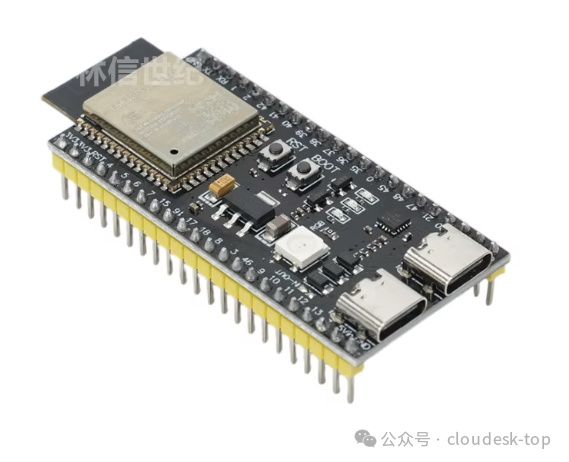
For the device-side software, we will use the Arduino environment in Platformio to simplify development. Subsequent articles in this series will detail how to set up and develop the device-side program, so stay tuned.
5.1.3 App Side
On the app side, I plan to first introduce how to develop an MQTT client using native Android development. Subsequent articles will cover how to develop the app using Flutter and native iOS, so stay tuned.
5.1.4 Communication Protocol
This project uses the following topics to achieve bidirectional communication:
- • Device upstream:
<span>eiot/<MAC address>/properties/upstream</span>, where the MAC address is obtained through the program, and each module is different. - • Device downstream:
<span>eiot/<MAC address>/properties/downstream</span>
The payload of the topic uses JSON encoding, with the data format as follows:
| Field Attribute | Type | Description |
|---|---|---|
| command | String | Type of command, currently fixed as light, indicating light properties |
| payload | Object | Control parameters |
| payload.i | Number | Controls which LED, currently fixed as 0 |
| payload.r | Number | RGB red value, 0–255 |
| payload.g | Number | RGB green value, 0–255 |
| payload.b | Number | RGB blue value, 0–255 |
| payload.a | Number | Brightness of the light, 0–255 |
Example reference:
1
2
3
4
5
6
7
8
9
10

{
    "command": "light",
    "payload": {
        "r": 96,
        "b": 255,
        "g": 0,
        "i": 0,
        "a": 100
    }
}
The above command indicates setting the light color to <span>R = 96, B = 255, G = 0</span>, with brightness set to <span>100</span>
5.2 MQTT Sequence Diagram
The interaction flow of the various components in this project is shown in the diagram below, using the EMQX broker:<span>broker.emqx.io</span>
App Broker ESP32-RGB Light App Broker ESP32-RGB Light Device connection and message publishing Application subscription message routing distribution Application control CONNECT CONNACK PUBLISH eiot/MAC/properties/upstream SUBSCRIBE eiot/MAC/properties/upstream SUBACK PUBLISH eiot/MAC/properties/upstream PUBLISH eiot/MAC/properties/downstream PUBLISH eiot/MAC/properties/downstream5.2.1 Device Side Process
- 1. Search for the pre-set Wi-Fi router and attempt to connect
- 2. After connecting to the network, initiate the MQTT connection
- 3. After connecting to the broker, subscribe to the downstream data topic
<span>eiot/<MAC address>/properties/downstream</span>, note that each module has a different MAC address. - 4. After receiving the downstream data topic, call the FastLED library to control the WS2818 light
5.2.2 App Side Process
- 1. Users can set the MAC address of the device they want to subscribe to through the app
- 2. Implement a color ring picker, allowing users to choose their preferred color
- 3. Connect to the MQTT broker
- 4. Subscribe to the device upstream data topic:
<span>eiot/<MAC address>/properties/upstream</span> - 5. After the user selects a color from the color ring, publish to the downstream data topic:
<span>eiot/<MAC address>/properties/downstream</span>
6. References
- • MQTT Version 3.1.1 Plus Errata 01, https://docs.oasis-open.org/mqtt/mqtt/v3.1.1/mqtt-v3.1.1.html
- • MQTT Version 5.0, https://docs.oasis-open.org/mqtt/mqtt/v5.0/mqtt-v5.0.html
- • JSON Schema and Hyper-Schema. json-schema.org