def build_profile(name, age, *hobbies, **details):
    """Create user profile"""
    print(f"Name: {name}")
    print(f"Age: {age}")
    print("Hobbies:", hobbies)  # Tuple format
    print("Details:", details)  # Dictionary format

# Call
build_profile("Li Si", 25, "Photography", "Travel", city="Beijing", occupation="Engineer")
"""
Output:
Name: Li Si
Age: 25
Hobbies: ('Photography', 'Travel')
Details: {'city': 'Beijing', 'occupation': 'Engineer'}
"""
6. Handling Return Values
6.1 Characteristics of the return Statement
The function ends immediately upon reaching return
Can return any type of data
Can return multiple values (actually a tuple)
If no return statement, defaults to None
# Return a single value
def get_square(n):
    return n * n

# Return multiple values
def calc_circle(radius):
    area = 3.14 * radius ** 2
    circumference = 2 * 3.14 * radius
    return area, circumference  # Actually returns a tuple

# Function with no return value
def show_info(msg):
    print("Prompt message:", msg)
    # Implicitly returns None
6.2 Handling Multiple Return Values
# Receive returned tuple
result = calc_circle(5)
print("Area and Circumference:", result)  # (78.5, 31.4)

# Unpack return values
area, circ = calc_circle(3)
print(f"Area: {area}, Circumference: {circ}")

# Ignore some return values
area, _ = calc_circle(4)  # Ignore circumference
print("Area:", area)
7. Documentation Strings and Comments
7.1 Documentation String Standards
def format_name(first, last):
    """Format user name

    Parameters:
        first (str): First name
        last (str): Last name

    Returns:
        str: Formatted full name "Last name, First name"

    Example:
        >>> format_name("Xiao Ming", "Zhang")
        'Zhang, Xiao Ming'
    """
    return f"{last}, {first}"

# View documentation
help(format_name)
print(format_name.__doc__)
7.2 Documentation Tool Generation Effect
Help on function format_name in module __main__:

format_name(first, last)
    Format user name

    Parameters:
        first (str): First name
        last (str): Last name

    Returns:
        str: Formatted full name "Last name, First name"

    Example:
        >>> format_name("Xiao Ming", "Zhang")
        'Zhang, Xiao Ming'
def calculate(operation, a, b):
    """Perform basic arithmetic operations"""
    match operation:
        case '+':
            return a + b
        case '-':
            return a - b
        case '*':
            return a * b
        case '/':
            if b == 0:
                return "Error: Division by zero"
            return a / b
        case _:
            return "Error: Invalid operator"

# Usage
print("10 + 5 =", calculate('+', 10, 5))
print("20 / 4 =", calculate('/', 20, 4))
print("7 * 0 =", calculate('*', 7, 0))
9. Common Error Solutions
Error Type
Cause
Solution
<span>NameError: name 'func' is not defined</span>
<span>IndentationError: expected an indented block</span>
Missing indentation in function body
Consistently indent function body by 4 spaces
<span>UnboundLocalError</span>
Using local variable before assignment
Declare global variable using global statement
Conclusion: Full Process of Function Usage
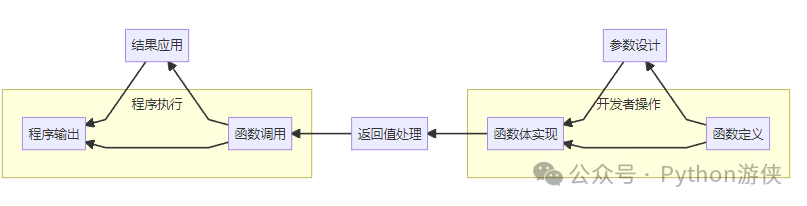
Python functions are the building blocks of programming. Master the core points:
Definition: Use <span>def</span> keyword + function name + parameter list
Call: Pass actual parameters through function name()
Parameters: Supports various forms such as required, default, variable, etc.
Return Values: Use return to return results, can return multiple values
Scope: Understand the scope of local and global variables
By designing and using functions effectively, you can build modular, reusable, and maintainable code structures, which are the foundation of all excellent Python programs.
✨Follow me for more Python learning resources, practical projects, and industry updates! Reply “python learning” in the public account backend to get Python learning e-books!