The word <span><span>while</span></span> means “during…”; thus, a <span><span>while</span></span> loop can be understood as “looping while…”. Indeed, in a <span><span>while</span></span> loop, the computer repeats execution of a certain block of code as long as the condition is met, and stops the loop when the condition is no longer satisfied.
Let’s understand this looping pattern through the story of SpongeBob:
- SpongeBob makes one Krabby Patty after another using the secret recipe, which is a task he needs to repeat;
- If it is working hours, SpongeBob will keep making Krabby Patties;
- But at 8 PM, when SpongeBob finishes work, he will stop and do other things.
In this process, “during working hours” can be seen as the “condition” that the loop needs to satisfy, repeating the operation of “making Krabby Patties” while the condition is met. This is the execution logic of a <span><span>while</span></span> loop.
Speaking of conditions being met, does it remind you of the conditional statements you learned before? In conditional statements, the computer executes a block of code when the condition is met; in a <span><span>while</span></span> loop, the computer repeats execution of a block of code when the condition is met. Doesn’t that sound similar?
Comparing the flowcharts of the two types of statements, do you now have a better understanding of loops?
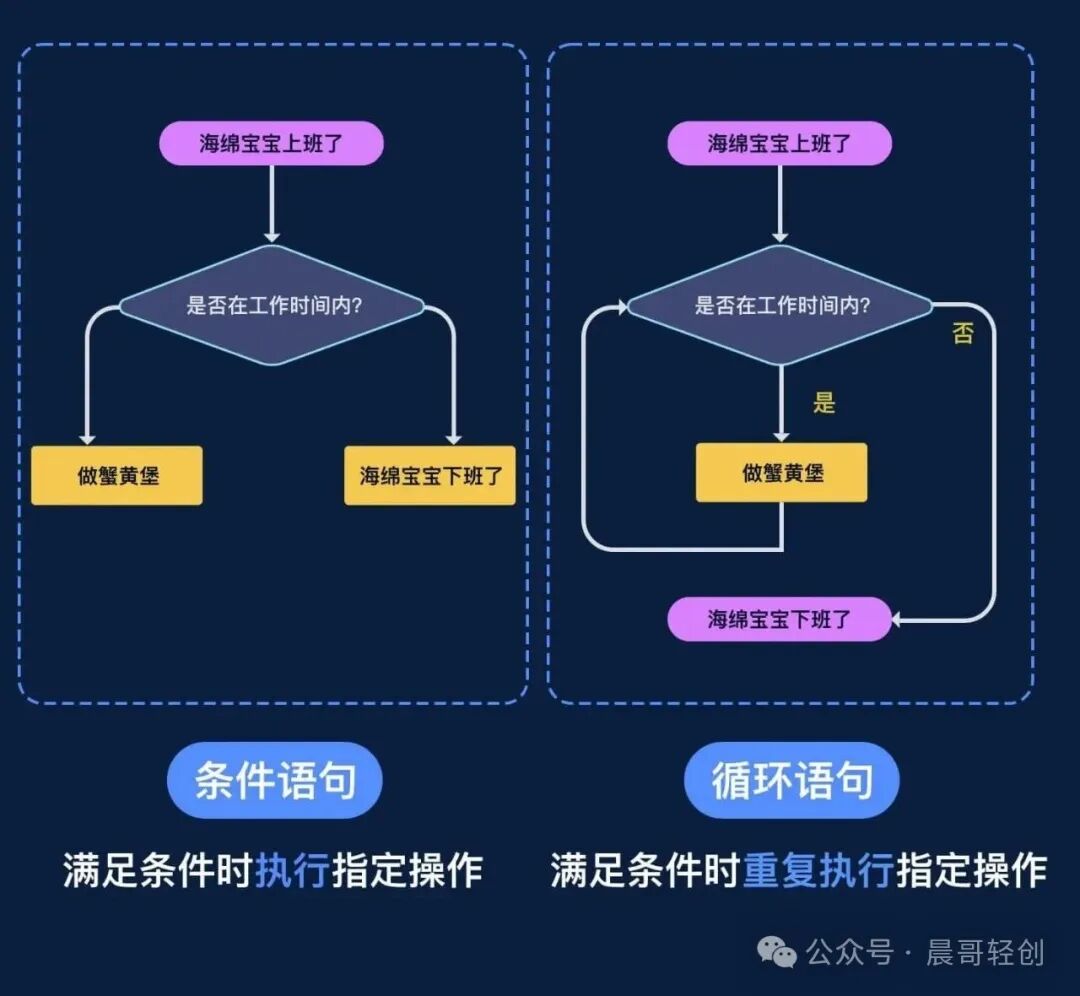
<span><span>while</span></span> loops have a similar execution flow to <span><span>if</span></span> statements, and the syntax rules are also quite similar. The following is a typical <span><span>while</span></span> loop that will output 0, 1, 2 line by line after execution:
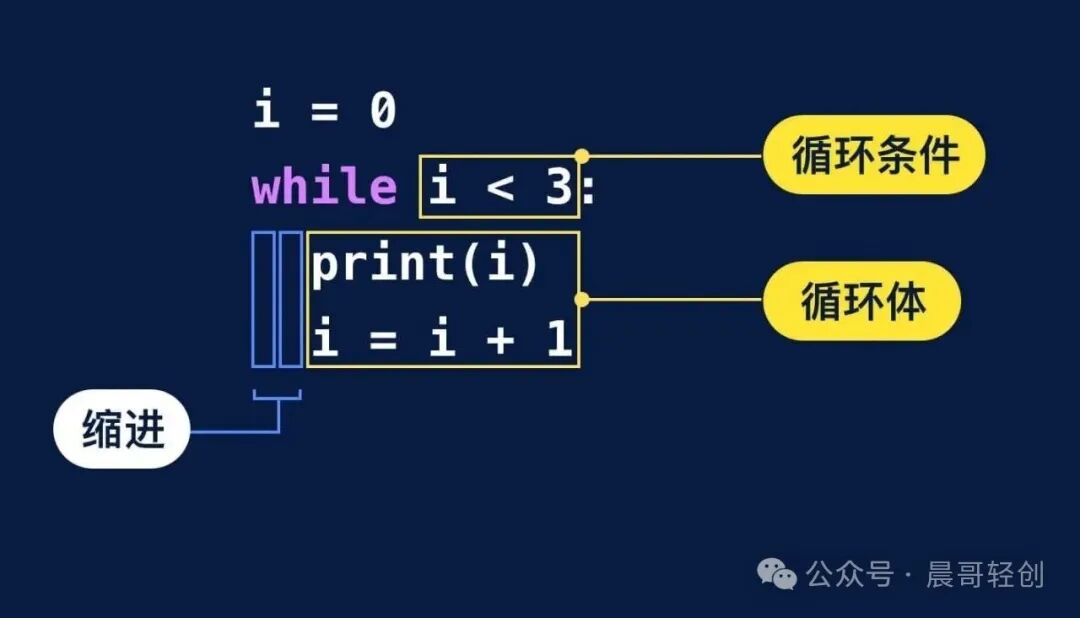
Similar to <span><span>if</span></span> statements, <span><span>while</span></span> loops also require us to pay attention to colons and indentation.
A complete <span><span>while</span></span> loop consists of a loop condition and a loop body. The loop body contains the code that needs to be repeated, such as printing a statement, processing a batch of files, filling out a series of information, etc.
The loop condition is a boolean value, which is evaluated each time the loop runs. When the loop condition is satisfied (the boolean value is <span><span>True</span></span>), the code inside the loop body is executed; otherwise, the loop ends.
Tip: Do you remember the boolean type you learned before? The boolean type has only two values: <span><span>True</span></span> (true) and <span><span>False</span></span> (false). A conditional expression is essentially a boolean value, which is true when the condition is met.
Having understood the basic syntax requirements, let’s discuss how to write a <span><span>while</span></span> loop ourselves.
Taking the example of printing the numbers 0, 1, and 2, if we use the most basic <span><span>print()</span></span> function, the code should be written as:
print(0)print(1)print(2)Let’s find the commonality among these three lines of code: they all use the <span><span>print()</span></span> function to print a number, and the difference between each two numbers is 1.
So we can define a variable, starting at 0, and the value of the variable changes by adding 1 each time. Using <span><span>print()</span></span> to print the value of the variable that changes according to this pattern, we can write the print operation as three completely repeated lines of code:
i = 0
# First repetition
print(i)
i = i + 1
# Second repetition
print(i)
i = i + 1
# Third repetition
print(i)
i = i + 1
Tip: The variable <span><span>i</span></span> we defined here is the value that will be repeatedly operated on through the <span><span>while</span></span> loop later. Naming the variable as <span><span>i</span></span> is just a common coding convention; if needed, you can name the variable something else, like <span><span>m</span></span>, <span><span>n</span></span>, or <span><span>age</span></span>, etc. You can name it as you find convenient.
At this point, our loop body is taking shape. Now let’s think about how to write the loop condition. When the value of <span><span>i</span></span> equals <span><span>3</span></span>, the loop should end, and while <span><span>i < 3</span></span> it should keep repeating the print operation. Thus, <span><span>i < 3</span></span> can serve as the loop condition, and the final code will look like this:
# Define a variable i, initial value 0
i = 0
# Repeat the following code while i < 3
while i < 3:
    print(i)
    i = i + 1
<span><span>i</span></span> starts at 0, and after each round of the loop, the value of <span><span>i</span></span> increases by 1. The final output of the code will be 0, 1, 2 printed line by line.
Tip: If you want to output numbers from 0 to 5 like in the previous exercise, just change <span><span>i < 3</span></span> to <span><span>i < 6</span></span> and you’re good to go.
If you’re new to loops, you might still be a bit unclear about how Python executes loop code. Don’t worry, I’ve prepared an animated diagram for you to intuitively understand:
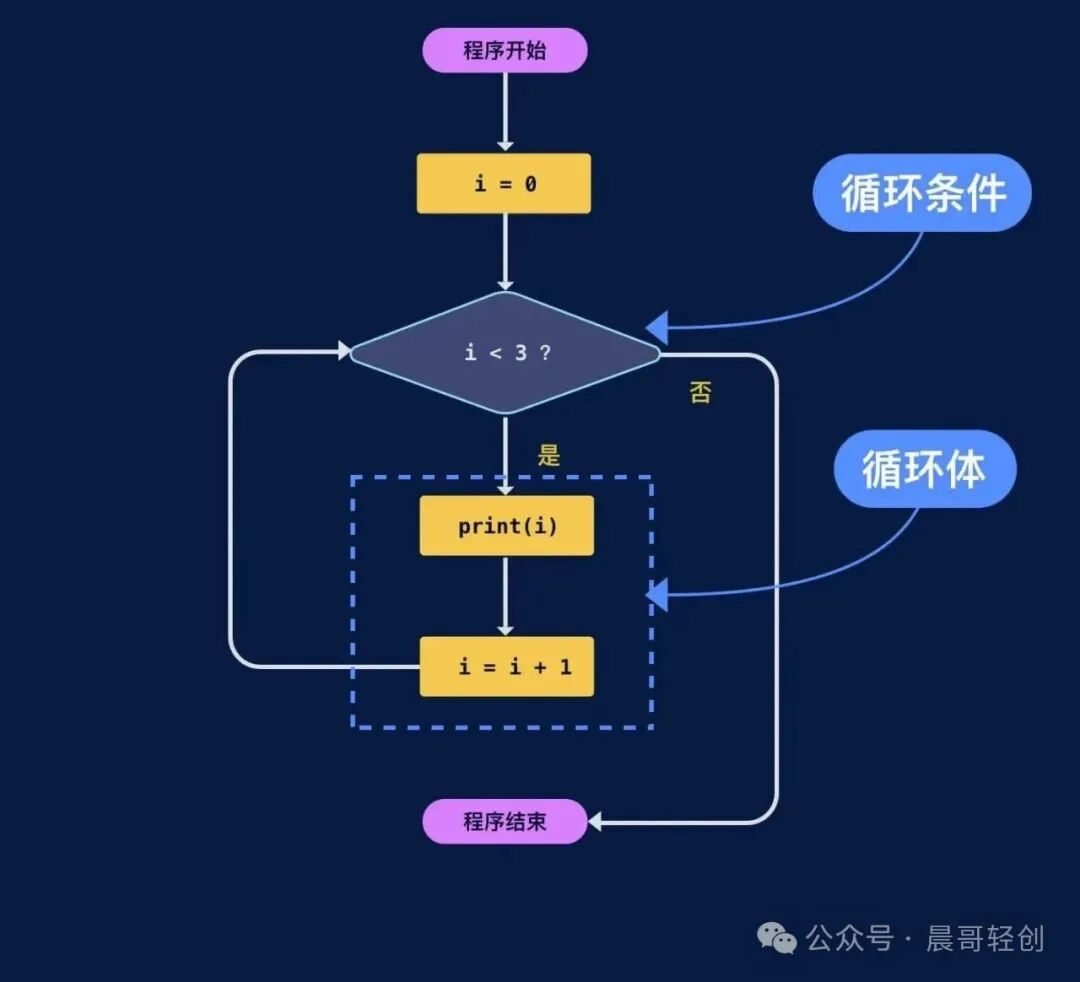
You can see that the code executes from top to bottom, but the <span><span>while</span></span> loop causes Python to jump back to the line where the <span><span>while</span></span> statement is after completing one round of the loop, checking again if the condition <span><span>i < 3</span></span> holds true.
The flowchart of this code execution is as follows:
Here’s a small knowledge point: <span><span>i = i + 1</span></span> can be simplified to <span><span>i += 1</span></span>. Therefore, the code above is equivalent to:
i = 0
while i < 3:
    print(i)
    i += 1
In simple terms:<span><span>A += B</span></span> is equivalent to <span><span>A = A + B</span></span>. Similarly, <span><span>A -= B</span></span> is equivalent to <span><span>A = A - B</span></span>. Don’t be surprised when you encounter <span><span>+=</span></span>, <span><span>-=</span></span>, <span><span>*=</span></span>, or <span><span>/=</span></span> later on!
Next, let’s look at the <span><span>while</span></span> loop. Define a variable <span><span>n = 0</span></span>, and the loop condition for the <span><span>while</span></span> loop is <span><span>n < 5</span></span>. In each loop, we pass the parameter <span><span>n</span></span> to call the <span><span>double()</span></span> function, printing out <span><span>n</span></span>‘s double, and incrementing <span><span>n</span></span><code><span><span> by 1.</span></span>
Note that the last line of code <span><span>n += 1</span></span> is equivalent to <span><span>n = n + 1</span></span>. This syntax is quite common, so make sure to remember it!
Now, imagine if we didn’t use a <span><span>while</span></span> loop, how would we complete this code?
def double(x):
    print(x * 2)
double(0)
double(1)
double(2)
double(3)
double(4)
If we didn’t use a loop, we would have to repeat the code to call the <span><span>double()</span></span><span><span> function 5 times! And that's not the worst part. If we needed to loop 1000 times, would we have to type the same code 1000 times?</span></span>
However, if we use a <span><span>while</span></span> loop, we can simply change the loop condition from <span><span>n < 5</span></span> to <span><span>n < 1000</span></span>, saving time and effort. Comparing the two, you should appreciate how powerful loops are. With just a few lines of code, you can have the computer perform complex operations; this is the magic of loops!