


On Embedded Development Boards
Practical Guide to Compiling and Using Valgrind and ASan Tools
01
Introduction
In embedded development, memory issues (such as memory leaks, out-of-bounds access, double free, etc.) are major causes of program crashes or instability.
Valgrind and AddressSanitizer (ASan) are two powerful memory detection tools, but their usage scenarios and deployment methods differ. This article will detail how to cross-compile Valgrind and deploy ASan on a development board, along with efficient debugging of memory issues through practical examples.
02
Environment Preparation
Development Board Environment
Hardware: ARM architecture development board
System: Linux (such as Ubuntu-based systems)
Dependency Libraries: Ensure that the development board has basic libraries like glibc, libpthread installed.
Host Machine Environment
Toolchain: ARM cross-compilation toolchain (e.g., arm-linux-gnueabihf-gcc)
Dependency Packages: Compilation tools such as autoconf, automake, libtool, etc.
03
Cross-compiling and Deploying Valgrind
Valgrind is feature-rich, but cross-compilation requires attention to version compatibility.
Selecting a Stable Version
Issue: The latest Valgrind version (e.g., 3.23.0) may fail to compile due to architecture support issues. Solution: Use an older version (e.g., 3.20.0):
wget https://sourceware.org/pub/valgrind/valgrind-3.20.0.tar.bz2
tar -xvf valgrind-3.20.0.tar.bz2
cd valgrind-3.20.0
Configuring Cross-compilation
./configure \
--host=arm-linux-gnueabihf \
CC=arm-linux-gnueabihf-gcc \
--prefix=/path/to/valgrind-install \
--disable-optimize \
--enable-only-64bit \
--build=x86_64-linux-gnu
–host: Target platform (ARM architecture)
–prefix: Specify installation path
–disable-optimize: Disable optimization to reduce compilation errors
–enable-only-64bit: If the development board is 64-bit ARM (e.g., ARMv8)
Compiling and Installing
make -j4
make install
Deploying to the Development Board
Copy the compiled Valgrind directory (including bin/valgrind and libexec/valgrind) to the /opt/valgrind directory on the development board.
Preparation Before Running
-
Dynamic Link Library Issues
The /lib directory of the development board may lack the unstripped ld-linux-armhf.so.3.
Solution: Copy the unstripped version from the host machine or a clean ARM image:
scp /lib/ld-linux-armhf.so.3 root@devboard:/lib/-
Environment Variable Configuration
Specify the Valgrind tool path:
export VALGRIND_LIB=/opt/valgrind/libexec/valgrindUsage Example
Detecting Memory Leaks
/opt/valgrind/bin/valgrind --tool=memcheck --leak-check=yes /path/to/your_app04
Integration and Use of ASan
ASan does not require cross-compilation but must be enabled during compilation.
Development Board Environment Configuration
Ubuntu
apt install libasanCompiling Code
Add compilation options:
arm-linux-gnueabihf-gcc -fsanitize=address -g -O0 -o my_app my_app.c-fsanitize=address: Enable ASan
-g: Generate debug symbols
-O0: Disable optimization (to avoid interference with detection)
Running and Debugging
Execute the program directly, ASan will automatically report errors:
./my_appAdvanced Configuration (via Environment Variables)
# Output detailed logs to specified path
export ASAN_OPTIONS=log_path=/tmp/asan.log:verbosity=1
# Disable memory leak detection (only for debugging other issues)
export ASAN_OPTIONS=detect_leaks=0
05
Practical Case: Memory Leak Detection
Case Code
memchek.c
#include<stdlib.h>
int main() {
    int *arr = malloc(10 * sizeof(int));
    arr[10] = 0;   // Out-of-bounds write (index out of range)
    return 0;       // Memory not freed (leak)
}

Test_asan.c
#include<stdlib.h>
int main() {
    volatile int* p = (int*)malloc(10 * sizeof(int));
    p[10] = 0; // Trigger heap buffer overflow
    return 0;
}
Using Valgrind for Detection
valgrind --tool=memcheck --leak-check=full ./memchek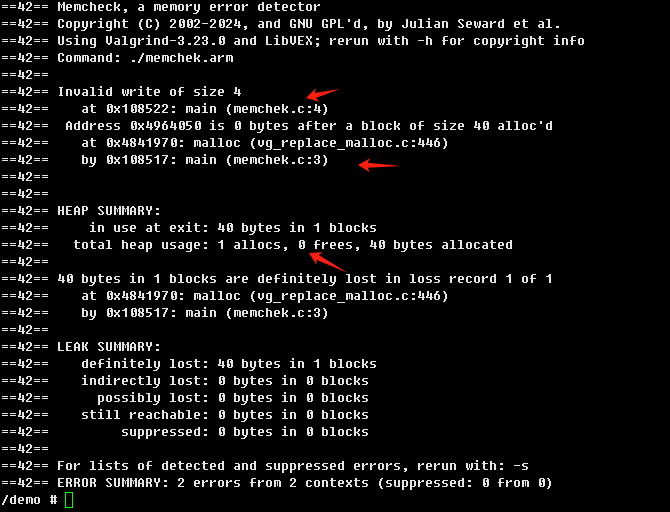
Indicates the type of leak, summarizes leaks, and shows program location.
Using ASan for Detection
export ASAN_OPTIONS="detect_leaks=1:halt_on_error=0:allocator_may_return_null=1:malloc_context_size=10:symbolize=1:verbosity=1:log_path=asan.log"
# Set parameters
export LD_PRELOAD=libasan.so.5 # Load library
./test_asan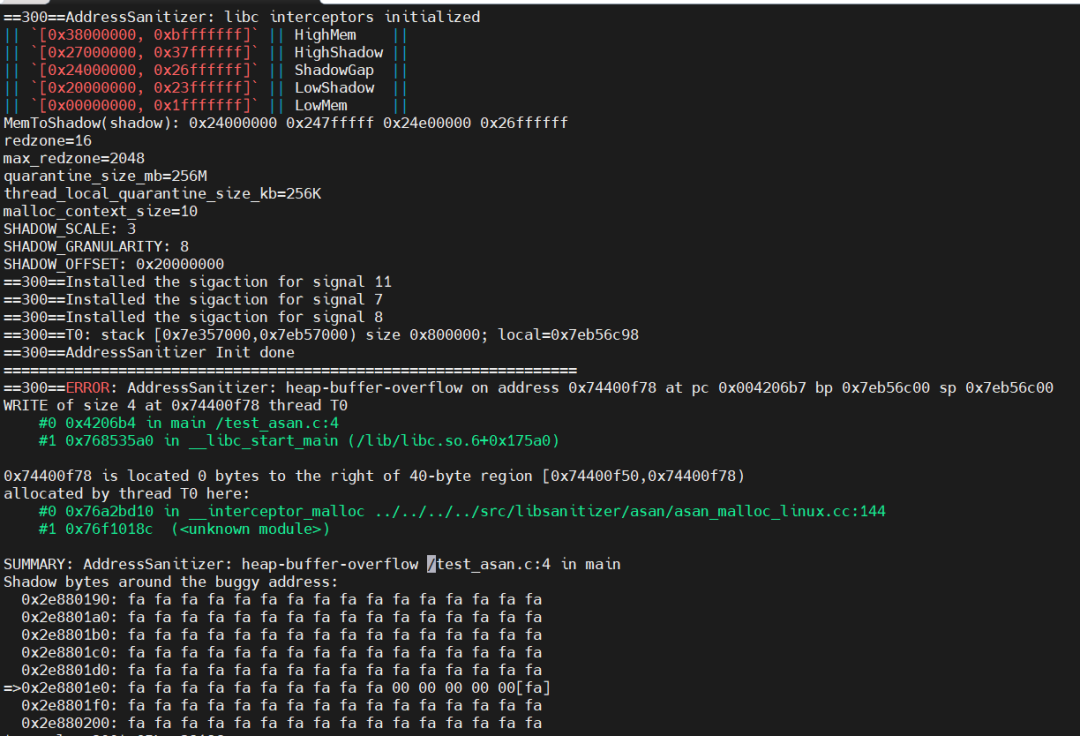
Indicates the type and location of the error.
06
Common Issues and Solutions
Valgrind Errors
Valgrind error: No such file or directory
Reason: Tool path not configured correctly.
Solution:
export VALGRIND_LIB=/opt/valgrind/libexec/valgrindASan Errors
ASan error: libasan.so.6: cannot open shared object file
Reason: The development board does not have the ASan runtime library installed.
Solution:
apt install libasanValgrind Performance Overhead Too High
Solution: Enable only for critical modules, or use –trace-children=no to ignore child processes.
07
Tool Comparison and Selection Recommendations
Features
Valgrind
ASan
Compilation Dependency
No code modification required,
Run directly
Must be enabled during compilation
Performance Overhead
High (about 10-30 times)
Medium (about 2-5 times)
Detection Scope
Memory leaks,
Out-of-bounds, thread issues
Memory leaks,
Out-of-bounds, double free
Applicable Scenarios
Global debugging,
Function verification
Fast iteration,
CI/CD integration
08
Conclusion
Valgrind is suitable for non-intrusive debugging of existing code but requires cross-compilation and library support, significantly reducing program execution efficiency. ASan is suitable for rapid detection during the development phase but requires recompiling code, minimizing impact on program execution. A mixed approach: use ASan for quick problem localization during development, and validate comprehensively with Valgrind.
✦
✧
END
✦