 Source:www.cnblogs.com/chenliangchaoshuai/p/11827383.html,Author: Chen Liang, Thank you!
The Linux commands are used to manage the Linux system. For the Linux system, whether it is the CPU, memory, disk drives, keyboard, mouse, or users, everything is a file. The commands for managing the Linux system are the core of its normal operation.
Online Query and Help Commands (2)
man: View command help, a dictionary of commands; more complex is info, but it is not commonly used.help: View help for built-in Linux commands, such as the cd command.
File and Directory Operation Commands (18)
ls: Full name list, its function is to list the contents of a directory and its attribute information.cd: Full name change directory, its function is to switch from the current working directory to a specified working directory.cp: Full name copy, its function is to copy files or directories.find: Means to find, used to find directories and files under directories.mkdir: Full name make directories, its function is to create directories.mv: Full name move, its function is to move or rename files.pwd: Full name print working directory, its function is to display the absolute path of the current working directory.rename: Used to rename files.rm: Full name remove, its function is to delete one or more files or directories.rmdir: Full name remove empty directories, its function is to delete empty directories.touch: Create a new empty file, change the timestamp attribute of an existing file.tree: Its function is to display the contents of a directory in a tree structure.basename: Display the file name or directory name.dirname: Display the file or directory path.chattr: Change the extended attributes of a file.lsattr: View file extended attributes.file: Display the type of file.md5sum: Calculate and verify the MD5 value of a file.
View File and Content Processing Commands (21)
cat: Full name concatenate, its function is to connect multiple files and print to screen output or redirect to a specified file.tactac: Is the reverse spelling of cat, therefore the function of the command is to display file content in reverse.more: Paginate the display of file content.less: Paginate the display of file content, the opposite usage of more command.head: Display the head of file content.tail: Display the tail of file content.cut: Split each line of the file by a specified delimiter and output.split: Split files into different small segments.paste: Merge file contents by lines.sort: Sort the text content of the file.uniq: Remove duplicate lines.wc: Count the number of lines, words, or bytes in the file.iconv: Convert the encoding format of the file.dos2unix: Convert DOS format files to UNIX format.diff: Full name difference, compare the differences between files, commonly used for text files.vimdiff: Command line visual file comparison tool, commonly used for text files.rev: Reverse output file content.grep/egrep: Filter strings, the three musketeers’ third.join: Merge by matching fields in two files.tr: Replace or delete characters.vi/vim: Command line text editor.
File Compression and Decompression Commands (4)
tar: Package and compress. oldboyunzip: Decompress files.gzip: Compression tool.zip: Compression tool.
Information Display Commands (11)
uname: Command to display operating system related information.hostname: Display or set the current system’s hostname.dmesg: Display boot information, used for diagnosing system failures.uptime: Display system uptime and load.stat: Display the status of files or file systems.du: Calculate disk space usage.df: Report file system disk space usage.top: Display system resource usage in real-time.free: View system memory.date: Display and set system time.cal: View calendar and other time information.
File Search Commands (4)
which: Find binary commands, searching according to the environment variable PATH.find: Traverse the disk to find files or directories.whereis: Find binary commands, searching according to the environment variable PATH.locate: Find commands from the database (/var/lib/mlocate/mlocate.db), using updatedb to update the database.
User Management Commands (10)
useradd: Add a user.usermod: Modify the attributes of an existing user in the system.userdel: Delete a user.groupadd: Add a user group.passwd: Modify user password.chage: Modify the expiration date of the user password.id: View the user’s uid, gid, and belonging user groups.su: Switch user identity.visudo: Exclusive command to edit the /etc/sudoers file.sudo: Execute commands allowed in the sudoers file as another user (default root user).
Basic Network Operation Commands (11)
telnet: Use TELNET protocol for remote login.ssh: Use SSH encryption protocol for remote login.scp: Full name secure copy, used to copy files between different hosts.wget: Command line download files.ping: Test network connectivity between hosts.route: Display and set the routing table of the Linux system.ifconfig: Command to view, configure, enable, or disable network interfaces.ifup: Start the network card.ifdown: Shut down the network card.netstat: View network status.ss: View network status.
Advanced Network Operation Commands (9)
nmap: Network scanning command.lsof: Full name list open files, which lists the files that have been opened in the system.mail: Send and receive emails.mutt: Mail management command.nslookup: Interactive command to query internet DNS servers.dig: Check the DNS resolution process.host: Command to query DNS.traceroute: Trace the routing status of data transmission.tcpdump: Command line packet capture tool.
Commands Related to Disk and File Systems (16)
mount: Mount the file system.umount: Unmount the file system.fsck: Check and repair the Linux file system.dd: Convert or copy files.dumpe2fs: Export ext2/ext3/ext4 file system information.dumpe: xt2/3/4 file system backup tool.fdisk: Disk partition command, suitable for partitions below 2TB.parted: Disk partition command, with no disk size limit, commonly used for partitions below 2TB.mkfs: Format and create a Linux file system.partprobe: Update the kernel’s hard disk partition table information.e2fsck: Check ext2/ext3/ext4 type file systems.mkswap: Create a Linux swap partition.swapon: Enable swap partition.swapoff: Disable swap partition.sync: Write data from memory buffer to disk.resize2fs: Adjust the size of ext2/ext3/ext4 file systems.
System Permissions and User Authorization Commands (4)
chmod: Change file or directory permissions.chown: Change the owner and group of a file or directory.chgrp: Change file user group.umask: Display or set the permission mask.
Commands to View System User Login Information (7)
whoami: Display the current effective user name, equivalent to executing id -un command.who: Display user information currently logged into the system.w: Display the list of users logged into the system and the commands they are executing.last: Display users who logged into the system.lastlog: Display the last login information of all users in the system.users: Display the user list of all users currently logged into the system.finger: Find and display user information.
Built-in Commands and Others (19)
echo: Print variables or directly output specified strings.printf: Format output results to standard output.rpm: Command to manage rpm packages.yum: Command to automate and simplify the management of rpm packages.watch: Periodically execute a given command and display the command output in full screen.alias: Set system aliases.unalias: Cancel system aliases.date: View or set system time.clear: Clear the screen, short for clear screen.history: View the history of executed commands.eject: Eject the optical drive.time: Calculate command execution time.nc: A powerful network tool.xargs: Convert standard input into command line parameters.exec: Command to call and execute instructions.export: Set or display environment variables.unset: Delete variables or functions.type: Used to determine whether another command is a built-in command.bc: Command line scientific calculator.
System Management and Performance Monitoring Commands (9)
chkconfig: Manage Linux system startup items.vmstat: Virtual memory statistics.mpstat: Display the status statistics of each available CPU.iostat: Statistics of system IO.sar: Comprehensive acquisition of system performance data including CPU, run queue, disk I/O, paging (swap area), memory, CPU interrupts, and network.ipcs: Used to report the status of inter-process communication facilities in Linux, including information on message lists, shared memory, and semaphores.ipcrm: Used to delete one or more message queues, semaphore sets, or shared memory identifiers.strace: Used for diagnosing and debugging Linux user space tracers. We use it to monitor interactions between user space processes and the kernel, such as system calls, signal transmissions, and process status changes.ltrace: The command will trace the library function calls of processes, showing which library functions are called.
Shutdown/Reboot/Logout and View System Information Commands (6)
shutdown: Shutdown.halt: Shutdown.poweroff: Turn off power.logout: Exit the currently logged-in Shell.exit: Exit the currently logged-in Shell.Ctrl+d: Shortcut key to exit the currently logged-in Shell.
Process Management Related Commands (15)
bg: Change a suspended command in the background to continue executing (execute in the background).fg: Bring a command from the background to the foreground to continue running.jobs: View how many commands are currently running in the background.kill: Terminate a process.killall: Terminate processes by process name.pkill: Terminate processes by process name.crontab: Scheduled task command.ps: Display a snapshot of processes.pstree: Display processes in a tree structure.nice/renice: Adjust the priority of program execution.nohup: Run the specified command ignoring hangup signals.pgrep: Find processes that match the criteria.runlevel: View the current run level of the system.init: Switch run levels.service: Start, stop, restart, and shut down system services, and can also display the current status of all system services.
IC Job Course Limited-Time Benefits
To help more college students continue to improve and progress in their job search, mastering relevant professional skills and IC project experience, E Course Network has launched limited-time benefits including 6 major chip design employment classes, IC design learning card, and IC backend basic training course! Students who want to enter the industry or improve should quickly scan the code to enjoy the latest discounted price!
Benefit One:
50% Off on 6 Major Chip Design Employment Classes
The employment class courses of E Course Network are job-oriented, with each course starting with basic Linux and gvim content, covering professional skill explanations for various positions, and the use of IC design EDA tools, which are highly practical and close to actual recruitment needs.At the same time, each course is equipped with 2-3 IC design commercial projects that have been verified by tape-out, allowing students to use the supporting VNC server for hands-on practice to run through the complete project process, enhancing engineering practical ability and mastering real and effective project experience.Finally, E Course Network’s employment class provides services such as resume modification, mock interviews, and internal referrals to help students increase their resume submission opportunities, improve interview pass rates, and solve the last mile problem of employment, securing a satisfactory offer.From now on, students who enroll in E Course Network’s employment class can enjoy a 50% discount price. Interested students can scan the code to consult E Course Network teachers!



Scan to consult the course
Benefit Two:
IC Design Learning Card for 399 Yuan Plus 1 Month Server
The IC Learning Card includes all basic courses in six major directions of chip design, totaling 21 courses, over 500 class hours! Less than 1 yuan per class hour!
All 21 courses are oriented towards the job requirements of IC design companies, setting up six major directions: design, verification, backend, DFT, analog design, and layout! There is also a general introductory course for the entire chip design process!
Course content is continuously optimized: PPT courseware, experimental manuals, and homework exercises! Students in need can also use a VNC account for hands-on practice on the server,unlocking theoretical learning + practical environment data at once!
The IC Learning Card is priced at 999 yuan on the E Course Network official website, during the promotional period it is only399 yuan, and you can also get 1 month of VNC account worth 800 yuan for free, unlocking theoretical learning + practical environment data at once!
After this event ends, the price will immediately return to the original 999 yuan, and the VNC account will return to 800 yuan/month!
With the learning card, you can quickly master the basic knowledge of chip design and determine if you are suitable for a chip design job; you can finish a single course in a few days, greatly improving learning efficiency! Interested students, hurry to consult and place an order!

Scan to consult the course
Benefit Three:
Digital Backend + Analog Layout Training Course Limited Time60% Off
The E Course Network has recently launched a practical training course “Basic Training in Analog and Digital Backend Design”, covering the basic knowledge of digital backend design and analog layout design for two major positions, helping IC newcomers who want to engage in chip backend work to solidify their foundations and prepare adequately for job hunting.
This course has a total of 58 class hours, and is equipped with 4 ALU experimental class hours at the end of the course, helping students practice hands-on experiments to consolidate corresponding skills and enhance their resumes.

For detailed course content settings, please check the course outline below:
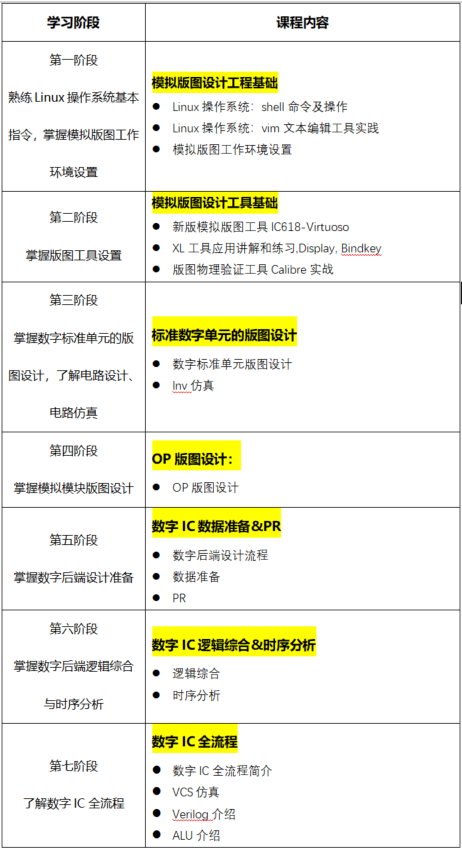
From now on, enrolling in this event course (a total of 58 class hours) can enjoy a 60% discount, the promotional price is only 2980 yuan, and you can also get 2 months of server access for free,completing the loop of theoretical and practical learning!
Students who want to master professional skills in digital backend and analog layout and practice hands-on should quickly scan the code to consult, do not miss this wave of discounts!
Scan to consult the course

E Course Network (www.eecourse.com) is a professional integrated circuit education platform under Moore Elite, dedicated to cultivating high-quality integrated circuit professionals in the semiconductor industry. The platform is oriented towards the job requirements of integrated circuit enterprises, providing practical training platforms that fit the corporate environment, quickly training students to meet corporate needs.
E Course Network has a mature training platform, a complete course system, and strong teaching resources, planning 168 high-quality courses in China’s semiconductor curriculum, covering the entire integrated circuit industry chain, and has 4 offline training bases. To date, a total of 15,367 people have been deeply trained, directly supplying 4,476 professionals to the industry. Established deep cooperation with 143 universities, and held 240 corporate special IC training sessions.