Linux | Red Hat Certification | IT Technology | Operations Engineer
👇 Join the technical exchange QQ group with 1000 members, note 【Official Account】 for faster approval

1. Concept of Address Space
In the study of C/C++ language, we often hear people discussing the concept of addresses in memory. In Linux, the exact concept is called the process address space. Each process has its corresponding process address space, which is roughly distributed as shown in the figure below:
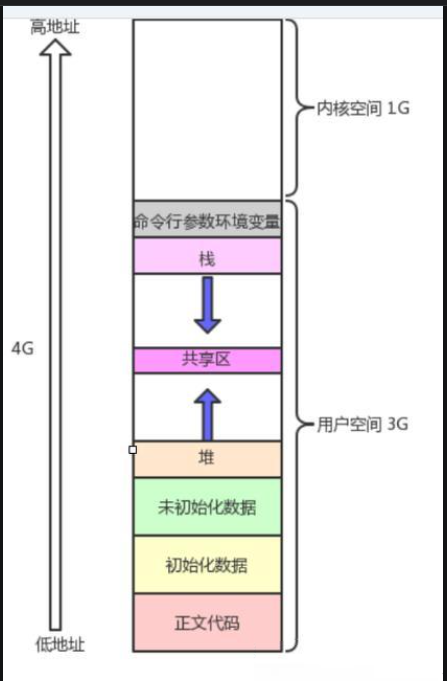
The stack area, heap area, code area, and constant area mentioned above are certainly familiar to everyone. The stack grows downwards, while the heap grows upwards. Moreover, the address distribution of these areas in the figure has its rules. From the bottom of the text code, initialized data, uninitialized data up to the stack and command line arguments, their address distribution is from low to high. However, we have only heard of it this way; let’s verify it below.
1 #include<stdio.h> 2 #include<string.h> 3 #include<stdlib.h> 4 #include<unistd.h> 5 6 int g_val1=100; 7 int g_val2; 8 int main() 9 { 10 printf("code addr:%p\n",main); 11 const char *str="hello world"; 12 printf("read only string addr:%p\n",str); 13 printf("init global value addr:%p\n",&g_val1); 14 printf("uninit global value addr:%p\n",&g_val2); 15 char *mem1=(char*)malloc(100); 16 char *mem2=(char*)malloc(100); 17 char *mem3=(char*)malloc(100); 18 printf("m1 heap addr:%p\n",mem1); 19 printf("m2 heap addr:%p\n",mem2); 20 printf("m3 heap addr:%p\n",mem3); 21 printf("stack addr:%p\n",&str); 22 int a; 23 int b; 24 int c; 25 printf("a stack addr:%p\n",&a); 26 printf("b stack addr:%p\n",&b); 27 printf("c stack addr:%p\n",&c); 28 return 0; 29 } 30 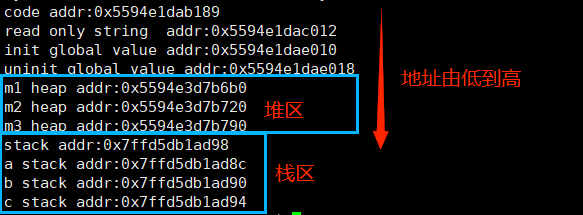
The above is just a rough division of address space. So, what is address space? Essentially, it is the size of the visible range of a process. The address space must contain various area divisions, i.e., defining start and end for linear addresses.
2. Significance of Address Space
So why is there an address space? What is its significance?
Firstly, it allows processes to view memory from a unified perspective. With the existence of address space, processes no longer need to care about how the actual physical addresses are distributed in physical memory. From the process’s point of view, there is only one address space allocated by the CPU, and the process can use it directly.
Secondly, increasing the virtual address space of the process allows us to access memory through an additional conversion process. During this conversion, we can review our addressing requests. Therefore, if there is an abnormal access, it can be intercepted directly, and that request will not reach physical memory, thus protecting physical memory. It is similar to when we were children, our parents would often require us to hand over our pocket money to them for management. When we wanted to buy something, we would just ask them for it. If we wanted to buy a 10 yuan pencil case, our parents would give us 10 yuan, but if we wanted to buy a 200 yuan game console, they might stop us with the reason of studying hard, which is similar to this principle.
Thirdly, with the existence of address space and page tables, we can decouple the process management module from the memory management module. From the process’s perspective, it only needs to handle virtual addresses without needing to care about how memory stores and processes code and data.
3. Page Tables
Before explaining page tables, let’s review a small detail about creating child processes. When we create a child process with fork, we find that the return value of the fork function is different between the parent and child processes; the child process is 0, and the parent process is the ID of the created child process. So how is this achieved? Let’s look at the results of the following code.
1 #include<stdio.h> 2 #include<string.h> 3 #include<stdlib.h> 4 #include<unistd.h> 5 6 int g_val=100; 7 int main() 8 { 9 pid_t id=fork(); 10 if(id==0) 11 { 12 int cnt=5; 13 // Child Process 14 while(1) 15 { 16 printf("I'm a child, pid: %d, ppid: %d, g_val: %d, &g_val: %p\n",getpid(),getppid(),g_val,&g_val); 17 sleep(1); 18 } 19 } 20 else 21 { 22 // Parent Process 23 while(1) 24 { 25 printf("I'm a parent, pid: %d, ppid: %d, g_val: %d, &g_val: %p\n",getpid(),getppid(),g_val,&g_val); 26 sleep(1); 27 } 28 } 29 return 0; 30 }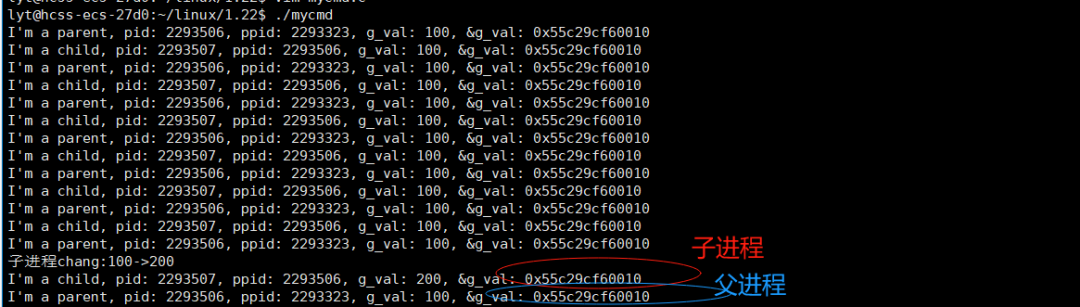
In the above code, we print the value and address of g_val in both parent and child processes. We find that both are exactly the same, which aligns with our understanding that the child process inherits resources from the parent process. However, what happens when we modify this value?
pid_t id=fork(); 10 if(id==0) 11 { 12 int cnt=5; 13 // Child Process 14 while(1) 15 { 16 printf("I'm a child, pid: %d, ppid: %d, g_val: %d, &g_val: %p\n",getpid(),getppid(),g_val,&g_val); 17 sleep(1); 18 if(cnt) cnt--; 19 else 20 { 21 g_val=200; 22 printf("Child process change:100->200\n"); 23 } 24 } 25 } 26 else 27 { 28 // Parent Process 29 while(1) 30 { 31 printf("I'm a parent, pid: %d, ppid: %d, g_val: %d, &g_val: %p\n",getpid(),getppid(),g_val,&g_val); 32 sleep(1); 33 } 34 }
When we modify the value of g_val in the child process, according to our understanding, the child process should perform a copy-on-write, i.e., a deep copy. Therefore, the printed address of g_val in the parent and child processes should be different. However, the actual situation shows that the addresses are still the same, but their values are indeed different. This indicates that the address of g_val is not the actual physical address but a linear address or what is commonly referred to as a virtual address. So how can the virtual addresses be the same while the values are different? This involves page tables.
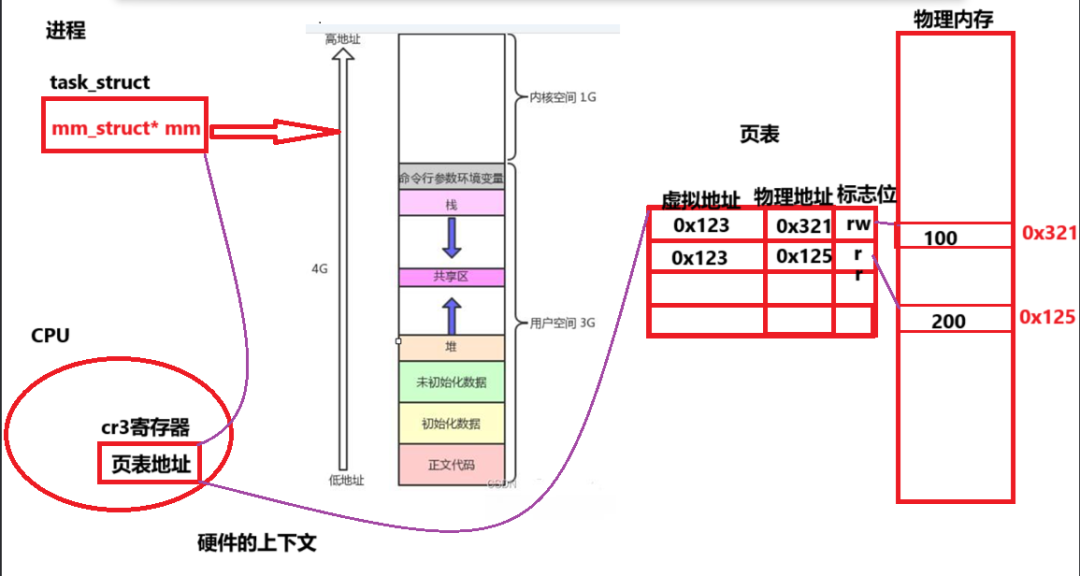
Previously, when we discussed processes, we mentioned that a process consists of a PCB and code data. Today we can further enrich the concept of processes. A process is composed of a PCB, program address space, page table, and code and data stored in physical memory.
Now, what is a page table? Simply put, it consists of three parts: the first part is the virtual address, the second part is the physical address in physical memory corresponding to the virtual address, and the flag bits, which indicate whether the data stored at the physical address is readable or writable. This is also why we cannot modify the code and data in the code and constant areas.
Next, let’s understand some surrounding knowledge about page tables. One is the cr3 register in the CPU, which stores the address of the page table and is part of the process in the hardware context. Therefore, during process switching, the address of the page table in the cr3 register will also be taken away by the process, facilitating the recovery of context when the process is executed again.
Moreover, there is lazy loading. We all know that for a large file, the operating system may not be able to load all of its contents into memory at once. It often adopts a batch loading method. For example, for a 40G file, it may load 300M or 500M at a time. After understanding this loading process, what is lazy loading? It means that when the operating system loads a process, it can load, say, 500M of code and data at once, but it does not do this all at once because the process itself may only run 5MB of code or need that much data. If the CPU does this for every process, it would greatly consume CPU resources. Therefore, it does not load so much at once but loads on demand, i.e., it loads resources or objects only when needed, rather than loading all resources immediately when the program starts. This technique can effectively reduce initial overhead and improve application performance and user experience.
Finally, there is page fault interrupt, which refers to the process of interrupting the execution of the current instruction due to the required page not being in memory and loading the required page from external storage (such as a hard disk) into memory. Page fault interrupts are a common phenomenon in paging storage, primarily occurring in virtual memory systems. In the context of processes, when a process is created, it first creates kernel data structures, i.e., address space, page tables, etc. At this time, the page table may have virtual addresses, but the actual physical addresses have not yet been allocated. Only when the process starts executing and uses certain codes and resources does it trigger a page fault interrupt, allocating physical addresses for the page table.
4. Summary and Reflection
Through the study of address space and page tables, we have gained a deeper understanding of processes. A process consists of kernel data structures (task_struct && mm_struct && page table) + program code and arrays.
For course consultation, add: HCIE666CCIE
↓ Or scan the QR code below ↓

What technical points and content would you like to see?
You can leave a message below to let us know!