Welcome to click below 👇 to follow me, and remember to star it~
There will be significant benefits at the end of the article.
Introduction
The NodeSwap feature of Kubernetes (see Kubernetes documentation) is expected to be officially stabilized in the upcoming v1.34 release. This feature marks a significant shift in Kubernetes from the traditional practice of disabling Swap to ensure predictable performance to allowing the use of Swap. This article focuses on Swap tuning on Linux nodes, a feature that is only available in Linux environments. By allowing nodes to utilize secondary storage as additional virtual memory when physical RAM is exhausted, NodeSwap aims to enhance resource utilization and reduce out-of-memory (OOM) kill events.
However, enabling Swap is not a one-size-fits-all solution. The performance and stability of nodes under memory pressure are highly dependent on the configuration of Linux kernel parameters. Misconfiguration can lead to performance degradation and interfere with Kubelet’s eviction logic. This article will delve into the key kernel parameters that affect Swap behavior, analyzing their impact on Kubernetes workload performance, Swap utilization, and eviction mechanisms. Through various test results, we share findings on optimizing configurations to achieve a stable and high-performance Kubernetes cluster.
https://kubernetes.io/blog/2025/08/19/tuning-linux-swap-for-kubernetes-a-deep-dive/
Basics of Linux Swap
The Linux kernel manages memory through pages (typically 4KiB in size). When physical memory is constrained, the kernel’s page replacement algorithm determines which pages to move to Swap space. This algorithm is influenced by factors such as page access patterns, page dirtiness (whether modified), and memory pressure.
Anonymous Memory vs File-backed Memory
The kernel distinguishes between two types of memory:
- Anonymous Memory: Not associated with specific disk files, such as the heap and stack of a program. This is private memory for applications, and when reclaimed by the kernel, it must be written to a dedicated Swap device.
- File-backed Memory: Associated with files in the file system, including executable code, shared libraries, and file system caches. The kernel can discard unmodified “clean” pages; for “dirty” pages, they must be written back to the file.
In a system without Swap, the kernel can reclaim clean file-backed pages but cannot unload anonymous memory. Enabling Swap provides this capability, allowing the kernel to move infrequently accessed pages to disk, thereby saving RAM and avoiding system OOM kills.
Key Kernel Parameters
Linux provides parameters to tune Swap behavior through sysctl:
- vm.swappiness (range 0-200): Controls the kernel’s preference for swapping anonymous memory vs reclaiming file-backed memory (page cache).
- High values (e.g., 90+): The kernel aggressively swaps out inactive anonymous memory to retain file cache.
- Low values (e.g., <10): The kernel prioritizes discarding file cache pages.
- vm.min_free_kbytes: Sets the minimum free memory buffer that the kernel reserves. When free memory falls below this value, the kernel more aggressively reclaims pages (including Swap), which may eventually trigger OOM kills. This parameter acts as a safety mechanism to ensure critical allocations have sufficient memory. A high value will cause Swap to start earlier under memory pressure.
- vm.watermark_scale_factor: Controls the gap between
min,low, andhighwatermarks calculated based onmin_free_kbytes. - Watermark Explanation:
low: When free memory falls below this value, thekswapdprocess wakes up to reclaim pages in the background, starting the Swap cycle.min: When free memory reaches this value, blocking process allocations occur, leading to aggressive reclamation; failure triggers OOM.high: When free memory reaches this value, reclamation stops.- High values create a larger buffer between
lowandmin, givingkswapdmore time to gradually reclaim memory, avoiding the system entering a critical state.
In typical server workloads, high swappiness can free up RAM by swapping out “cold” memory, supporting processes that rely on file cache. Increasing min_free_kbytes and watermark_scale_factor can move the Swap window earlier, providing more space to prevent OOM.
Testing and Results Analysis
To evaluate the impact of these parameters, we designed a series of stress tests.
Test Environment
- Platform: Google Cloud GKE.
- Kubernetes Version: 1.33.2.
- Node Configuration: n2-standard-2 (8GiB RAM, 50GB Swap on pd-balanced disk, no encryption), Ubuntu 22.04.
- Workload: Custom Go application, controllable memory allocation rate, generating file cache pressure, and simulating different access patterns (random vs sequential).
- Monitoring: Sidecar container capturing system metrics every second.
- Protection: Critical components (e.g., kubelet, container runtime, sshd) prevented from swapping by setting
memory.swap.max=0through cgroup.
Testing Methodology
Stress test Pods were run under different swappiness (0, 60, 90) and watermark parameters, observing behavior under high memory allocation and I/O pressure.
Swap Visualization
In a 100MB/s stress test, as free memory decreased, Swap usage and swapping activity increased, while I/O activity and CPU I/O wait times rose, indicating increased system pressure (see original article charts).
Key Findings
Under default parameters (swappiness=60, min_free_kbytes=68MB, watermark_scale_factor=10), high pressure quickly led to OOM and node restarts. Through optimization, a balance of node stability and performance can be achieved.
Impact of swappiness
Tests showed:
swappiness=90: The kernel prioritizes swapping out inactive anonymous memory, retaining file cache, leading to high Swap usage and I/O activity, with CPU I/O wait spikes.swappiness=0: Prioritizes discarding file cache, delaying Swap. However, this does not disable Swap; under high pressure, anonymous memory will still be swapped.
The choice depends on the workload: I/O sensitive workloads should use low values; workloads relying on file cache should use high values, provided the disk is fast enough.
Watermark Tuning to Prevent Evictions and OOM
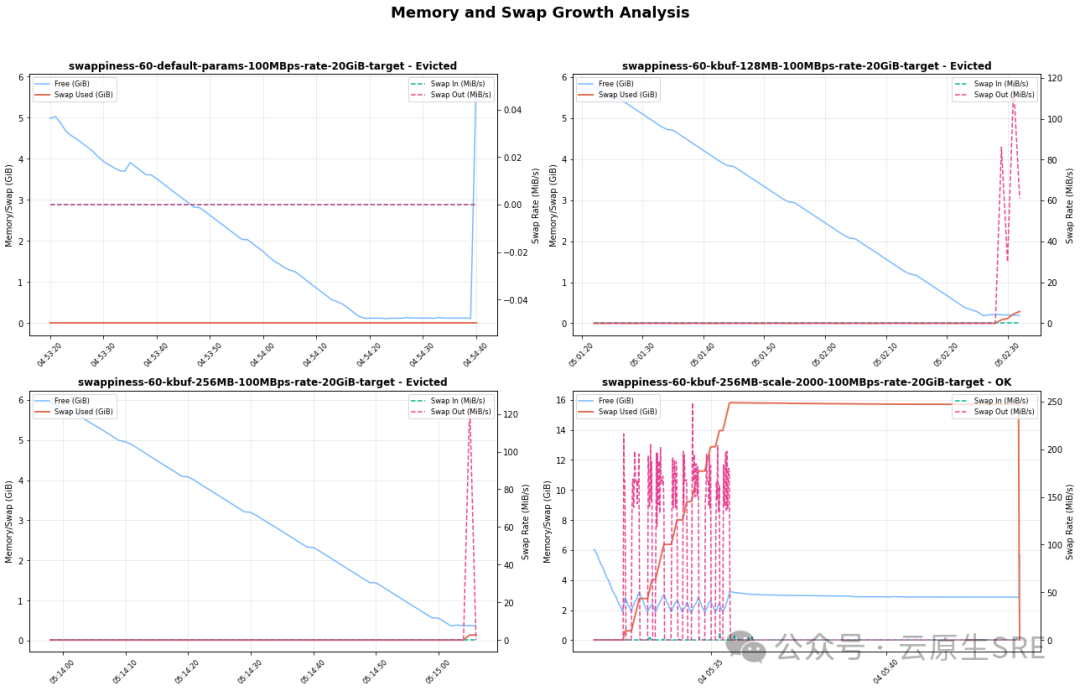
Under rapid memory allocation (300-500 MB/s), the default watermark buffer is too small, causing kswapd to be unable to reclaim in time, triggering Kubelet evictions or OOM.
Optimization proposals:
- Increase
min_free_kbytesto 512MiB: Reclaim earlier, providing a larger safety buffer. - Increase
watermark_scale_factorto 2000: Expand the gap betweenlowandhigh(from approximately 337MB to approximately 591MB in tests), extending the Swap window.
This configuration successfully prevented evictions and OOM (see original article comparison tables and charts).
Risks and Recommendations
While enabling Swap is powerful, it requires careful risk management:
- Risk of Performance Degradation: Swap is much slower than RAM; if an active working set is swapped out, it will lead to thrashing. It is recommended to use SSD storage.
- Risk of Masking Memory Leaks: Swap can hide leaks, leading to gradual performance degradation rather than rapid OOM, making diagnosis easier.
- Risk of Disabling Evictions: Improper tuning may trigger OOM before Kubelet evictions. Ensure
min_free_kbytesconfiguration supports Kubelet mechanisms.
Kubernetes Context
The kernel watermark and Kubelet eviction thresholds together define the memory pressure zone. The ideal configuration should create a sufficiently large “Swap area” (between high and min), allowing the kernel to handle pressure through Swap, avoiding entering the eviction/direct reclaim zone (see original article threshold chart).
Recommended Starting Configuration
Based on tests, the following is a starting point for enabling Swap on Linux nodes (recommended to benchmark your workload in a test environment):
vm.swappiness=60: Linux default, suitable for general workloads; sensitive applications may require further tuning.vm.min_free_kbytes=500000(500MB): Set to 2-3% of total node memory, providing a reasonable safety buffer.vm.watermark_scale_factor=2000: Expands thekswapdoperating window, preventing sudden OOM.
When enabling Swap, it is strongly recommended to run benchmarks in a test environment, considering factors such as CPU load, disk type (SSD vs HDD), and I/O patterns.
Previous Reviews
K8S Tool Recommendations, Kargo: Next-Generation GitOps Continuous Delivery Tool
K8S Tool Recommendations: Bufstream – The Only Cloud-Native Kafka Implementation Verified by Jepsen
K8S Tool Recommendations: Using Kubemark for Large-Scale Kubernetes Cluster Simulation Practice
K8S Tool Recommendations: Implementing GitOps Automation Testing and Rollback with Argo Rollouts
K8S Tool Recommendations: A New Resource Orchestration Tool: KRO Launched by Three Major Cloud Vendors
K8S Tool Recommendations: Say Goodbye to Complex Authentication! Guide to Kubernetes Login Tool kubelogin
K8S Tool Recommendations: Kubernetes Resource Optimization Tool KRR: One-Click Diagnosis of Cluster Resource Waste
Kubernetes Tool Recommendations: Simplifying Fault Diagnosis with k8s-pod-restart-info-collector
K8S Tool Recommendations: Dynamic Seamless Kubernetes Multi-Cluster Solution – Liqo
K8S Learning Path 2025
Best Practices for Managing Kubernetes (2025)
How to Implement an Enterprise-Level PaaS Container Cloud Platform: A Comprehensive Guide from Planning to Implementation