Click on the above “Linux Notes” and select “Pin/Star Public Account”
Get valuable content delivered first-hand
- What is Buildroot
- Obtaining Buildroot Source Code
- Buildroot Directory Structure
- Buildroot Compilation
- Configuration
- Full Compilation
- Individual Compilation
- How to Add Custom Third-Party Projects
- How to Patch Buildroot Source Code
- Summary
In the previous article, we discussed how to build Lubuntu, creating a Lubuntu 20.04 system step by step. In this article, we will talk about the building and usage of Buildroot.
What is Buildroot
Buildroot is a framework for building embedded Linux systems on the Linux platform. The entire Buildroot consists of Makefile scripts and Kconfig configuration files. You can configure Buildroot just like compiling the Linux kernel using <span>menuconfig</span>, to compile a complete Linux system software that can be directly flashed onto the machine (including boot, kernel, rootfs, and various libraries and applications within rootfs).
Obtaining Buildroot Source Code
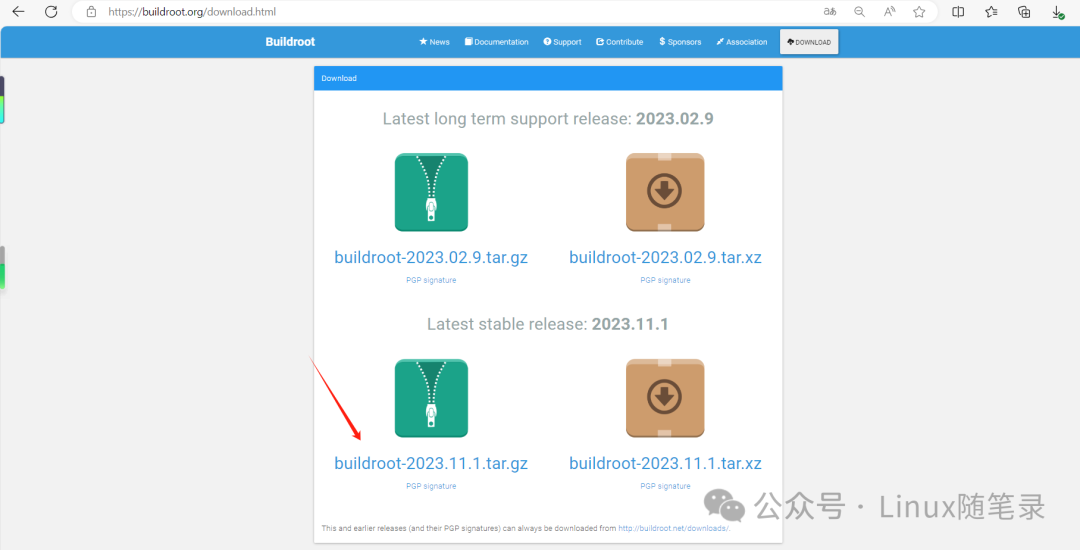
Download Buildroot from the official website. Buildroot is updated annually, with releases in February, May, August, and November each year.
Buildroot source code download site: https://buildroot.org/download.html
Buildroot Directory Structure
Here is an introduction to the Buildroot directory structure:
$ tree -L 1
.
├── arch   # Architecture-related configuration scripts
├── board # Configuration patches for various development boards
├── boot # Various boot software
├── CHANGES
├── Config.in
├── Config.in.legacy
├── configs # Configuration files for various development boards
├── COPYING
├── DEVELOPERS
├── dl  # Directory for downloaded software packages
├── docs # Reference documents
├── fs  # Source code for various file systems
├── linux # Automatic build scripts for the Linux kernel
├── Makefile  # Build script
├── Makefile.legacy
├── output  # Directory for compiled output products
├── package # Directory for configuration files and build scripts for various software packages
├── README
├── support # Support software that may be used in the build
├── system   # Configuration and build scripts for the root directory, skeleton directory stores the root directory skeleton
├── toolchain  # Scripts for building the toolchain
└── utils      # Some utility software
Buildroot Compilation
Configuration
After downloading and extracting the Buildroot source package, it needs to be configured before it can be used on the board, such as configuring the processor architecture, toolchain, kernel source tree path, kernel version, and filesystem type, as well as the password for entering the system.
make menuconfig
After executing, the following menu will pop up: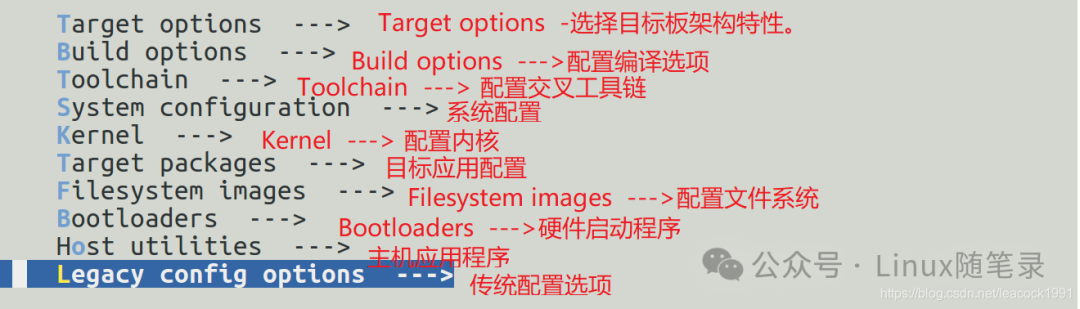
Generally, the relevant configurations to focus on are the following options:
Target option —>
Target Architecture Variant (cortex-A53)

Toolchain —>
Kernel Headers (Linux 5.10.x kernel headers) --->

System configuration —> (root) Root password

Kernel —>
(5.10.209) kernel version
Filesystem images —>
   [*] ext2/3/4 root filesystem
        ext2/3/4 variant (ext4) --->
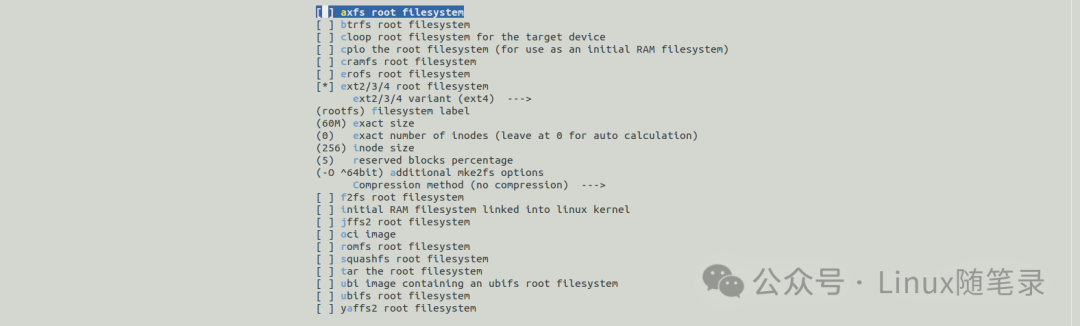
Other optional configurations include libraries such as <span>gstreamer</span>, <span>bluez</span>, <span>bluealsa</span>, and <span>alsa</span>.
Full Compilation
Full compilation refers to compiling <span>uboot</span>, <span>kernel</span>, and <span>buildroot</span> images.
make clean
make -j$(nproc)
<span>-j(nproc)</span> uses multiple cores for parallel compilation. Since this is the first compilation, many software packages need to be downloaded, which may take about two to four hours to complete. If the network conditions are poor, be prepared for a longer time.
The contents of the output directory <span>out</span> include:
.
├── build # Source code of various packages after extraction
├── host  # Toolchain, libraries, and header files
├── images # Contains Image, bootloader, and rootfs images
└── target # Complete rootfs content
Individual Compilation
Sometimes we only need to compile a single module. If the full compilation is too slow, we can compile just a specific module to improve work efficiency.
For example, if we need to compile the <span>rkwifibt-app</span> module, it can be found in <span>buildroot</span> under <span>package/rkwifibt-app</span>, or it can also be in an external directory <span>external/rkwifibt-app</span>.
First, delete the previously compiled version of rkwifibt-app in Buildroot:
rm buildroot/output/rockchip_rk3xxx/build/rkwifibt-app/

Next, clean the rkwifibt-app module content:
make rkwifibt-app-dirclean

Compile the rkwifibt-app-rebuild part:
make rkwifibt-app-rebuild
How to Add Custom Third-Party Projects
Method 1: Add External Package
You can integrate your C/C++ project into the company’s Buildroot project in the following way:
- Create a directory
<span>package/yourapp</span>for<span>yourapp</span> - Add
<span>Config.in</span>and<span>yourapp.mk</span>files with the necessary content - Modify
<span>package/Config.in</span>to include<span>yourapp</span> - Add the corresponding macros to
<span>buildroot_defconfig</span>
Here is an example of the content rules for <span>yourapp.mk</span>, using <span>qtdemo.mk</span> as an example:
file:qtdemo.mk
################################################################################
#
# qtdemo
#
################################################################################

QTDEMO_SITE = $(TOPDIR)/../app/qt_demo/Apps/MotorCtrl
QTDEMO_SITE_METHOD = local                # Local source method

QTDEMO_DEPENDENCIES = qt5base             # Dependency on qt5base

define QTDEMO_CONFIGURE_CMDS              # Configure QTDEMO commands
    cd $(QTDEMO_SITE) && $(QT5_QMAKE)     # Use qmake to generate Makefile
endef

define QTDEMO_BUILD_CMDS                  # Build QTDEMO
    $(MAKE) -C $(QTDEMO_SITE)             # Build
endef

define QTDEMO_INSTALL_TARGET_CMDS         # Install to target directory
    $(INSTALL) -D -m 0755  $(QTDEMO_SITE)/../../bin/MotorCtrl $(TARGET_DIR)/
endef

define QTDEMO_INSTALL_INIT_SYSV          # Install initialization system script to /etc/init.d/
    $(INSTALL) -D -m 0755 $(QTDEMO_SITE)/S91qtdemoinit  $(TARGET_DIR)/etc/init.d/
endef

define QTDEMO_INSTALL_INIT_SYSTEMD       # Install system service

$(eval $(qmake-package))
Method 2: Add External Package
Using the <span>BR2_EXTERNAL</span> mechanism, you can centralize your C/C++ projects in the <span>external</span> directory, making it easier to maintain a shared package repository for multiple projects, which is recommended for company projects.
- Create a directory
<span>external/yourapp</span>for your application - Add
<span>Config.in</span>and<span>yourapp.mk</span>files with the necessary content - Add the corresponding macros to
<span>buildroot_defconfig</span>
How to Patch Buildroot Source Code
<span>Buildroot</span>has a third-party source in<span>output/rockchip_rk3XXX/build/xxx</span>where you can initialize a<span>git</span>repository- Add modifications to the third-party source
<span>git</span>generate a patch file- Place the
<span>patch</span>file in the<span>package/xxx/</span>directory
For example, here is how I added a patch for <span>bluez</span> in Buildroot:
cd  SDK/buildroot/output/rockchip_rk3XXX/build/bluez5_utils-5.77
git init . && git add . && git commit -m init
vi src/main.conf
BaBa......
git add src/main.conf
git commit -m "JustWorksRepairing = confirm"
git format-patch -n -1
cp 0001-JustWorksRepairing-confirm.patch ../../../../package/bluez5_utils/0008-JustWorksRepairing-confirm.patch
Summary
This is my summary of the usage and scenarios for Buildroot. If there are any shortcomings, please feel free to point them out. If you learned something, please support with a like! Feel free to follow the public account [Linux Notes] for periodic sharing of Linux tips.
end
Previous Recommendations
Essential reading for learning embedded systems
My Linux driver learning path
1-on-1 paid consultation
What websites do embedded experts browse regularly?
Ten projects recommended for fresh graduates to include in their resumes