In-Depth Analysis and Practice of Unix Domain Sockets (UDS) in C++ ROS
0. Introduction
In the architectural design of the Robot Operating System (ROS), Inter-Process Communication (IPC) is one of the core components. Traditional ROS communication primarily relies on the TCP/IP protocol stack, but in scenarios of inter-process communication on the same host, Unix Domain Sockets (UDS) provide a more efficient and reliable solution. This article will delve into the application of UDS in the C++ ROS environment, from theoretical foundations to practical code implementations, providing readers with comprehensive technical guidance.
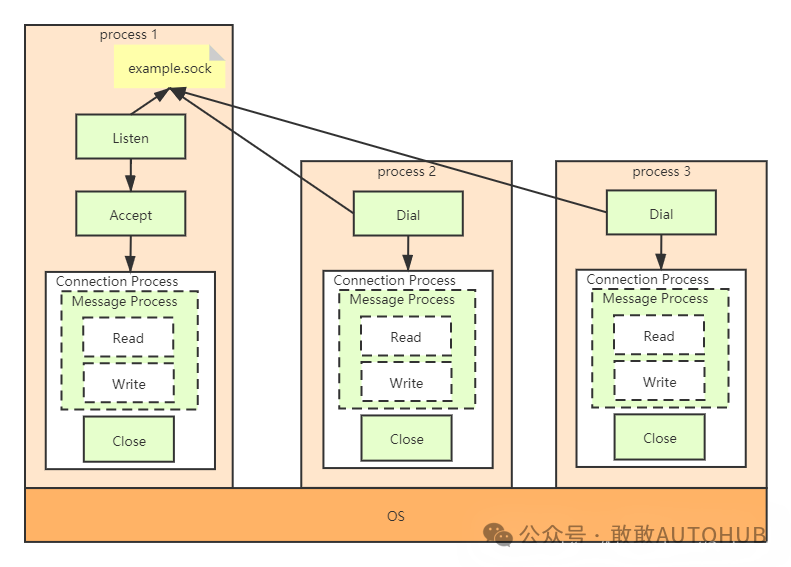
1. Basic Theory of Unix Domain Sockets
1.1 What is a Unix Domain Socket
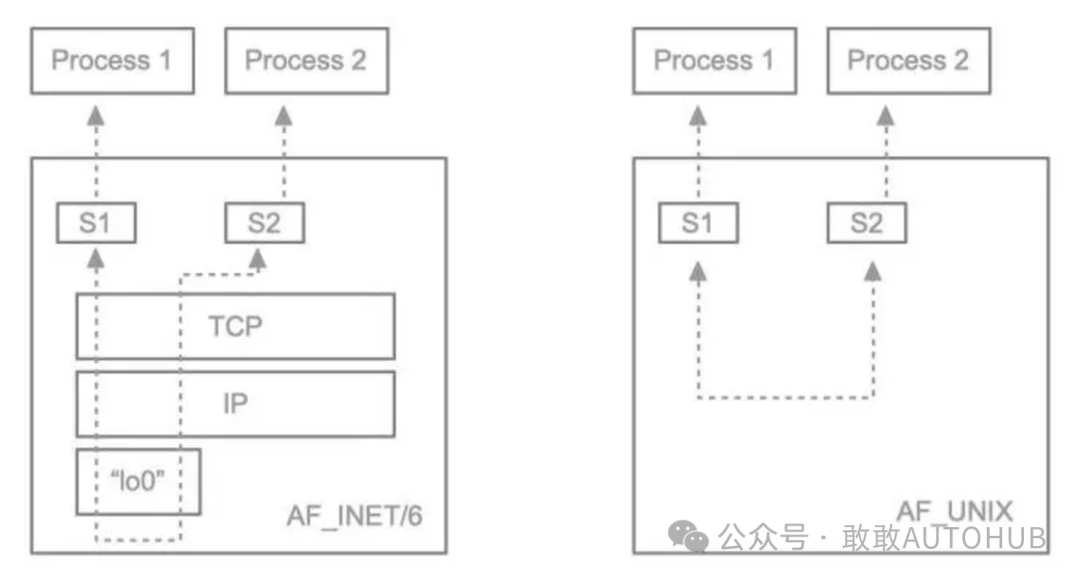
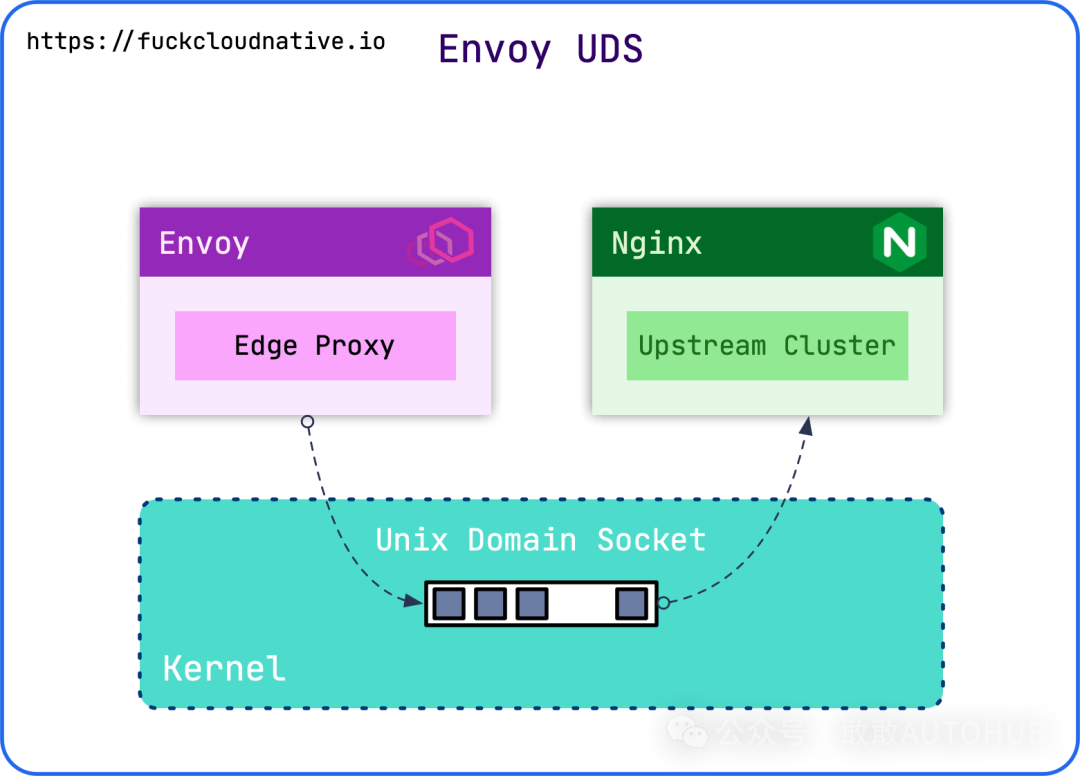
A Unix Domain Socket is a special IPC mechanism, allowing processes running on the same host to communicate via file system paths. Unlike traditional Internet Sockets, UDS does not require traversing the network protocol stack; data is transmitted directly in memory, resulting in higher performance and lower latency.
The core advantage of UDS lies in its simplified communication model. Traditional TCP/IP communication requires complex processing through the network protocol stack, including IP header encapsulation, TCP segment fragmentation, checksum calculation, routing, and other steps. UDS completely bypasses these overheads, with data being copied directly from the user space of the sending process to the user space of the receiving process, all occurring in kernel memory without disk I/O operations.
1.2 Three Types of UDS Communication
UDS supports three main types of communication, each with its specific application scenarios and performance characteristics. The choice of these types directly affects the performance and reliability requirements of applications.
1. SOCK_STREAM (Stream Socket)SOCK_STREAM provides ordered, reliable, connection-oriented, bidirectional byte stream communication, functioning similarly to the TCP protocol. This type of socket ensures that data arrives without error in the order sent and requires an explicit connection to be established (via system calls like listen(), accept(), connect()). SOCK_STREAM is particularly suitable for scenarios requiring data integrity and order, such as file transfers and database connections. In the ROS environment, this type is commonly used for configuration synchronization and parameter server communication, where reliable data transmission is needed.
2. SOCK_DGRAM (Datagram Socket)SOCK_DGRAM provides connectionless, unreliable, and boundary-preserving datagram communication, similar to the operation of the UDP protocol. This type of socket has limitations on message size, and data may be lost or arrive out of order, but it offers lower latency and higher real-time performance. SOCK_DGRAM is particularly suitable for scenarios with high real-time requirements but allowing for some data loss, such as sensor data stream transmission and real-time control commands. In robotic systems, high-frequency data transmission scenarios like LiDAR data and camera image streams can benefit from the performance of SOCK_DGRAM.
3. SOCK_SEQPACKET (Sequenced Packet Socket)
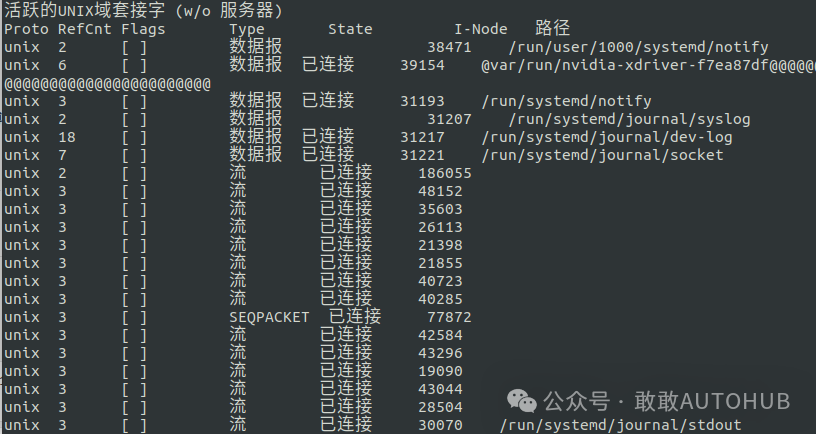
SOCK_SEQPACKET is a communication type that lies between stream sockets and datagram sockets, providing ordered, reliable, and boundary-preserving datagram communication. Each message is sent as an independent unit, with the receiving order matching the sending order while ensuring reliable delivery. This type is particularly suitable for scenarios requiring message boundaries but also needing reliability, such as command transmission and state synchronization between ROS nodes. SOCK_SEQPACKET offers better message segmentation and reassembly capabilities while maintaining message integrity.
2. C++ UDS Programming Practice
2.1 Basic UDS Server Implementation
In actual ROS development, the implementation of a UDS server needs to consider various factors, including error handling, resource management, and concurrent connections. Below is a complete example of a C++ UDS server implementation, demonstrating how to create a reliable UDS server using the SOCK_SEQPACKET type. This implementation adopts an object-oriented design pattern, providing good encapsulation and maintainability, while also including comprehensive error handling and resource cleanup features.
#include <iostream>
#include <sys/socket.h>
#include <sys/un.h>
#include <unistd.h>
#include <cstring>
#include <signal.h>
#include <sys/stat.h>

class UDSServer {
private:
    static constexpr const char* SOCKET_PATH = "/tmp/ros_uds_server.sock";
    static constexpr int MAX_MSG_SIZE = 1024;
    static constexpr int BACKLOG = 5;

    int server_fd_;
    volatile sig_atomic_t running_;

    void handle_signal(int sig){
        running_ = 0;
        std::cout << "\nReceived signal " << sig << ", shutting down server..." << std::endl;
    }

    static void signal_handler(int sig){
        // Static method cannot directly access member variables, simplified here
        std::cout << "\nReceived signal " << sig << std::endl;
    }

public:
    UDSServer() : server_fd_(-1), running_(1) {}

    ~UDSServer() {
        cleanup();
    }

    bool initialize(){
        // Register signal handler
        struct sigaction sa;
        sa.sa_handler = signal_handler;
        sigemptyset(&sa.sa_mask);
        sa.sa_flags = 0;
        sigaction(SIGINT, &sa, nullptr);
        sigaction(SIGTERM, &sa, nullptr);

        // Create socket
        server_fd_ = socket(AF_UNIX, SOCK_SEQPACKET, 0);
        if (server_fd_ == -1) {
            std::cerr << "Socket creation failed: " << strerror(errno) << std::endl;
            return false;
        }

        // Set socket options
        int reuse = 1;
        if (setsockopt(server_fd_, SOL_SOCKET, SO_REUSEADDR, &reuse, sizeof(reuse)) == -1) {
            std::cerr << "Setting socket options failed: " << strerror(errno) << std::endl;
        }

        // Set address structure
        struct sockaddr_un addr;
        memset(&addr, 0, sizeof(addr));
        addr.sun_family = AF_UNIX;
        strncpy(addr.sun_path, SOCKET_PATH, sizeof(addr.sun_path) - 1);

        // Remove existing socket file if any
        unlink(SOCKET_PATH);

        // Bind socket
        if (bind(server_fd_, (struct sockaddr*)&addr, sizeof(addr)) == -1) {
            std::cerr << "Binding failed: " << strerror(errno) << std::endl;
            close(server_fd_);
            return false;
        }

        // Set file permissions
        chmod(SOCKET_PATH, 0666);

        // Start listening
        if (listen(server_fd_, BACKLOG) == -1) {
            std::cerr << "Listening failed: " << strerror(errno) << std::endl;
            close(server_fd_);
            unlink(SOCKET_PATH);
            return false;
        }

        std::cout << "UDS server started, listening on path: " << SOCKET_PATH << std::endl;
        return true;
    }

    void run(){
        while (running_) {
            int client_fd = accept(server_fd_, nullptr, nullptr);
            if (client_fd == -1) {
                if (running_) {
                    std::cerr << "Accepting connection failed: " << strerror(errno) << std::endl;
                }
                continue;
            }

            std::cout << "Client connected, file descriptor: " << client_fd << std::endl;
            handle_client(client_fd);
            close(client_fd);
        }
    }

private:
    void handle_client(int client_fd){
        char buffer[MAX_MSG_SIZE + 1];

        while (running_) {
            ssize_t bytes_read = read(client_fd, buffer, MAX_MSG_SIZE);
            if (bytes_read == -1) {
                std::cerr << "Reading data failed: " << strerror(errno) << std::endl;
                break;
            } else if (bytes_read == 0) {
                std::cout << "Client disconnected" << std::endl;
                break;
            }

            buffer[bytes_read] = '\0';
            std::cout << "Received message (" << bytes_read << " bytes): " << buffer << std::endl;

            // Build response
            std::string response = "Server confirmation: " + std::string(buffer);
            ssize_t resp_len = response.length();

            if (write(client_fd, response.c_str(), resp_len) != resp_len) {
                std::cerr << "Sending response failed: " << strerror(errno) << std::endl;
                break;
            }

            std::cout << "Response sent: " << response << std::endl;
        }
    }

    void cleanup(){
        if (server_fd_ != -1) {
            close(server_fd_);
            server_fd_ = -1;
        }
        unlink(SOCKET_PATH);
        std::cout << "Server closed, resources cleaned up" << std::endl;
    }
};

int main(){
    UDSServer server;

    if (!server.initialize()) {
        std::cerr << "Server initialization failed" << std::endl;
        return 1;
    }

    server.run();
    return 0;
}
2.2 Basic UDS Client Implementation
The design of the UDS client also needs to consider connection management, data transmission efficiency, and error recovery. The corresponding client implementation demonstrates how to connect to the UDS server and perform efficient data exchange. This client implementation adopts intelligent resource management strategies to ensure that system resources are correctly released during connection anomalies or program exits, while providing flexible message sending and receiving interfaces that support the transmission of various data types.
#include <iostream>
#include <sys/socket.h>
#include <sys/un.h>
#include <unistd.h>
#include <cstring>
#include <vector>
#include <chrono>
#include <thread>

class UDSClient {
private:
    static constexpr const char* SOCKET_PATH = "/tmp/ros_uds_server.sock";
    static constexpr int MAX_MSG_SIZE = 1024;

    int client_fd_;

public:
    UDSClient() : client_fd_(-1) {}

    ~UDSClient() {
        if (client_fd_ != -1) {
            close(client_fd_);
        }
    }

    bool connect(){
        // Create socket
        client_fd_ = socket(AF_UNIX, SOCK_SEQPACKET, 0);
        if (client_fd_ == -1) {
            std::cerr << "Socket creation failed: " << strerror(errno) << std::endl;
            return false;
        }

        // Set address structure
        struct sockaddr_un addr;
        memset(&addr, 0, sizeof(addr));
        addr.sun_family = AF_UNIX;
        strncpy(addr.sun_path, SOCKET_PATH, sizeof(addr.sun_path) - 1);

        // Connect to server
        if (::connect(client_fd_, (struct sockaddr*)&addr, sizeof(addr)) == -1) {
            std::cerr << "Connection failed: " << strerror(errno) << std::endl;
            close(client_fd_);
            client_fd_ = -1;
            return false;
        }

        std::cout << "Connected to UDS server: " << SOCKET_PATH << std::endl;
        return true;
    }

    bool send_message(const std::string& message){
        if (client_fd_ == -1) {
            std::cerr << "Client not connected" << std::endl;
            return false;
        }

        ssize_t sent = write(client_fd_, message.c_str(), message.length());
        if (sent != static_cast<ssize_t>(message.length())) {
            std::cerr << "Sending message failed: " << strerror(errno) << std::endl;
            return false;
        }

        std::cout << "Message sent (" << sent << " bytes): " << message << std::endl;
        return true;
    }

    std::string receive_response(){
        if (client_fd_ == -1) {
            std::cerr << "Client not connected" << std::endl;
            return "";
        }

        char buffer[MAX_MSG_SIZE + 1];
        ssize_t bytes_read = read(client_fd_, buffer, MAX_MSG_SIZE);

        if (bytes_read == -1) {
            std::cerr << "Receiving response failed: " << strerror(errno) << std::endl;
            return "";
        } else if (bytes_read == 0) {
            std::cout << "Server disconnected" << std::endl;
            return "";
        }

        buffer[bytes_read] = '\0';
        std::string response(buffer);
        std::cout << "Received response (" << bytes_read << " bytes): " << response << std::endl;

        return response;
    }

    void disconnect(){
        if (client_fd_ != -1) {
            close(client_fd_);
            client_fd_ = -1;
            std::cout << "Disconnected" << std::endl;
        }
    }
};

int main(){
    UDSClient client;

    if (!client.connect()) {
        std::cerr << "Failed to connect to server" << std::endl;
        return 1;
    }

    // Test message list
    std::vector<std::string> test_messages = {
        "Hello, UDS Server!",
        "This is the second test message",
        "ROS node communication test",
        "Performance test message - " + std::string(100, 'A')
    };

    for (const auto& msg : test_messages) {
        if (!client.send_message(msg)) {
            std::cerr << "Sending message failed" << std::endl;
            break;
        }

        std::string response = client.receive_response();
        if (response.empty()) {
            std::cerr << "Receiving response failed" << std::endl;
            break;
        }

        std::cout << "---" << std::endl;
        std::this_thread::sleep_for(std::chrono::milliseconds(500));
    }

    client.disconnect();
    return 0;
}
3. Integration Applications of ROS and UDS
3.1 UDS Communication Architecture Between ROS Nodes
In the distributed architecture of ROS, the efficiency of communication between nodes directly affects the overall system performance. Although traditional ROS communication mechanisms are powerful, they may have latency and throughput limitations in certain high-performance scenarios. By using UDS as a supplementary mechanism for inter-node communication, we can significantly enhance system performance while maintaining the flexibility of the ROS architecture. This integrated solution is particularly suitable for scenarios requiring high-frequency data transmission, such as sensor data processing and real-time control command transmission. Below is a complete example of UDS communication between ROS nodes, demonstrating how to implement this integrated solution in practical projects.
#include <ros/ros.h>
#include <std_msgs/String.h>
#include <sys/socket.h>
#include <sys/un.h>
#include <unistd.h>
#include <cstring>
#include <thread>
#include <atomic>

class ROSUDSBridge {
private:
    ros::NodeHandle nh_;
    ros::Publisher uds_pub_;
    ros::Subscriber uds_sub_;

    static constexpr const char* SOCKET_PATH = "/tmp/ros_uds_bridge.sock";
    static constexpr int MAX_MSG_SIZE = 4096;

    int uds_fd_;
    std::atomic<bool> running_;
    std::thread uds_thread_;

public:
    ROSUDSBridge() : uds_fd_(-1), running_(false) {
        // Initialize ROS publisher and subscriber
        uds_pub_ = nh_.advertise<std_msgs::String>("/uds_data", 10);
        uds_sub_ = nh_.subscribe("/uds_command", 10, &ROSUDSBridge::udsCommandCallback, this);
    }

    ~ROSUDSBridge() {
        stop();
    }

    bool initialize(){
        // Create UDS socket
        uds_fd_ = socket(AF_UNIX, SOCK_SEQPACKET, 0);
        if (uds_fd_ == -1) {
            ROS_ERROR("UDS socket creation failed: %s", strerror(errno));
            return false;
        }

        // Set socket options
        int reuse = 1;
        setsockopt(uds_fd_, SOL_SOCKET, SO_REUSEADDR, &reuse, sizeof(reuse));

        // Bind address
        struct sockaddr_un addr;
        memset(&addr, 0, sizeof(addr));
        addr.sun_family = AF_UNIX;
        strncpy(addr.sun_path, SOCKET_PATH, sizeof(addr.sun_path) - 1);

        unlink(SOCKET_PATH);

        if (bind(uds_fd_, (struct sockaddr*)&addr, sizeof(addr)) == -1) {
            ROS_ERROR("UDS binding failed: %s", strerror(errno));
            close(uds_fd_);
            return false;
        }

        chmod(SOCKET_PATH, 0666);

        if (listen(uds_fd_, 5) == -1) {
            ROS_ERROR("UDS listening failed: %s", strerror(errno));
            close(uds_fd_);
            unlink(SOCKET_PATH);
            return false;
        }

        ROS_INFO("ROS UDS bridge started, listening on path: %s", SOCKET_PATH);

        // Start UDS handling thread
        running_ = true;
        uds_thread_ = std::thread(&ROSUDSBridge::udsHandler, this);

        return true;
    }

    void stop(){
        running_ = false;

        if (uds_thread_.joinable()) {
            uds_thread_.join();
        }

        if (uds_fd_ != -1) {
            close(uds_fd_);
            uds_fd_ = -1;
        }

        unlink(SOCKET_PATH);
        ROS_INFO("ROS UDS bridge stopped");
    }

private:
    void udsCommandCallback(const std_msgs::String::ConstPtr& msg){
        // Forward ROS messages to UDS client
        if (uds_fd_ != -1) {
            // Simplified here, actual applications need to maintain a client connection list
            ROS_INFO("Received ROS command, preparing to forward to UDS: %s", msg->data.c_str());
        }
    }

    void udsHandler(){
        while (running_) {
            int client_fd = accept(uds_fd_, nullptr, nullptr);
            if (client_fd == -1) {
                if (running_) {
                    ROS_ERROR("Accepting UDS connection failed: %s", strerror(errno));
                }
                continue;
            }

            ROS_INFO("UDS client connected");
            handleUDSClient(client_fd);
            close(client_fd);
        }
    }

    void handleUDSClient(int client_fd){
        char buffer[MAX_MSG_SIZE + 1];

        while (running_) {
            ssize_t bytes_read = read(client_fd, buffer, MAX_MSG_SIZE);
            if (bytes_read == -1) {
                ROS_ERROR("Reading UDS data failed: %s", strerror(errno));
                break;
            } else if (bytes_read == 0) {
                ROS_INFO("UDS client disconnected");
                break;
            }

            buffer[bytes_read] = '\0';
            ROS_INFO("Received UDS data (%zd bytes): %s", bytes_read, buffer);

            // Publish UDS data to ROS topic
            std_msgs::String ros_msg;
            ros_msg.data = std::string(buffer);
            uds_pub_.publish(ros_msg);

            // Send confirmation response
            std::string response = "ROS received: " + std::string(buffer);
            if (write(client_fd, response.c_str(), response.length()) == -1) {
                ROS_ERROR("Sending UDS response failed: %s", strerror(errno));
                break;
            }
        }
    }
};

int main(int argc, char** argv){
    ros::init(argc, argv, "ros_uds_bridge");

    ROSUDSBridge bridge;

    if (!bridge.initialize()) {
        ROS_ERROR("ROS UDS bridge initialization failed");
        return 1;
    }

    ros::spin();

    return 0;
}
3.2 High-Performance Data Transmission Example
In modern robotic systems, the real-time and accuracy of sensor data are key performance indicators. Data generated by sensors such as LiDAR, cameras, and IMUs need to be transmitted to processing nodes at extremely high frequencies. Although the traditional ROS topic mechanism provides powerful publish/subscribe functionality, it may have latency and throughput bottlenecks in certain high-performance scenarios. Especially when processing high-resolution image data and high-frequency laser scan data, the overhead of the network protocol stack can become a performance bottleneck. Using UDS can achieve more efficient data transmission by bypassing the network protocol stack and transmitting data directly in memory, significantly reducing latency and increasing throughput. This optimization is of great practical significance for real-time robotic applications, such as autonomous driving and industrial robot control.
// Sensor data UDS transmission example
class SensorUDSBridge {
private:
    static constexpr const char* SOCKET_PATH = "/tmp/sensor_data.sock";
    static constexpr int BUFFER_SIZE = 65536;

    int uds_fd_;
    std::atomic<bool> running_;
    std::thread data_thread_;

public:
    bool initialize(){
        // Create high-performance UDS socket
        uds_fd_ = socket(AF_UNIX, SOCK_SEQPACKET, 0);
        if (uds_fd_ == -1) return false;

        // Set socket options to optimize performance
        int send_buf_size = BUFFER_SIZE;
        int recv_buf_size = BUFFER_SIZE;
        setsockopt(uds_fd_, SOL_SOCKET, SO_SNDBUF, &send_buf_size, sizeof(send_buf_size));
        setsockopt(uds_fd_, SOL_SOCKET, SO_RCVBUF, &recv_buf_size, sizeof(recv_buf_size));

        // Set non-blocking mode
        int flags = fcntl(uds_fd_, F_GETFL, 0);
        fcntl(uds_fd_, F_SETFL, flags | O_NONBLOCK);

        // Bind and listen
        struct sockaddr_un addr;
        memset(&addr, 0, sizeof(addr));
        addr.sun_family = AF_UNIX;
        strncpy(addr.sun_path, SOCKET_PATH, sizeof(addr.sun_path) - 1);

        unlink(SOCKET_PATH);
        bind(uds_fd_, (struct sockaddr*)&addr, sizeof(addr));
        listen(uds_fd_, 10);

        running_ = true;
        data_thread_ = std::thread(&SensorUDSBridge::dataHandler, this);

        return true;
    }

private:
    void dataHandler(){
        while (running_) {
            int client_fd = accept(uds_fd_, nullptr, nullptr);
            if (client_fd == -1) {
                if (errno != EAGAIN && errno != EWOULDBLOCK) {
                    ROS_ERROR("Accepting connection failed: %s", strerror(errno));
                }
                std::this_thread::sleep_for(std::chrono::milliseconds(1));
                continue;
            }

            handleClient(client_fd);
            close(client_fd);
        }
    }

    void handleClient(int client_fd){
        // Use epoll for efficient event handling
        int epoll_fd = epoll_create1(0);
        struct epoll_event event;
        event.events = EPOLLIN;
        event.data.fd = client_fd;
        epoll_ctl(epoll_fd, EPOLL_CTL_ADD, client_fd, &event);

        struct epoll_event events[10];

        while (running_) {
            int nfds = epoll_wait(epoll_fd, events, 10, 1000);
            if (nfds == -1) {
                if (errno != EINTR) {
                    ROS_ERROR("epoll wait failed: %s", strerror(errno));
                }
                break;
            }

            for (int i = 0; i < nfds; i++) {
                if (events[i].data.fd == client_fd && events[i].events & EPOLLIN) {
                    processData(client_fd);
                }
            }
        }

        close(epoll_fd);
    }

    void processData(int client_fd){
        char buffer[BUFFER_SIZE];
        ssize_t bytes_read = read(client_fd, buffer, BUFFER_SIZE);

        if (bytes_read > 0) {
            // Process received sensor data
            // This can be integrated into ROS topics
            ROS_DEBUG("Received sensor data: %zd bytes", bytes_read);
        }
    }
};
4. Conclusion
Unix Domain Sockets, as an efficient inter-process communication mechanism, hold significant application value in the ROS environment. Through the in-depth analysis presented in this article, we can see that UDS brings significant advantages to ROS systems in terms of performance enhancement, resource efficiency, security, and flexibility. As robotic technology continues to evolve, the demand for system performance is also increasing, and the application prospects of UDS will become even broader.
References
https://blog.csdn.net/Dontla/article/details/122539148
https://blog.csdn.net/m0_37749564/article/details/130937773
https://mp.weixin.qq.com/s/skG4MOYbL4nZrJFedTLDKQ
https://blog.csdn.net/sc35262/article/details/144219894
https://blog.csdn.net/weixin_40482577/article/details/137476272
For more content related to ROS and embodied intelligence, please follow GuYueJu.
👉 Follow us to discover more in-depth content on autonomous driving/embodied intelligence/GitHub!
🚀 Review of past content👀
🔥 Study abroad life | Driving travel (1)🔥 Ten-minute paper reading | NavA3 preview open-source code: understanding any command, navigating to any location, finding any object🔥 Embodied intelligence | HIL-SERL robot training workflow guide