Linux | Red Hat Certified | IT Technology | Operations Engineer
👇 1000 people technical exchange QQ group, note [public account] for faster access

1. Soft and Hard Link Operations
1. Soft Link
How to create a corresponding soft link for the file file.txt created using touch?

ln -s file.txt file-soft.link to create a soft link for the corresponding file.
A soft link is essentially an independent file because the corresponding soft link has its own inode, which is different from the inode of the file it points to file.txt.
As shown below:
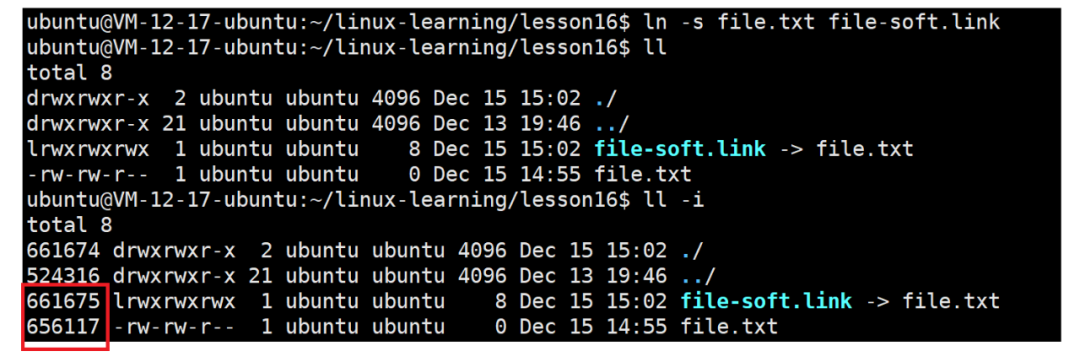
We write a string into file.txt and check the content of both files; we can see the string in both, indicating that the soft link is equivalent to our target file at the user level. A soft link references another file by name, but in reality, the new file has a different inode from the referenced file.

2. Hard Link
How to create a hard link for the file file.txt?

ln file.txt file-head.link to create a hard link for the corresponding file.
A hard link is not an independent file; it does not have its own inode but shares the same inode with a different file name.
In Linux, multiple file names can point to the same inode.
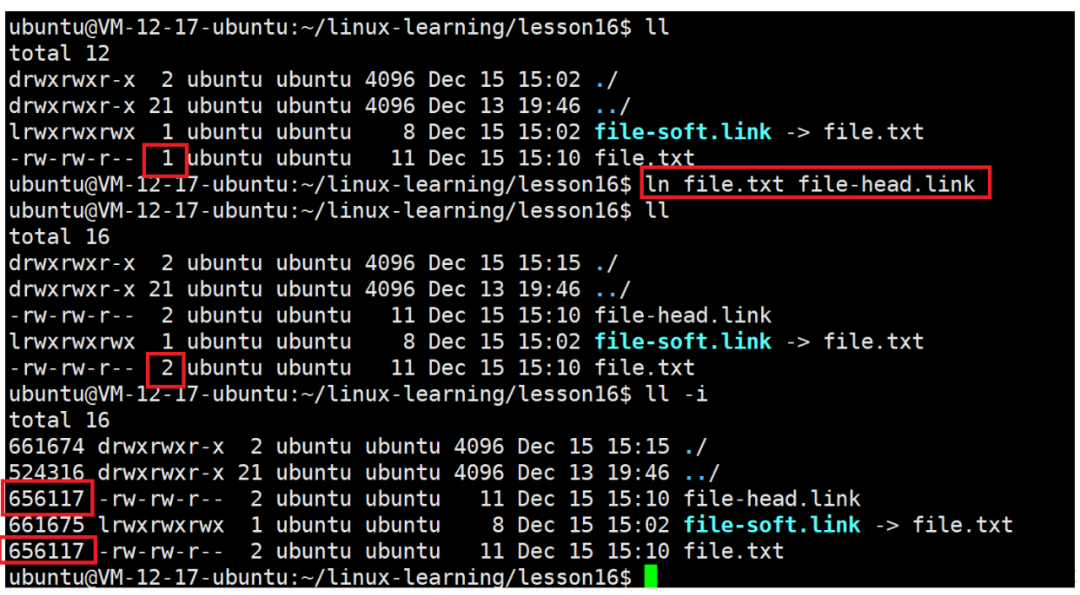
As shown in the image above, what is the number behind the permissions? Before creating a hard link, the number is 1; after creating a hard link, the number becomes 2. We will discuss this later!!
Understanding operations in Linux is not enough; just like previously creating processes and waiting for processes, discussing operations and interfaces without understanding what they do is useless. Next, we will learn how to understand soft and hard links!!!
2. How to Understand Soft and Hard Links
a.Soft and hard links have independent inodes, so they must have independent attributes and content. The content of a soft link saves the path of the target file. In Windows, it is equivalent to a shortcut of a software on the desktop, so the shortcuts we commonly use are also soft link files. In Linux, a soft link is a shortcut pointing to a file!!
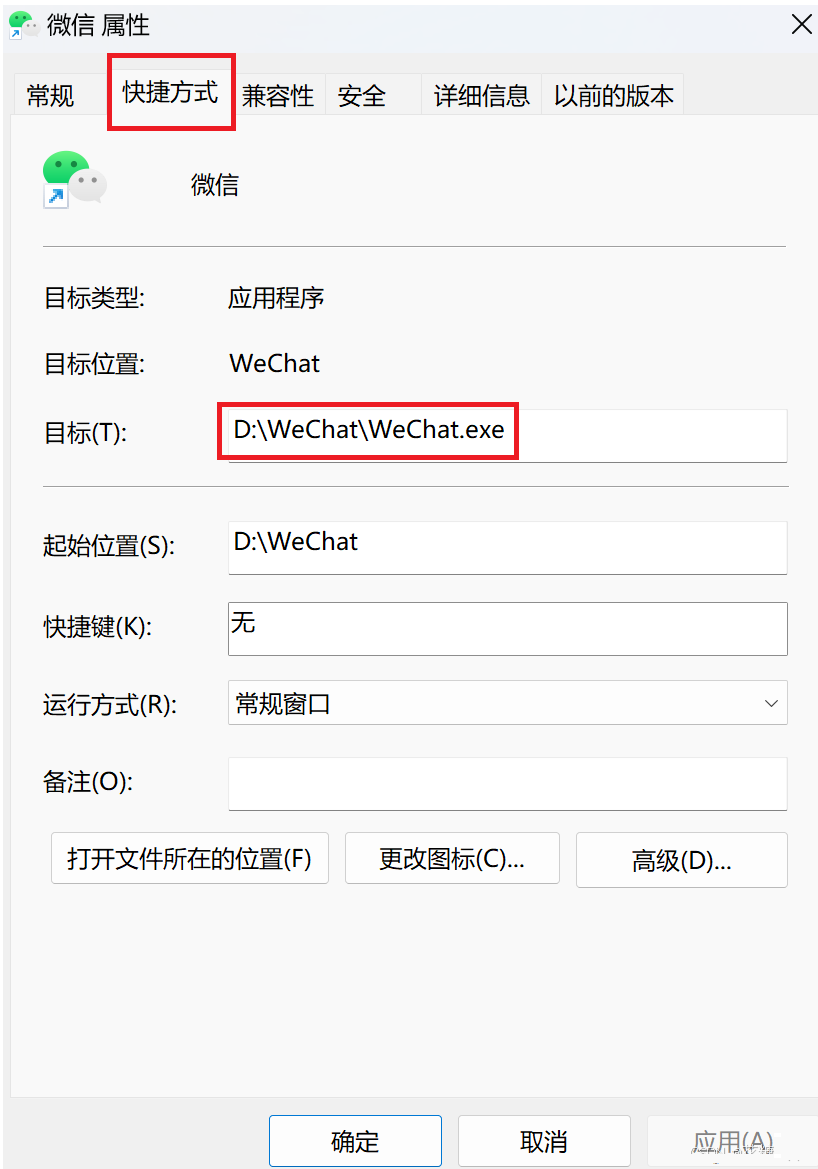
b.A hard link is not an independent file; it does not have its own inode. A hard link is essentially a mapping relationship between a group of file names and an already existing file’s inode!!!
c.Thus, when we establish a soft link, it is equivalent to creating a soft link file (shortcut) in the current directory, while creating a hard link adds a mapping relationship of a file name to the inode of the file to the current directory. Therefore, we will find that the inode of this hard link file is the same as the inode of the target file; this is a hard link!!!
d.What is the number corresponding to the file permissions? Before creating the hard link file, the target file’s number is 1; after creating the hard link file, it becomes 2?
From the previous file system content, we know that a directory is also a file, and its content saves the mapping relationship between the file names and inodes of the files under that directory. Therefore, when we create a normal file, the file name is not saved in the inode, but rather in the content of the directory file where the file is located. Creating a hard link file, in other words, means that there are now two file names in the current directory that map to the same inode. What does this resemble?
The inode is particularly like something that acts as a pointer. Therefore, when we want to use the file name to find the file, we know that in Linux, files are found through inodes. Since the inodes of the two files are the same, it is essentially equivalent to having two file names pointing to the same inode. In other words, when I, as an inode, am considered truly deleted in the system?Shouldn’t it be when there are no file name strings anywhere in the entire system that have a mapping relationship with my inode, meaning this file has no name? At this point, the corresponding file should be deleted. But how do we know how many file names are mapped to my inode through the inode number?
The answer is that there is a reference count in our inode, int ret_count. This means that today, if there is a file name mapping to the inode of this file in a specific directory, ret_count will increment. If another file name maps to this file’s inode, it increments again. Therefore, the number we refer to is called the reference count of the inode itself, known as the hard link count!!!!!
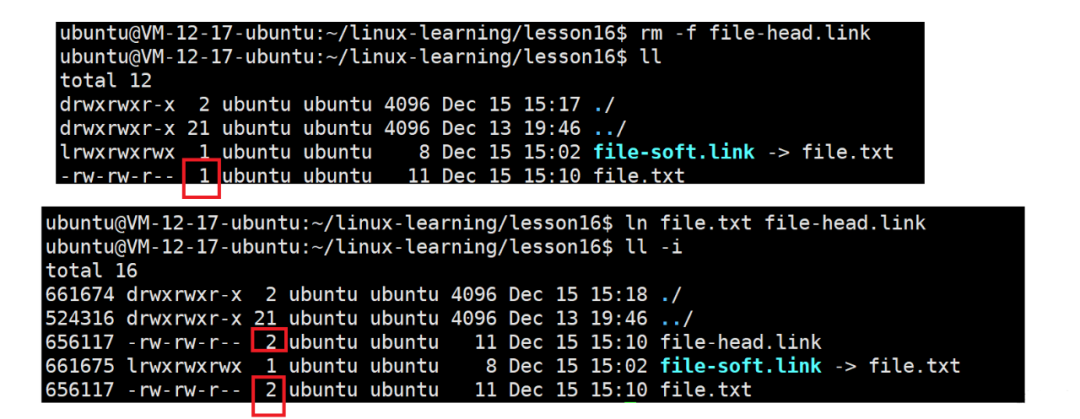
e.What happens if we delete the target file?
When the target file is deleted, the hard link still exists, and its content can still be printed. This file has not been deleted, so what work does this deletion do? It performs a renaming operation on the target file. Creating a normal file essentially keeps establishing hard links. Creating a file is essentially creating a hard link file because the mapping relationship of your file name and inode is equivalent to one copy. Therefore, when the target file is deleted, it reduces one copy, and when the remaining hard link is deleted, the reference count becomes 0, and the file system will directly delete the corresponding inode.
When the target file is deleted, the soft link will turn red because the soft link file saves the path of the target file, which can no longer be found.
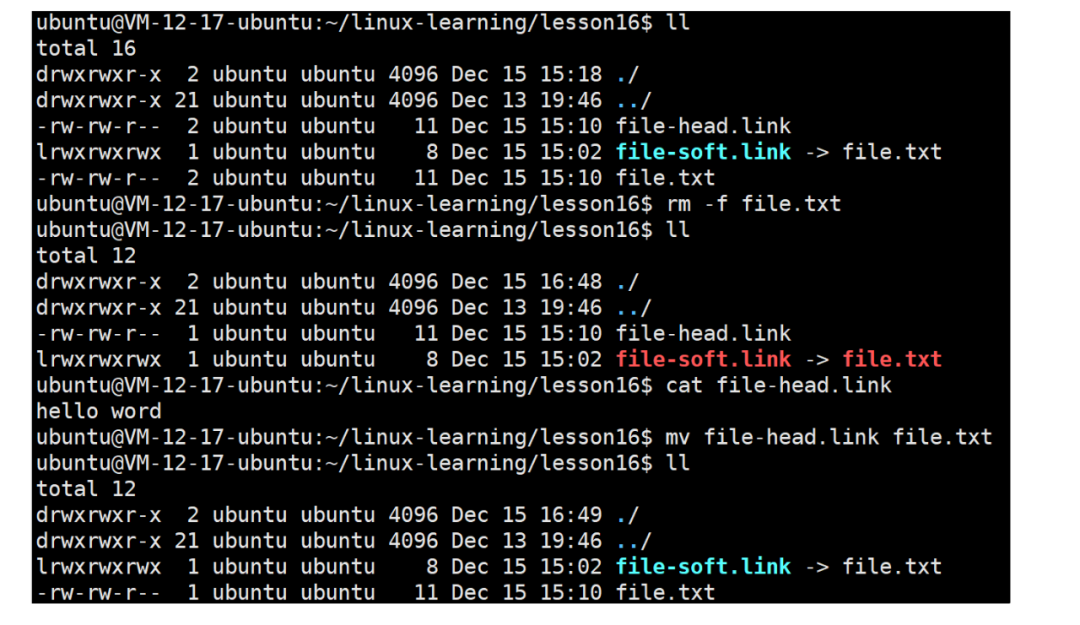
Summary:
In fact, a soft link is essentially just a normal file that saves the path of the target file. Therefore, when the target file is deleted, it turns red because the path saved in this soft link file is no longer available. A hard link, on the other hand, is equivalent to saving the mapping relationship of the file name and inode in the current directory without creating a new file.
3. Why Have Soft and Hard Links? Various Application Scenarios
Soft Link:
a.If we create an executable program code.exe, to execute this file on the command line, we need to use ./code.exe. If we want to use ./code directly, what should we do?
As mentioned before, we can add the current path to the environment variable or copy the executable file to the system’s default path to execute it directly without ./.
Now that we have learned about soft links, we can directly create a soft link in the current path:
ln -s code.exe code
This creates a soft link, allowing us to directly execute the executable program with ./code.
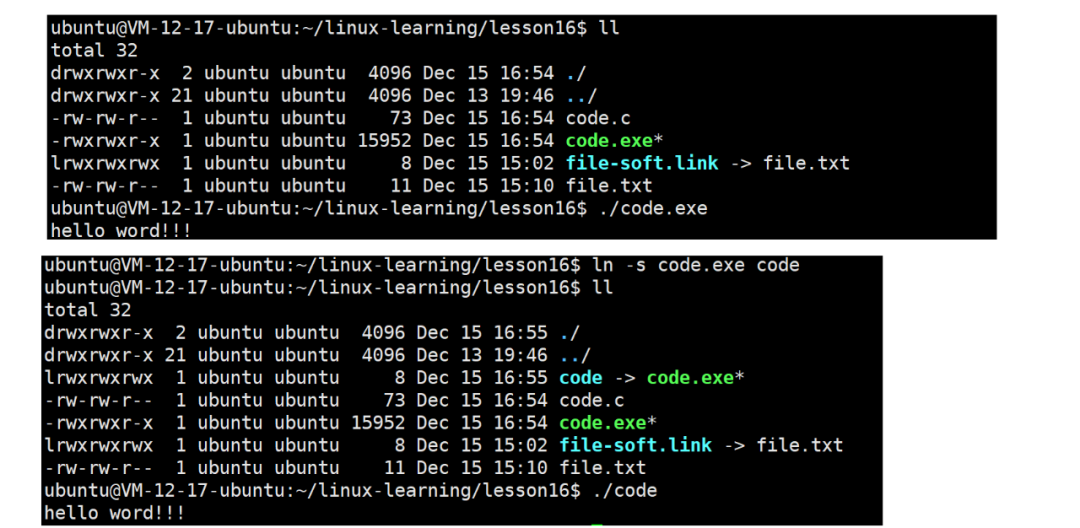
If we want to execute it without ./?
We can create a soft link in the /usr/bin/ path, which is the default path for executable files in the system, allowing us to execute it directly by just typing code. Creating a shortcut by establishing a soft link can point to the target program.
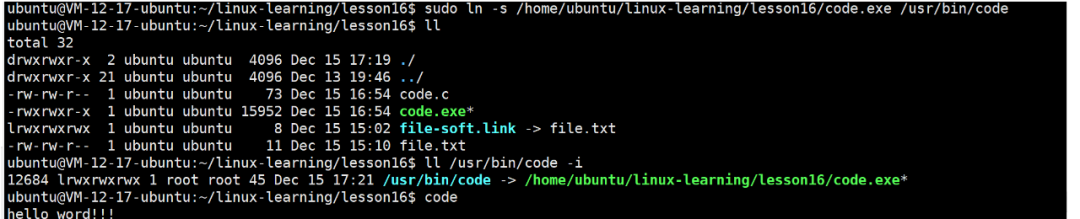
To delete a soft link file: use rm or unlink

b.If the executable program is hidden in a deep path, such as ./dir1/dir2/dir3/, we must carry a long string of paths to use the executable program in the current path. Therefore, we can create a soft link in the current path.
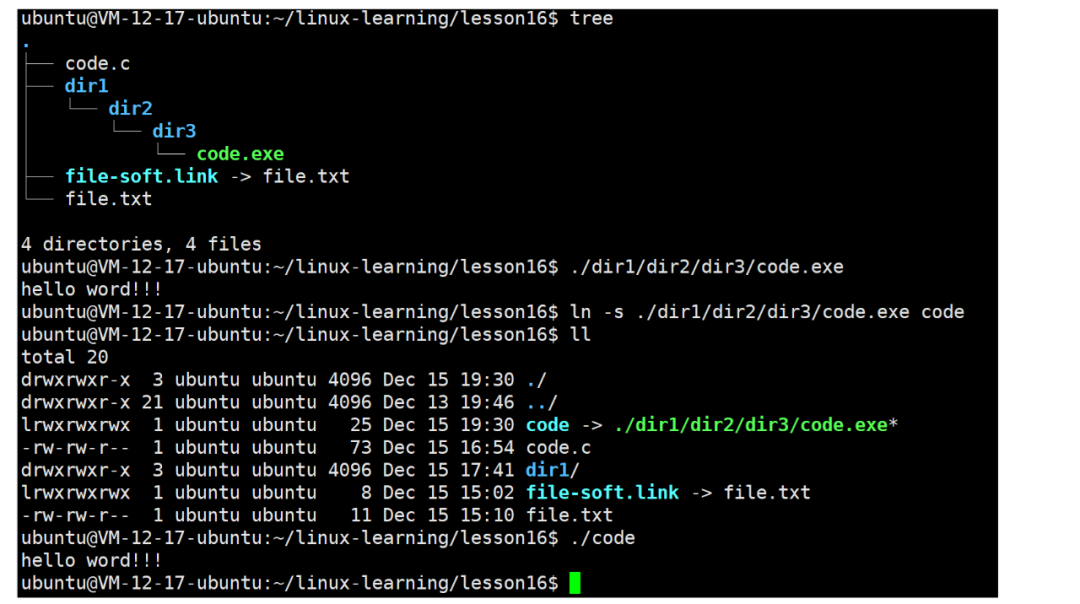
c.We can also create a soft link for a directory, for example, /usr/include/. If I want to view header files, I can create a soft link for this directory.
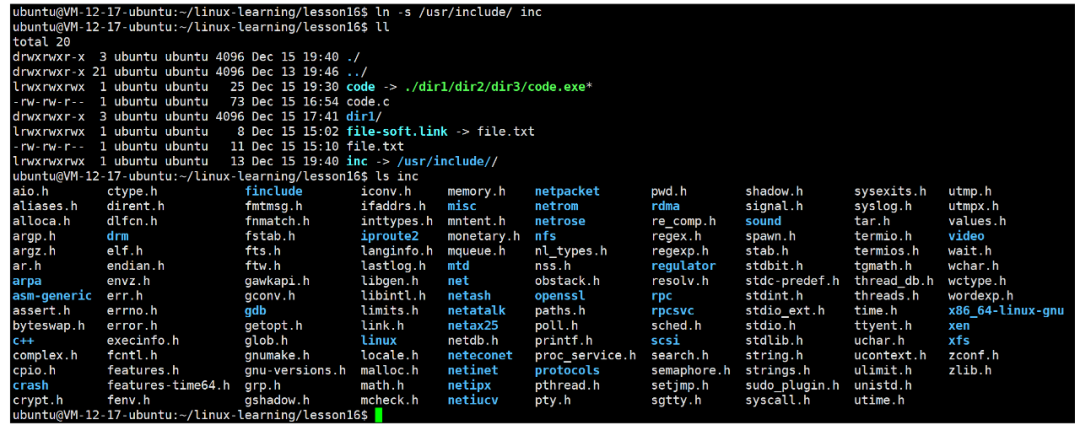
d.Soft links are designed for quick file location, allowing the simplest way to access files!!!
e. Functions:Shortcut
Main Uses:Quickly find commands, quickly locate corresponding libraries
Hard Link:
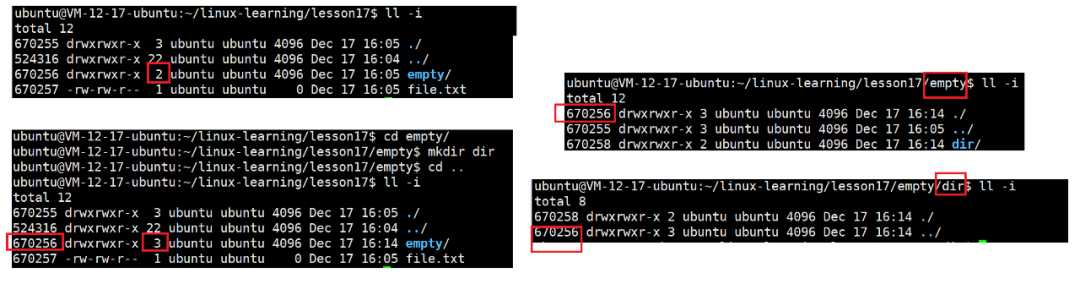
a.Creating a normal file and a directory in one directory, the reference count of the normal file is 1 because there is only one file name mapping to the inode in the current directory. Why is the reference count of the newly created directory 2? When you enter this directory and create a new directory, why does the reference count become 3?
Because inside the directory, there are a . file and a .. file. As mentioned before, a single dot represents the current directory, while two dots represent the parent directory. A single dot represents its own current directory, as it is a file name that maps to the same inode as the inode of the current directory. Different file names point to the same file, so a single dot represents the current working path. Therefore, when a new directory is created in the newly created directory, it contains two dot files that map to the inode of the parent directory, resulting in three file names pointing to the same file, hence the reference count is 3. This is why every directory in Linux must have a . and .. file; it is to facilitate path switching!!!
b.Creating a file, for example, in a directory like /tmp/, and creating a hard link for this file. If you accidentally delete the original file, it doesn’t matter because you have a hard link file for that file in a specific path. You can still access the content of that file through the hard link. What does this mean?This means that in Linux, to back up a file, you only need to create a hard link file; you don’t need to copy it!!!
c.Now that we can create hard links for normal files, can we create hard links for directories?
In Linux, creating hard link files for directories is not allowed because it may create circular paths that can lead to system issues. However, the . and .. files inside directories are hard link files for the current and parent directories, respectively. How should this be understood? It is a special processing of Linux!!!
Hazards of creating hard links for directories that form circular paths
File system traversal anomalies:File system traversal algorithms are typically based on a tree structure. If it were possible to create hard links for directories that form circular paths, when the system or application attempts to traverse the directory tree, it could get stuck in an infinite loop, failing to complete the traversal operation normally, causing the program to hang or even crash the system.
Metadata update confusion:Hard links for directories make managing the directory’s metadata (such as link count, modification time, etc.) extremely complex and prone to confusion. For example, when a directory is modified through a hard link, it is difficult to determine how to correctly update the metadata of other hard links pointing to the same directory, which can lead to inconsistencies in the file system’s metadata, affecting its stability and reliability.
Complex permission management:In Linux, permissions are managed based on the inodes of files and directories. If there are circular structures formed by hard links for directories, the inheritance and propagation of permissions become very complex, potentially leading to security vulnerabilities or incorrect permission settings, threatening system security.
For course inquiries, add: HCIE666CCIE
↓ Or scan the QR code below ↓

What technical points and content do you want to see?
You can leave a message below to let us know!