
What is an IoT Gas Meter?
The IoT gas meter is an intelligent gas meter with remote communication capabilities. It can automatically collect various data from the gas meter, enabling functions like remote meter reading, real-time billing, low balance reminders, remote valve control, and online recharging.
This year, Weihai Ganghua Gas Co., Ltd. plans to replace old gas meters in residential homes that have reached or are nearing their usage limit with smart IoT meters, free of charge. Additionally, alarm cutoff devices will be installed, and the combination of both can achieve the effect of “alarm cutoff” to ensure user safety.
The payment method for the IoT meter is prepaid, and users must recharge in a timely manner before use. Customers can pay at the nearest business outlets, or they can follow the “Weihai Ganghua Gas Co., Ltd.” WeChat public account to pre-store gas fees through the 【Gas Service】 module. If the account is not in arrears before recharging, no further action is needed after recharging; if the account has an arrears and the valve is closed, please operate the meter to restore gas supply 10 minutes after successful recharging.
Different manufacturers’ IoT meters may vary slightly in appearance and meter operation.

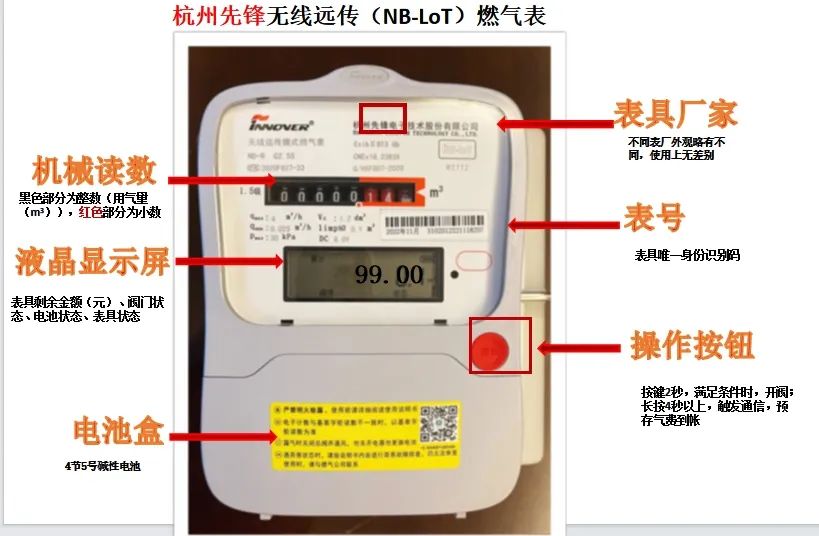
Hangzhou Pioneer IoT Meter
In screen always-on status, long press the operation button for 4-5 seconds, the green indicator light on the meter will flash, or the LCD screen will display “SEND”. Release the button, and shortly the screen will display “SUCC”, indicating successful communication. After successful communication, the LCD screen will display the pre-stored amount, and then press the operation button to open the valve for gas usage. (If the balance in the meter is not synchronized, please repeat the above operation once.)
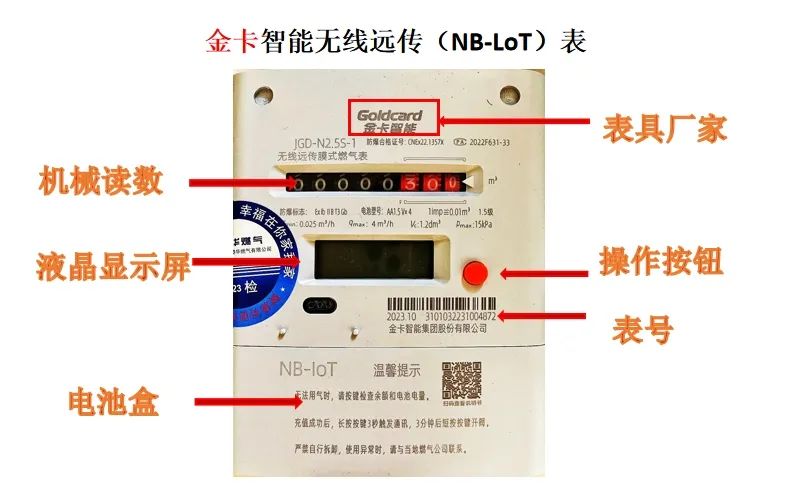
Jin Card Intelligent Wireless Remote Transmission (NB-LoT) Meter
The screen is usually off and needs to be tapped to turn it on. Long press the operation button for 3-6 seconds, when the meter displays “SEND”, release the button, and successful communication will show “SUCC”. Then press the operation button to complete the valve opening.
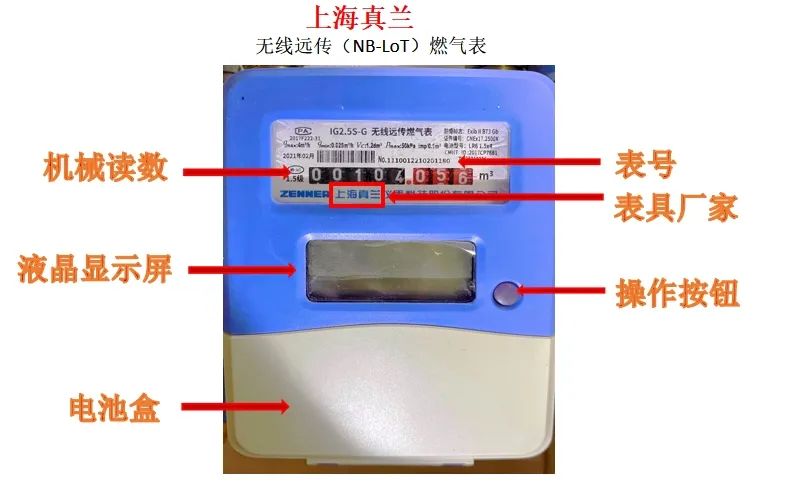
Shanghai Zhenlan Wireless Remote Transmission (NB-LoT) Meter
The screen is usually off and needs to be tapped to turn it on. Long press the operation button for 5 seconds, and after hearing two “beeps”, the LCD screen will display “SIG **”, entering network mode. Release the button, and the network mode will proceed automatically; successful networking = communication completed. After that, tap the operation button to open the valve.

What to Do If the IoT Meter Stops Gas Supply?
Situation 1
Insufficient Gas Account Balance
If the stove does not ignite, consider whether it is due to insufficient balance or the IoT meter stopping gas supply. You can operate the operation button on the IoT meter to check the balance display (in yuan), or check the balance through the WeChat public account【Gas Service】 module. If the balance is less than 10 yuan, the meter’s LCD will give a valve closing reminder. Please press the operation button after receiving the reminder to restore gas supply.
Situation 2
Low Battery of the Gas Meter
If the account balance is sufficient, then consider whether it is due to low battery of the gas meter. You can observe the battery display on the gas meter; if it shows not fully charged (or the LCD displays a battery replacement reminder), you need to replace all batteries of the meter before pressing the operation button to open the valve for gas usage. Please use alkaline batteries and avoid using carbon batteries.
Situation 3
No Gas Usage for Over 30 Days
If the valve is closed due to no gas usage for over 30 days, you can press the operation button to open the valve for gas usage.
Situation 4
Alarm Self-Check Closed Valve
If there is a gas smell at home, the alarm will close the valve and stop gas supply. You should immediately open windows for ventilation, do not touch any electrical switches, move to a safe area, and call the 24-hour emergency repair number of Weihai Ganghua0631-5321111. After eliminating the danger, you can press the operation button to open the valve for gas usage.
Situation 5
Others
If all the above situations have been checked, please pay attention to whether the button display has any abnormal codes. Remember that code and then call the Weihai Ganghua service number 0631-5207779 for inquiry and processing.
Real-time alarm cutoff, safe gas usage;
Data automatically returned, quiet meter reading;
Daily reading and daily settlement, clear consumption;
Recharge immediately and use easily.
The advantages of the IoT meter are waiting for you to experience slowly~

Kind Reminder
Due to WeChat changing its push rules, readers need to frequently leave comments or light up “viewed” and “liked”, otherwise, they will gradually stop receiving pushes! If you still want to see our pushes every day, please add “Weihai Broadcasting and Television Station” as a star mark or light up the “viewed” or “liked” at the bottom of the page after viewing each time.
Reviewed: by Hua Wei Reviewed: Wang Xiaoxia Edited: Yang Ying Source: Weihai Ganghua Gas Co., Ltd.

New Videos on “Watch Weihai”

Dear Family
Leave your little love before you go!