Language models have revolutionized the field of natural language processing, enabling computers to understand and generate text similar to that of humans. One powerful language model is ChatGPT, developed by OpenAI. The current market features many AI players, including ChatGPT, Google Bard, Bing AI Chat, and others. However, all these models require an internet connection for interaction. Moreover, there is a growing demand for running similar models on edge devices (like single-board computers) for offline and low-latency applications.
The author of this article, Nurgaliyev Shakhizat, was inspired by Nick Bild’s groundbreaking work in his Hackster post, where he explored the concept of VoiceGPT, a voice assistant utilizing advanced ChatGPT on a Raspberry Pi.

In this article, the author will use the NVIDIA Jetson development board instead of the Raspberry Pi. The NVIDIA Jetson development board is known for its powerful GPU and compact form factor, providing an excellent platform for running complex language models. By running a ChatGPT-like language model on the NVIDIA Jetson development board, you can benefit from reduced network latency, enhanced privacy, and the ability to use the model in resource-constrained environments without relying on an internet connection. This is the power evolution towards new horizons!
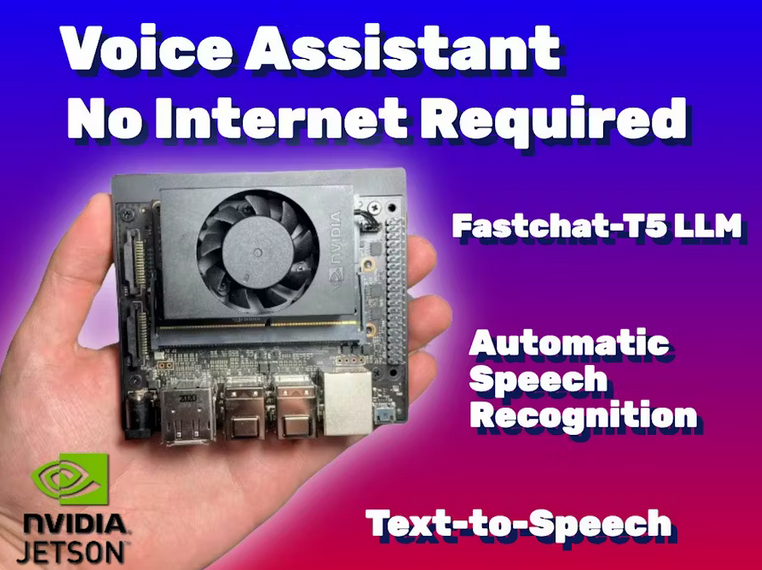
Original tutorial: https://www.hackster.io/shahizat/how-to-run-a-chatgpt-like-llm-on-nvidia-jetson-board-41fd79
Overview
Imagine running a ChatGPT-like language model (LLM) on the NVIDIA Jetson development board. You might ask, how is this achieved? Well, take a look at the hardware schematic below, featuring the Respeaker USB microphone array, the powerful NVIDIA Jetson single-board computer, and a charming Bluetooth speaker.
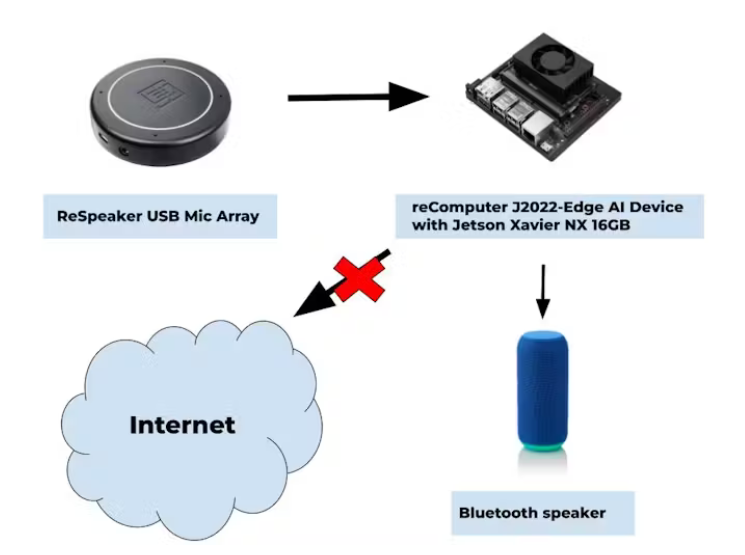
The magic unfolds before your eyes: the microphone array easily captures your voice, while the Jetson development board showcases its computational power by processing the audio data. Then, cheers! The Jetson board unleashes a ChatGPT-like language model, instantly presenting text responses to your queries. But our magic doesn’t stop there, oh no! The text responses embark on an exciting journey, magically transforming into sound through the Bluetooth speaker.
Now, here comes the incredible part. The entire process—capturing audio, generating text, and converting to speech—is done entirely on the edge device without an internet connection. It’s like having your private AI assistant, ensuring your privacy while avoiding the need to send data to remote servers.
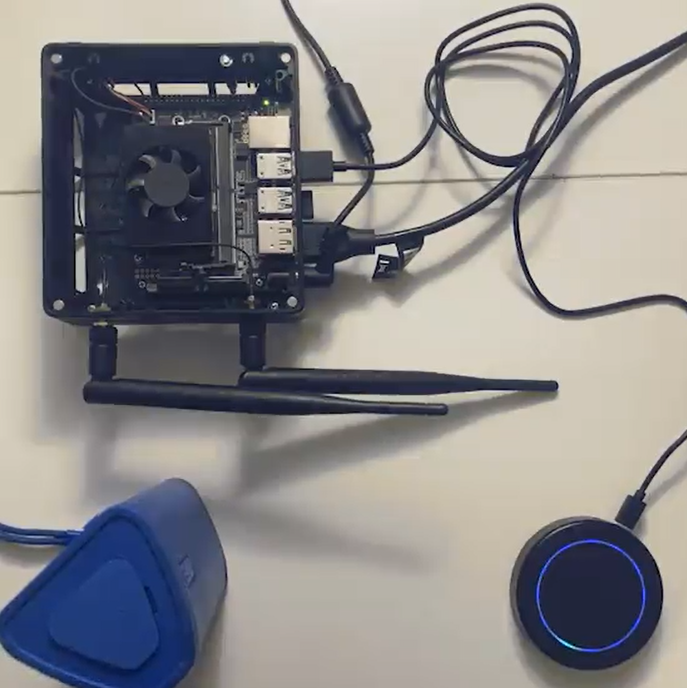
And there’s a little surprise: check out the image below showcasing my amazing setup demonstration: the powerful Nvidia Jetson development board, the awesome microphone array, and the charming Bluetooth speaker. Get ready to be amazed!
Machine Learning Pipeline for Voice Assistant
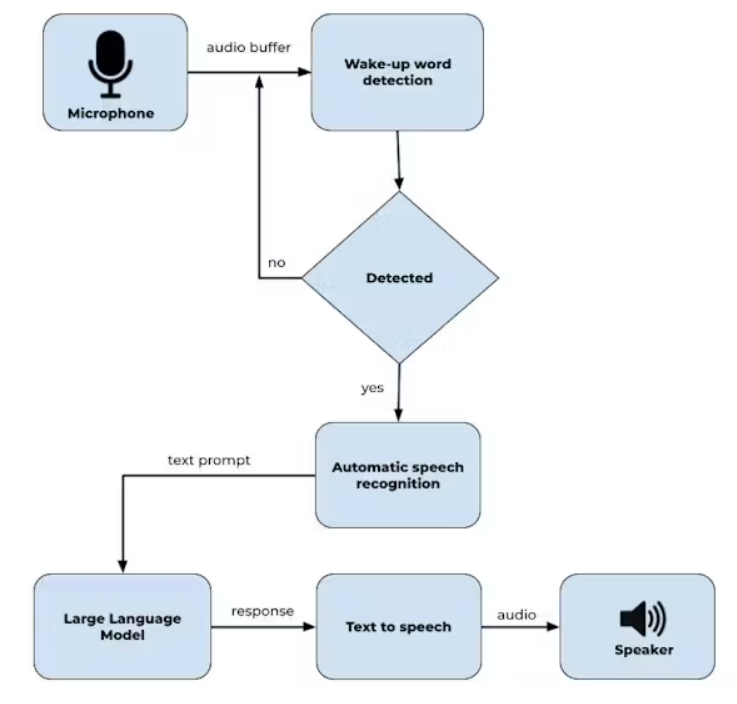
Let’s unveil the magical machine learning process behind the voice assistant. Ready? We will break down the process step by step, so let’s take a look at the software schematic:
-
Microphone Input: Our adventure begins with the user’s voice being captured through a reliable microphone. Like the ears of the voice assistant, listening attentively.
-
Wake Word Detection: Now, we analyze the captured audio to determine if the user has issued the magical wake word. If detected, it’s time to spring into action! The voice assistant comes to life. But if not, it patiently waits, like a coiled spring ready to launch.
-
Automatic Speech Recognition (ASR): Once the wake word is confirmed, the audio data embarks on a transformative journey. It passes through the mysterious realm of Automatic Speech Recognition (ASR), converting spoken language into written text. Like deciphering a secret language.
-
Large Language Model: The text provided by ASR is the key to unlocking the Chatbot large language model. Here, the recognized text enters the domain of a powerful language model, like a master conversationalist ready to understand and respond.
-
Text-to-Speech (TTS): The Chatbot language model works its magic, generating a response presented in text form. But wait, the adventure isn’t over yet! We need to turn this text into sound. Therefore, the text response travels to the magical Text-to-Speech (TTS) system. With a touch of magic, the text transforms into speech, ready to dance through the air.
And that’s it! The fantastical journey in the machine learning process of the voice assistant, where speech transforms into comprehended text, and text converts into speech. Get ready to embrace a miraculous world!
How To Run Large Language Models On Nvidia Jetson
In this project, we will explore the features and functionalities of the FastChat repository. To deploy the FastChat model on the Nvidia Jetson Xavier NX board (https://github.com/lm-sys/FastChat),
follow these steps: Use the pip package manager to install the Fastchat library. Execute the following command:
pip3 install fschatUse the pip package manager to install the Fastchat library. Execute the following command:
python3 -m fastchat.serve.cli --model-path lmsys/fastchat-t5-3b-v1.0Finally, the following video demonstrates:
The code runs on the Jetson board without transferring any data to the cloud. Although the video shows slow performance during initial model loading and token generation, we will explore various techniques to enhance your Jetson board’s performance.
Project Integration
For this project, I integrated wake word detection and automatic speech recognition using the Vosk API. Then, the Piper text-to-speech component was used. It is implemented using FastAPI, a web framework for quickly building APIs. When the chatbot generates a response, the text is sent to the TTS module. FastAPI receives the text data, processes it, and synthesizes it into natural-sounding speech. The generated audio is then returned as a response to the user, allowing the system to interact with the user through speech.
This is the demonstration video of the final result:
Overall, this implementation of a voice assistant allows understanding verbal commands and speech, processing them with a chatbot, and generating verbal responses, providing a conversational experience for users utilizing a ChatGPT-like large language model on the NVIDIA Jetson board.
Conclusion
That’s all for today! I explored how to set up and run a ChatGPT-like large language model on NVIDIA Jetson, enabling you to have conversational AI capabilities locally. All the code referenced in this story can be found in the Github repository.
https://github.com/shahizat/jetsonGPT
More projects
Visual assistance devices utilizing TensorRT to aid the visually impaired