

System Version Introduction
The openGauss installation in this case is based on the openEuler-20.03-LTS version. The current compatible Python versions for openGauss are Python 3.6 and Python 3.7. The openEuler version used in this experiment comes with Python 3.7.4, so there is no need for a separate installation.

Modify System Configuration
1. Change Default Python Version
(Default is 2.x, change to 3.x)
First, use the following command to check the current system default Python version and the Python3 version in the system. The command python -V shows the default Python version. If it is not 3.x, you need to change the default Python to Python 3.x.
python -Vpython3 -V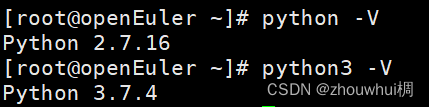
Execute the following command to change the default Python version to Python 3.x:
mv /usr/bin/python /usr/bin/python.bak
ln -s /usr/bin/python3 /usr/bin/python
Check whether the current default Python version has switched from Python 2.x to Python 3.x.
2. Disable SELINUX, set status to disabled
(Restart the operating system for changes to take effect)
SELINUX stands for Security Enhanced Linux, which provides finer-grained security settings for the system. Since SELinux configuration is too strict, it may conflict with the functionalities required by CM.
vi /etc/selinux/config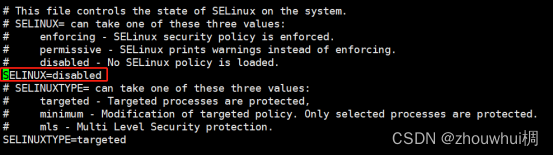
3. Turn Off Firewall
The installation process needs to be completed with the firewall turned off.
systemctl stop firewalldsystemctl disable firewalld
4. Disable Swap Memory
Disabling swap memory is to avoid data being swapped to disk IO, which affects performance.
swapoff -a
5. Change Character Set to utf-8
echo export LANG=en_US.UTF-8 >> /etc/profile
6. Disable RemoveIPC
By default, RemoveIPC=yes, which means that when a user logs out, the user’s shared memory segments and semaphores will be deleted.
echo RemoveIPC=no >> /etc/systemd/logind.confecho RemoveIPC=no >> /usr/lib/systemd/system/systemd-logind.service
Restart the service to refresh the configuration (after making changes, you may not need to restart the service).
systemctl daemon-reloadsystemctl restart systemd-logind
7. Comment Out Welcome Message
Set to allow root remote login; in openEuler 20.3, the default PermitRootLogin=yes is allowed, so no changes are needed. Modify the Banner configuration to remove the welcome message when connecting to the system. The welcome message may interfere with the return results of remote operations during installation, affecting the normal execution of the installation.
vi /etc/ssh/sshd_config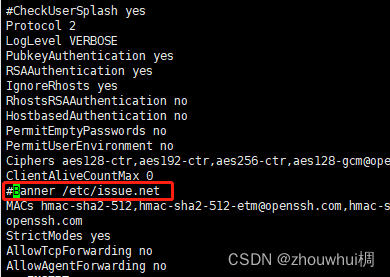
Restart the service to refresh the configuration (after making changes, you may not need to restart the service).
systemctl restart sshd.service
8. Disable THP Service
THP (Transparent Huge Pages) functionality can reduce the IO performance of the operating system and requires some CPU resources to organize the huge page fragments.
echo never >> /sys/kernel/mm/transparent_hugepage/defragecho never >> /sys/kernel/mm/transparent_hugepage/enabledecho ‘echo never >> /sys/kernel/mm/transparent_hugepage/defrag’ >> /etc/rc.d/rc.localecho ‘echo never >> /sys/kernel/mm/transparent_hugepage/enabled’ >> /etc/rc.d/rc.localsh /etc/rc.d/rc.local
9. Restart the Operating System
Changes to SELINUX and THP services require a restart of the operating system to take effect.
reboot
Prepare Installation Package
1. Create Installation Directory
mkdir -p /opt/software/openGauss
2. Unzip all and om compressed packages
Download the installation package from the openGauss community at https://www.opengauss.org/zh/ (download the installation package corresponding to the ARM architecture).
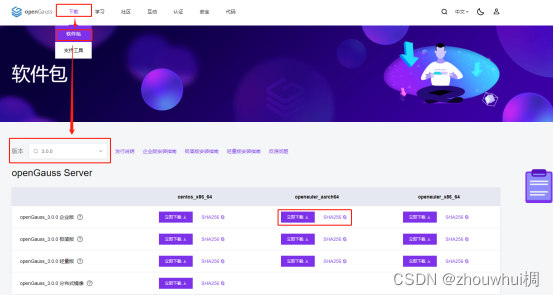
Then upload the installation package to the server. Execute the following command in the path where the installation package is stored to unzip the installation package to the /opt/software/openGauss directory:
tar zxf openGauss-3.0.0-openEuler-64bit-all.tar.gz -C /opt/software/openGausscd /opt/software/openGausstar zxf openGauss-3.0.0-openEuler-64bit-om.tar.gz
3. Change Directory Permissions
chmod -R 775 /opt/softwarechmod -R 777 /opt/software/openGauss
4. Prepare Configuration File clusterconfig.xml
(in /opt/software/openGauss directory)
vi clusterconfig.xml
Note to set nodeNames to the hostname of the database installation, backIp1s to the corresponding IP of the host
<?xml version=”1.0″ encoding=”UTF-8″?>
<ROOT>
<!– openGauss overall information –>
<CLUSTER>
<!– Database name –>
<PARAM name=”clusterName” value=”dbCluster” />
<!– Database node name (hostname) –>
<PARAM name=”nodeNames” value=”openEuler” />
<!– Database installation directory –>
<PARAM name=”gaussdbAppPath” value=”/opt/software/install/app” />
<!– Log directory –>
<PARAM name=”gaussdbLogPath” value=”/opt/software/log/omm” />
<!– Temporary file directory –>
<PARAM name=”tmpMppdbPath” value=”/opt/software/tmp” />
<!– Database tool directory –>
<PARAM name=”gaussdbToolPath” value=”/opt/software/om” />
<!– Database core file directory –>
<PARAM name=”corePath” value=”/opt/software/corefile” />
<!– Node IP, corresponding to the database node name list –>
<PARAM name=”backIp1s” value=”192.168.1.9″/>
</CLUSTER>
<!– Deployment information on each server’s node –>
<DEVICELIST>
<!– Deployment information on Node 1 –>
<DEVICE sn=”openEuler”>
<!– Hostname of Node 1 –>
<PARAM name=”name” value=”openEuler”/>
<!– AZ and AZ priority of Node 1 –>
<PARAM name=”azName” value=”AZ1″/>
<PARAM name=”azPriority” value=”1″/>
<!– Node 1’s IP, if the server has only one available network card, set backIP1 and sshIP1 to the same IP –>
<PARAM name=”backIp1″ value=”192.168.1.9″/>
<PARAM name=”sshIp1″ value=”192.168.1.9″/>
<!–dbnode–>
<PARAM name=”dataNum” value=”1″/>
<PARAM name=”dataPortBase” value=”8000″/>
<PARAM name=”dataNode1″ value=”/opt/software/install/data/dn”/>
<PARAM name=”dataNode1_syncNum” value=”0″/>
</DEVICE>
</DEVICELIST>
</ROOT>
Initialize Installation Environment gs_preinstall
Enter the script directory obtained after unzipping om.
cd /opt/software/openGauss/script./gs_preinstall -U omm -G dbgrp -X ../clusterconfig.xml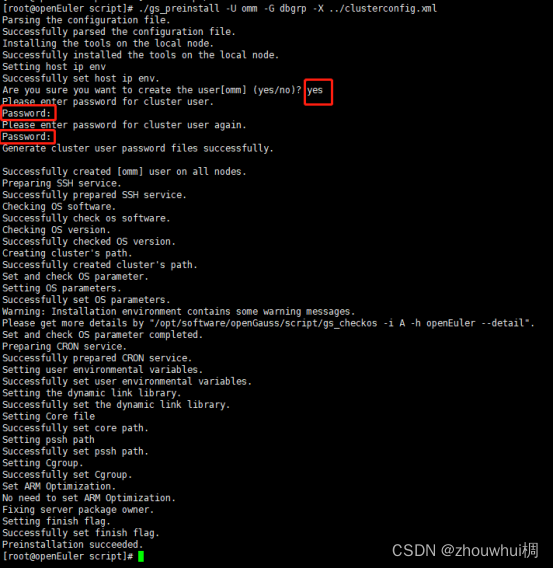
Note that the omm user does not exist; if the user exists, it needs to be initialized, otherwise an error will be reported. The content entered in the Password field is the password for the omm user.
Install gs_install
1. Change Directory Permissions
After initialization, the database installation path permissions will be reset to allow only the root user to operate. You need to change the directory permissions again.
chmod -R 775 /opt/softwarechmod -R 777 /opt/software/openGauss
2. Switch to System User omm and Install Using omm
su ommcd /opt/software/openGauss/script./gs_install -X ../clusterconfig.xml
Configure the password to log into the database (the user is the omm set by preinstall -U).
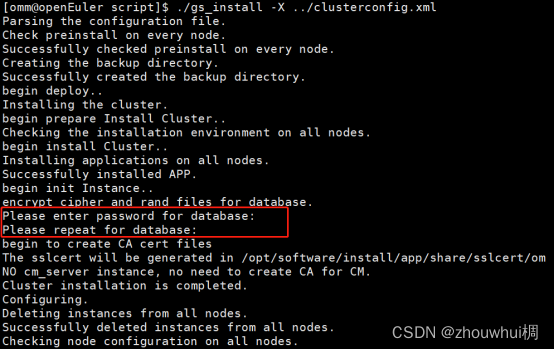
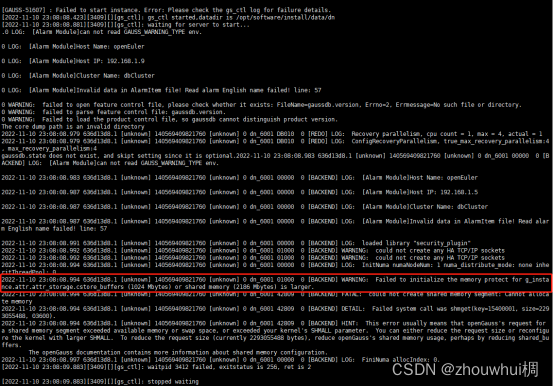
If the following error occurs, it is because the physical machine’s memory is too small to install, and you need to reconfigure the memory.
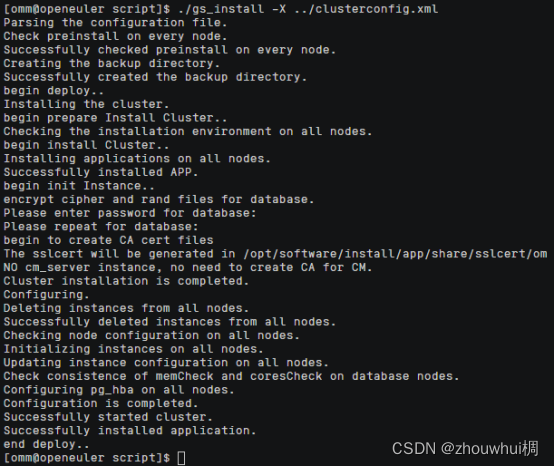
After successful installation, it will look like this (the service will automatically start after the installation is complete).
Using openGauss
1. Start Service
gs_om -t start
2. Check Service Status
gs_om -t status –detail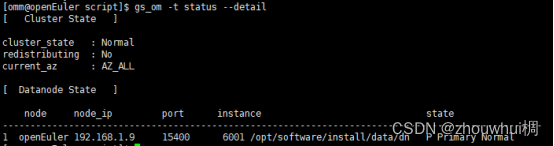
3. Stop Service
gs_om -t stop

END