Copyright belongs to the author. If reposting, please indicate the source of the article: https://cyrus-studio.github.io/blog/
HMAC
HMAC (Hash-based Message Authentication Code) is a message authentication code based on a hash function, used to verify the integrity and authenticity of data.
HMAC mainly relies on the following elements:
- 1. Message: The data that needs to be verified.
- 2. Key: A shared secret key used to protect the message.
- 3. Hash Function: Such as MD5, SHA-256, etc.
The calculation formula for HMAC is as follows:

Where:
- • H is the hash function.
- • K is the key.
- • M is the message.
- • opad is the outer padding (0x5c).
- • ipad is the inner padding (0x36).
- • ∥ denotes concatenation.
- • ⊕ denotes bitwise XOR.
Thus, the length of the string returned by HMAC depends on the specific hash function.
For example, if the hash function is MD5, the returned string is 16 bytes (128 bits), typically represented as a hexadecimal string of length 32.
For example, if the hash function is SHA256, the returned string is 32 bytes (256 bits), typically represented as a hexadecimal string of length 64.
HMAC MD5
The standard HMAC MD5 algorithm implementation is as follows:
1. Key processing:
- • If the key is too long, compress it to 16 bytes using MD5.
- • If the key is less than 64 bytes, pad it with 0x00 to 64 bytes.
2. Data processing: Use ipad and opad for XOR operations and concatenate the data.
3. MD5 calculation: Use the md5() function to calculate the Inner Hash and Outer Hash.
4. Return result: Return as a hexadecimal string.
The C++ code is as follows:
#include <string>
#include <vector>
#include <cstring>
#include <iomanip>
#include <sstream>
#include "md5.h"

// Define block size and output length
constexpr size_t BLOCK_SIZE = 64;
constexpr size_t MD5_DIGEST_LENGTH = 16;

// HMAC-MD5 implementation
void hmacMd5(const std::vector<uint8_t>& key, const std::vector<uint8_t>& data, uint8_t* outDigest) {
    std::vector<uint8_t> modifiedKey = key;

    // 1. Key processing
    if (modifiedKey.size() > BLOCK_SIZE) {
        uint8_t hash[MD5_DIGEST_LENGTH];
        MD5_CTX ctx;
        MD5_Init(&ctx);
        MD5_Update(&ctx, modifiedKey.data(), modifiedKey.size());
        MD5_Final(hash, &ctx);
        modifiedKey.assign(hash, hash + MD5_DIGEST_LENGTH);
    }
    if (modifiedKey.size() < BLOCK_SIZE) {
        modifiedKey.resize(BLOCK_SIZE, 0x00); // Pad with zeros
    }

    // 2. Generate ipad and opad
    std::vector<uint8_t> ipad(BLOCK_SIZE, 0x36);
    std::vector<uint8_t> opad(BLOCK_SIZE, 0x5c);

    for (size_t i = 0; i < BLOCK_SIZE; i++) {
        ipad[i] ^= modifiedKey[i];
        opad[i] ^= modifiedKey[i];
    }

    // 3. Inner Hash: MD5(ipad + data)
    uint8_t innerDigest[MD5_DIGEST_LENGTH];
    MD5_CTX innerCtx;
    MD5_Init(&innerCtx);
    MD5_Update(&innerCtx, ipad.data(), BLOCK_SIZE);
    MD5_Update(&innerCtx, data.data(), data.size());
    MD5_Final(innerDigest, &innerCtx);

    // 4. Outer Hash: MD5(opad + Inner Hash)
    MD5_CTX outerCtx;
    MD5_Init(&outerCtx);
    MD5_Update(&outerCtx, opad.data(), BLOCK_SIZE);
    MD5_Update(&outerCtx, innerDigest, MD5_DIGEST_LENGTH);
    MD5_Final(outDigest, &outerCtx);
}
The implementation of the MD5 algorithm refers to this article:
How to Morph an MD5 Algorithm? Android Implementation + OLLVM Protection Practical Analysis[1]
HMAC-MD5 calls MD5 a total of 2 times: once to calculate the Inner Hash and once to calculate the final HMAC.
Implementing JNI methods in Android to call the HMAC-MD5 algorithm to encrypt strings:
#include <jni.h>

// Convert string to byte array
std::vector<uint8_t> toBytes(const std::string& str) {
    return std::vector<uint8_t>(str.begin(), str.end());
}

// Convert byte array to hexadecimal string
std::string bytesToHex(const std::vector<uint8_t>& bytes) {
    std::ostringstream oss;
    for (uint8_t byte : bytes) {
        oss << std::hex << std::setw(2) << std::setfill('0') << (int)byte;
    }
    return oss.str();
}

// JNI interface implementation
extern "C"
JNIEXPORT jstring JNICALL
Java_com_cyrus_example_hmac_HMACUtils_hmacMD5(
        JNIEnv* env,
        jclass,
        jstring data) {

    // Convert jstring to std::string
    const char* dataStr = env->GetStringUTFChars(data, nullptr);
    const char* keyStr = "CYRUS STUDIO";

    std::vector<uint8_t> dataBytes = toBytes(dataStr);
    std::vector<uint8_t> keyBytes = toBytes(keyStr);

    // Calculate HMAC-MD5
    uint8_t resultDigest[MD5_DIGEST_LENGTH];
    hmacMd5(keyBytes, dataBytes, resultDigest);

    // Convert result to hexadecimal string
    std::string hexResult = bytesToHex(std::vector<uint8_t>(resultDigest, resultDigest + MD5_DIGEST_LENGTH));

    // Release resources
    env->ReleaseStringUTFChars(data, dataStr);

    return env->NewStringUTF(hexResult.c_str());
}
The effect is as follows:
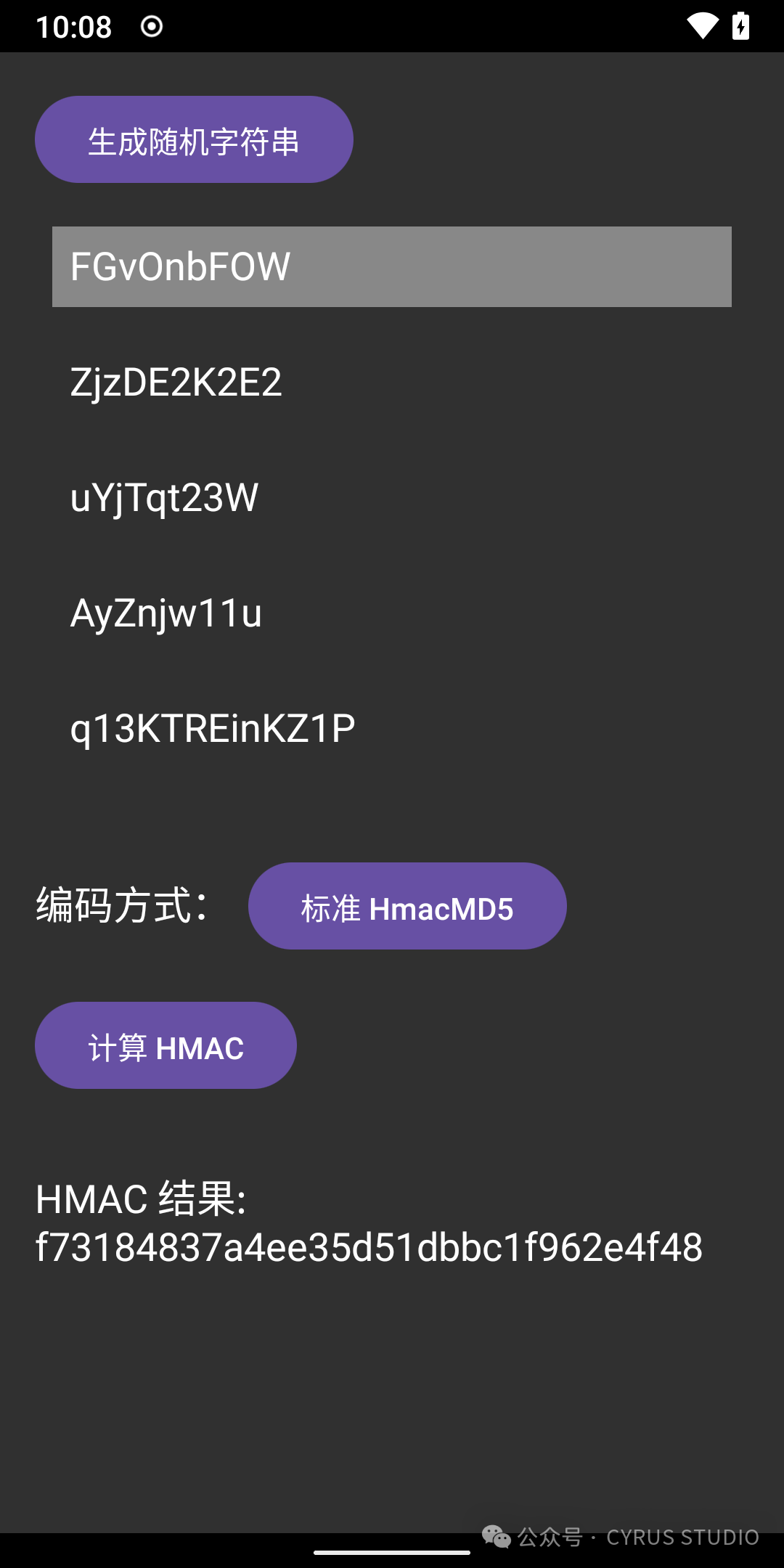
HMAC MD5 Morphing
HMAC MD5 can be morphed by modifying the initial constants in MD5Init, MD5_Update, macro constants, etc.
For specific implementations, refer to this article:How to Morph an MD5 Algorithm? Android Implementation + OLLVM Protection Practical Analysis[2]
HMAC SHA256
HMAC SHA256 is implemented similarly to HMAC MD5, except that the hash function is changed to SHA256.
The C++ code implementation is as follows:
#include <jni.h>
#include <string>
#include <vector>
#include <cstring>
#include <iomanip>
#include <sstream>
#include "sha256.h"

// Define block size and output length
constexpr size_t BLOCK_SIZE = 64;
constexpr size_t SHA256_DIGEST_LENGTH = 32;

// HMAC-SHA256 implementation
void hmacSha256(const std::vector<uint8_t>& key, const std::vector<uint8_t>& data, uint8_t* outDigest) {
    std::vector<uint8_t> modifiedKey = key;

    // 1. Key processing
    if (modifiedKey.size() > BLOCK_SIZE) {
        uint8_t hash[SHA256_DIGEST_LENGTH];
        SHA256_hash(modifiedKey.data(), modifiedKey.size(), hash);
        modifiedKey.assign(hash, hash + SHA256_DIGEST_LENGTH);
    }
    if (modifiedKey.size() < BLOCK_SIZE) {
        modifiedKey.resize(BLOCK_SIZE, 0x00); // Pad with zeros
    }

    // 2. Generate ipad and opad
    std::vector<uint8_t> ipad(BLOCK_SIZE, 0x36);
    std::vector<uint8_t> opad(BLOCK_SIZE, 0x5c);

    for (size_t i = 0; i < BLOCK_SIZE; i++) {
        ipad[i] ^= modifiedKey[i];
        opad[i] ^= modifiedKey[i];
    }

    // 3. Inner Hash: SHA256(ipad + data)
    uint8_t innerDigest[SHA256_DIGEST_LENGTH];
    SHA256_CTX innerCtx;
    SHA256_init(&innerCtx);
    SHA256_update(&innerCtx, ipad.data(), BLOCK_SIZE);
    SHA256_update(&innerCtx, data.data(), data.size());
    memcpy(innerDigest, SHA256_final(&innerCtx), SHA256_DIGEST_LENGTH);

    // 4. Outer Hash: SHA256(opad + Inner Hash)
    SHA256_CTX outerCtx;
    SHA256_init(&outerCtx);
    SHA256_update(&outerCtx, opad.data(), BLOCK_SIZE);
    SHA256_update(&outerCtx, innerDigest, SHA256_DIGEST_LENGTH);
    memcpy(outDigest, SHA256_final(&outerCtx), SHA256_DIGEST_LENGTH);
}
The SHA256 algorithm implementation refers to:
- • sha256.h[3]
- • hash-internal.h[4]
- • sha256.c[5]
Implementing JNI methods in Android to call the HMAC SHA256 algorithm to encrypt strings:
#include <jni.h>

// Convert string to byte array
extern std::vector<uint8_t> toBytes(const std::string& str);

// Convert byte array to hexadecimal string
extern std::string bytesToHex(const std::vector<uint8_t>& bytes);

// JNI interface implementation
extern "C"
JNIEXPORT jstring JNICALL
Java_com_cyrus_example_hmac_HMACUtils_hmacSHA256(
        JNIEnv* env,
        jclass,
        jstring data) {

    // Convert jstring to std::string
    const char* dataStr = env->GetStringUTFChars(data, nullptr);
    const char* keyStr = "CYRUS STUDIO";

    std::vector<uint8_t> dataBytes = toBytes(dataStr);
    std::vector<uint8_t> keyBytes = toBytes(keyStr);

    // Calculate HMAC-SHA256
    uint8_t resultDigest[SHA256_DIGEST_LENGTH];
    hmacSha256(keyBytes, dataBytes, resultDigest);

    // Convert result to hexadecimal string
    std::string hexResult = bytesToHex(std::vector<uint8_t>(resultDigest, resultDigest + SHA256_DIGEST_LENGTH));

    // Release resources
    env->ReleaseStringUTFChars(data, dataStr);

    return env->NewStringUTF(hexResult.c_str());
}
The effect is as follows:
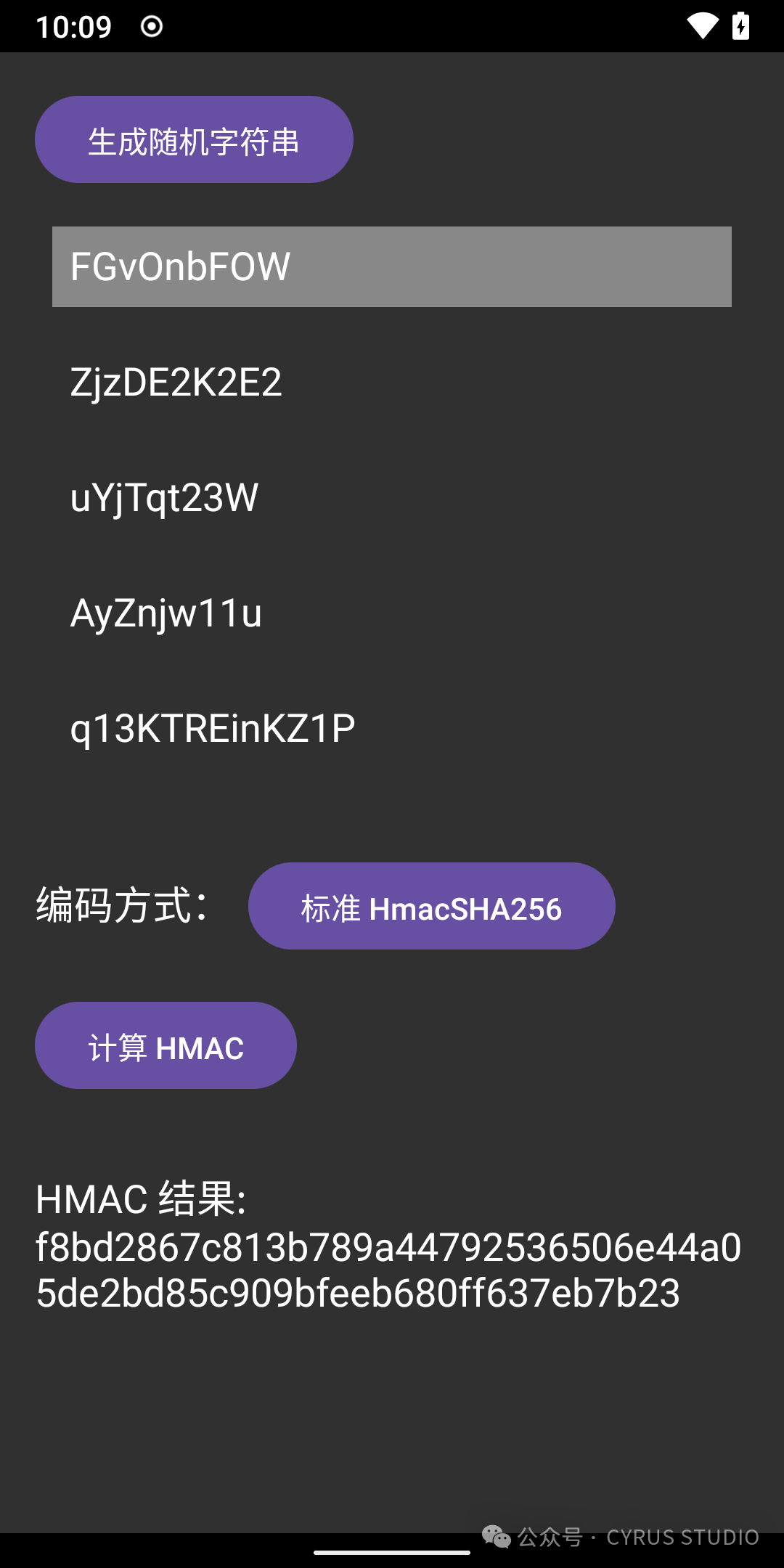
HMAC SHA256 Morphing
HMAC SHA256 can be morphed by modifying the initial constants in SHA256_init.
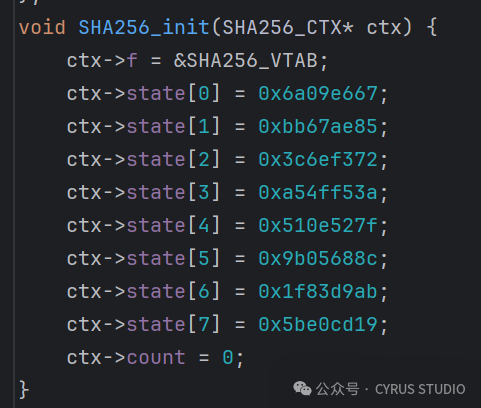
Call SHA256_Update to add custom data.
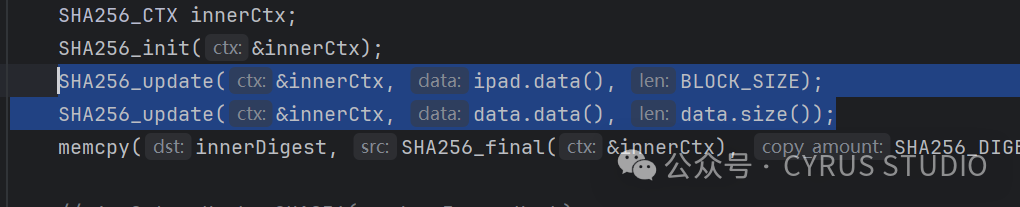
Modify the K constant and other methods to achieve algorithm morphing.
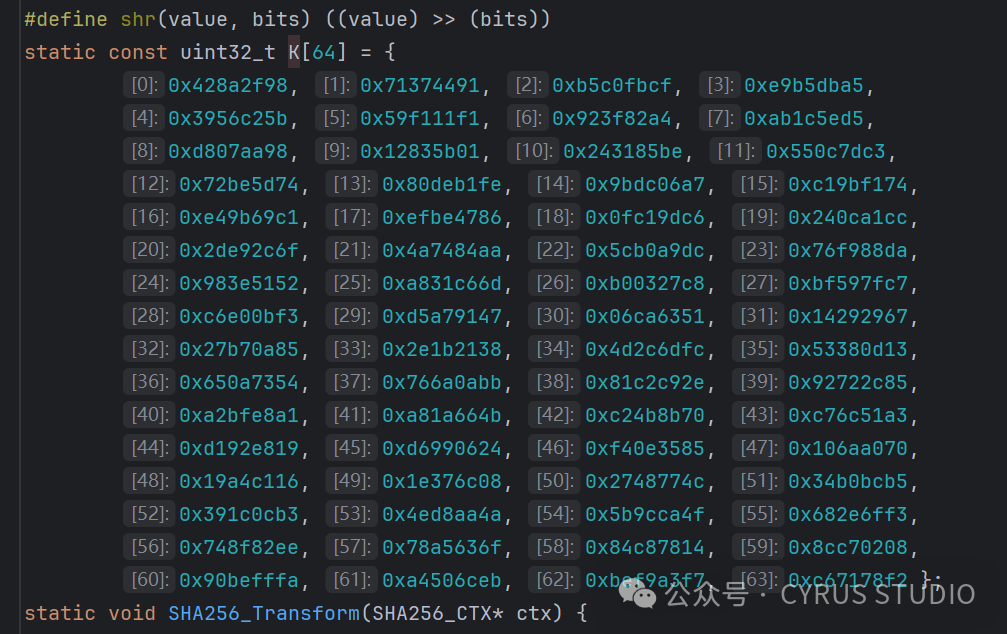
For specific implementations, refer to this article:How to Morph SHA-1 Algorithm? From Standard Implementation to Android Custom Encryption Practice[6]
Complete Source Code
Complete source code address: https://github.com/CYRUS-STUDIO/AndroidExample
Reference Links
<span>[1]</span> How to Morph an MD5 Algorithm? Android Implementation + OLLVM Protection Practical Analysis:https://cyrus-studio.github.io/blog/posts/%E5%A6%82%E4%BD%95%E5%8F%98%E5%BD%A2%E4%B8%80%E4%B8%AA-md5-%E7%AE%97%E6%B3%95android-%E5%AE%9E%E7%8E%B0-+-ollvm-%E9%98%B2%E6%8A%A4%E5%AE%9E%E6%88%98%E8%A7%A3%E6%9E%90/<span>[2]</span>How to Morph an MD5 Algorithm? Android Implementation + OLLVM Protection Practical Analysis:https://cyrus-studio.github.io/blog/posts/%E5%A6%82%E4%BD%95%E5%8F%98%E5%BD%A2%E4%B8%80%E4%B8%AA-md5-%E7%AE%97%E6%B3%95android-%E5%AE%9E%E7%8E%B0-+-ollvm-%E9%98%B2%E6%8A%A4%E5%AE%9E%E6%88%98%E8%A7%A3%E6%9E%90/<span>[3]</span>sha256.h:https://android.googlesource.com/platform/system/core/+/l-preview/include/mincrypt/sha256.h<span>[4]</span>hash-internal.h:https://android.googlesource.com/platform/system/core/+/l-preview/include/mincrypt/hash-internal.h<span>[5]</span>sha256.c:https://android.googlesource.com/platform/system/core/+/669ecc2f5e80ff924fa20ce7445354a7c5bcfd98/libmincrypt/sha256.c<span>[6]</span>How to Morph SHA-1 Algorithm? From Standard Implementation to Android Custom Encryption Practice:https://cyrus-studio.github.io/blog/posts/%E5%A6%82%E4%BD%95%E5%8F%98%E5%BD%A2-sha-1-%E7%AE%97%E6%B3%95%E4%BB%8E%E6%A0%87%E5%87%86%E5%AE%9E%E7%8E%B0%E5%88%B0-android-%E5%AE%9A%E5%88%B6%E5%8A%A0%E5%AF%86%E5%AE%9E%E8%B7%B5/