The core of the NPU compilation process is the “operator”. An operator can be understood as each computational step in the model, such as convolution, pooling, and fully connected layers. The compiler determines the destination of each operator through a multi-stage decision process.The core process of separating tasks between the CPU and NPU can be summarized in the following three key steps:Step 1: Operator Support Check – “Can it run?”The compiler first has a built-in NPU supported operator list. This list is hard-coded based on the hardware design of the NPU. For example, the list for the Ethos-U NPU typically includes:· High-performance operators: Conv2D, DepthwiseConv2D, FullyConnected, AveragePool2D, MaxPool2D· Basic operators: certain versions of Reshape, SoftmaxIf an operator (like Conv2D) is in this list, it is marked as an “NPU candidate operator”. If an operator (like some custom operator MyCustomOp, or very specific Reshape) is not in the list, it will be immediately and unconditionally assigned to the CPU.Step 2: Cost Model Evaluation – “Is it worth running?”This is a more intelligent step; even if it can run, is it cost-effective to run on the NPU? An operator, even if it is in the support list, may be “downgraded” back to the CPU for the following reasons:1. Data transfer overhead > computational gain A very small convolution layer (e.g., 3x3x3x3 convolution) has a small computational load. Transferring input data from the CPU-controlled memory to the NPU’s dedicated memory, and then back after computation, may consume more time and energy than directly computing on the CPU using the CMSIS-NN library. In this case, the compiler will determine that it is more efficient for the operator to remain on the CPU.
2. Unfavorable operator parameters or tensor shapes Some NPUs have optimal configurations for convolution strides, dilation, and input/output channel counts. For example, asymmetric padding or unconventional kernel sizes may lead to inefficient execution on the NPU. The compiler will simulate the execution of the operator on the NPU, and if it finds that due to parameter issues the NPU’s parallel computing units cannot be fully utilized, it may choose to revert to the CPU.
3. Dynamic shapes The input size of the model is dynamically changing. NPUs typically prefer static scheduling and fixed tensor shapes. If an operator involves dynamic shapes, processing on the NPU can be very complex or even impossible, so the compiler will assign it to the more flexible CPU.Step 3: Graph Fusion and Data Flow Optimization – “How to run together most effectively?”After the initial allocation, the compiler will also optimize from a global perspective, which may sometimes affect task allocation:Conv2D -> BiasAdd -> ReLU is a very common sequence. The compiler will not assign these three operators separately to the NPU but will fuse them into a large “composite operator” (Fused Conv2D+Bias+ReLU). This composite operator will be assigned to the NPU as a whole, completed by a complex NPU instruction.
Why do this?Reduce memory read/write: The output of the intermediate result BiasAdd does not need to be written back to main memory, but can be used directly within the NPU.It reduces the number of task synchronizations and data transfers between the CPU and NPU.If the entire fused subgraph can be perfectly supported by the NPU, it is the ideal “NPU task block”. If any part of it is not supported by the NPU, the entire fused block may be abandoned and handed over to the CPU for processing.
For example, let’s say we have a model structured as follows:Input -> Conv1 -> ReLU -> CustomOp -> Conv2 -> Output1. Support check: Conv1, ReLU, Conv2 are in the NPU support list. CustomOp is not in the list.
2. Initial allocation: CustomOp is directly assigned to the CPU. Conv1, ReLU, Conv2 are marked as NPU candidates.
3. Cost model and fusion: The compiler finds that Conv1 -> ReLU is a perfect fusion pattern. It fuses these two operators into a Fused_Conv1_ReLU operator and assigns it to the NPU. Conv2 is assigned separately to the NPU.
4. Final execution plan: NPU executes: Fused_Conv1_ReLU CPU executes: CustomOp (running on Cortex-M CPU, possibly calling CMSIS-NN or other libraries) NPU executes: Conv2 The compiler will automatically insert necessary synchronizations and memory barriers to ensure data consistency between the CPU and NPU.In summary,the AI compiler separates tasks between the CPU and NPU, with the ultimate goal of allowing the NPU to focus on its strengths in large-scale parallel computation while the CPU handles control logic and unsupported operators.
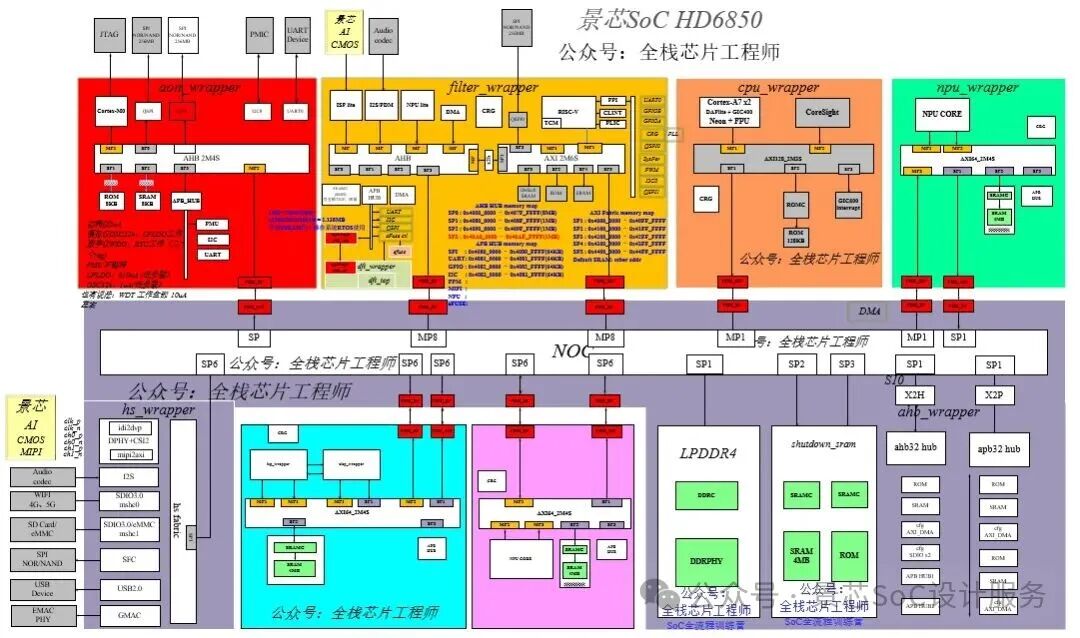
The Jingxin AI processor project, compatible with the RISC-V architecture, can scale up to GPU and down to NPU. To become stronger, we must persevere no matter how difficult it is!
Part One:AI Processor Architecture
1.1 AI Computing Chip Development History
-
Evolution from GeneralCPU to DedicatedAI Chips
-
DifferentAI Workloads and Their Architectural Requirements
-
Differences Between Cloud and EdgeAI Processors
1.2 MainstreamAI Processor Architecture Comparison
1.2.1 DedicatedAI Accelerators (ASIC)
-
In-depth Analysis of Google TPU Architecture
-
Advantages and Limitations of Pulsed Array Computing Mode
-
Balancing Fixed Function Units and Programmability
1.2.2 ReconfigurableAI Processors (FPGA)
-
Hardware Programmability inAI Applications
-
Dynamic Reconfiguration to Adapt to Algorithm Evolution
-
Trade-off Between Energy Efficiency and Flexibility
1.2.3 Neural Processing Units (NPU)
-
Mobile AI Accelerator Design Concepts
-
Architectural Optimization Under Power Constraints
-
On-device Model Compression and Hardware Collaboration
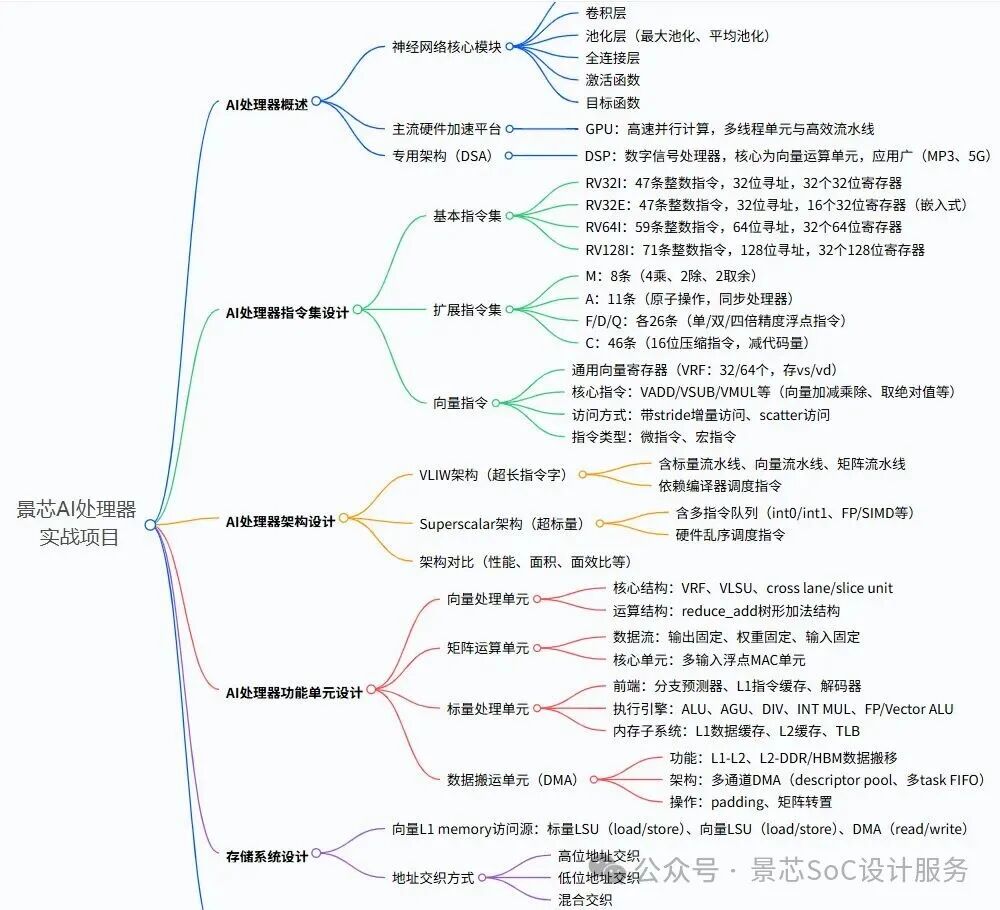
1.2.4 Graphics Processing Units (GPU)
-
Evolution from Vector Processors to ModernGPGPU Architectures
-
Comparison Between GPU andGPGPU Architectures
-
Applications of GPGPU inAI and High-Performance Computing
-
Comparison of GPU with OtherAI Architectures and Their Advantages
1.2.5 Graphics Processing Unit (GPU) Architecture Selection
-
Why ChooseGPGPU as the Foundation forAI Processors
-
Fit of General Parallel Computing withAI Workloads
-
Advantages of Software and Development Ecosystems
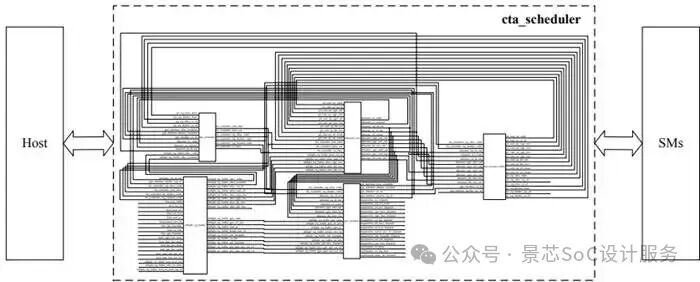
Part Two:GPGPU Architecture as anAI Processor Advantage
2.1 AI Workload Characteristics andGPGPU Architecture Compatibility
-
The Parallel Nature of Matrix Operations
-
Data Flow Parallelism Between Neural Network Layers
-
Differentiated Architectural Requirements for Training and Inference
2.2 Jingxin CustomizedGPGPU Core Architecture Analysis
-
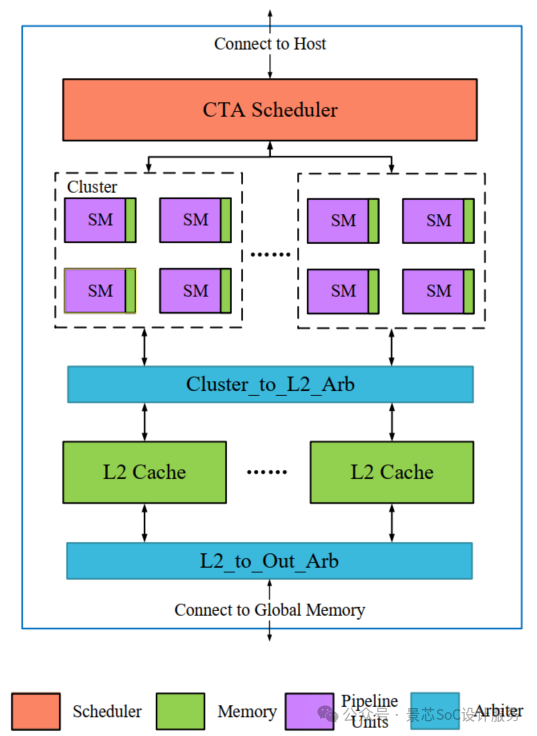
Overall Hardware Architecture Diagram and Component Interaction
-
Streaming Multiprocessor (SM) Cluster Organization
-
In-depth Analysis of Multi-level Storage Architecture
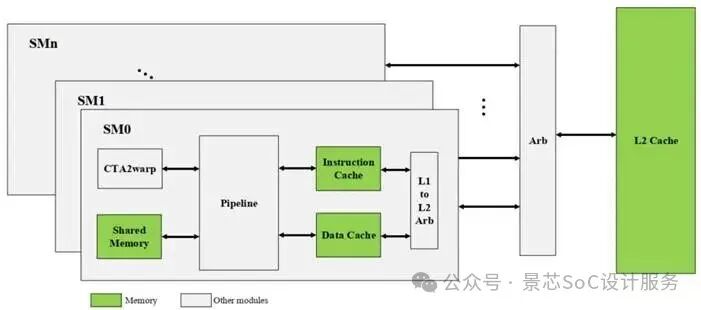
2.3 Jingxin CustomizedGPGPU Features
-
Flexible Architecture Switch Mechanism, Configurable asNPU
-
Hardware Support for Mixed Precision Computing
-
Dedicated Computing Units for Tensor Cores
-
Sparse Computing Acceleration Mechanism
Part Three:AI Processor Microarchitecture Deep Design
3.1 Parallel Computing Architecture Optimization
3.1.1 Utilization of Multi-level Parallelism
-
Cooperation of Data Parallelism and Model Parallelism
-
Instruction Level Parallelism (ILP) Optimization Techniques
-
Thread Level Parallelism (TLP) Scheduling Strategies
3.1.2 AI Dedicated Execution Unit Design
-
Optimization Implementation of Matrix Multiplication Units
-
Dedicated Data Path for Convolution Computation
-
Hardware Acceleration for Activation Functions
3.2 Storage Subsystem AI Optimization
3.2.1 Data Flow Optimization Architecture
-
Optimization of Weight Data Reuse Patterns
-
Utilization of Feature Map Data Locality
-
Gradient Computation Storage Access Patterns
3.2.2 On-chip Storage Hierarchy Customization
-
Shared Memory AI Workload Optimization
-
Cache Replacement Algorithms Adapted toAI Characteristics
-
On-chip Cache Strategies for Model Parameters
Part Four:AI Dedicated Instruction Set and Programming Model
4.1 AI Dedicated Instruction Set Extensions
-
Tensor Operation Instruction Design
-
Support for Sparse Computing Instructions
-
Implementation of Quantization Operation Instructions
Part Five: Chip Implementation and Verification
5.1 AI Processor RTL Implementation Deep Analysis
5.1.1 AI Processor RTL Architecture Introduction
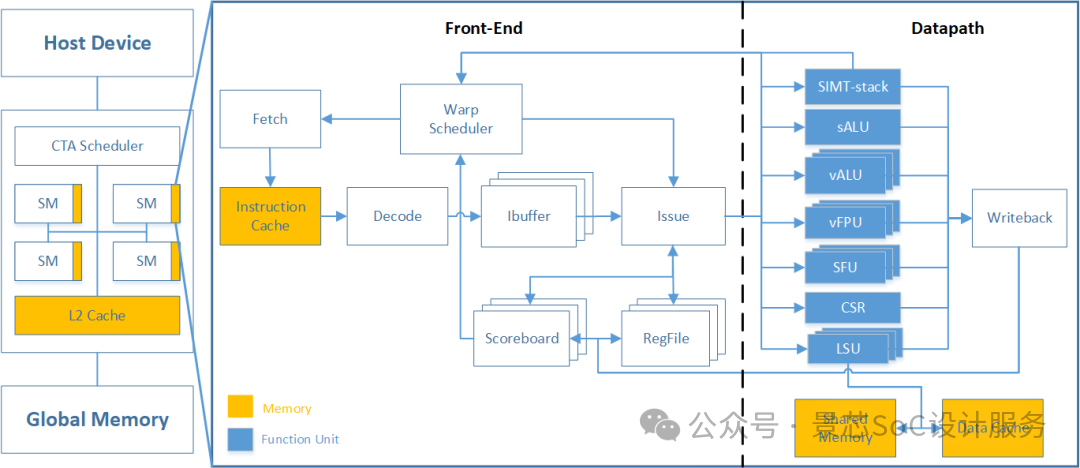
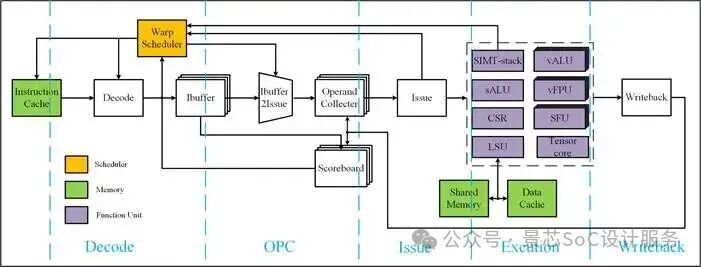 AI Processor RTL pipeline Architecture Diagram
5.1.2 KeyAI Computing Module 1
-
Scheduler Module
- Warp Scheduling
- Register File
- Instruction Fetch
- Decoding
- Instruction Buffering
- Dispatch, Scoreboard
- Write Back
- L1 Cache
- L2 Cache
5.1.2 Key AI Computing Module 2
-
ALU
-
vALU
-
vFPU
-
MUL
-
LSU
-
CSR
-
SFU
-
Warp Control
-
Tensors Core
5.2 AI Processor Dedicated Verification Methods
5.2.1 Simulation Verification
-
Building Simulation Verification Environment
-
AI Testcase Development
-
AI Performance Accuracy System Verification
5.2.2 FPGA Prototype Verification
-
FPGA Selection
-
AI Processor RTL Porting
-
FPGA Simulation Verification
-
Performance and Power Profiling