-Begin-Hello everyone! I am Engineer Fu.
Whether learning about host computers or PLCs, one topic seems unavoidable—communication.
PLC communication focuses more on application; it only requires calling the corresponding function blocks and filling in the correct parameters, without needing to understand the underlying implementation principles.
Host computer communication emphasizes the underlying principles, requiring knowledge of various communication protocols and how to encapsulate communication libraries.
Today, I will share a case study on troubleshooting communication issues on-site.
Project Background
Recently, I undertook a project involving a weighbridge host computer, which needed to collect data from two weighbridges at the entrance and exit. The design approach was to use two serial servers to convert RS485 to Ethernet, allowing the PLC to collect weighbridge data via Modbus TCP.One day, I went to the site with the PLC engineer, who brought a 485 communication cable. He mentioned that during testing yesterday, the PLC could not collect weighbridge data via Modbus TCP, and if it didn’t work, they would switch to Modbus RTU communication.Although this was unrelated to the host computer, as a technician, I knew that Modbus RTU was definitely not the optimal solution due to issues related to polling or station dropouts.So I told him: Let me take a look, and if we can’t solve it, we can switch to the Modbus RTU solution.
Communication Testing
1. First, configure the serial server.
Serial servers generally have two modes:
One is the transparent mode, which still uses Modbus RTU messages but communicates over TCP; this is Modbus RTU Over TCP communication.
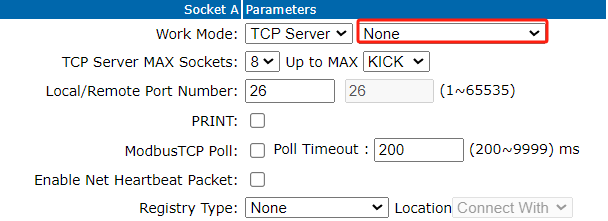
Another mode is Modbus protocol conversion, which can directly convert Modbus RTU messages into Modbus TCP messages; this is Modbus TCP communication.
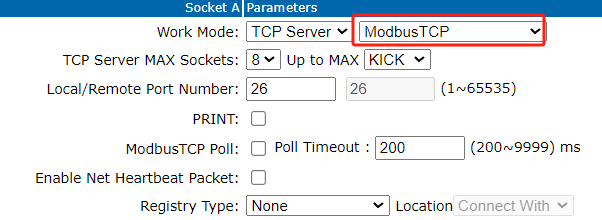
2. After configuration, test using software.
Here, I used ModbusPoll software, selected Modbus TCP, with the IP address set to 192.168.2.7 and port number 26. The test results are as follows:
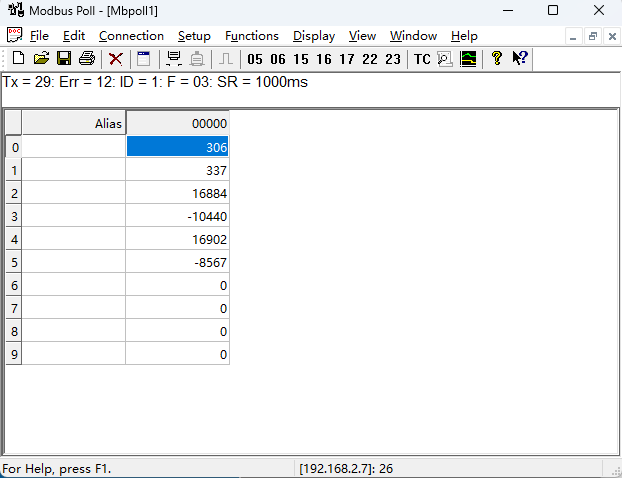
3. The test passed, indicating that the serial server is functioning correctly.
PLC Testing
After checking the PLC program written by the PLC engineer, it seemed fine, but data could not be read.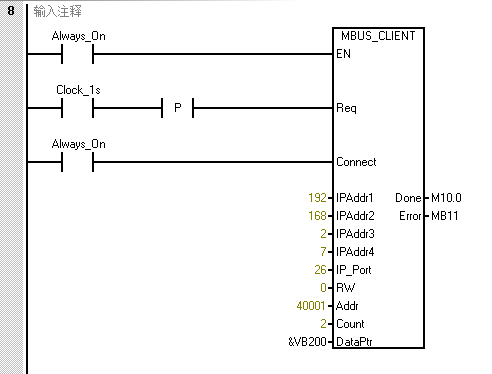
The PLC engineer said the problem lies here, and it cannot be resolved.
I analyzed the situation; since ModbusPoll tested fine, but the PLC could not communicate, it was likely that the messages sent by the PLC program were inconsistent with those sent by ModbusPoll software. Therefore, I needed to monitor the messages sent by the PLC.
Monitoring Messages
1. First, I opened a Modbus Slave on my machine, setting the IP address to my machine’s IP and the port to 26.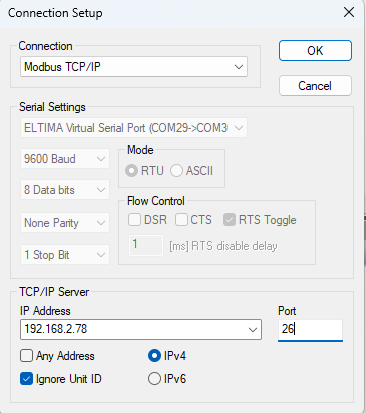 2. Then, I asked the PLC engineer to change the IP in the PLC program to 192.168.2.78, so I could observe the messages sent by the PLC through the Slave.
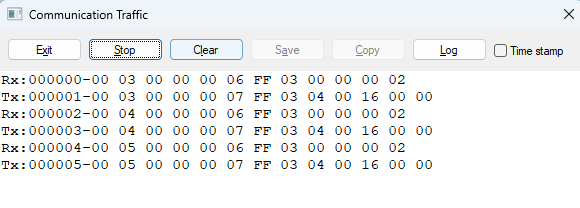 3. After the change, the PLC engineer said data could be read, and I also saw the messages sent by the PLC.The unit identifier in the messages sent by the PLC is 255(0xFF), while the weighbridge’s station address is 0x01, so the weighbridge would not return a message.
The reason the PLC uses 255 as the default value is that in some implementations, address 255 is treated as a broadcast address, but not all hardware supports broadcast addresses.
Why did the Slave software return a response? Because I set it to Ignore Unit ID.
After identifying the issue, I instructed the PLC engineer to set the weighbridge’s slave address to 255, and the communication test was successful.
Problem Analysis
In the S7-200 Smart documentation, we found relevant information about MBUS_Client: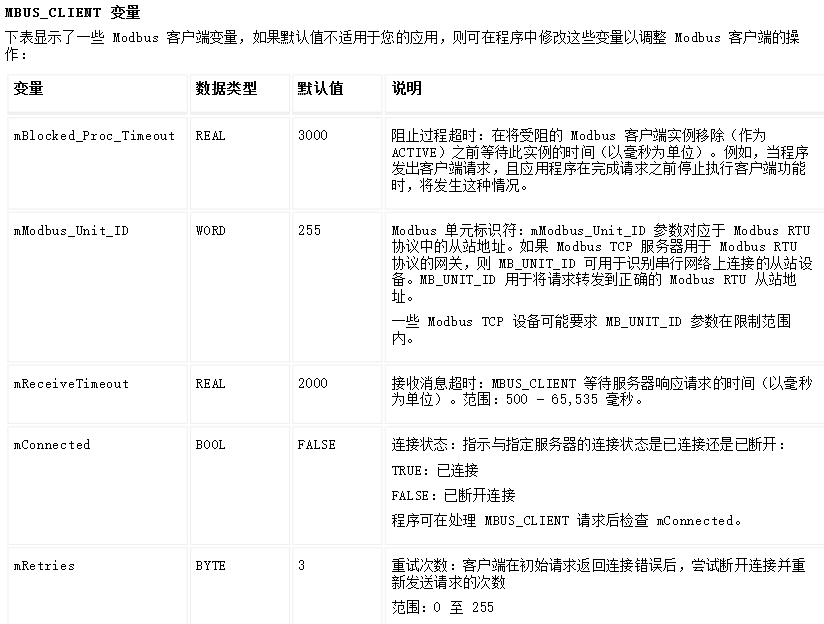 For Modbus TCP, we can distinguish different devices by IP address, so Unit ID often seems unimportant. However, in some cases, such as when the S7-200 SMART acts as a Modbus TCP client, and the server is a gateway module connecting multiple Modbus RTU devices, it becomes necessary to distinguish Modbus RTU slave addresses.Therefore, the above solution is not perfect; if the serial server connects multiple RTU devices, it will not be applicable.The default value of mModbusUnitID in the MBUS_Client library is 255 (16#FF). If there are multiple slave devices, a connection can be established between the S7-200 SMART and the gateway module, and the Unit ID can be polled by modifying the Unit ID value on this connection.We opened the symbol table of the Modbus_TCP Client and found that the address corresponding to Unit ID is VB3739.
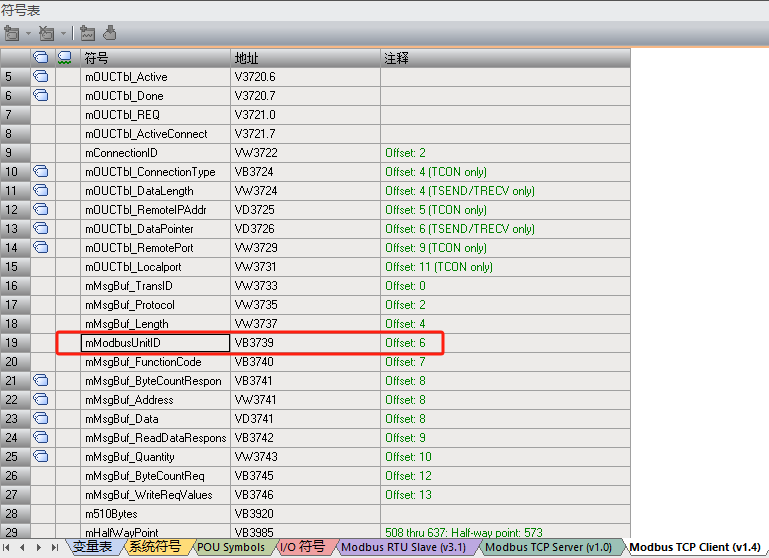 Later, I instructed the PLC engineer to restore the weighbridge’s station address to 1, and we resolved the issue by modifying the PLC program.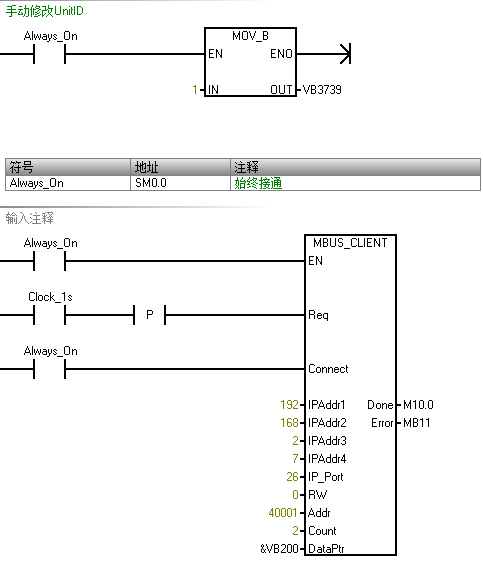
Final Thoughts
In August of this year, after two years, I published a book on host computer development—”C# Host Computer Development Practical Guide”.
My new book “C# Host Computer Development Practical Guide” has been published.
If anyone needs to purchase it, you can buy it through the JD flagship store.
-END-
For articles on host computer technology, please follow the public account [Host Computer Guide].For discussions on host computer technology, please add my WeChat [fuswj001].
Thank you all for reading, follow me, and share host computer development technology.