0x00
This article is dedicated to daily learning and note sharing to help everyone learn assembly language. Why learn assembly language? Because in red-blue confrontations, our tools are often detected and eliminated by AV/EDR systems. Therefore, we need to counter AV, which involves evasion techniques. To learn evasion techniques, we must start from the basics. In the future, I may also share notes on C++, PE file structures, and possibly some reverse engineering knowledge.
0x01
1. Introduction
1. Assembly language is a programming language that works directly on hardware. To effectively use assembly language for programming, one must first understand the structure of the hardware system.
2. Machine language is a collection of machine instructions, which are commands that a machine can execute correctly.
3. The emergence of assembly language is based on assembly instructions. The main body of assembly language consists of assembly instructions, which differ from machine instructions (represented by a series of binary numbers) in terms of their representation method. Assembly instructions are a more memorable format for machine instructions.
2. Principles of Assembly Language
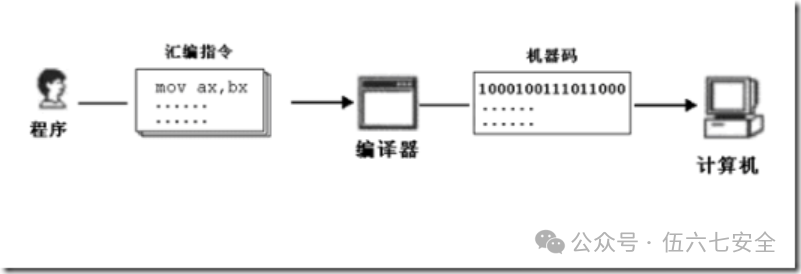
The principle of assembly language is illustrated in the above image. First, the programmer writes assembly instructions to create an .asm file, which is then compiled to form an .obj file. At this point, the .obj file contains machine code, which the computer can recognize. It is important to note that after forming the .obj file, linking is required to create the commonly used EXE file.
3. Components of Assembly Language
1. Assembly instructions (mnemonics for machine code, corresponding to machine code)
2. Pseudo-instructions (no corresponding machine code, executed by the compiler, not executed by the computer)
3. Other symbols (such as + – x /, recognized by the compiler, with no corresponding machine code)
The core of assembly language is assembly instructions, which determine the characteristics of assembly language.
4. Memory
1. The CPU is the core component of the computer, controlling the entire operation and performing calculations. To enable a CPU to interact, it must be provided with instructions.
2. Disks differ from memory; data or programs on the disk cannot be used by the CPU unless they are loaded into memory.
3. Memory is divided into several storage units, each sequentially numbered starting from 0;
5. CPU Read/Write Operations on Memory
For the CPU to read and write data, it must interact with external devices (commonly referred to as chips) through three types of information:
1. Address of the storage unit (address information)
2. Device selection, read or write command (control information)
3. Data to be read or written (data information)
So how does the CPU transmit address, data, and control information to the memory chip? —— Through the bus.
All information processed and transmitted by electronic computers is electrical signals, which must be transmitted via wires.
Physically, a bus is a collection of wires.
Logically: address bus, data bus, control bus.
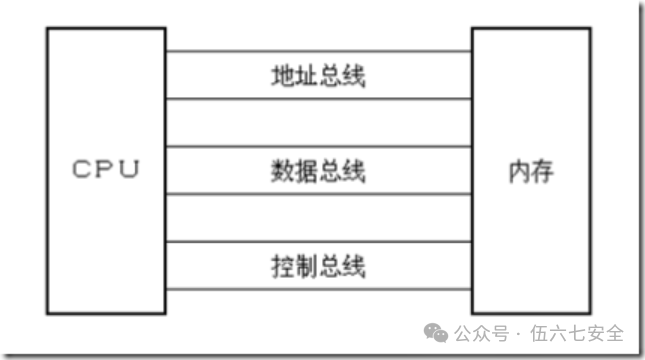
6. Address Bus, Data Bus, Control Bus (Read/Write)
Address Bus:
1. The CPU specifies the storage unit through the address bus. The number of different addresses that the address bus can transmit determines how many storage units the CPU can address;
2. If a CPU has N address lines, it can be said that the width of the address bus for this CPU is N; indexing memory addresses.
3. Ten address lines can access a maximum of 2^10 memory units, which means its addressing capability is 2KB.
Data Bus:
1. Data transfer between the CPU and memory or other devices is conducted through the data bus.
2. The width of the data bus determines the speed of data transfer between the CPU and the outside world.
3. Each transmission line can only transmit 1 bit of binary data at a time. For example, 8 data lines can transmit an 8-bit binary data (1 byte) at once.
4. The 8088 CPU transmits 8 bits at a time, while the 8086 CPU transmits 16 bits at a time.
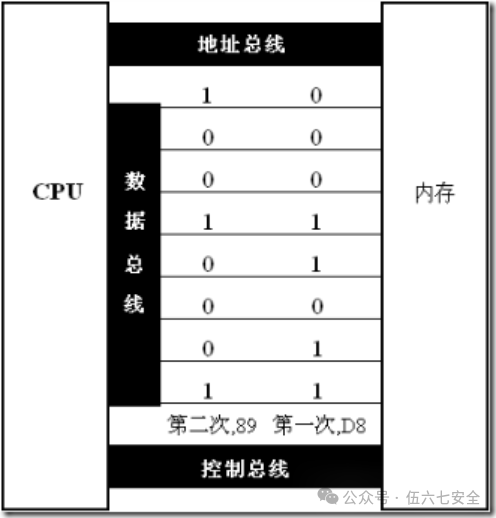
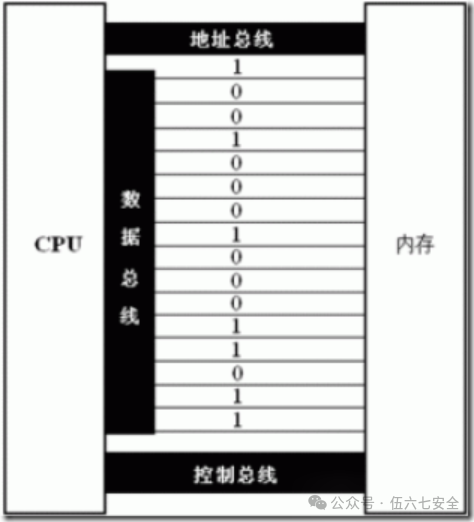
Control Bus:
1. The CPU controls external devices through the control bus.
2. The number of control buses indicates how many types of control the CPU can provide externally.
3. The width of the control bus determines the CPU’s control capability over external devices.
4. Memory read or write commands are issued through several control buses:
1) One of them, called the read/write signal output control line, is responsible for sending read signals from the CPU to the outside. The CPU will output a low level on this control line to indicate that it is about to read data;
2) Another line, called the write signal output control line, is responsible for sending write signals from the CPU to the outside..
Summary:
1. Assembly instructions are mnemonics for machine instructions, corresponding one-to-one with machine instructions.
2. Each CPU has its own set of assembly instructions.
3. The CPU can directly use information stored in memory.
4. In memory, instructions and data are indistinguishable; both are binary information.
5. Storage units are sequentially numbered starting from zero.
6. A storage unit can store 8 bits (written as “b”), which is 1 byte of binary data;
7. Each CPU chip has many pins, which are connected to the bus. It can also be said that without these pins leading to the bus, a CPU can lead out three types of bus widths, marking different aspects of the CPU’s performance:
The width of the address bus determines the CPU’s addressing capability;
The width of the data bus determines the amount of data transferred in one operation between the CPU and other devices;
The width of the control bus determines the CPU’s control capability over other devices in the system.
7. Memory Address Space
What is Memory Address Space
If a CPU has a width of 10 address lines, it can address 1024 memory units, and these 1024 addressable memory units constitute the memory address space of this CPU.
For the CPU, all storage units in the system are part of a unified logical memory, whose capacity is limited by the CPU’s addressing capability. This logical memory is what we refer to as memory address space.
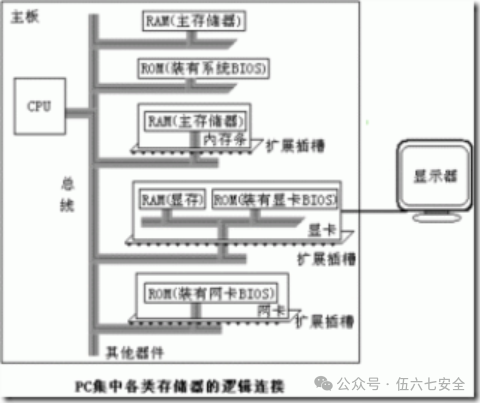
Types of Storage Chips
1. Classified into two types based on read/write properties.
Random Access Memory (RAM) and Read-Only Memory (ROM)
2. Classified based on function and appearance.
Random Access Memory (RAM) — Memory — Data lost when power is off.
ROM with BIOS — Data retained when power is off.
RAM on interface cards.
3. Logical connections of various types of memory in a PC:
 Share
Share Collect
 View
View Like
Like

Scan to follow us and become an excellent network security professional.