
Source: CSDN Blog, Author: I Am Not A Melon.
1Given the transfer function, find the frequency response characteristics.
Take a random transfer function as an example
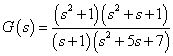
Write the code in MATLAB as follows.
There are two ways to write the code, one is to directly write the expression of the transfer function G , which is straightforward.tf is actually an abbreviation for transfer function.
s=tf(‘s’);
G=(s^2+1)*(s^2+s+1)/((s+1)*(s^2+5*s+7));
bode(G);
grid
xlabel(‘Frequency f’);title(‘ ‘);
Another way to write the code:
num=conv([1,0,1],[1,1,1]);
den=conv([1,1],[1,5,7]);
bode(tf(num,den));
grid
xlabel(‘Frequency f’);title(‘ ‘);
Here, the conv command multiplies the factors of the numerator and denominator, and then arranges them in descending order of the power of s to obtain two one-dimensional matrices num and den , where num=[1,1,2,1,1], den=[1,6,12,7]. To be more intuitive, at this point
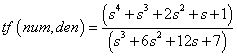
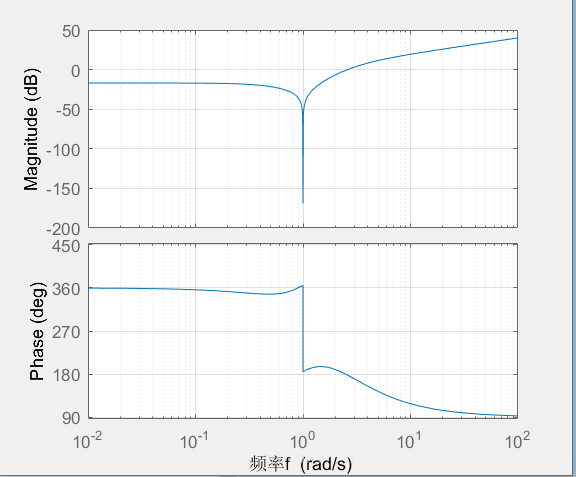
At this point, tf (num, den) is equivalent to G in the first method. The result is:
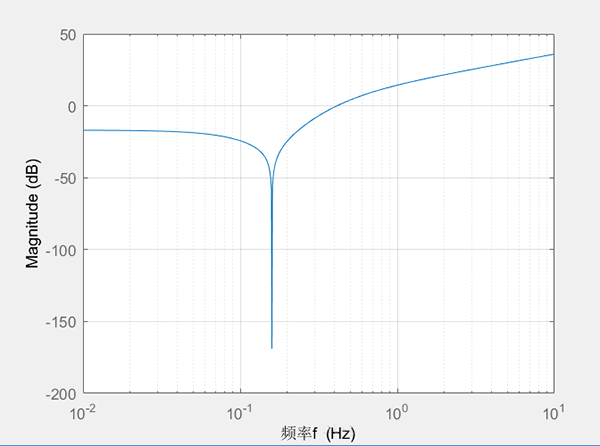
Sometimes we do not need the phase plot in the bode plot, and only want the frequency plot, we just need to replace bode(G) with
h = bodeplot(G);
setoptions(h,’FreqUnits’,’Hz’,’PhaseVisible’,’off’);
The result is:
2Given the state equation, find the frequency response characteristics
For a general state equation
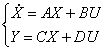
The transfer function G=Y/U.
[num,den]=ss2tf(A,B,C,D)
The num and den obtained here are the same as above, except that the transfer function now depends on how many outputs you set for Y. If Y has three outputs, then num and den will be three-dimensional matrices corresponding to three transfer functions, and the remaining work is the same as above.
As for converting the transfer function to a state equation, it is the reverse process [A,B,C,D]=tf2ss(num,den). However, I have not used this yet, because I think the state equation derived from the state variables I need will be different, and the state space obtained from MATLAB is just one of the methods.
Original link:
https://blog.csdn.net/akirattc/article/details/80542692

Frequency Response Functions and Transfer Functions

Disclaimer: This WeChat reposted article is for non-commercial educational and research purposes, and does not imply support for its views or confirm the authenticity of its content. Copyright belongs to the original author. If there are any copyright issues with the reposted articles, please contact us immediately, and we will modify or delete the related articles to ensure your rights!