A faster version can be found in the C language implementation of FFT and IFFT source code, which does not depend on a specific platform.
The porting is very simple, does not rely on other libraries, and allows customization of the number of points.
The algorithm is derived from the usage instructions of the FFT algorithm and the C language implementation source code — Original Author: Ji Shuaihu.
Source code
FFT.c
/*********************************************************************Fast Fourier Transform C Program Package Function Overview: This package is a general Fast Fourier Transform C language function, highly portable, the following parts do not depend on hardware. This package uses a union to represent a complex number, input is a complex number in natural order (input real number can set the imaginary part of the complex number to 0), output is the complex number in natural order after FFT transformation. This package can call the create_sin_tab() function to create a sine function table during initialization, and thereafter can use the lookup method to calculate the time-consuming sin and cos operations, speeding up the calculable speed. Compared to version 1.1, version 1.2 only establishes 1/4 of the sine wave sampling values when creating the sine table, saving FFT_N/4 storage space. Usage Instructions: To use this function, simply change the macro definition of FFT_N to change the number of points. FFT_N should be a power of 2; if this condition is not met, zeros should be padded afterward. If using the lookup method to calculate sin and cos values, the create_sin_tab() function should be called before calling the FFT function. Function Call: FFT(Compx); Author: Ji Shuaihu Time: 2010-2-20 Version: Ver1.2 References: **********************************************************************/#include <math.h>#include "FFT.h"
struct compx Compx[FFT_N] = {0};    //FFT input and output: stored from Compx[0], defined by size itself
double SIN_TAB[FFT_N / 4 + 1];      //Define storage space for sine table
/*******************************************************************Function Prototype: struct compx EE(struct compx b1, struct compx b2) Function Functionality: Multiply two complex numbers Input Parameters: two complex numbers defined by union a, b Output Parameters: The product of a and b, output in union form*******************************************************************/struct compx EE(struct compx a, struct compx b){  struct compx c;  c.real = a.real * b.real - a.imag * b.imag;  c.imag = a.real * b.imag + a.imag * b.real;  return(c);}
/******************************************************************Function Prototype: void create_sin_tab(double *sin_t) Function Functionality: Create a sine sampling table, the number of sampling points is the same as the number of Fourier transform points Input Parameters: *sin_t pointer to the array storing the sine table Output Parameters: none******************************************************************/void create_sin_tab(double *sin_t){  int i;  for (i = 0; i <= FFT_N / 4; i++)    sin_t[i] = sin(2 * PI * i / FFT_N);}
/******************************************************************Function Prototype: void sin_tab(double pi) Function Functionality: Calculate the sine value of a number using the lookup method Input Parameters: pi The radian value whose sine value is to be calculated, range 0--2*PI, needs conversion if not satisfied Output Parameters: The sine value of the input value pi******************************************************************/double sin_tab(double pi){  int n;  double a = 0;  n = (int)(pi * FFT_N / 2 / PI);
  if (n >= 0 && n <= FFT_N / 4)    a = SIN_TAB[n];  else if (n > FFT_N / 4 && n < FFT_N / 2)  {    n -= FFT_N / 4;    a = SIN_TAB[FFT_N / 4 - n];  }  else if (n >= FFT_N / 2 && n < 3 * FFT_N / 4)  {    n -= FFT_N / 2;    a = -SIN_TAB[n];  }  else if (n >= 3 * FFT_N / 4 && n < 3 * FFT_N)  {    n = FFT_N - n;    a = -SIN_TAB[n];  }
  return a;}
/******************************************************************Function Prototype: void cos_tab(double pi) Function Functionality: Calculate the cosine value of a number using the lookup method Input Parameters: pi The radian value whose cosine value is to be calculated, range 0--2*PI, needs conversion if not satisfied Output Parameters: The cosine value of the input value pi******************************************************************/double cos_tab(double pi){  double a, pi2;  pi2 = pi + PI / 2;  if (pi2 > 2 * PI)    pi2 -= 2 * PI;  a = sin_tab(pi2);  return a;}
/*****************************************************************Function Prototype: void FFT(struct compx *xin) Function Functionality: Perform Fast Fourier Transform (FFT) on the input complex array Input Parameters: *xin pointer to the address of the complex structure array, struct type Output Parameters: none*****************************************************************/void FFT(struct compx *xin){  register int f, m, nv2, nm1, i, k, l, j = 0;  struct compx u, w, t;
vn2 = FFT_N / 2;          //Bit-reversed operation, turning natural order into bit-reversed order, using the radix-2 algorithm  nm1 = FFT_N - 1;  for (i = 0; i < nm1; ++i)  {    if (i < j)            //If i<j, perform bit-reversal    {      t = xin[j];      xin[j] = xin[i];      xin[i] = t;    }    k = nv2;            //Calculate the next bit-reversed order of j    while (k <= j)          //If k<=j, indicates the highest bit of j is 1    {      j = j - k;          //Set the highest bit to 0      k = k / 2;          //k/2, compare the next highest bit, and so on, comparing until a bit is 0    }    j = j + k;            //Set 0 to 1  }
  {    int le, lei, ip;        //FFT operation core, completing FFT operation using butterfly operations    f = FFT_N;    for (l = 1; (f = f / 2) != 1; ++l);        //Calculate the value of l, which is the number of butterfly stages    for (m = 1; m <= l; m++)            // Control the number of butterfly stages    {         //m indicates the m-th stage of the butterfly, l is the total number of butterfly stages l=log(2)N      le = 2 << (m - 1);              //le butterfly distance, that is, the points between the butterfly nodes of the m-th stage      lei = le / 2;                               //The distance between the two points participating in the operation in the same butterfly node      u.real = 1.0;                //u is the coefficient of the butterfly operation, initial value is 1      u.imag = 0.0;      w.real = cos_tab(PI / lei);          //w is the coefficient ratio, that is, the current coefficient divided by the previous coefficient      w.imag = -sin_tab(PI / lei);      for (j = 0; j <= lei - 1; j++)        //Control the calculation of different types of butterfly nodes, that is, calculate the butterfly nodes with different coefficients      {        for (i = j; i <= FFT_N - 1; i = i + le)  //Control the operation of the same butterfly node, that is, calculate the butterfly nodes with the same coefficient        {          ip = i + lei;            //i, ip represent the two nodes participating in the butterfly operation          t = EE(xin[ip], u);          //Butterfly operation, see formula in detail          xin[ip].real = xin[i].real - t.real;          xin[ip].imag = xin[i].imag - t.imag;          xin[i].real = xin[i].real + t.real;          xin[i].imag = xin[i].imag + t.imag;        }        u = EE(u, w);              //Change the coefficient for the next butterfly operation      }    }  }}
/*****************************************************************Function Prototype: void Get_Result(struct compx *xin, double sample_frequency) Function Functionality: Calculate the modulus of the transformed result, store it in the real part of the complex number, frequency stored in the imaginary part of the complex number, valid data is the first FFT_N/2 numbers Input Parameters: *xin pointer to the address of the complex structure array, struct type, sample_frequency: sampling frequency Output Parameters: none*****************************************************************/void Get_Result(struct compx *xin, double sample_frequency){  int i = 0;  for (i = 0; i < FFT_N / 2; ++i)  {              //Calculate the modulus of the transformed result, store it in the real part of the complex number    xin[i].real = sqrt(xin[i].real * xin[i].real + xin[i].imag * xin[i].imag) / (FFT_N >> (i != 0));    xin[i].imag = i * sample_frequency / FFT_N;  }}
/*****************************************************************Function Prototype: void Refresh_Data(struct compx *xin, double wave_data) Function Functionality: Update data Input Parameters: *xin pointer to the address of the complex structure array, struct type, id: label, wave_data: value of a point Output Parameters: none*****************************************************************/void Refresh_Data(struct compx *xin, int id, double wave_data){  xin[id].real = wave_data;  xin[id].imag = 0;}
FFT.h
#ifndef FFT_H#define FFT_H
#define FFT_N 16                                        //Define the number of points for Fourier transform
#define PI 3.14159265358979323846264338327950288419717  //Define the value of pi
struct compx { double real, imag; };                    //Define a complex number structure
extern struct compx Compx[];              //FFT input and output: stored from Compx[0], defined by size itself
extern double SIN_TAB[];                //Sine signal table
extern void Refresh_Data(struct compx *xin, int id, double wave_data);
extern void create_sin_tab(double *sin_t);
extern void FFT(struct compx *xin);
extern void Get_Result(struct compx *xin, double sample_frequency);
#endif
Usage Instructions
In FFT.h, modify FFT_N to 16, defining the number of points for the Fourier transform. Since the FFT transformation is normalized, except for the DC component at 0Hz, the entire result table is symmetric, meaning if the number of points is 16, we only need to look at the first 8 points. Therefore, this number of points for the Fourier transform can be determined based on your screen’s pixel count in the long direction; for example, a 128×64 screen can consider using 256 points for the FFT. Here, I am using an 8×8 LED dot matrix screen to display, hence using 16 points for the FFT.
Before computation, you need to call create_sin_tab(SIN_TAB) to establish the sine signal table, which will then use the lookup method to calculate sine values and speed up calculations.
After using Refresh_Data (Compx, i, wave_data) function to input data,
call FFT(Compx) to complete the transformation.
Use Get_Result (Compx, Sample_Frequency) function to calculate the modulus of the transformed result, storing it in the real part of the complex number, with frequency stored in the imaginary part of the complex number, valid data being the first FFT_N/2 numbers.
  #define Sample_Frequency 800      //Sampling frequency 800Hz  #define Frequency 100          //Test signal 100Hz
  for (i = 0; i < FFT_N; ++i)        //Using Refresh_Data(Compx, i, wave_data) function to input data, here establishing a 100Hz square wave test signal  {     if (sin(2 * PI * Frequency * i / Sample_Frequency) > 0)      Refresh_Data(Compx, i, 1);    else if (sin(2 * PI * Frequency * i / Sample_Frequency) < 0)      Refresh_Data(Compx, i, -1);    else      Refresh_Data(Compx, i, 0);  }
  create_sin_tab(SIN_TAB);        //Establish the sine signal table, which will then use the lookup method to calculate sine values and speed up calculations  FFT(Compx);                //Fast Fourier Transform  Get_Result(Compx, Sample_Frequency);  //Calculate the modulus of the transformed result, stored in the real part of the complex number, frequency stored in the imaginary part, valid data being the first FFT_N/2 numbers
Results
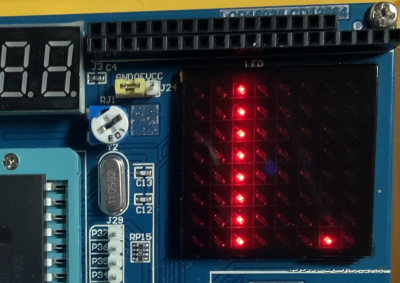
Method for Calculating Frequency:
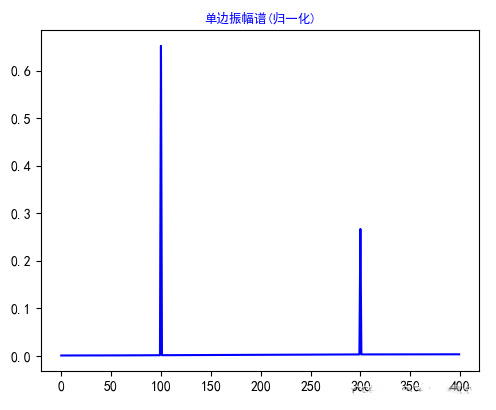
The sampling frequency is 800Hz, with a total of 16 points, hence one grid = 800Hz / 16 = 50 Hz.
As shown in the figure, there are peaks in the third and seventh grids, corresponding to frequencies of 2 x 50Hz = 100Hz and 6 x 50Hz = 300Hz, respectively. This result has been calculated by the Get_Result function and stored in the imaginary part of the original array.
Performance
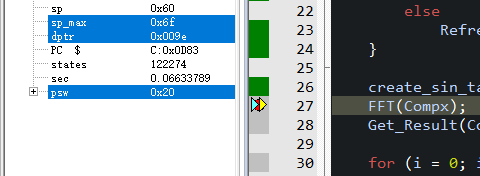
Crystal oscillator frequency 11.0592MHz 6T mode (22.1184MHz 12T)
Simulation takes about 0.13222819 – 0.06633789 = 0.0658903 (s)
That is, it takes 65.8903 ms for a 16-point FFT transformation using a 51 microcontroller at 11.0592MHz 6T.

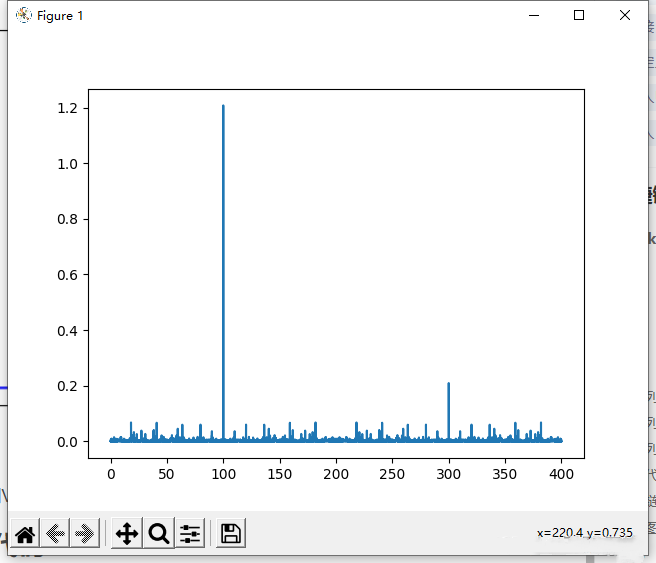
The same program, using VS 2015 to run 65536 points results:
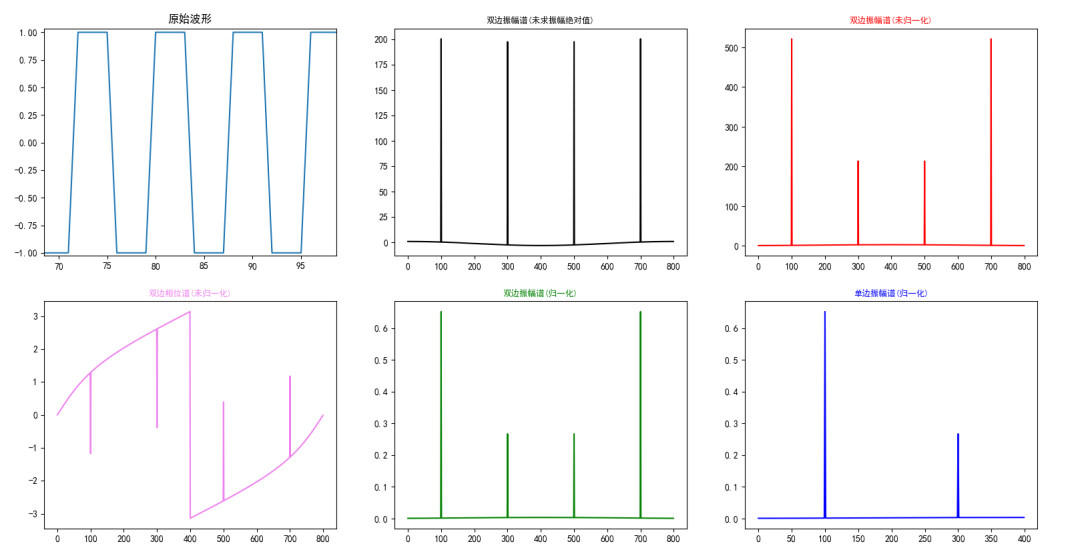
Using the same data to calculate 800 points with Python:
Source: The most detailed tutorial on implementing Fast Fourier Transform (FFT) using Python (scipy and numpy) — LoveMIss-Y
Other Parts of the Code
Dot matrix screen part code can be found in [51 Microcontroller Quick Start Guide] 2.4: IO Expansion (Serial to Parallel) and LED Dot Matrix Screen.
main.c
#include <REGX52.H>#include "intrins.h"#include "stdint.h"#include "FFT.h"#include <math.h>#include "HC74595.h"
void main(void){  uint8_t i, j;   double Largest = 0;
  #define Sample_Frequency 800      //Sampling frequency 800Hz  #define Frequency 100          //Test signal 100Hz
  for (i = 0; i < FFT_N; ++i)        //Using Refresh_Data(Compx, i, wave_data) function to input data, here establishing a 100Hz square wave signal  {     if (sin(2 * PI * Frequency * i / Sample_Frequency) > 0)      Refresh_Data(Compx, i, 1);    else if (sin(2 * PI * Frequency * i / Sample_Frequency) < 0)      Refresh_Data(Compx, i, -1);    else      Refresh_Data(Compx, i, 0);  }
  create_sin_tab(SIN_TAB);        //Establish the sine signal table, which will then use the lookup method to calculate sine values and speed up calculations  FFT(Compx);                //Fast Fourier Transform  Get_Result(Compx, Sample_Frequency);  //Calculate the modulus of the transformed result, stored in the real part of the complex number, frequency stored in the imaginary part, valid data being the first FFT_N/2 numbers
  for (i = 0; i < FFT_N / 2; ++i)      //Process the calculation results into an image  {             if(Compx[i].real > Largest)      Largest = Compx[i].real;  }  for(i = 0; i < 8; ++i)  {    for(j = 0; j < (uint8_t)((Compx[i].real / Largest) * 8 + 0.5); ++j)      Mat[8 - j - 1][i] = 1;  }
  while(1)  {    imshow(Mat);            //Display the image  }}
Copyright Statement: This article is an original work by CSDN blogger “Yuan Acetic Acid Beryllium”, following the CC 4.0 BY-SA copyright agreement. Reprint requires the original source link and this statement. Original link: https://blog.csdn.net/weixin_44457994/article/details/121238658
END
[Free Download] Multisim Simulation 100 Examples.rar
Follow the Breadboard Community WeChat Official AccountReply: Simulation 100to download for free