Follow 👆 the public account and reply 'python' to receive a zero-based tutorial! From the internet, please delete if infringed.Learning a language is valuable when you persist in using it; otherwise, you will forget it. Writing an article also helps with quick recall in the future. The entire article is divided into two main parts: Python basic syntax and object-oriented programming.
【Tutorial The method to receive it is at the end of the article!!】
Getting started with Python is actually very easy, but we need to persist in learning. It’s very difficult to stick to it every day, and I believe many people give up after a week. Why? It’s actually because there aren’t good learning materials available, making it hard for you to persist. I hope this helps you.
Part One: Python Basic Syntax
1. Understanding Python
1.1 Introduction to Python
The founder of Python is Guido van Rossum.
The design goals of Python:
A simple and intuitive language that is as powerful as its main competitors and open-source so anyone can contribute. Code should be as easy to understand as plain English and suitable for short-term development of everyday tasks.
The design philosophy of Python:
Elegant, clear, and simple.
The philosophy of Python developers is: There should be one—and preferably only one—obvious way to do it.
Python is a fully object-oriented language, where everything is an object.
Scalability: If you need a piece of critical code to run faster or wish to keep certain algorithms private, you can write this part of the program in C or C++, and then use it in your Python program.
1.2. Your First Python Program
There are three ways to execute Python programs: using the interpreter, interactive mode, or IDE.
Python is a programming language with very strict formatting. Python 2.x does not support Chinese by default.
ASCII characters only contain 256 characters and do not support Chinese.
-
The interpreter name for Python 2.x is python.
-
The interpreter name for Python 3.x is python3.
To accommodate existing programs, the official transition version is Python 2.7.
Tip: If you cannot immediately use Python 3.0 during development (as there are still very few third-party libraries that do not support 3.0 syntax), it is recommended:
To first develop with Python 3.0 and then execute using Python 2.6 or Python 2.7, making some compatibility adjustments.
IPython is an interactive shell for Python that is much more user-friendly than the default Python shell. It supports bash shell commands and is suitable for learning/validating Python syntax or local code.
An Integrated Development Environment (IDE) integrates all the tools needed for development, generally including the following tools:
-
Graphical User Interface
-
Code Editor (supports code completion / automatic indentation)
-
Compiler / Interpreter
-
Debugger (breakpoints / step execution)
-
……
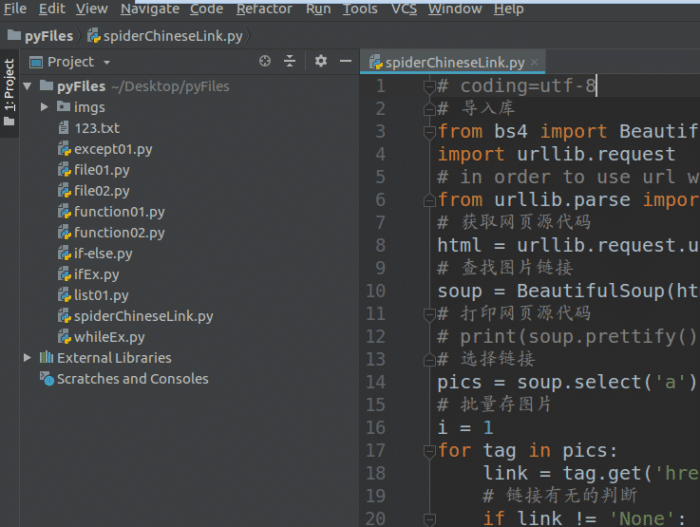
PyCharm is an excellent IDE for Python.
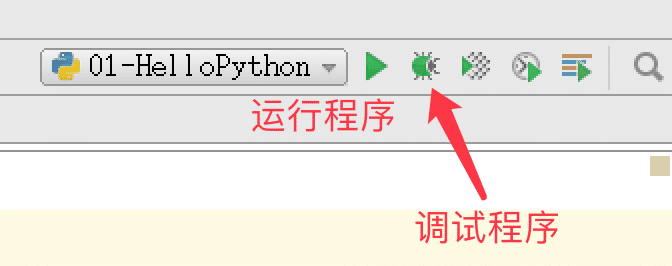
PyCharm run toolbar
1.4. Practice with Multi-file Projects
-
Developing a project means creating software that specifically solves a complex business function.
-
Typically, each project has an independent dedicated directory to store all files related to the project.
-
In PyCharm, to allow a Python program to execute, you must first execute it through right-clicking.
-
For beginners, setting multiple programs to execute within a project is very convenient for practicing and testing different knowledge points.
-
For commercial projects, typically there is only one executable Python source program in a project.
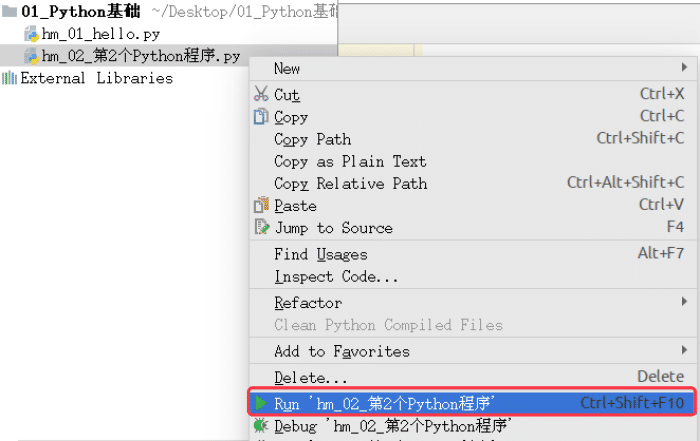
Allow the selected program to execute
2. Comments
-
The purpose of comments is to use a language you are familiar with to annotate certain code in the program, enhancing the readability of the program.
2.1 Single-line Comments
-
Start with #, everything to the right of # is treated as explanatory text and not actual executable code, serving only as auxiliary explanation.
print(hello python)
# Output hello python
`
To ensure code readability, it is recommended to add a space after # before writing the corresponding explanatory text; to ensure code readability, there should be at least two spaces between comments and code.
2.2 Multi-line Comments
-
To use multi-line comments in Python programs, you can use a pair of consecutive three quotes (either single or double quotes).
This is a multi-line comment

You can write a lot of content in the multi-line comment...

print(hello python)
Tip:
-
More comments are not always better. For self-explanatory code, comments are unnecessary.
-
For complex operations, several lines of comments should be written before the operation starts.
-
For not self-explanatory code, comments should be added at the end of the line (to improve readability, comments should be at least two spaces away from the code).
-
Never describe the code; assume that the person reading the code knows Python better than you do; they just don’t know what your code is supposed to do.
2.3 Code Standards:
-
The official Python documentation provides a series of PEP (Python Enhancement Proposals), with the 8th document specifically giving suggestions on Python code formatting, commonly referred to as PEP 8: Document address: https://www.python.org/dev/peps/pep-0008/Google has a corresponding Chinese document: http://zh-google-styleguide.readthedocs.io/en/latest/google-python-styleguide/python_style_rules/
3. Operators
3.1 Arithmetic Operators
These are symbols used to perform basic arithmetic operations and handle the four basic operations, while “+” and “*” can also be used to handle strings.
Operator Description Example + Addition
10 + 20 = 30
– Subtraction
10 - 20 = -10
* Multiplication
10 * 20 = 200
/ Division
10 / 20 = 0.5
// Integer Division Returns the integer part of the division (quotient)
 9 // 2 Output result
4
% Modulus Returns the remainder of the division
9 % 2 = 1
2 ** 3 = 8
3.2 Comparison (Relational) Operators
Operator Description
== Checks if the values of two operands are equal; if so, the condition is true and returns True
!= Checks if the values of two operands are not equal; if so, the condition is true and returns True
> Checks if the value of the left operand is greater than the value of the right operand; if so, the condition is true and returns True
< Checks if the value of the left operand is less than the value of the right operand; if so, the condition is true and returns True
>= Checks if the value of the left operand is greater than or equal to the value of the right operand; if so, the condition is true and returns True
<= Checks if the value of the left operand is less than or equal to the value of the right operand; if so, the condition is true and returns True
In Python 2.x, to check for not equal, you can also use the <> operator.
!= can also be used in Python 2.x to check for not equal.
3.3 Assignment Operators
-
In Python, the = operator is used to assign values to variables.
-
To simplify the code writing during arithmetic operations, Python also provides a series of assignment operators corresponding to arithmetic operators; note: there should be no spaces in assignment operators.
Operator Description Example = Simple assignment operator
 c = a + b
# Assign the result of a + b to c
c += a
# Equivalent to c = c + a
-= Subtraction assignment operator
c -= a
# Equivalent to c = c - a
*= Multiplication assignment operator
c *= a
# Equivalent to c = c * a
/= Division assignment operator
c /= a
# Equivalent to c = c / a
//= Integer division assignment operator
c //= a
# Equivalent to c = c // a
%= Modulus assignment operator
c %= a
# Equivalent to c = c % a
**= Exponentiation assignment operator
c **= a
# Equivalent to c = c ** a
3.4 Identity Operators
Identity operators compare the memory locations of two objects. The commonly used identity operators are described below:
Operator Description Example
is Checks if two identifiers refer to the same object x is y, similar to id(x) == id(y)
not Checks if two identifiers refer to different objects x is not y, similar to id(a) != id(b)
Distinction
-
is is used to check if the objects referenced by two variables are the same
-
== is used to check if the values referenced by the variables are equal
3.5 Membership Operators
The Python membership operator tests whether a given value is a member of a sequence. There are two membership operators, as described below:
Operator Description
in Returns true if a variable’s value is found in the specified sequence; otherwise, returns false.
not in Returns true if a variable’s value is not found in the specified sequence; otherwise, returns false.
3.6 Logical Operators
Operator Logical Expression Description
and x and y Returns True only if the values of both x and y are True; otherwise, returns False if either x or y is False.
or x or y Returns True if either x or y is True; only returns False if both x and y are False.
not not x Returns False if x is True; returns True if x is False.
3.7 Operator Precedence
-
The arithmetic precedence in the following table is arranged from highest to lowest:
Operator Description
** Exponentiation (highest precedence)
* / % // Multiplication, Division, Modulus, Integer Division
+ – Addition, Subtraction
<= < > >= Comparison Operators
== != Equality Operators
= %= /= //= -= += *= **= Assignment Operators
is is not Identity Operators
in not in Membership Operators
not or and Logical Operators
<Supplement> Program Execution Principle
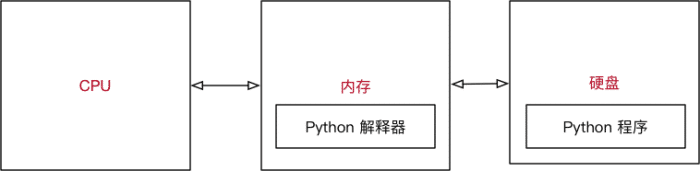
Illustration of Python Program Execution
-
The operating system first allows the CPU to copy the Python interpreter program into memory.
-
The Python interpreter translates the code in the Python program from top to bottom according to syntax rules.
-
The CPU is responsible for executing the translated code.
How large is the Python interpreter?
-
You can check the size of the Python interpreter by executing the following terminal commands:
# 1. Confirm the location of the interpreter $ which python # 2. Check the size of the python file (it’s just a soft link) $ ls -lh /usr/bin/python # 3. Check the specific file size $ ls -lh /usr/bin/python2.7
4. Variables
4.1 Variable Definition
-
In Python, each variable must be assigned a value before use; a variable is created only after it is assigned a value.
-
You can define a variable using the calculation result of other variables.
-
A variable name is only defined the first time it appears.
Variable name = Value
Using an interactive way, if you want to see the content of a variable, just enter the variable name directly without needing to use the print function. To output the content of the variable, you must use the print function.
4.2 Variable Types
-
In Python, defining a variable does not require specifying a type (unlike many other high-level languages). Python can automatically infer the type of data stored in a variable based on the value on the right side of the = sign.
-
Data types can be divided into numeric and non-numeric. Numeric types include integer (int): All integers in Python 3 are represented as long integers. Therefore, there is no separate numeric type for long integers. Floating-point type (float) Boolean type (bool): True is non-zero, false is zero. Complex type (complex): A complex number is composed of an ordered pair of real floating-point numbers x + yj, where x and y are real numbers, and j is the imaginary unit. Non-numeric types: Some operators also support these data types, see 4.4.5.3 Operators.
-
String (str): The plus (+) is the string concatenation operator, and the asterisk (*) is the repetition operator.
-
List (list) Tuple (tuple) Dictionary (dict)
Tip: In Python 2.x, integers are also divided based on the length of the value stored:
int (integer) long (long integer)
-
You can use the type function to check the type of a variable.
In [1]: type(name)
<Supplement> Calculating between Variables of Different Types
-
Numeric variables can be calculated directly with each other.
-
In Python, two numeric variables can perform arithmetic operations directly.
-
If the variable is of the bool type, during calculation, True corresponds to the number 1 and False corresponds to the number 0.
-
String variables can be concatenated using +.
-
String variables can use * to repeat and concatenate the same string with integers.
-
Numeric variables and strings cannot perform other calculations.
<Supplement> Getting Input from the Keyboard: input
-
You can use the input function in Python to wait for user input from the keyboard.
-
The user input of any content is treated as a string by Python.
String variable = input(prompt message:)
<Supplement> Type Conversion Functions
Function Description int(x) Converts x to an integer float(x) Converts x to a floating-point number str(x) Converts object x to string representation tuple(s) Converts s to a tuple list(s) Converts s to a list
price = float(input(Please enter the price:))
<Supplement> Formatted Output: print
-
If you want to output text information while also outputting data, you need to use formatting operators.
-
% is called the formatting operator, specifically used to handle the format in strings containing %. Strings containing % are called format strings and can be used with different characters, with different types of data requiring different formatting characters.
Formatting characters Meaning %s String %d Signed decimal integer, %06d indicates that the displayed integer shows a certain number of digits, and insufficient places are filled with 0 %f Floating-point number, %.2f indicates that only two digits are displayed after the decimal point %% Outputs %
-
The syntax format is as follows:
print(format string % variable1)
print(format string % (variable1, variable2…))
4.4.5 Advanced Applications of Common Methods and Variables
4.4.5.1 Built-in Functions
Python includes the following built-in functions:
Function Description Remarks
len(item) Calculates the number of elements in a container
del(item) Deletes a variable
max(item) Returns the maximum value of elements in a container If it is a dictionary, only compares keys
min(item) Returns the minimum value of elements in a container If it is a dictionary, only compares keys
cmp(item1, item2) Compares two values, -1 less than / 0 equal / 1 greater Python 3.x has removed the cmp function
Note: String comparisons follow the rules: 0 < A < a.
4.4.5.2 Slicing
Describes Python expression results supported data types Slicing 0123456789[::-2] 97531 Strings, lists, tuples
-
Slicing uses index values to limit the range, cutting out a smaller string from a larger string.
-
Lists and tuples are both ordered collections and can access the corresponding data through index values.
-
Dictionaries are an unordered collection that uses key-value pairs to store data.
Object-Oriented Programming – OOP
-
Procedural-oriented – How to do?Implementing all steps to meet a specific requirement from start to finish. Based on development needs, encapsulating certain independent codes into functions to complete the code, which is sequentially called. Characteristics: Focus on steps and processes, not on responsibilities. If the requirements are complex, the code will become very complex. Developing complex projects has no fixed pattern, making it very difficult!
-
Object-oriented – Who does it?Compared to functions, object-oriented programming is a larger encapsulation, encapsulating multiple methods based on responsibilities within one object. Before completing a requirement, first determine the responsibilities – what needs to be done (methods). Determine different objects based on responsibilities, encapsulating different methods (multiple) within the object. The final code is sequentially letting different objects call.
-
Different methods Characteristics: Focus on objects and responsibilities; different objects bear different responsibilities, making it more suitable for addressing complex requirement changes. Specially designed for complex project development, providing a fixed pattern that requires learning some object-oriented syntax on top of procedural programming.
-
Classes and ObjectsA class is a general term for a group of things that have similar characteristics or behaviors, which is abstract. Characteristics are called attributes, and behaviors are called methods. An object is a specific existence created by a class, which is an instantiation of the class. In program development, designing a class usually requires meeting the following three elements: Class name is the name of the type of thing, which should comply with Pascal case naming convention; Attributes describe the characteristics of this type of thing; Methods describe the behaviors of this type of thing.
2. Basic Syntax of Object-Oriented Programming
2.1 dir Built-in Function and Built-in Methods
In Python, objects are almost ubiquitous. The variables, data, functions we learned earlier are all objects. You can use the following two methods to verify in Python:
-
After entering a dot (.) following an identifier/data, press the TAB key, and iPython will prompt the list of methods that this object can call.
-
Use the built-in function dir to pass in an identifier/data to view all attributes and methods of the object. Note that methods in the format __method_name__ are built-in methods/attributes provided by Python.
Method Name Type Function __new__ Method called automatically when creating an object __init__ Method called automatically when initializing an object __del__ Method called before the object is destroyed from memory __str__ Method that returns the description of the object, used in print function output
Tip: Utilize the dir() function well, and many contents do not need to be memorized.
2.2 Defining a Simple Class (Only Containing Methods)
Object-oriented programming is a larger encapsulation, encapsulating multiple methods within a class. This way, the objects created from this class can directly call these methods!
Defining a class that only contains methods:
class ClassName:

   def method1(self, parameters):
       pass

   def method2(self, parameters):
       pass
Method definition format is almost the same as what we learned before with functions; the difference is that the first parameter must be self. Note: The naming rules of the class name must comply with Pascal case naming convention. After a class is defined, to use this class to create an object, the syntax format is as follows:
Object variable = ClassName()
In object-oriented development, the concept of referencing is also applicable!
Using print to output the object variable, by default, it can output which class the referenced object was created from and its address in memory (represented in hexadecimal).
Tip: In computers, memory addresses are usually represented in hexadecimal.
If you want to print custom content when using print to output the object variable, you can utilize the __str__ built-in method:
class Cat:

   def __init__(self, new_name):
       self.name = new_name
       print(%s has arrived % self.name)

   def __del__(self):
       print(%s has left % self.name)

   def __str__(self):
       return I am a kitten: %s % self.name

tom = Cat(Tom)
print(tom)
Note: The __str__ method must return a string.
2.3 The self Parameter in Methods
In Python, setting attributes for an object is very easy; you can directly set an attribute through the object in external code, but it is not recommended:
class Cat:   This is a cat class
   def eat(self):       print(The kitten loves to eat fish)       def drink(self):       print(The kitten is drinking water)
tom = Cat()# Set attribute for the object tom.name = Tom
Because: The encapsulation of object attributes should be encapsulated within the class.
Which object calls the method, the self in the method refers to the reference of that object.
-
Within the methods encapsulated in the class, self represents the object calling the method itself. Inside the method: you can access the object’s attributes through self. and also call other methods of the object through self.
-
When calling a method, the programmer does not need to pass the self parameter.
-
In the external class, you can access the object’s attributes and methods through the variable name. In the methods encapsulated in the class, you can access the object’s attributes and methods through self.
2.4 Initialization Method: __init__
-
When using ClassName() to create an object, the following operations are automatically executed: allocating memory space for the object – creating the object and setting initial values for the object’s attributes – initialization method (__init__).
The __init__ method is specifically used to define what attributes a class has!
-
Use self.attribute_name = initial value inside the __init__ method to define attributes. After defining attributes, any object created using the class will have that attribute.
-
In development, if you want to set the object’s attributes while creating the object, you can modify the __init__ method: define the desired attribute values as parameters of the __init__ method. Inside the method, use self.attribute = formal parameter to receive parameters passed from outside. When creating the object, use ClassName(attribute1, attribute2…) to call.
class Cat:
   This is a cat class

   def eat(self):
       print(The kitten loves to eat fish)    def drink(self):
       print(The kitten is drinking water)

tom = Cat()
# Set attribute for the object
tom.name = Tom
2.5 Private Attributes and Methods
Application Scenarios
-
In actual development, some attributes or methods of an object may only be desired to be used internally by the object and not to be accessed externally.
-
Private attributes are attributes that the object does not wish to expose.
-
Private methods are methods that the object does not wish to expose.
Definition Method
-
When defining attributes or methods, adding two underscores before the attribute name or method name defines it as a private attribute or method:
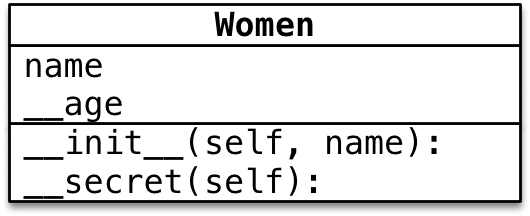
Private attributes and methods
Pseudo-private attributes and methodsIn Python, there is no true meaning of privacy. When naming attributes and methods, it actually performs some special processing on the name, making it inaccessible externally. Processing method: add _ClassName => _ClassName__Name before the name.
# Private attribute, cannot be accessed directly from outside
print(xiaofang._Women__age)

# Private method, cannot be called directly from outside
xiaofang._Women__secret()
Tip: In daily development, do not use this method to access an object’s private attributes or methods.
3. Encapsulation, Inheritance, and Polymorphism
The three major characteristics of object-oriented programming:
-
Encapsulation encapsulates attributes and methods into an abstract class based on responsibilities.
-
Inheritance achieves code reuse, and the same code does not need to be rewritten.
-
Polymorphism allows different objects to call the same method, producing different execution results, increasing code flexibility.
3.1 Inheritance
3.1.1 Single Inheritance
The concept of inheritance: a subclass has all the attributes and methods encapsulated in its parent class and the parent of its parent class.
class ClassName(ParentClassName):

   pass
When the implementation of the parent class’s method does not meet the needs of the subclass, the method can be overridden (override). There are two situations for overriding the parent class method:
-
Overriding the parent class method: The implementation of the parent class’s method is completely different from the implementation of the subclass’s method. The specific implementation method is equivalent to defining a method with the same name as the parent class in the subclass and implementing it.
-
Extending the parent class method: The implementation of the subclass’s method includes the implementation of the parent class’s method. In the subclass, override the parent class’s method; at the needed positions, use super().ParentClassMethod to call the execution code of the parent class’s method; in other places, write code specific to the subclass’s needs.
About super
-
In Python, super is a special class.
-
super() is an object created using the super class.
-
The most common scenario is when overriding the parent class method, calling the method encapsulated in the parent class.
Another way to call the parent class method: In Python 2.x, if you need to call the parent class’s method, you can also use the following way:ParentClass.method(self). Currently, this method is still supported in Python 3.x but is not recommended because if the parent class changes, the class name at the method call position also needs to be modified.
Private Attributes and Methods of Parent Class
Subclass objects cannot directly access the private attributes or methods of the parent class in their own methods. Subclass objects can indirectly access private attributes or methods through the public methods of the parent class.
Private attributes and methods are the privacy of the object and are not publicly available. The outside world and subclasses cannot directly access private attributes and methods. They are usually used for internal affairs.
3.1.2 Multiple Inheritance
A subclass can have multiple parent classes, inheriting all attributes and methods of all parent classes. For example: a child inherits traits from both their father and mother.
class SubClassName(ParentClassName1, ParentClassName2...):
   pass
MRO Algorithm in Python (Method Resolution Order)
-
If there are methods with the same name in different parent classes, when a subclass object calls a method, which parent’s method will it call?Tip: During development, you should try to avoid situations that can easily cause confusion! – If there are attributes or methods with the same name between parent classes, you should try to avoid using multiple inheritance.
-
Python provides a built-in attribute __mro__ to view the method search order. When searching for methods, it looks for them in the order of the output of mro from left to right. If a method is found in the current class, it is executed directly without further searching. If not found, it checks the next class for the corresponding method. If found, it is executed directly without further searching. If the last class is reached without finding the method, the program raises an error.
MRO is method resolution order, primarily used to determine the calling path of methods and attributes in multiple inheritance.
New-style Classes vs Old-style (Classic) Classes
-
New-style classes: classes that use object as the base class, recommended for use.
-
Classic classes: classes that do not use object as the base class, not recommended for use.
In Python 3.x, when defining a class, if no parent class is specified, it will default to using object as the base class – classes defined in Python 3.x are all new-style classes. In Python 2.x, when defining a class, if no parent class is specified, it will not use object as the base class.
-
To ensure that the written code can run in both Python 2.x and Python 3.x, it is recommended to uniformly inherit from object when defining classes:
class ClassName(object):
   pass
The object is the base class provided by Python for all objects, providing some built-in attributes and methods that can be viewed using the dir(object) function.
3.2 Polymorphism
The three major characteristics of object-oriented programming:
-
Encapsulation Encapsulates attributes and methods into an abstract class, defining the criteria for defining classes.
-
Inheritance Achieves code reuse, and the same code does not need to be rewritten. Design techniques for classes allow subclasses to write specific code for their unique needs.
-
Polymorphism Different subclass objects call the same parent class method, producing different execution results, increasing code flexibility. This requires inheritance and overriding parent class methods as a prerequisite.
Polymorphism makes it easier to write general code and create general programming to adapt to changing demands!
Example: In the Dog class, encapsulate the method game: ordinary dogs just play. Define XiaoTianDog to inherit from Dog and override the game method: the celestial dog needs to play in the sky. Define the Person class and encapsulate a method to play with dogs: internally, directly let the dog object call the game method.
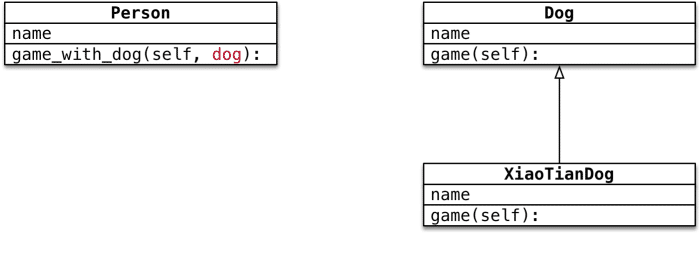
Example of Polymorphism
In the Person class, you only need to let the dog object call the game method without caring about what kind of dog it is.
4. Class Attributes and Class Methods
4.1 Structure of a Class
Typically, the created objects are called class instances, and the action of creating objects is called instantiation. The attributes of objects are called instance attributes, and the methods called by objects are called instance methods. Each object has its own independent memory space to store its different attributes, while multiple objects share only one copy of methods in memory. When calling methods, the reference of the object needs to be passed to the method.
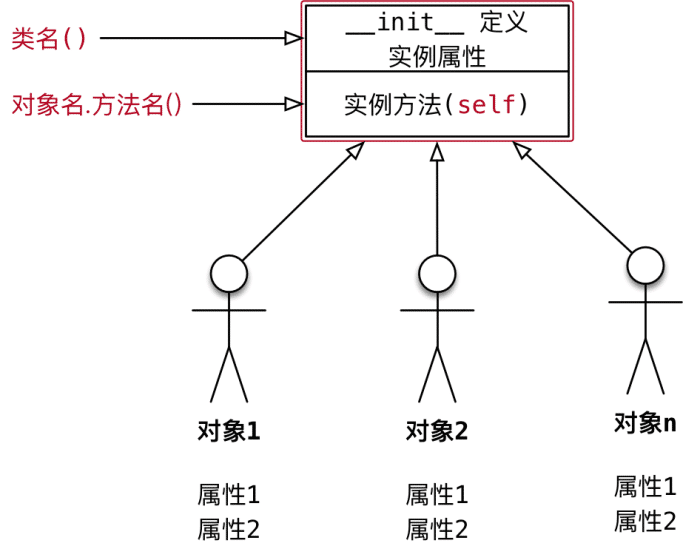
Different attributes, one unique copy of methods
In Python, a class is a special object.
In Python, everything is an object:
class AAA: defines a class that belongs to class object; obj1 = AAA() belongs to instance object.
During program execution, classes are also loaded into memory. During program execution, class objects have only one copy in memory. Using one class, many object instances can be created. In addition to encapsulating instance attributes and methods, class objects can also have their own attributes and methods – class attributes and class methods, which can be accessed or called using ClassName.
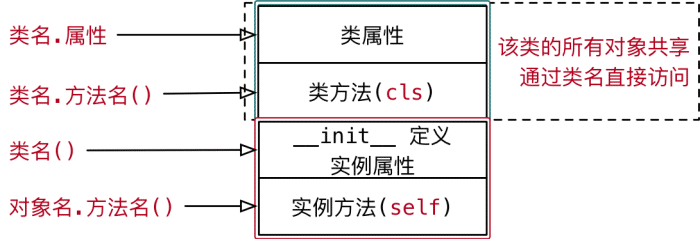
Structure of a Class
4.2 Class Attributes and Instance Attributes
Class attributes are attributes defined in class objects. They are usually used to record characteristics related to this class. Class attributes are not used to record specific object characteristics.Example: Define a tool class, where each tool has its own name: Requirement – Know how many tool objects have been created using this class.
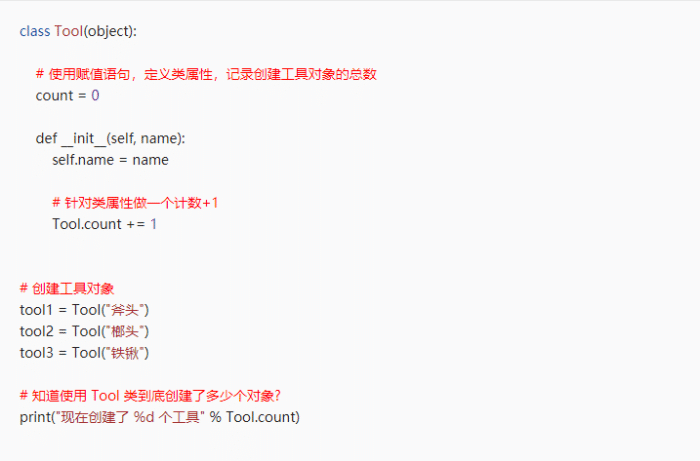
Attribute Access Mechanism
In Python, there exists an upward search mechanism for attribute access.
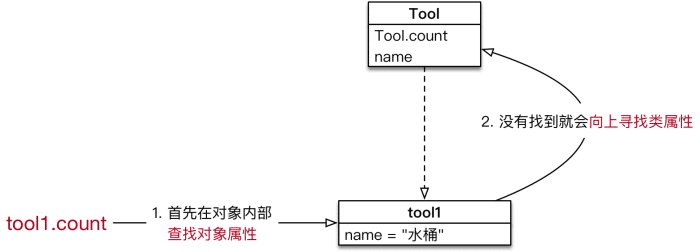
Therefore, there are two ways to access class attributes:
-
ClassName.ClassAttribute
-
Object.ClassAttribute (not recommended, because if you use Object.ClassAttribute = Value assignment statement, it will only add an attribute to the object and will not affect the value of the class attribute).
4.3 Class Methods and Static Methods
4.3.1 Class Methods
-
Class attributes are attributes defined for class objects. Using assignment statements, class attributes can be defined under the class keyword. Class attributes are used to record characteristics related to this class.
-
Class methods are methods defined for class objects. Inside class methods, class attributes or other class methods can be directly accessed.
The syntax is as follows:
@classmethod
def ClassMethodName(cls):
   pass
-
Class methods need to be marked with the decorator @classmethod, indicating to the interpreter that this is a class method.
-
The first parameter of class methods should be cls, which is the reference of the class that calls the method. This parameter is similar to the first parameter of instance methods, which is self. Tip: Other names can also be used, but it is customary to use cls.
-
Class methods can be called using ClassName., and there is no need to pass the cls parameter when calling the method.
-
Inside the method, you can access the class attributes through cls. and also call other class methods through cls.
Example
-
Define a tool class where each tool has its own name.
-
Requirement – In the class, encapsulate a class method show_tool_count to output the number of objects created using the current class.
@classmethod
def show_tool_count(cls):
   Display the total number of tool objects
   print(The total number of tools %d % cls.count)
4.3.2 Static Methods
- In development, if you need to encapsulate a method in a class that:
-
Does not need to access instance attributes or call instance methods and does not need to access class attributes or call class methods.
-
This is when you can encapsulate the method as a static method.
The syntax is as follows:
@staticmethod
def StaticMethodName():
   pass
-
Static methods need to be marked with the decorator @staticmethod, indicating to the interpreter that this is a static method.
-
Static methods can be called using ClassName.
Example:
-
Static method show_help displays game help information.
-
Class method show_top_score displays the highest score in history.
-
Instance method start_game starts the current player’s game.
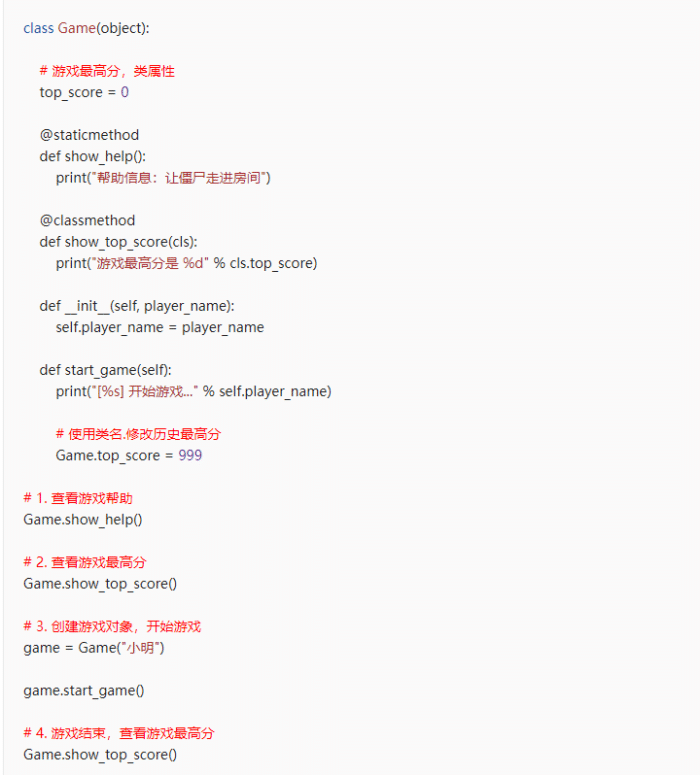
Exploration:
-
Instance methods — Methods that need to access instance attributes. Instance methods can access class attributes using ClassName.
-
Class methods — Methods that only need to access class attributes.
-
Static methods — Methods that do not need to access instance attributes and class attributes.
5. Singleton
5.1 Singleton Design Pattern
-
Design patterns are a summary and refinement of previous work. Typically, widely circulated design patterns are mature solutions to specific problems. Using design patterns is to reuse code, make the code easier for others to understand, and ensure code reliability.
-
The purpose of the singleton design pattern is to ensure that there is only one instance of an object created by a class in the system. Each time the ClassName() is executed, the returned object has the same memory address.
-
Application scenarios for singleton design patterns include music players, recycle bin objects, printers objects, etc.
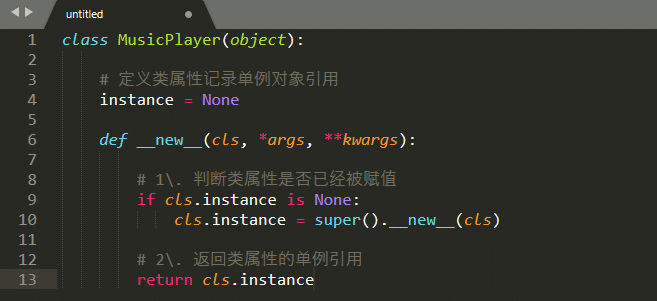
5.2 Static Method: __new__
-
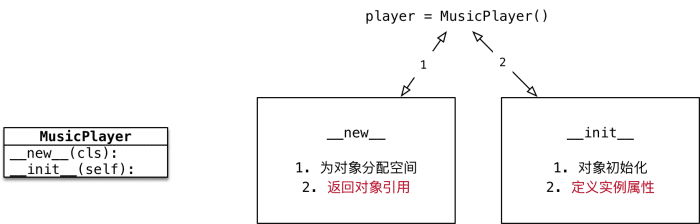
When creating an object using ClassName(), the Python interpreter first calls the __new__ method to allocate space for the object.
-
__new__ is a built-in static method provided by the object base class, mainly serving two purposes: allocating space for the object in memory and returning the reference of the object.
-
After the Python interpreter obtains the reference of the object, it passes this reference as the first parameter to the __init__ method.
Overriding the __new__ method has a very fixed code structure!
-
When overriding the __new__ method, you must return super().__new__(cls); otherwise, the Python interpreter will not get the allocated space’s object reference, and the object’s initialization method will not be called.
-
Note: __new__ is a static method, and when calling it, you need to actively pass the cls parameter.
5.3 Singleton in Python
-
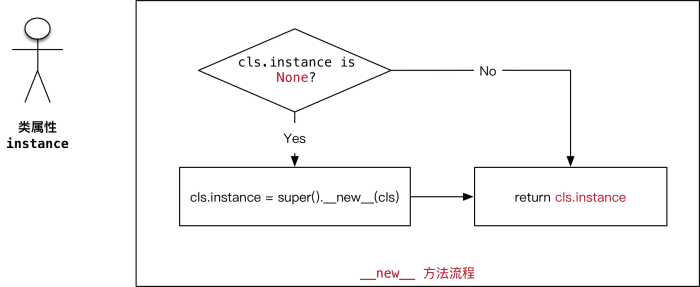
Singleton — Ensures that there is only one instance of an object created by a class in the system. Define a class attribute, initially set to None, to record the reference of the singleton object. Override the __new__ method. If the class attribute is None, call the parent class method to allocate space and record the result in the class attribute, returning the object reference stored in the class attribute.
Only Execute Initialization Work Once
-
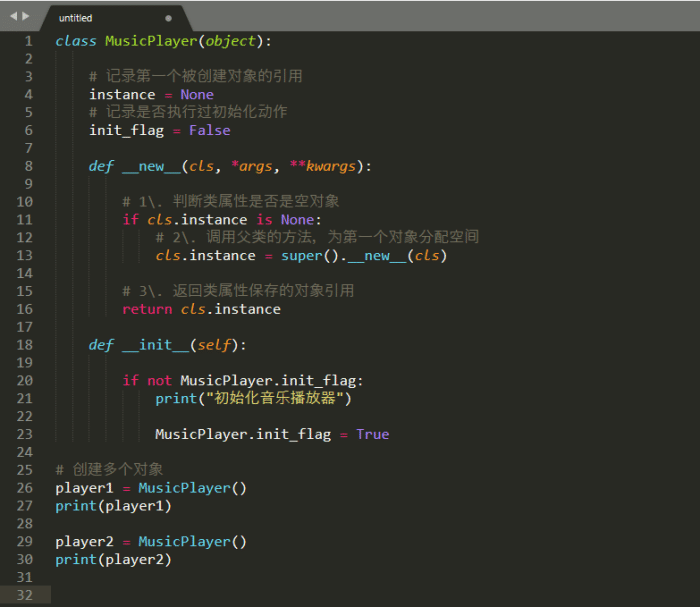
Each time the ClassName() is used to create an object, the Python interpreter automatically calls two methods: __new__ to allocate space and __init__ to initialize the object.
-
After modifying the __new__ method, each time you will get the reference of the object created for the first time.
-
However: the initialization method will still be called again.
Requirement
-
Let the initialization action be executed only once.
Solution
-
Define a class attribute init_flag to mark whether the initialization action has been executed, initially set to False.
-
In the __init__ method, check init_flag; if it is False, execute the initialization action.
-
Then set init_flag to True.
-
This way, when __init__ is called again, the initialization action will not be executed again.
Tips
1. Python can automatically concatenate the code inside a pair of parentheses:
'''**Requirement**
*   Define the `input_password` function, prompting the user to enter a password.
*   If the length of the user input < 8, throw an exception.
*   If the length of the user input >= 8, return the entered password.'''
def input_password():

   # 1. Prompt the user to enter a password.
   pwd = input(Please enter the password:)
   # 2. Check the length of the password; if the length >= 8, return the user's input password.
   if len(pwd) >= 8:        return pwd
   # 3. Password length is insufficient, need to throw an exception.
   # 1> Create an exception object - using the error message string of the exception as a parameter.
   ex = Exception(Password length is insufficient)
   # 2> Throw the exception object.
   raise ex
try:
   user_pwd = input_password()
   print(user_pwd)
except Exception as result:
   print(Error found: %s % result)
2. An object’s attributes can be another object created by another class. 3. When defining class attributes in the __init__ method, if you do not know what initial value to set, you can set it to None): The None keyword indicates nothing, representing an empty object that has no methods and attributes; it is a special constant. You can assign None to any variable.
In Python, it is recommended to use is for comparisons involving None.
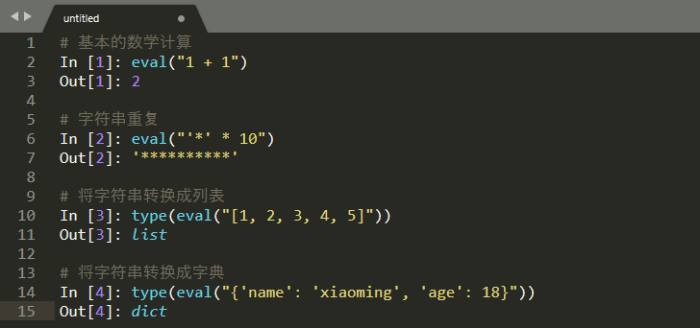
4. The eval() function is very powerful – it evaluates a string as a valid expression and returns the calculation result.
-
In development, never use eval to directly convert the result of input, for example:
-
__import__('os').system('ls')

# Equivalent code import os
os.system(Terminal command)
How to obtain:
-
Like + view again
-
Reply ‘python’ in the public account
Receive the latest Python zero-based learning materials for 2024,Reply in the background:Python