Question:
Is it possible to have both the ARM core compiler and the 51 microcontroller compiler installed simultaneously when installing KEIL? How can I install them both, and what should I pay attention to when using them?
Answer:
Theoretically, KEIL software supports the installation of multiple compilers on one platform, which means you can open both 51 microcontroller and STM32 microcontroller (ARM) projects in KEIL software at the same time. Here, we will take the KEIL4 software from “100 Steps to Get Started with STM32” as an example to explain how to install both compilers simultaneously.
1. First, you need to download two software versions: KEIL4-C51 and KEIL4-MDK (MDK is the ARM compiler).
2. Install the KEIL4-C51 version first and complete the registration using a keygen. The installation process will not be covered here; friends who need it can search on Baidu.
3. After confirming that the KEIL4-C51 version runs normally and can open 51 microcontroller projects, install the KEIL4-MDK version and complete the registration.
4. At this point, open the STM32 project in KEIL4 and also open a 51 project. If both can compile, it indicates that the installation was successful.
Check Method:
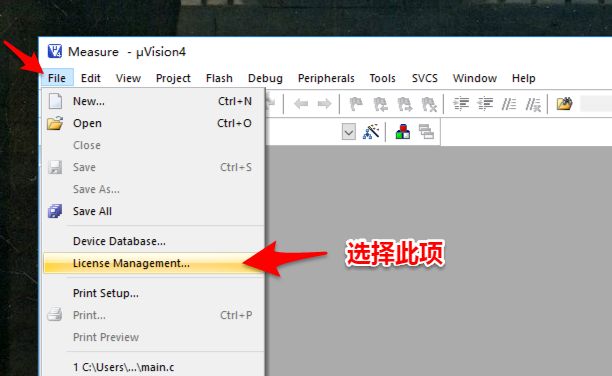
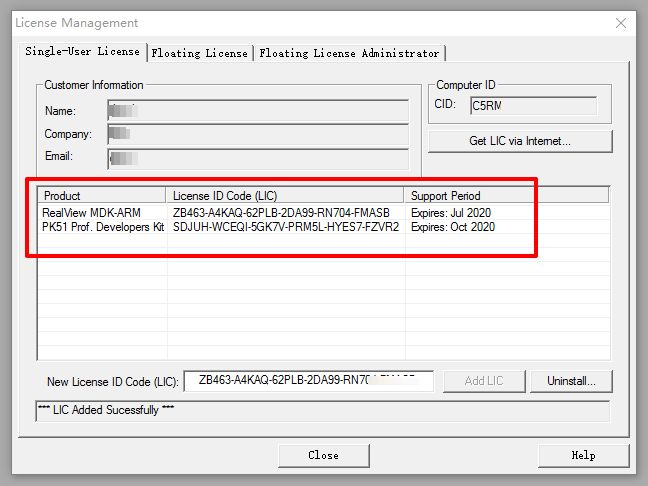
You can select “File–>License Management” in the KEIL menu. The License Management window will display the registration information for MDK-ARM and PKC51. If both are displayed, it indicates a successful installation.
Precautions:
1. Make sure to use the same version of KEIL software; for example, if you are using KEIL4, then install both versions as KEIL4. If you install KEIL4 and KEIL5 simultaneously, different compiler projects will open in different versions.
2. On some computers, after installing C51 and then installing MDK-ARM, you may find that the registration information for C51 disappears. In this case, you can reinstall the C51 software to restore it.
3. After installing the software, be sure to complete the registration; otherwise, the compiler will only be able to compile programs under 2KB.

Long press the QR code above to enter the Yangtao homepage.
You can download related materials for the article.
Did this article help you? Feel free to click “Like Author” below to reward!