Background
CMake
CMake is a cross-platform open-source build tool used to manage and automate the build process of software projects.
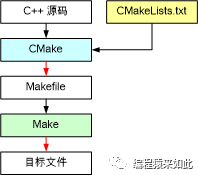
CMake automatically generates build system files suitable for different compilers and operating systems, such as Makefile and Visual Studio solutions, based on the descriptions in the CMakeLists.txt file.
Compilation Types
Generally, programs can be compiled into three types corresponding to the following forms:
- Linux System: demo (executable), libcommon.a (static library), libcommon.so (dynamic library)
- Windows System: demo.exe (executable), libcommon.lib (static library), libcommon.dll (dynamic library)
Building Library Files
Overview
Sometimes we need to generate static or dynamic libraries from the source code we write for third-party use, instead of executable programs.
Preparation Work
Overview
Assuming we want to implement a log library loglib, create a log library project directory in the current directory.
Creating Include Directory
Create the loglib.h header file in loglib/include:
#ifndef LOGLIB_H
#define LOGLIB_H

void printMsg(const char* msg);

#endif
Creating Src Directory
Create the loglib.cpp source file in loglib/src:
#include "loglib.h"
#include "iostream"

void printMsg(const char *msg)
{
    std::cout << msg << std::endl;
}
Creating CMakeLists.txt
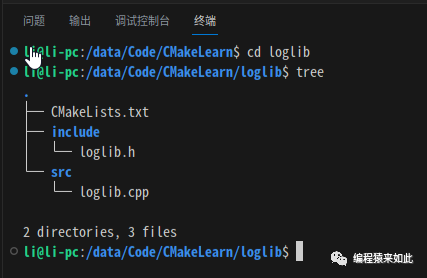
Create a CMakeLists.txt in the loglib directory to build the loglib library, the final directory structure is as follows:
Building loglib Library
Overview
To build a static library in CMake, use the add_library command. Based on the directory structure above, write the CMakeLists.txt file.
Writing CMakeLists.txt
Basic Contents
A CMakeLists.txt contains the following basic contents:
cmake_minimum_required(VERSION 3.0)
set(CMAKE_CXX_STANDARD 11)

project(loglib)
Including Header Files
Since loglib.cpp and loglib.h are not in the same directory, we need to specify the include path for the project. Use the include_directories command to specify the header file search path:
cmake_minimum_required(VERSION 3.0)
set(CMAKE_CXX_STANDARD 11)

project(loglib)

include_directories(${PROJECT_SOURCE_DIR}/include
Finding Source Files
When there are many source files in the project, manually listing each file can be cumbersome. You can use the file command to find files:
cmake_minimum_required(VERSION 3.0)
set(CMAKE_CXX_STANDARD 11)

project(loglib)

include_directories(${PROJECT_SOURCE_DIR}/include
file(GLOB SRC_LIST ${CMAKE_CURRENT_SOURCE_DIR}/src/*.cpp)
Adding Source Files
In add_library, use the keywords SHARED and STATIC to specify the generation of dynamic and static library files respectively:
cmake_minimum_required(VERSION 3.0)
set(CMAKE_CXX_STANDARD 11)

project(loglib)

include_directories(${PROJECT_SOURCE_DIR}/include
file(GLOB SRC_LIST ${CMAKE_CURRENT_SOURCE_DIR}/src/*.cpp)
add_library(loglib STATIC ${SRC_LIST})
Specifying Output Directory
Use the LIBRARY_OUTPUT_PATH parameter to specify the generation path of the library file:
cmake_minimum_required(VERSION 3.0)
set(CMAKE_CXX_STANDARD 11)

project(loglib)

include_directories(${PROJECT_SOURCE_DIR}/include
file(GLOB SRC_LIST ${CMAKE_CURRENT_SOURCE_DIR}/src/*.cpp)
set(LIBRARY_OUTPUT_PATH ${PROJECT_SOURCE_DIR}/bin)
add_library(loglib STATIC ${SRC_LIST})
Building Library Files
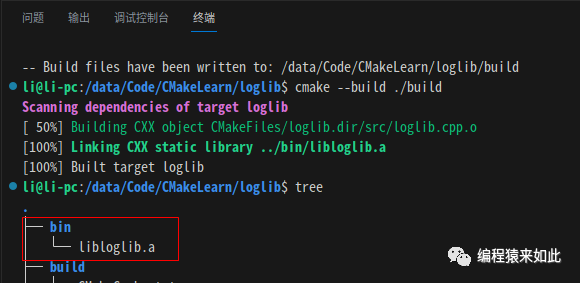
Execute the build command in the terminal and then check the generation result:
cmake -B build -S .
cmake --build ./build
tree
The execution result is as follows:
If executed on Windows, a .lib file will be generated:
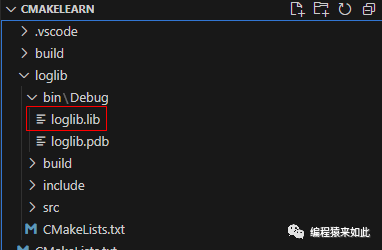
Controlling Library Generation Type
The variable BUILD_SHARED_LIBS can set the generation type of the add_library library file. When the value is ON, a dynamic library is generated; when OFF, a static library is generated.
cmake_minimum_required(VERSION 3.0)
set(CMAKE_CXX_STANDARD 11)

project(loglib)

option(BUILD_SHARED_LIBS "Build shared libraries" ON)

include_directories(${PROJECT_SOURCE_DIR}/include)
file(GLOB SRC_LIST ${CMAKE_CURRENT_SOURCE_DIR}/src/*.cpp)

set(LIBRARY_OUTPUT_PATH ${PROJECT_SOURCE_DIR}/bin)
add_library(loglib  ${SRC_LIST})
Execute the build command, the running result is as follows:
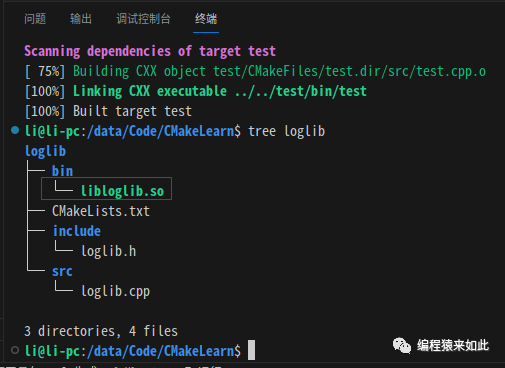
Building loglib Library on Windows
Overview
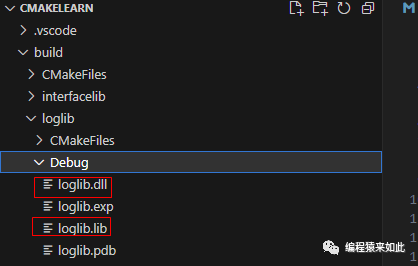
Dynamic link libraries on Windows usually generate two files: one is the .dll file and the other is the .lib file.
Symbol Marking
On the Windows platform, symbols defined in the executable file exporting the DLL must be marked as __declspec(dllexport), and symbols defined in the executable file exporting the DLL must also be marked as __declspec(dllexport).
Modifying loglib.h
Modify the loglib.h file to adapt to Windows definitions:
#ifndef LOGLIB_H
#define LOGLIB_H

#ifdef _WIN32
    #ifdef LOGLIB_EXPORTS
        #define LOGLIB_API __declspec(dllexport)
    #else
        #define LOGLIB_API __declspec(dllimport)
    #endif
#else
    #define LOGLIB_API
#endif

LOGLIB_API void  printMsg(const char* msg);

#endif
Modifying CMakeLists.txt
Use the target_compile_definitions command to add the predefined macro LOGLIB_EXPORTS to the target loglib:
cmake_minimum_required(VERSION 3.0)
project(loglib)

option(BUILD_SHARED_LIBS "Build shared libraries" ON)

file(GLOB SRC_LIST ${CMAKE_CURRENT_SOURCE_DIR}/src/*.cpp)
add_library(loglib  ${SRC_LIST})

# Add LOGLIB_EXPORTS macro
target_compile_definitions(loglib PRIVATE LOGLIB_EXPORTS)

target_link_libraries(loglib interfacelib)

install(TARGETS loglib DESTINATION bin)
Building Project
Execute the build command, and you can see that loglib.dll and the corresponding loglib.lib files are generated correctly:
Adding Subprojects
Overview
Typically, a project has multiple modules or subprojects. If each module is built separately, it can be cumbersome. In CMake, use add_subdirectory to add a subdirectory to the current project. Thus, a project can be decomposed into multiple subprojects, each with its own CMakeLists.txt file to manage the build process.
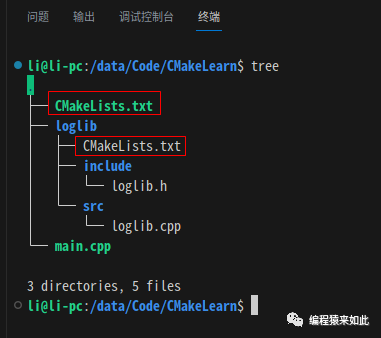
Adding Main CMakeLists.txt
Add the main project’s CMakeLists.txt in the root directory, the directory structure is as follows:
Writing CMakeLists.txt
Use the add_subdirectory command to add subprojects:
cmake_minimum_required(VERSION 3.0)
project(mainProject)# Main project

add_subdirectory(loglib)# Add subproject
Building Project
Execute the build command in the terminal and then check the generation result:
cmake -B build -S .
cmake --build ./build
tree loglib
The execution result is as shown in the figure above, indicating that the subproject was correctly built when building the main project.
Referencing Library Files
Overview
Generally, in the process of implementing a project, some third-party dynamic or static library files will be needed.
Preparation Work
Add a subproject test in the current main project directory to reference the loglib library generated above. The directory structure is as follows:
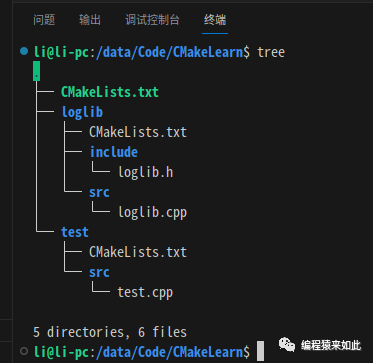
The code in test.cpp is as follows:
#include "loglib.h"

int main()
{
    printMsg("hello world");
    return 0;
}
Using Static Libraries
Overview
In CMake, to build a static library, use the link_libraries command to link one or more static libraries.
Writing CMakeLists.txt
Basic Contents
A CMakeLists.txt contains the following basic contents:
cmake_minimum_required(VERSION 3.0)
set(CMAKE_CXX_STANDARD 11)
project(test)

file(GLOB SRC_LIST ${CMAKE_CURRENT_SOURCE_DIR}/src/*.cpp)
add_executable(test ${SRC_LIST})
Adding Header File Paths
Use the include_directories command to specify the loglib library header file search path:
cmake_minimum_required(VERSION 3.0)
set(CMAKE_CXX_STANDARD 11)
project(test)

# Header file search path
include_directories(${PROJECT_SOURCE_DIR}/../loglib/include)

file(GLOB SRC_LIST ${CMAKE_CURRENT_SOURCE_DIR}/src/*.cpp)
add_executable(test ${SRC_LIST})
Adding Library File Paths
Use the link_directories command to specify the loglib library file search path:
cmake_minimum_required(VERSION 3.0)
set(CMAKE_CXX_STANDARD 11)
project(test)

# Header file search path
include_directories(${PROJECT_SOURCE_DIR}/../loglib/include)
# Library file search path
link_directories(${PROJECT_SOURCE_DIR}/../loglib/bin)

file(GLOB SRC_LIST ${CMAKE_CURRENT_SOURCE_DIR}/src/*.cpp)
add_executable(test ${SRC_LIST})
Linking Static Libraries
Use the link_libraries command to link the static library loglib:
cmake_minimum_required(VERSION 3.0)
set(CMAKE_CXX_STANDARD 11)
project(test)

# Header file search path
include_directories(${PROJECT_SOURCE_DIR}/../loglib/include)
# Library file search path
link_directories(${PROJECT_SOURCE_DIR}/../loglib/bin)
# Link static library
link_libraries(loglib)

file(GLOB SRC_LIST ${CMAKE_CURRENT_SOURCE_DIR}/src/*.cpp)
add_executable(test ${SRC_LIST})
Specifying Generation Path
Use the EXECUTABLE_OUTPUT_PATH parameter to specify the generation path of the executable program:
cmake_minimum_required(VERSION 3.0)
set(CMAKE_CXX_STANDARD 11)
project(test)

# Header file search path
include_directories(${PROJECT_SOURCE_DIR}/../loglib/include)
# Library file search path
link_directories(${PROJECT_SOURCE_DIR}/../loglib/bin)
# Link static library
link_libraries(loglib)
# Specify generation path
set(EXECUTABLE_OUTPUT_PATH ${PROJECT_SOURCE_DIR}/bin)
file(GLOB SRC_LIST ${CMAKE_CURRENT_SOURCE_DIR}/src/*.cpp)
add_executable(test ${SRC_LIST})
Adding Test Subproject
Add the test subproject in the main CMakeLists.txt:
cmake_minimum_required(VERSION 3.0)
project(mainProject)# Main project

# Add loglib subproject
add_subdirectory(loglib)
# Add test subproject
add_subdirectory(test)
Building and Running Program
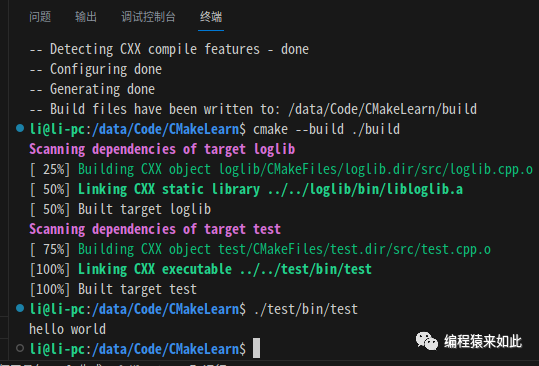
Execute the build command in the terminal and then check the generation result:
cmake -B build -S .
cmake --build ./build
./test/bin/test
The execution result is as follows:
Using Dynamic Libraries
Overview
In CMake, to build a static library, use the target_link_libraries command to link one or more dynamic libraries.
Writing CMakeLists.txt
Basic Contents
A CMakeLists.txt contains the following basic contents:
cmake_minimum_required(VERSION 3.0)
set(CMAKE_CXX_STANDARD 11)
project(test)

file(GLOB SRC_LIST ${CMAKE_CURRENT_SOURCE_DIR}/src/*.cpp)
add_executable(test ${SRC_LIST})
Adding Header File Paths
Use the include_directories command to specify the loglib library header file search path:
cmake_minimum_required(VERSION 3.0)
set(CMAKE_CXX_STANDARD 11)
project(test)

# Header file search path
include_directories(${PROJECT_SOURCE_DIR}/../loglib/include)

file(GLOB SRC_LIST ${CMAKE_CURRENT_SOURCE_DIR}/src/*.cpp)
add_executable(test ${SRC_LIST})
Adding Dynamic Library File Paths
Use the link_directories command to specify the loglib library file search path:
cmake_minimum_required(VERSION 3.0)
set(CMAKE_CXX_STANDARD 11)
project(test)

# Header file search path
include_directories(${PROJECT_SOURCE_DIR}/../loglib/include)
# Library file search path
link_directories(${PROJECT_SOURCE_DIR}/../loglib/bin)

file(GLOB SRC_LIST ${CMAKE_CURRENT_SOURCE_DIR}/src/*.cpp)
add_executable(test ${SRC_LIST})
Linking Dynamic Libraries
Unlike static libraries, target_link_libraries should be placed after add_executable because the dynamic library will only be loaded into memory when the executable program calls the functions in the dynamic library.
cmake_minimum_required(VERSION 3.0)
set(CMAKE_CXX_STANDARD 11)
project(test)

# Header file search path
include_directories(${PROJECT_SOURCE_DIR}/../loglib/include)
# Library file search path
link_directories(${PROJECT_SOURCE_DIR}/../loglib/bin)

file(GLOB SRC_LIST ${CMAKE_CURRENT_SOURCE_DIR}/src/*.cpp)
add_executable(test ${SRC_LIST})

# Link dynamic library
target_link_libraries(test loglib)
Specifying Generation Path
Use the EXECUTABLE_OUTPUT_PATH parameter to specify the generation path of the executable program:
cmake_minimum_required(VERSION 3.0)
set(CMAKE_CXX_STANDARD 11)
project(test)

# Header file search path
include_directories(${PROJECT_SOURCE_DIR}/../loglib/include)
# Library file search path
link_directories(${PROJECT_SOURCE_DIR}/../loglib/bin)

# Specify generation path
set(EXECUTABLE_OUTPUT_PATH ${PROJECT_SOURCE_DIR}/bin)
file(GLOB SRC_LIST ${CMAKE_CURRENT_SOURCE_DIR}/src/*.cpp)
add_executable(test ${SRC_LIST})

# Link dynamic library
target_link_libraries(test loglib)
Adding Test Subproject
Add the test subproject in the main CMakeLists.txt:
cmake_minimum_required(VERSION 3.0)
project(mainProject)# Main project

# Add loglib subproject
add_subdirectory(loglib)
# Add test subproject
add_subdirectory(test)
Building and Running Program
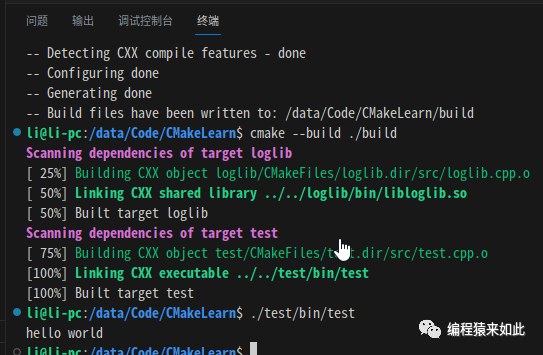
Execute the build command in the terminal and then check the generation result:
cmake -B build -S .
cmake --build ./build
./test/bin/test
The execution result is as follows:
Installation and Packaging
Library File Installation
Overview
Installation means copying the compiled files (executable files, static libraries, dynamic libraries, header files, etc.) to the corresponding directories.
Setting Installation Path
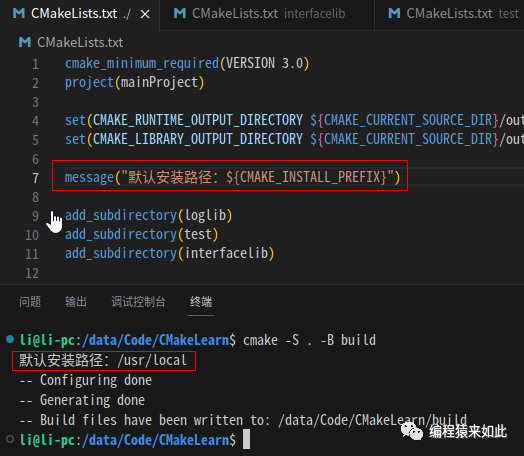
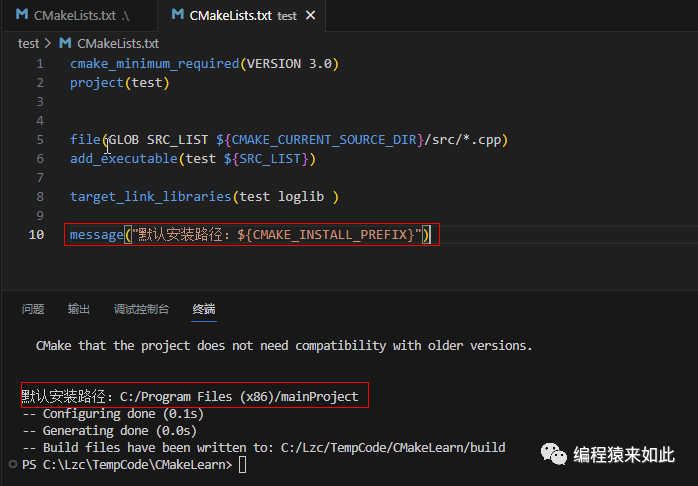
In CMake, use the parameter CMAKE_INSTALL_PREFIX to set the installation path. To customize the installation path, just set this parameter.
Default Path on Linux
On Linux, printing the value of the CMAKE_INSTALL_PREFIX parameter results in:
Default Path on Windows
On Windows, printing the value of the CMAKE_INSTALL_PREFIX parameter results in:
Modifying Default Path
Since the default installation path is in the system’s file directory, it requires administrative permissions to operate. You can modify the installation path in the main module:
cmake_minimum_required(VERSION 3.0)
project(mainProject)

set(CMAKE_RUNTIME_OUTPUT_DIRECTORY ${CMAKE_CURRENT_SOURCE_DIR}/output/bin)
set(CMAKE_LIBRARY_OUTPUT_DIRECTORY ${CMAKE_CURRENT_SOURCE_DIR}/output/bin)
set(CMAKE_ARCHIVE_OUTPUT_DIRECTORY ${CMAKE_CURRENT_SOURCE_DIR}/output/bin)

set(CMAKE_INSTALL_PREFIX "/data/loglib")

add_subdirectory(loglib)
add_subdirectory(test)
add_subdirectory(interfacelib)
Installing Library Files
Overview
Use the install command to perform installation operations.
Target Installation
Use the TARGETS parameter to install target files, adding the installation command in the loglib module:
cmake_minimum_required(VERSION 3.0)
project(loglib)

option(BUILD_SHARED_LIBS "Build shared libraries" ON)

file(GLOB SRC_LIST ${CMAKE_CURRENT_SOURCE_DIR}/src/*.cpp)
add_library(loglib  ${SRC_LIST})

target_link_libraries(loglib interfacelib)

install(TARGETS loglib interfacelib DESTINATION lib)
File Installation
Use the FILES parameter to install target files, adding the installation command in the loglib module:
cmake_minimum_required(VERSION 3.0)
project(loglib)

option(BUILD_SHARED_LIBS "Build shared libraries" ON)

file(GLOB SRC_LIST ${CMAKE_CURRENT_SOURCE_DIR}/src/*.cpp)
add_library(loglib  ${SRC_LIST})

target_link_libraries(loglib interfacelib)

install(TARGETS loglib interfacelib DESTINATION lib)
install(FILES ${PROJECT_SOURCE_DIR}/include/loglib.h DESTINATION include)
Installation Command
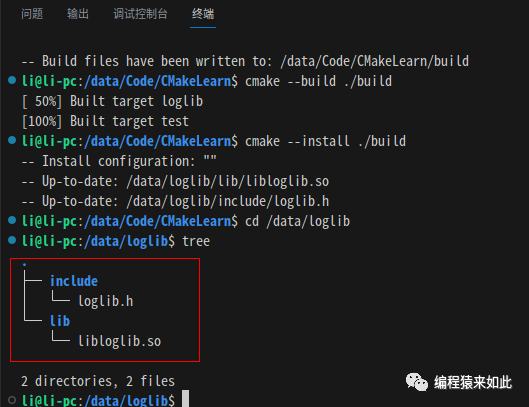
Use the –install command to execute the installation operation:
cmake -B build -S .
cmake --build ./build
cmake --install ./build

cd /data/loglib
tree
The execution result is as follows:
Library File Packaging
Overview
CPack is a component of CMake used for automating the creation and packaging of software packages. It can generate various software package formats, such as ZIP, TGZ, RPM, DEB, etc.
Enabling CPack
Enable CPack in the main module’s CMakeLists.txt, usually placed at the end of the file:
cmake_minimum_required(VERSION 3.0)
project(mainProject)

set(CMAKE_RUNTIME_OUTPUT_DIRECTORY ${CMAKE_CURRENT_SOURCE_DIR}/output/bin)
set(CMAKE_LIBRARY_OUTPUT_DIRECTORY ${CMAKE_CURRENT_SOURCE_DIR}/output/bin)
set(CMAKE_ARCHIVE_OUTPUT_DIRECTORY ${CMAKE_CURRENT_SOURCE_DIR}/output/bin)

set(CMAKE_INSTALL_PREFIX "/data/loglib")

add_subdirectory(interfacelib)
add_subdirectory(loglib)
add_subdirectory(test)

include(InstallRequiredSystemLibraries)
include(CPack)
Publishing Package
Execute the following command for the packaging operation:
cmake -S .. -B .
cpack
The execution result is as follows:
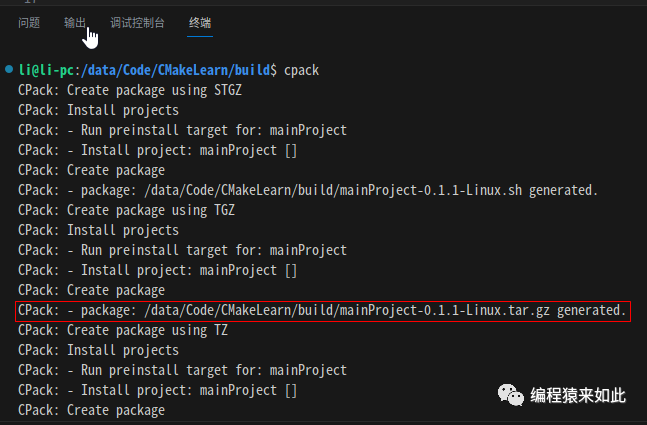
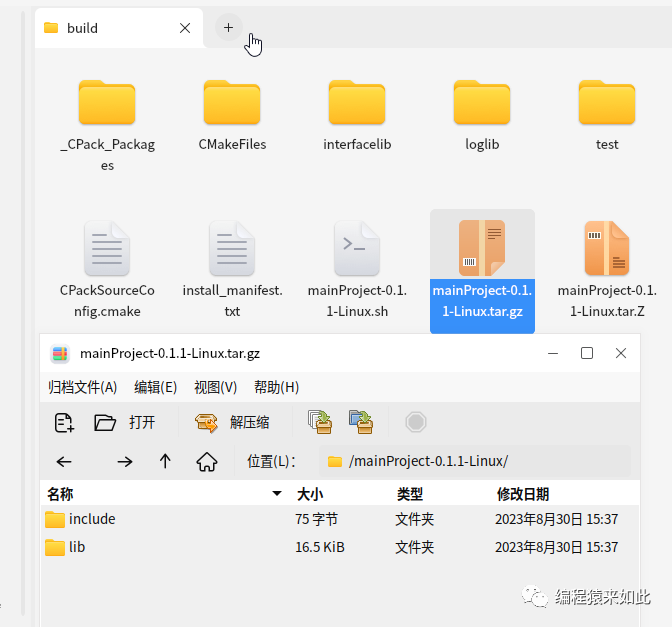
You can see the packaging results in the build directory: