
Introduction: Previously published Cloud Platform Tech Stack(ps: click to view), this article mainly discusses virtualization!
What is Cloud Computing?1.1 Definition of Cloud Computing
Cloud computing is a concept that has emerged in recent years, but the demand for it has existed for a long time. The widely accepted definition by the National Institute of Standards and Technology (NIST) is: Cloud computing is a pay-as-you-go model that provides convenient, on-demand network access to a shared pool of configurable computing resources (resources include networks, servers, storage, applications, services) that can be rapidly provisioned with minimal management effort or interaction with service providers.
The fundamental characteristics of cloud computing are: “pay-as-you-go,” “resource sharing pool,” and multi-tenant isolation.
1.2 Characteristics of Cloud Computing
-
Massive Scale
The cloud possesses significant scale; Google Cloud already has over one million servers, while Amazon, IBM, Microsoft, Yahoo, etc., each have hundreds of thousands of servers. Enterprise private clouds typically have hundreds to thousands of servers. The cloud can provide users with unprecedented computing power.
-
Virtualization
Cloud computing allows users to access application services from anywhere using various terminals. The requested resources come from the cloud, not from fixed tangible entities. Applications run somewhere in the cloud, but users do not need to know or worry about the specific location of the application. All that is needed is a laptop or a mobile phone to achieve everything we require through network services, including tasks such as supercomputing.
-
High Reliability
The cloud employs measures such as data redundancy and interchangeable computing nodes to ensure high reliability of services. Using cloud computing is more reliable than using local computers.
-
Generality
Cloud computing does not target specific applications; it can support a wide variety of applications under its umbrella, allowing the same cloud to run different applications simultaneously.
-
High Scalability
The cloud can dynamically scale to meet the growing needs of applications and users.
-
On-Demand Service
The cloud is a vast resource pool that you can purchase on-demand; cloud services can be billed like water, electricity, or gas.
-
Extremely Cost-Effective
Due to the cloud’s special fault-tolerance measures, it can use extremely inexpensive nodes to form the cloud. The centralized management of the cloud allows many enterprises to avoid the increasingly high costs of data center management, and the generality of the cloud significantly increases resource utilization compared to traditional systems. Therefore, users can fully enjoy the low-cost advantages of the cloud, often completing tasks that previously required tens of thousands of dollars and months of time in just a few hundred dollars and days.
-
Potential Risks
Cloud computing services not only provide computing services but also inevitably offer storage services. However, cloud computing services are currently monopolized by private institutions (enterprises), which can only provide commercial credit. Government agencies and businesses (especially sensitive data-holding entities like banks) should remain vigilant when choosing cloud computing services. Once commercial users widely adopt cloud computing services provided by private institutions, regardless of their technical advantages, it inevitably allows these private institutions to leverage the importance of data (information) to coerce society as a whole.
Information is crucial for an information society. On the other hand, data in cloud computing is confidential to users other than the data owner, but it is not secretive to the commercial institutions providing cloud computing. All these potential dangers are important considerations for commercial and government agencies when choosing cloud computing services, especially those provided by foreign institutions.
1.3 Classification of Cloud Computing
-
Public Cloud: Only usage rights; pay-as-you-go when in use. However, data is stored with others. Data security is not guaranteed. Moreover, banks do not use public clouds; the financial industry should avoid public clouds. The core attribute of public clouds is shared resource services.
-
Private Cloud: A cloud built in one’s own data center; private clouds have limitations, with fixed resources; data is relatively secure. The core attribute of private clouds is proprietary resources.
-
Hybrid Cloud: Primarily utilizes a private cloud, and temporarily utilizes a hybrid cloud when needed, combining public and private clouds for optimal results. This personalized solution achieves both cost savings and security.
1.4 Layers of Cloud Computing
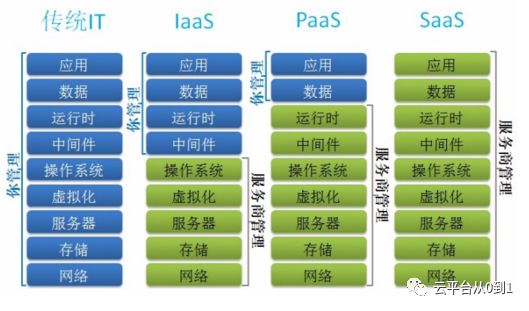
Cloud computing also has layers, generally as follows:
-
Traditional IT
Almost everything requires self-management, including: networks, storage, servers, virtualization, operating systems, middleware, runtime environments, data, applications, etc.
-
IaaS
IaaS, Infrastructure-as-a-Service in Chinese is 基础设施即服务. Its main role is to provide virtual machines or other resources as services to users.
-
PaaS
PaaS, Platform-as-a-Service in Chinese is 平台即服务. If viewed from the perspective of traditional computer architecture of “hardware + operating system/development tools + application software,” then the platform layer of cloud computing should provide functions similar to operating systems and development tools. In fact, it does; PaaS is positioned to provide users with a complete platform for developing, running, and operating application software via the Internet. Just like in personal computer software development, where programmers might develop and deploy application software on a computer running Windows or Linux operating systems using development tools. PaaS is sometimes also referred to as middleware, mainly providing a development and operating platform for users.
-
SaaS
SaaS, Software-as-a-Service in Chinese is 软件即服务. Simply put, it is a software application model that provides software services via the Internet. In this model, users do not need to invest heavily in hardware, software, and development teams; they only need to pay a rental fee to enjoy corresponding services via the Internet, and the entire system maintenance is also handled by the vendor.
In one sentence, IaaS, PaaS, and SaaS can be summarized as: If cloud computing is likened to a mobile phone, then IaaS is the hardware, where you need to write code to develop the system to use it; PaaS is the phone system, where you need to install various software to achieve desired functions; SaaS is hardware + system + software, where you can solve your needs in one sentence.
What is Virtualization?
2.1 Definition of Virtualization
Virtualization is a technology that uses software means to mirror, integrate, manage, and redistribute computer hardware resources. Common methods include virtualization based on virtual machines and virtualization based on containers.
2.2 Classification of Virtualization Technologies
2.2.1 Classification by Application Scenario
-
Operating System Virtualization
-
Application Virtualization
-
Desktop Application Virtualization
-
Storage Virtualization
-
Network Virtualization
2.2.2 Classification by Application Mode
-
One-to-Many: This divides a physical server into multiple virtual servers, which is a typical server consolidation model.
-
Many-to-One: This consolidates multiple virtual servers and treats them as a resource pool, which is a typical grid computing model.
-
Many-to-Many: This combines the previous two models.
2.2.3 Classification by Hardware Resource Invocation Mode
-
Full Virtualization
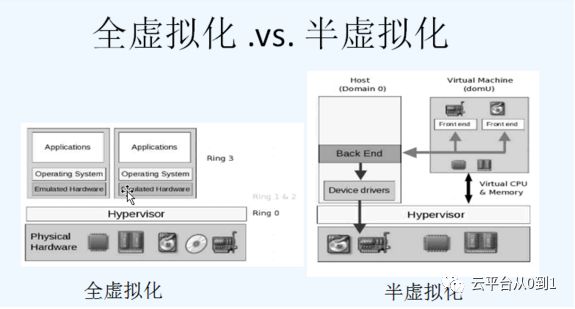
Full virtualization completely isolates the virtual operating system from the underlying hardware. The intermediate Hypervisor layer translates the virtualized client operating system’s calls to the underlying hardware. Full virtualization does not require changes to the client operating system and has good compatibility. Typical representatives include: VMware Workstation, KVM.
-
Paravirtualization
Paravirtualization adds specific virtualization instructions to the virtual client operating system, allowing these instructions to call hardware resources directly through the Hypervisor layer, eliminating the performance overhead of converting instructions in the Hypervisor layer. Typical representatives of paravirtualization include Microsoft Hyper-V and VMware’s vSphere.
Note: In terms of IO, paravirtualization is better than full virtualization, as disk IO will inevitably slow down with an extra layer. Generally, IO refers to network IO and disk IO, as these two are relatively slow.
2.3 Hypervisor-based Virtualization
It provides the same input-output performance as physical hardware through a software layer encapsulation. It decouples the operating system from the computer hardware, transforming the relationship from one-to-one to many-to-many (actually one-to-many). This software layer is called the Virtual Machine Manager (VMM / Hypervisor), which can run directly on bare metal (Xen, VMware EXSi) or on an operating system (KVM, VMware Workstation). This technology is well-established (developed over 40 years), but still has the following issues:
-
Running a complete operating system (Guest OS) on a virtual machine, along with a virtualization layer and host operating system, will inherently perform worse than running the same service directly on physical machines;
-
With the existence of Guest OS, virtual machine images often range from several GB to tens of GB, occupying large storage space and having poor portability;
-
To utilize more hardware resources, a new virtual machine must be started. Waiting for the Guest OS to boot can take anywhere from several seconds to several minutes.
In practical scenarios, we use virtualization technology to allocate resources on demand to complete service deployment and usage while isolating the environment that the service depends on, preventing interference from other services. Therefore, starting a Guest OS is not necessary. Why not consider allowing multiple virtual machines to share a single operating system kernel while isolating the service runtime environment and controlling the system resources used by the services? Container-based virtualization is such a technology.
2.4 Container-based Virtualization
Containers are lightweight virtual machines without a Guest OS, sharing a single OS kernel. Each container includes the applications to be deployed and their dependent system environments, typically ranging from tens to hundreds of MB in size. Since they share the operating system kernel, containers depend on the underlying operating system; most operating systems have their own container technologies and tools.
Docker is a Linux container management tool, and with the rise of Docker, Linux container technology has become the most popular container virtualization technology today. There are many Linux container tools, including OpenVZ, LXC, Docker, Rocket, Lmctfy, etc., most of which are based on two mechanisms provided by the Linux kernel: Cgroups (for resource allocation on demand) and Namespace (for task isolation).
2.5 Differences Between the Two Virtualization Technologies
-
Virtual machine technology has developed for many years, and the interfaces between virtual machines and the virtualization layer, as well as virtual machine image formats, have been standardized. Corresponding management tools and distributed cluster management tools have relatively complete solutions, while containers have only recently emerged, and supporting technologies and standards are still being improved;
-
Due to the existence of Guest OS, virtual machines can run different operating systems from the host machine, while containers can only support operating systems that share the same kernel as the host;
-
Virtual machines have good isolation due to the presence of VMM, while containers share the host’s kernel, sharing system calls and some underlying libraries, resulting in relatively poor isolation;
-
Containers are significantly more lightweight than virtual machines; to the host operating system, a container is almost like a process. Therefore, containers have advantages such as faster startup speeds (in seconds or even faster), higher storage density and usage (smaller images), and easier cluster management. Moreover, since there is no Guest OS, running applications in containers incurs almost no performance loss compared to running directly on the host machine, giving containers a clear performance advantage over virtual machines.
Differences Between Cloud Computing and Virtualization
A classic statement describing the difference between cloud computing and virtualization is: Virtualization is a major way to build resource pools for cloud computing. As long as you understand this statement, you will know the relationship between the two.
In simple terms, cloud computing is a concept, not a specific technology. Virtualization is a specific technology that refers to virtualizing hardware resources to achieve characteristics such as isolation, scalability, security, and optimal resource utilization.
Currently, cloud computing largely relies on virtualization, creating a resource pool by virtualizing multiple physical servers to facilitate shared computing and resource sharing. In other words, what we now call cloud computing had already been realized by server clusters in the past before this term was coined, albeit not as advanced as it is today.
3.1 Representative Products in Various Fields
-
The open-source product for cloud computing architecture is OpenStack, which is a free software and open-source project initiated by NASA and Rackspace under the Apache license.
-
Virtualization of virtual machines: Commercial paid vSphere or open-source KVM.
-
Container virtualization: Docker.
3.2 OpenStack
OpenStack is a combination of many technologies, including network components like Neutron, dashboard components like Horizon, and those involved in computing resource allocation like Nova.
Virtualization technology is just one way to build resource pools. Of course, you can also use other methods to build resource pools, such as physical machines and containers.
After several years and numerous versions, OpenStack has components like Keystone, Nova, Neutron, Cinder, Glance, Swift, Heat, Ceilometer, etc., providing a relatively complete suite of modules that a cloud platform should have.
3.3 Selection of Different Layers in Cloud Computing
Should one choose virtualization based on virtual machines or based on containers? In the early days, due to the imperfections of container technology, cloud computing only had virtual machines as an option.
With the rise of container technology today, container-based virtualization offers higher performance, faster delivery, and easier management, with higher resource utilization, making it seem like a better solution than virtual machines. However, its two significant drawbacks (insufficient isolation and operating system dependence) prevent it from completely replacing VMs. For SaaS users and some PaaS users, these two drawbacks may not be as apparent. Currently, the main scenarios where containers and cloud computing are combined are in SaaS and PaaS, as most SaaS and PaaS service providers utilize container technology.
However, for IaaS users, they rent infrastructure. They run their own systems and services on top, and insufficient isolation means lower security and trustworthiness. In such cases, large clients are certainly not at ease. Additionally, operating system dependence is also a major issue limiting the application of containers at the IaaS layer, which is why most solutions run containers on VMs. This way, the performance advantages of containers cannot be fully realized in the cloud, with the only benefit being faster startup times.
Long press to subscribe for more exciting content ▼