Virtualization Resource Pool Management: Achieve unified management, monitoring, and scheduling of physical servers and virtual machines in the virtualization data center resource pool.
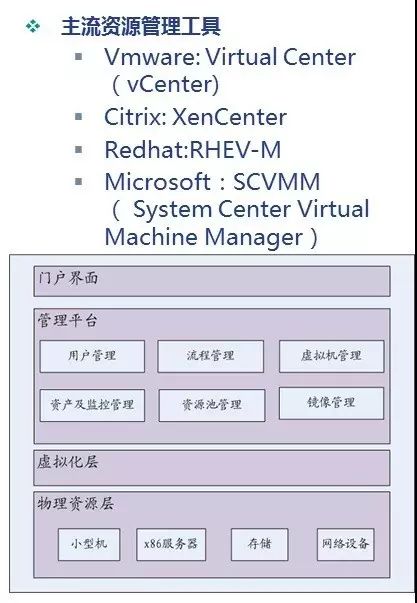
Main
Functions
Physical Server Management: Resource integration, information retrieval, inventory and query, configuration and management.
Virtual Machine Management: Lifecycle management, configuration, deployment, snapshots.
Resource Deployment Scheduling: Cluster management, resource allocation, dynamic resource scaling, resource binding, resource priority, scheduling policy management, failover, network switching, energy-saving management.
Template Management: Template management, image management.
Monitoring and Alert Management: Physical server resource monitoring, virtual machine monitoring, operating system monitoring, log detection, alert management.
Creation of Virtual Machines
Virtual Machine Configuration Information: Virtual machine name, location of the virtual machine (cluster, host, resource pool), data storage for storing virtual machine files.
Client operating system and version.
Disk Parameters Required for Creating New Virtual Disks: Disk size.
Disk Allocation Settings: On-demand allocation and committed space (thin provisioning), support for clustering features such as fault tolerance. Install client operating system and management tools (e.g., VMware Tools) into the client operating system.
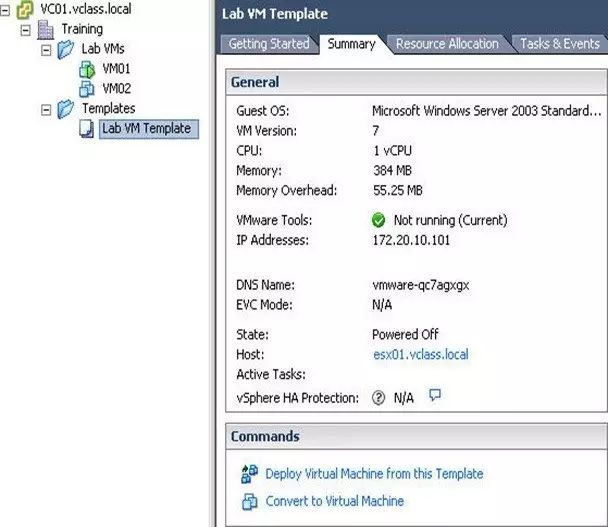
Virtual Machine Templates
Images/templates are the master copy of the virtual machine used to create and deploy new virtual machines.
Images/templates typically contain an operating system, a set of applications, and a specific virtual machine configuration.
Virtual Machine Cloning
Cloning a virtual machine is another way to deploy a virtual machine.
A clone is an exact copy of the virtual machine.
The cloned virtual machine can be in an on state or an off state.
Virtual Machine Migration
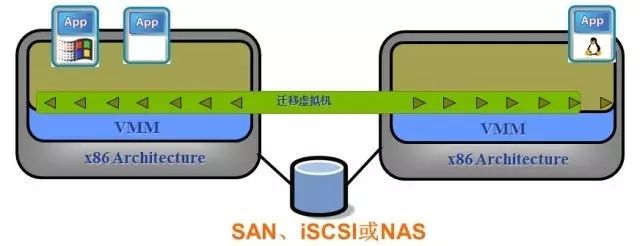
Implementing virtual machine migration is beneficial for flexible scheduling of server cluster resources, providing redundancy protection mechanisms, and achieving uninterrupted server maintenance and business upgrades.
Migration includes file system migration (using shared NAS/SAN), memory migration (real-time high-frequency migration of memory changes, freezing the virtual machine and achieving final migration, which requires a pause time), I/O redirection (virtual NIC), etc.
Online migration of virtual machines between Intel and AMD servers is generally not possible; however, online migration can occur between servers of different series from the same CPU vendor.
Currently, online migration of virtual machines requires that the source and target hosts be on the same Layer 2 network and connected to a common shared storage, making it unsuitable for online migration across wide area networks.
Virtualization migration technologies primarily include VMware’s Vmotion and Citrix’s XENMotion.
Types of Migration
Live Migration: Also known as dynamic migration or real-time migration, it typically involves saving the entire running state of the virtual machine and quickly restoring it to the original hardware platform or even a different hardware platform. After recovery, the virtual machine continues to run smoothly, and users will not notice any difference.
Cold Migration: Moving a powered-off virtual machine to a new host. (Optionally) the configuration files and disk files can be relocated to a new storage location. Cold migration can be used to move a virtual machine from one data center to another.
Long press fingerprint
One-click follow