Differences Between RGB to YCrCb Conversion in OpenCV and MATLAB
Introduction
Recently, while rewriting an image processing project from MATLAB to Python, I discovered that the results from the two were different. Upon investigation, I found that the default functions for RGB to YCrCb conversion in OpenCV and MATLAB yield different results.
In this article, we will explore the differences between the two.
Differences
First, let’s take a look at the results of converting the same image from RGB to YUV in OpenCV and MATLAB.
import cv2

img = cv2.imread("pythonProject/dut_img.png")
img = cv2.cvtColor(img, cv2.COLOR_BGR2YCrCb)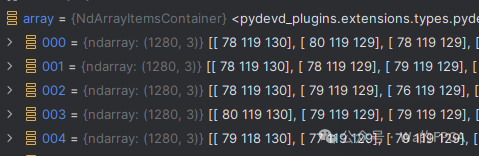
img = imread(inputName);
fid = fopen(outputName, 'w');
ycbcr_img = rgb2ycbcr(img);

y_image = ycbcr_img(:, :, 1);
cb_image = ycbcr_img(:, :, 2);
cr_image = ycbcr_img(:, :, 3);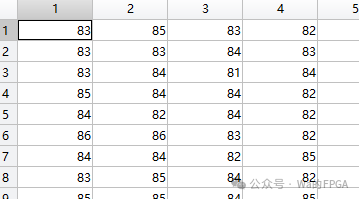
Next, let’s examine the result of the Y component processed in MATLAB.
It can be observed that the results from both methods are different.
Reasons
In Python’s OpenCV, the processing for RGB to YCrCb conversion uses the following calculation formula:
Whereas in MATLAB, the processing for RGB to YCrCb conversion uses the following calculation formula: