
Code Little BraidMillionFans CertifiedAccount
By clicking follow, you not only gain a tool for finding resources but also an interesting soul ▶ ▶ ▶
From an enterprise-level project perspective, if you are still using traditional programming HTTP clients like HttpClient or OkHttp to directly integrate with third-party HTTP APIs, your project is likely filled with a lot of integration logic and code. Each time you need to wrap a call for different integration channels, if the wrapping is not done well, the system will become difficult to maintain and read. Different developers may use their own methods with different HTTP clients and wrapping logic to integrate APIs. This situation generally occurs when the project changes maintainers, and the technical lead does not control code quality and standards.
If your project has such issues or needs to solve such problems, then UniHttp is your solution.
1. Introduction
A declarative HTTP API integration framework that can quickly complete the integration and use of a third-party HTTP API, after which it automatically initiates HTTP requests like calling local methods, without requiring developers to focus on how to send a request, how to pass HTTP request parameters, and how to process and deserialize request results. This framework handles all of that for you.
It’s as simple as configuring a Spring Controller, but it’s essentially reverse configuration.
This framework emphasizes maintaining high cohesion and readability of code while quickly integrating with third-party channel interfaces, rather than focusing on how to send HTTP requests like traditional programming HTTP clients (e.g., HttpClient, OkHttp), although it still uses OkHttp to send requests at the bottom layer.
Rather than saying it integrates HTTP APIs, it is more accurate to say it integrates third-party channels. UniHttp supports custom interface channel HTTP API annotations and some custom integration and interaction behaviors. To this end, it extends various lifecycle hooks for sending, responding, and deserializing an HTTP request, allowing developers to extend and implement as needed.
2. Quick Start
2.1. Add Dependency
<dependency>
  <groupId>io.github.burukeyou</groupId>
  <artifactId>uniapi-http</artifactId>
  <version>0.0.4</version>
</dependency>
2.2. Integrate API
First, create an interface and annotate it with @HttpApi, specifying the request domain URL, and then configure which interface to integrate in the method.
For example, the configuration of the following two methods integrates the following two interfaces:
- GET http://localhost:8080/getUser
- POST http://localhost:8080/addUser
Define the return type of the method as the type corresponding to the HTTP response body, and by default, it will use fastjson to deserialize the HTTP response body into that type of object.
@HttpApi(url = "http://localhost:8080")
interface UserHttpApi {

@GetHttpInterface("/getUser")
BaseRsp<String> getUser(@QueryPar("name") String param, @HeaderPar("userId") Integer id);

@PostHttpInterface("/addUser")
BaseRsp<Add4DTO> addUser(@BodyJsonPar Add4DTO req);
}
-
@QueryPar indicates that the parameter value is placed in the HTTP request’s query parameters.
-
@HeaderPar indicates that the parameter value is placed in the HTTP request’s headers.
-
@BodyJsonPar indicates that the parameter value is placed in the HTTP request body, and the
<span>content-type</span>is<span>application/json</span>
1. The final constructed HTTP request message for the getUser method is:
GET http://localhost:8080/getUser?name=param
Header:
    userId: id
2. The final constructed HTTP request message for addUser is:
POST:  http://localhost:8080/addUser
Header:
    Content-Type:   application/json
Body:
    {"id":1,"name":"jay"}
2.3. Declare the Package Scanning Path for the Defined HttpAPI
Use the <span>@UniAPIScan</span> annotation on the Spring configuration class to mark the package scanning path for the defined <span>@HttpAPI</span>, which will automatically generate proxy objects for the marked <span>@HttpApi</span> interfaces and inject them into the Spring container. After that, you can use them just like other Spring beans through dependency injection.
@UniAPIScan("com.xxx.demo.api")
@SpringBootApplication
public class DemoApplication {

    public static void main(String[] args) {
        SpringApplication.run(DemoApplication.class, args);
    }
}
2.4. Use Dependency Injection
@Service
class UserAppService {

    @Autowired
    private UserHttpApi userHttpApi;

    public void doSomething() {
        userHttpApi.getUser("jay", 3);
    }
}
3. Explanation
3.1. @HttpApi Annotation
Used to mark the interface, and the methods on this interface will be proxied to the corresponding HTTP request interface. You can specify the request domain and custom HTTP proxy logic, etc.
3.2. @HttpInterface Annotation
Used to configure an interface’s parameters, including request method, request path, request headers, request cookies, request query parameters, etc.
It also includes the following request methods:<span>@HttpInterface</span>, so you don’t have to specify the request method manually each time.
- @PostHttpInterface
- @PutHttpInterface
- @DeleteHttpInterface
- @GetHttpInterface
@PostHttpInterface(
// Request path
    path = "/getUser",
// Request headers
    headers = {"clientType:sys-app", "userId:99"},
// URL query parameters
    params = {"name=Jay Chou", "age=1"},
// URL query parameter concatenation string
    paramStr = "a=1&b=2&c=3&d=哈哈&e=%E7%89%9B%E9%80%BC",
// Cookie string
    cookie = "name=1;sessionId=999"
)
BaseRsp<String> getUser();
3.3. @Par Annotations
The various Par suffix annotations are mainly used on method parameters to specify where to place the parameter values in the HTTP request body when sending requests.
For convenience, the ordinary values described below refer to String, basic types, and their wrapper types.
Let’s briefly review the HTTP protocol message.
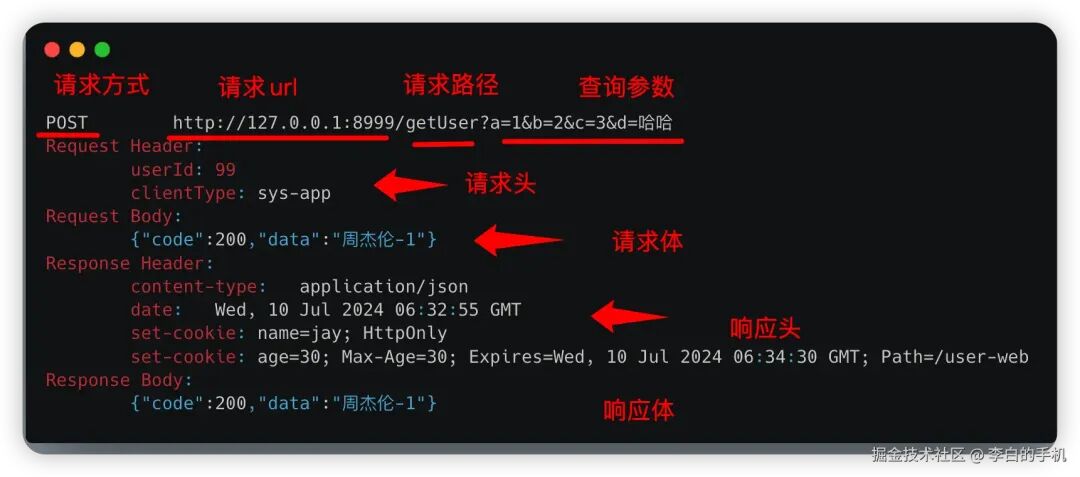
@QueryPar Annotation
Marks the query parameters of the HTTP request URL.
Supports the following method parameter types: ordinary values, collections of ordinary values, objects, and Maps.
@PostHttpInterface
BaseRsp<String> getUser(@QueryPar("id")  String id,  //  Ordinary value
                        @QueryPar("ids") List<Integer> idsList, //  Collection of ordinary values
                        @QueryPar User user,  // Object
                        @QueryPar Map<String,Object> map); // Map
If the type is an ordinary value or a collection of ordinary values, you need to manually specify the parameter name, as it is treated as a single query parameter. If the type is an object or a Map, it is treated as multiple query parameters, where the field names or map keys are the parameter names, and the field values or map values are the parameter values.
If it is an object, the parameter name defaults to the field name. Since fastjson is used for serialization, you can use the <span>@JSONField</span> annotation to specify an alias.
@PathPar Annotation
Marks the HTTP request path variable parameters, only supports marking ordinary value types.
@PostHttpInterface("/getUser/{userId}/detail")
BaseRsp<String> getUser(@PathPar("userId")  String id);  //  Ordinary value
@HeaderPar Annotation
Marks the HTTP request header parameters.
Supports the following method parameter types: objects, Maps, and ordinary values.
@PostHttpInterface
BaseRsp<String> getUser(@HeaderPar("id")  String id,  //  Ordinary value
                        @HeaderPar User user,  // Object
                        @HeaderPar Map<String,Object> map); // Map
If the type is an ordinary value, you need to manually specify the parameter name, which is treated as a single request header parameter. If it is an object or a Map, it is treated as multiple request header parameters.
@CookiePar Annotation
Used to mark the HTTP request’s cookie header.
Supports the following method parameter types: Map, Cookie objects, and strings.
@PostHttpInterface
BaseRsp<String> getUser(@CookiePar("id")  String cookiePar,  //   Ordinary value (specifying name) treated as a single cookie key-value pair
                        @CookiePar String cookieString,  //  Ordinary value (not specifying name), treated as a complete cookie string
                        @CookiePar com.burukeyou.uniapi.http.support.Cookie cookieObj,  // Single Cookie object
                        @CookiePar List<com.burukeyou.uniapi.http.support.Cookie> cookieList // List of Cookie objects
                        @CookiePar Map<String,Object> map); // Map
If the type is a string, when specifying the parameter name, it is treated as a single cookie key-value pair. If the parameter name is not specified, it is treated as a complete cookie string, such as <span>a=1;b=2;c=3</span>.
If it is a Map, it is treated as multiple cookie key-value pairs.
If the type is the built-in <span>com.burukeyou.uniapi.http.support.Cookie</span> object, it is treated as a single cookie key-value pair.
@BodyJsonPar Annotation
Used to mark the HTTP request body content as JSON format: corresponding to <span>content-type</span> as <span>application/json</span>
Supports the following method parameter types: objects, collections of objects, Maps, ordinary values, and collections of ordinary values.
@PostHttpInterface
BaseRsp<String> getUser(@BodyJsonPar  String id,                //  Ordinary value
                        @BodyJsonPar  String[] id               //  Collection of ordinary values
                        @BodyJsonPar List<User> userList,       // Collection of objects
                        @BodyJsonPar User user,                  // Object
                        @BodyJsonPar Map<String,Object> map);    // Map
Serialization and deserialization use fastjson by default, so if you want to specify an alias, you can mark the field with the <span>@JSONField</span> annotation.
@BodyFormPar Annotation
Used to mark the HTTP request body content as a regular form: corresponding to <span>content-type</span> as <span>application/x-www-form-urlencoded</span>
Supports the following method parameter types: objects, Maps, and ordinary values.
@PostHttpInterface
BaseRsp<String> getUser(@BodyFormPar("name") String value,         //  Ordinary value
                        @BodyFormPar User user,                   // Object
                        @BodyFormPar Map<String,Object> map);    // Map
If the type is an ordinary value, you need to manually specify the parameter name, which is treated as a single request form key-value pair.
@BodyMultiPartPar Annotation
Used to mark the HTTP request body content as a complex form: corresponding to <span>content-type</span> as <span>multipart/form-data</span>
Supports the following method parameter types: objects, Maps, ordinary values, and File objects.
@PostHttpInterface
BaseRsp<String> getUser(@BodyMultiPartPar("name") String value,         //  Single form text value
                        @BodyMultiPartPar User user,                   // Object
                        @BodyMultiPartPar Map<String,Object> map,      // Map
                        @BodyMultiPartPar("userImg") File file);     // Single form file value
If the parameter type is an ordinary value or File type, it is treated as a single form key-value pair, and you need to manually specify the parameter name.
If the parameter type is an object or Map, it is treated as multiple form key-value pairs. If the field value or map value is of File type, it is automatically treated as a file form field.
@BodyBinaryPar Annotation
Used to mark the HTTP request body content as binary: corresponding to <span>content-type</span> as <span>application/octet-stream</span>
Supports the following method parameter types: <span>InputStream</span>, <span>File</span>, <span>InputStreamSource</span>
@PostHttpInterface
BaseRsp<String> getUser(@BodyBinaryPar InputStream value,
                        @BodyBinaryPar File user,
                        @BodyBinaryPar InputStreamSource map);
@ComposePar Annotation
This annotation itself is not for configuring HTTP request content, but is used to mark an object, and it will process all fields marked with other @Par annotations within that object for nested parsing, aiming to reduce the number of method parameters and support cohesive passing.
Supports the following method parameter types: objects.
@PostHttpInterface
BaseRsp<String> getUser(@ComposePar UserReq req);
For example, the fields in UserReq can be nested with other @Par annotations, and the specific supported marking types and processing logic are consistent with the previous ones.
class UserReq {

@QueryPar
private Long id;

@HeaderPar
private String name;

@BodyJsonPar
private Add4DTO req;

@CookiePar
private String cook;
}
3.4. Raw HttpResponse
<span>HttpResponse</span> represents the raw response object of the HTTP request. If the business needs to focus on obtaining the complete HTTP response, you only need to wrap the return value in the method.
As shown below, at this time, <span>HttpResponse<Add4DTO></span> with the generic Add4DTO represents the actual response content returned by the interface, which can be directly obtained later.
@PostHttpInterface("/user-web/get")
HttpResponse<Add4DTO> get();
Through it, we can obtain the HTTP status code, response headers, response cookies, etc. Of course, we can also get the content of our response body through the <span>getBodyResult</span> method.
3.5. Handling File Download Interfaces
For interfaces that download files, you can define the return value of the method as <span>HttpBinaryResponse</span>, <span>HttpFileResponse</span>, or <span>HttpInputStreamResponse</span>, so you can obtain the downloaded file.
- HttpBinaryResponse: indicates that the downloaded file content is returned in binary form. Please handle it with caution for large files, as it will be stored in memory.
- HttpFileResponse: indicates that the downloaded file content is returned as a File object, and the file has been downloaded to the local disk.
- HttpInputStreamResponse: indicates that the downloaded file content is returned as an input stream. At this point, the file has not yet been downloaded to the client, and the caller can read this input stream to perform the file download.
3.6. HttpApiProcessor Lifecycle Hooks
<span>HttpApiProcessor</span> is a variety of lifecycle hooks for HTTP request interfaces. Developers can implement it to customize various integration logic. It can then be configured on the <span>@HttpApi</span> annotation or the <span>@HttpInterface</span> annotation, and the framework will default to obtain it from the <span>SpringContext</span>. If it cannot be obtained, it can be manually instantiated.
Typically, an HTTP request needs to go through building request parameters, sending the HTTP request, obtaining response content, and deserializing the HTTP response content into specific objects.
Currently, four hooks are provided, and the execution order is as follows:
postBeforeHttpMetadata  (Before sending the request) Post-process the HTTP request body before sending the request
           |
           V
postSendingHttpRequest  (During request sending) Process during HTTP request sending
           |
           V
postAfterHttpResponseBodyString  (After response) Post-process the response body text string
           |
           V
postAfterHttpResponseBodyResult  (After response) Post-process the result after deserializing the response body
           |
           V
postAfterMethodReturnValue  (After response) Post-process the return value of the proxy method, similar to AOP post-processing
- postBeforeHttpMetadata: Can perform secondary processing on the request body before sending the HTTP request, such as signing.
- postSendHttpRequest: This method will be called when the HTTP request is sent, allowing you to define custom sending logic or print sending logs.
- postAfterHttpResponseBodyString: After the HTTP request response, post-process the response body string, for example, if it is encrypted data, it can be decrypted.
- postAfterHttpResponseBodyResult: After the HTTP request response, post-process the object obtained after deserializing the response body, such as filling in default return values.
- postAfterMethodReturnValue: After the HTTP request response, post-process the return value of the proxy method, similar to AOP post-processing.
Callback Parameter Descriptions:
-
HttpMetadata: Represents the request body of this HTTP request, including request URL, request headers, request method, request cookies, request body, request parameters, etc.
-
HttpApiMethodInvocation: Inherits from
<span>MethodInvocation</span>, representing the context of the proxied method call, allowing access to the proxied class, the proxied method, the proxied HTTP API annotation, and the<span>HttpInterface</span>annotation, etc.
3.7. Configuring a Custom HTTP Client
The default client used is OkHttp. If you want to reconfigure the OkHttp client, simply inject the Spring bean as follows:
@Configuration
public class CustomConfiguration {

@Bean
public OkHttpClient myOkHttpClient() {
return new OkHttpClient.Builder()
                .readTimeout(50, TimeUnit.SECONDS)
                .writeTimeout(50, TimeUnit.SECONDS)
                .connectTimeout(10, TimeUnit.SECONDS)
                .connectionPool(new ConnectionPool(20, 10, TimeUnit.MINUTES))
                .build();
    }
}
4. Enterprise-Level Channel Integration Practice
Case Background:
Assuming you need to integrate all interfaces of a certain weather service, you need to include a token field and a sessionId field in the request cookies. The values of these two fields need to be manually obtained from a specific interface of the channel provider before each API call. The token value is returned in the response body of that interface, and the sessionId is returned in the response headers.
You also need to include a sign signature field in the request headers. The generation rule for this sign signature field requires using the public key provided by the channel provider to sign all request bodies and parameters.
Additionally, each interface’s query parameters must include a client appId assigned by the channel provider.
4.1 Configure Channel Provider Information in application.yml
channel:
  mtuan:
# Request domain
url: http://127.0.0.1:8999
# Assigned channel appId
appId: UUU-asd-01
# Assigned public key
publicKey: fajdkf9492304jklfahqq
4.2 Custom HTTP API Annotation for the Channel Provider
Assuming the integration is with a certain group, let’s call the custom annotation <span>@MTuanHttpApi</span>, and it needs to be marked with the <span>@HttpApi</span> annotation, and the <span>processor</span> field needs to be configured to implement a custom <span>HttpApiProcessor</span>, which will be discussed later.
With this annotation, you can customize various field configurations related to the channel provider, although it is not mandatory to define them.
Note that the URL field uses <span>@AliasFor(annotation = HttpApi.class)</span>, so the constructed <span>HttpMetadata</span> will automatically parse and fill the request body. If not marked, it can also be handled manually.
@Inherited
@Target({ElementType.TYPE})
@Retention(RetentionPolicy.RUNTIME)
@HttpApi(processor = MTuanHttpApiProcessor.class)
public @interface MTuanHttpApi {

    /**
     * Channel provider domain address
     */
    @AliasFor(annotation = HttpApi.class)
    String url() default "${channel.mtuan.url}";

    /**
     * Channel provider assigned appId
     */
    String appId() default "${channel.mtuan.appId}";
}
@Slf4j
@Component
public class MTuanHttpApiProcessor implements HttpApiProcessor<MTuanHttpApi> {

}
Note that the implemented <span>HttpApiProcessor</span> generic must be specified as the previously defined annotation <span>@MTuanHttpApi</span> type, because this <span>HttpApiProcessor</span> is configured on it. If you need general processing, you can define it as <span>Annotation</span> type.
4.3 Integrate API
With the <span>@MTuanHttpApi</span> annotation, you can start integrating APIs. For example, assume there are two interfaces to integrate: one is the token retrieval interface mentioned earlier, and the other is the weather condition retrieval interface.
Why does the getToken method return <span>HttpResponse</span>? This is the built-in raw HTTP response object of UniHttp, which makes it convenient for us to access some content of the raw HTTP response (such as response status code, response cookies).
The generic BaseRsp represents the actual content of the HTTP response body after deserialization. The <span>getCityWeather</span> method does not use <span>HttpResponse</span> wrapping; BaseRsp is simply the content of the HTTP response body after deserialization. This is the difference between the two.
As mentioned earlier, <span>HttpResponse</span> is not a concern for most interfaces, so it can be omitted from configuration.
@MTuanHttpApi
public interface WeatherApi {

/**
     * Get weather conditions by city name
     */
@GetHttpInterface("/getCityByName")
BaseRsp<WeatherDTO> getCityWeather(@QueryPar("city") String cityName);

/**
     * Get token based on appId and public key
     */
@PostHttpInterface("/getToken")
HttpResponse<BaseRsp<TokenDTO>> getToken(@HeaderPar("appId") String appId, @HeaderPar("publicKey") String publicKey);
}
4.4. Custom HttpApiProcessor
Previously, we defined a <span>@MTuanHttpApi</span> annotation with a specified <span>MTuanHttpApiProcessor</span>, and now we will implement its specific content to achieve the functionality described in our case background.
@Slf4j
@Component
public class MTuanHttpApiProcessor implements HttpApiProcessor<MTuanHttpApi> {

/**
     *  Public key assigned by the channel provider
     */
@Value("${channel.mtuan.publicKey}")
private String publicKey;

@Value("${channel.mtuan.appId}")
private String appId;

@Autowired
private Environment environment;

@Autowired
private WeatherApi weatherApi;

/** Implement postBeforeHttpMetadata: This method will be called before sending the HTTP request, allowing for secondary processing of the request body content
     * @param httpMetadata              Original request body
     * @param methodInvocation          Proxied method
     * @return                          New request body
     */
@Override
public HttpMetadata postBeforeHttpMetadata(HttpMetadata httpMetadata, HttpApiMethodInvocation<MTuanHttpApi> methodInvocation) {
/**
         * Add the provided appId field to the query parameters
         */
// Get MTuanHttpApi annotation
        MTuanHttpApi apiAnnotation = methodInvocation.getProxyApiAnnotation();

// Get appId from MTuanHttpApi annotation, since it is an environment variable, we resolve it from the environment
        String appIdVar = apiAnnotation.appId();
        appIdVar = environment.resolvePlaceholders(appIdVar);

// Add to query parameters
        httpMetadata.putQueryParam("appId", appIdVar);

/**
         *  Generate the sign field
         */
// Get all query parameters
        Map<String, Object> queryParam = httpMetadata.getHttpUrl().getQueryParam();

// Get request body parameters
        HttpBody body = httpMetadata.getBody();

// Generate sign
        String signKey = createSignKey(queryParam, body);

// Add the sign to the request headers
        httpMetadata.putHeader("sign", signKey);

return httpMetadata;
    }

private String createSignKey(Map<String, Object> queryParam, HttpBody body) {
// todo Pseudo code
// 1. Concatenate query parameters into a string
        String queryParamString = queryParam.entrySet()
                .stream().map(e -> e.getKey() + "=" + e.getValue())
                .collect(Collectors.joining(";"));

// 2. Concatenate request body parameters into a string
        String bodyString = "";
if (body instanceof HttpBodyJSON) {
// application/json type request body
            bodyString = body.toStringBody();
        } else if (body instanceof HttpBodyFormData) {
// application/x-www-form-urlencoded type request body
            bodyString = body.toStringBody();
        } else if (body instanceof HttpBodyMultipart) {
// multipart/form-data type request body
            bodyString =  body.toStringBody();
        }

// Use the public key to encrypt the concatenated string
        String sign = publicKey + queryParamString + bodyString;
try {
            MessageDigest md = MessageDigest.getInstance("SHA-256");
byte[] digest = md.digest(sign.getBytes());
return new String(digest);
        } catch (NoSuchAlgorithmException e) {
throw new RuntimeException(e);
        }
    }

/**
     *  Implement postSendHttpRequest: This method allows defining the behavior of sending requests or printing request and response logs.
     */
@Override
public HttpResponse<?> postSendHttpRequest(HttpSender httpSender, HttpMetadata httpMetadata) {
// Ignore the callback for weatherApi.getToken method, otherwise it will recursively call this method and cause a deadlock. Or specify a custom HttpApiProcessor for that interface to override postSendingHttpRequest.
        Method getTokenMethod = ReflectionUtils.findMethod(WeatherServiceApi.class, "getToken", String.class, String.class);
if (getTokenMethod == null || getTokenMethod.equals(methodInvocation.getMethod())) {
return httpSender.sendHttpRequest(httpMetadata);
        }

// 1. Dynamically obtain token and sessionId
        HttpResponse<String> httpResponse = weatherApi.getToken(appId, publicKey);

// Get the token from the response body
        String token = httpResponse.getBodyResult();
// Get sessionId from the response header
        String sessionId = httpResponse.getHeader("sessionId");

// Add these two values to the request cookies
        httpMetadata.addCookie(new Cookie("token", token));
        httpMetadata.addCookie(new Cookie("sessionId", sessionId));

        log.info("Starting to send HTTP request to interface: {} Request body: {}", httpMetadata.getHttpUrl().toUrl(), httpMetadata.toHttpProtocol());

// Use the framework's built-in tools to send the request
        HttpResponse<?> rsp =  httpSender.sendHttpRequest(httpMetadata);

        log.info("Starting to send HTTP request Response result: {}", rsp.toHttpProtocol());

return rsp;
    }

/**
     *  Implement postAfterHttpResponseBodyResult: This method is called after the HTTP response body is deserialized, allowing for secondary processing of the result returned.
     * @param bodyResult                     Result after deserializing the HTTP response body
     * @param rsp                            Original HTTP response object
     * @param method                         Proxied method
     * @param httpMetadata                   HTTP request body
     */
@Override
public Object postAfterHttpResponseBodyResult(Object bodyResult, HttpResponse<?> rsp, Method method, HttpMetadata httpMetadata) {
if (bodyResult instanceof BaseRsp) {
            BaseRsp baseRsp = (BaseRsp) bodyResult;
// Set
            baseRsp.setCode(999);
        }

return bodyResult;
    }
}
In the above, we have overridden the <span>postBeforeHttpMetadata</span>, <span>postSendHttpRequest</span>, and <span>postAfterHttpResponseBodyResult</span> lifecycle hook methods to fulfill our requirements: signing the request body before sending, dynamically obtaining the token and reconstructing the request body while printing logs during the request sending, and setting the response object’s code to 999 after the response.
Conclusion
GitHub code address:
https://github.com/burukeYou/UniAPI
Specific usage examples can be found in the <span>uniapi-test-http</span> module.
Author: Li Bai’s PhoneSource: juejin.cn/post/7389925676519948297
High-quality original review
China’s most difficult IT company to join…
Elon Musk sent a private message asking a beautiful internet celebrity to have his child, and after being rejected, cut off the internet celebrity’s $21,000 advertising income every two weeks?
A colleague from outsourcing attended a dinner, and just as he arrived at the door of the private room, he heard the supervisor say: We are all insiders, in the future, any dirty or tiring work will be given to outsourcing, they are here to serve us, so don’t feel bad.
After leaving the job, a bug appeared online, and the interface was developed by myself, and the n+1 compensation was reclaimed.
Heard that the internet is no longer blocked at 35 years old?
Programmers began “defensive programming” to protect their jobs…..
This operation by ByteDance directly changed everyone’s habits?
Huawei employees revealed: Most people in OD are at their peak upon joining! D4 level, except for a 3k monthly salary increase when promoted to D5, it has never increased at other times.
Don’t forget to share, bookmark, look, and like!